
Dragonwar 6931170103571
Dragonwar G22 Lancer Gaming Mouse User Manual
Model: G22 LANCER
Marke: Dragonwar
1. Einleitung
The Dragonwar G22 Lancer is a high-performance optical gaming mouse designed for precision and customization. It features an ergonomic design, 7 programmable buttons, and a 7000 DPI optical sensor, providing gamers with enhanced control and accuracy. This manual provides detailed instructions for setting up, operating, and maintaining your Dragonwar G22 Lancer gaming mouse.

Figure 1.1: Dragonwar G22 Lancer Gaming Mouse
2. Hauptmerkmale
- Ergonomisches Design: Engineered for comfort during extended gaming sessions.
- 7 Steuertasten: Optimize your gameplay with customizable button assignments.
- 7000 DPI Precision Mode: High-resolution optical sensor for accurate tracking and movement.
- Verstellbares Gewichtssystem: Customize the mouse's weight for personalized feel and control.
- Kabelgebundene Konnektivität: Reliable and responsive connection with a nearly two-meter cable.
- RGB-Beleuchtung: Customizable lighting effects for aesthetic appeal.
3. Packungsinhalt
- Dragonwar G22 Lancer Gaming Mouse
- Adjustable Weight Set (pre-installed or separate)
- Benutzerhandbuch (dieses Dokument)
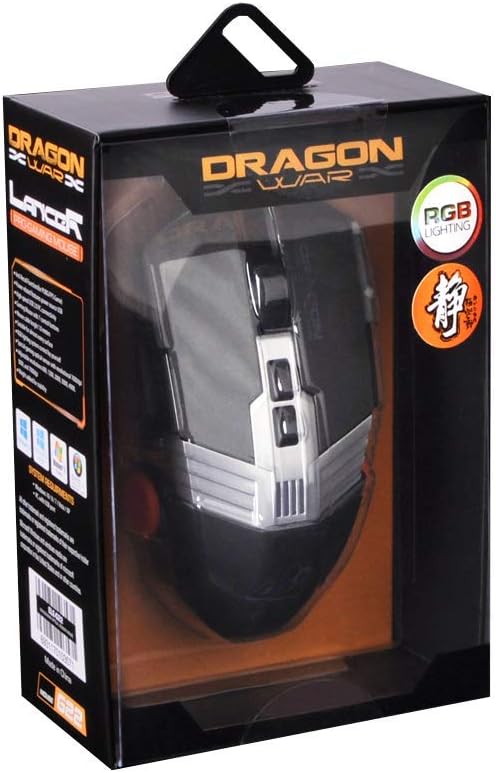
Abbildung 3.1: Oben view of the Dragonwar G22 Lancer Gaming Mouse
4. Einrichtung
- Schließen Sie die Maus an: Plug the USB connector of the Dragonwar G22 Lancer mouse into an available USB port on your computer. The mouse is plug-and-play compatible with most operating systems (Windows XP, Linux).
- Treiberinstallation (optional): While the mouse functions as a standard HID device, for full customization of buttons, DPI settings, and RGB lighting, it is recommended to download and install the official Dragonwar software from the manufacturer's webFolgen Sie den Anweisungen auf dem Bildschirm während der Installation.
- Erster Test: Once connected, move the mouse to ensure the cursor responds on your screen. The RGB lighting should illuminate.
5. Bedienungsanleitung
5.1 Tastenfunktionen
The Dragonwar G22 Lancer features 7 control buttons. Their default functions are as follows, but can be customized via the Dragonwar software:
- Links Klick: Primäre Maßnahme.
- Rechtsklick: Sekundäres Aktions-/Kontextmenü.
- Scrollrad (Klick): Middle click, often used for opening links in new tabs or specific game functions.
- Scrollrad (Auf/Ab): Scrolling content.
- DPI Cycle Button (behind scroll wheel): Durchläuft voreingestellte DPI-Stufen.
- Seitliche Tasten (Vorwärts/Rückwärts): Wird typischerweise zur Navigation verwendet in web Browser oder Aktionen im Spiel zugewiesen.

Figure 5.1: Detail of Scroll Wheel and Side Buttons
5.2 DPI-Anpassung
The mouse supports up to 7000 DPI. Use the dedicated DPI cycle button located behind the scroll wheel to switch between different sensitivity levels. Each press will cycle to the next preset DPI, allowing you to quickly adjust cursor speed for different tasks or game scenarios.
5.3 RGB-Beleuchtung
The Dragonwar G22 Lancer features customizable RGB lighting. Lighting modes and colors can be configured through the Dragonwar software, allowing you to personalize the mouse's appearance to match your setup or mood.
6. Customization: Adjustable Weight System
The Lancer mouse includes an adjustable weight system to fine-tune its feel and balance. This allows you to add or remove small weights to achieve your preferred mouse weight for optimal control and comfort.
- Locate Weight Compartment: The weight compartment is typically located on the underside of the mouse. Refer to Figure 6.1 for its approximate location.
- Fach öffnen: Gently open the cover of the weight compartment.
- Add/Remove Weights: Insert or remove the small metal weights as desired. Experiment with different configurations to find the balance that suits your grip and play style.
- Fach schließen: Securely close the weight compartment cover after making adjustments.

Figure 6.1: Adjustable Weight System Components
7. Wartung
- Reinigung: Verwenden Sie ein weiches, trockenes Tuch, um die Oberfläche der Maus abzuwischen. Bei hartnäckigem Schmutz leicht andrücken.ampBefeuchten Sie das Tuch mit Wasser. Vermeiden Sie die Verwendung von scharfen Chemikalien oder scheuernden Materialien.
- Sensorpflege: Um eine genaue Abtastung zu gewährleisten, halten Sie den optischen Sensor an der Unterseite der Maus sauber und frei von Staub und Schmutz.
- Kabelmanagement: Um Beschädigungen zu vermeiden, sollten Sie scharfe Knicke oder übermäßiges Ziehen am Mauskabel verhindern.
8. Fehlerbehebung
- Maus reagiert nicht:
- Stellen Sie sicher, dass das USB-Kabel fest an einen funktionierenden USB-Anschluss angeschlossen ist.
- Probieren Sie einen anderen USB-Anschluss an Ihrem Computer aus.
- Starte deinen Computer neu. - Die Cursorbewegung ist unregelmäßig:
- Reinigen Sie den optischen Sensor an der Unterseite der Maus.
- Ensure you are using the mouse on a suitable surface (e.g., a mouse pad, not highly reflective surfaces).
- Check DPI settings; a very high DPI might feel erratic if you are not used to it. - Tasten funktionieren nicht:
- Ensure the Dragonwar software is installed correctly if you have customized button functions.
- Try resetting the mouse to factory defaults via the software, if available. - RGB-Beleuchtung funktioniert nicht:
- Check the lighting settings within the Dragonwar software.
9. Spezifikationen
| Besonderheit | Spezifikation |
|---|---|
| Marke | Drachenkrieg |
| Modellreihen | G22 LANCER |
| Artikelmodellnummer | 6931170103571 |
| Bewegungserkennungstechnologie | Optisch |
| DPI | Bis zu 7000 DPI |
| Anzahl der Tasten | 7 |
| Konnektivitätstechnologie | Verdrahtet |
| Kabellänge | Ca. 2-Meter |
| Betriebssystemkompatibilität | Linux, Windows XP (and newer versions) |
| Farbe | Schwarz |
| Produktabmessungen (L x B x H) | 19.4 x 7.7 x 36 cm |
| Artikelgewicht | 248 g |
10. Garantie und Support
For warranty information and technical support, please refer to the official Dragonwar webBesuchen Sie die Website oder kontaktieren Sie den Kundenservice. Bewahren Sie Ihren Kaufbeleg als Kaufnachweis für Garantieansprüche auf.
Online-Hilfe: Visit the official Dragonwar webWebseite mit häufig gestellten Fragen, Treiber-Downloads und Kontaktinformationen.
Ask a question about this manual
Ask about setup, troubleshooting, compatibility, parts, safety, or missing instructions. Manuals+ will review the question and use this page’s manual context to help answer it.