
1. Einführung und Endeview
This manual provides essential instructions for the safe and efficient use of your QI-EU 4-in-1 Fast Wireless Charging Station, Model C1. This device is designed to simplify your charging setup by consolidating multiple devices onto a single platform, reducing cable clutter.
The charging station allows for simultaneous wireless charging of your Qi-enabled smartphone, Apple Watch, and AirPods. It also includes a dedicated charging dock for the Apple Pencil (1st generation).
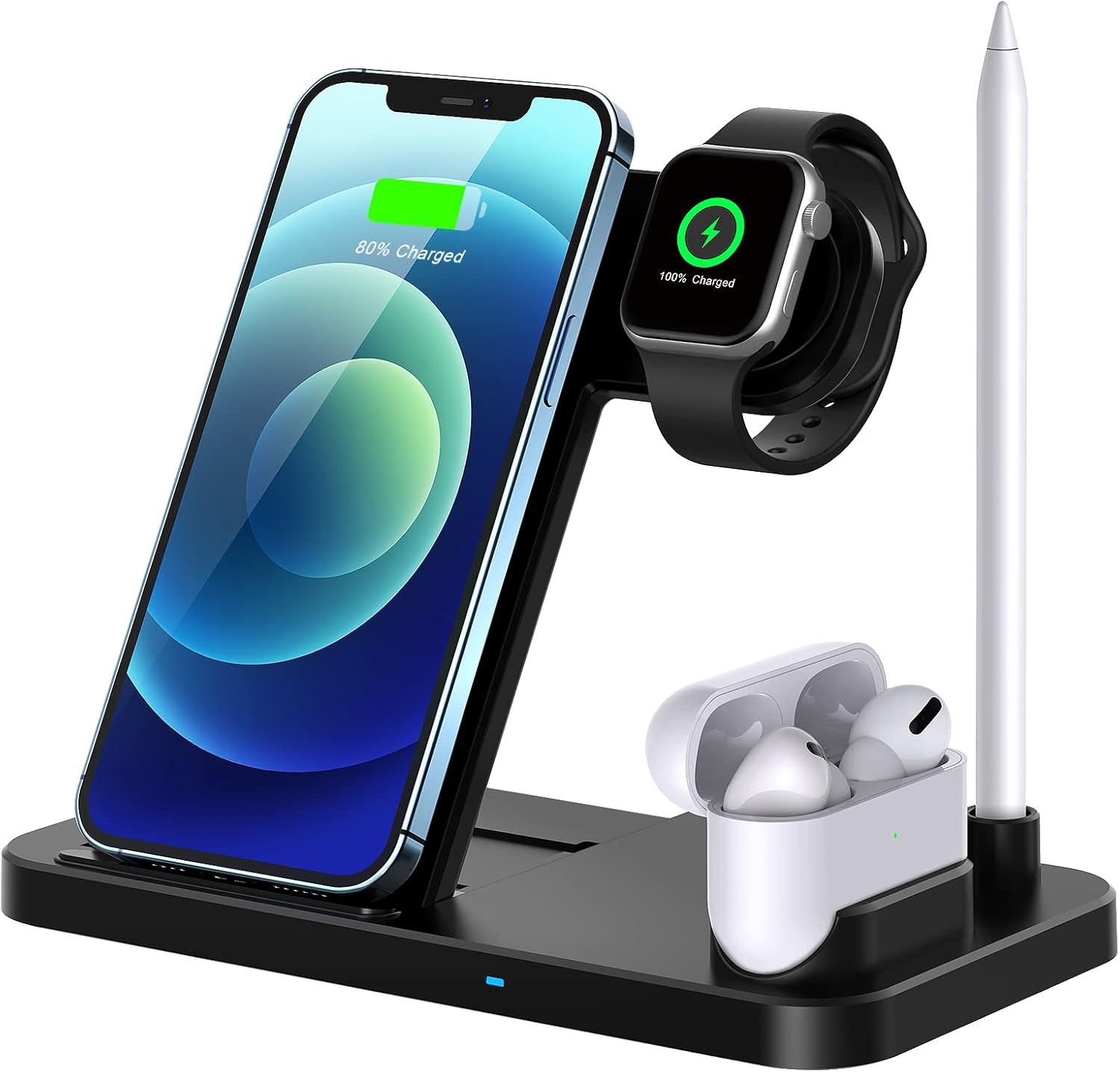
Image 1: The QI-EU 4-in-1 Fast Wireless Charging Station with devices in place.
2. Produktmerkmale
- 4-in-1-Aufladung: Simultaneously charges a Qi-enabled smartphone, Apple Watch, AirPods, and Apple Pencil.
- Schnelles kabelloses Laden: Supports 10W, 7.5W, and 5W wireless charging modes for compatible smartphones.
- Adjustable Support Angle: Features a magnetic metal support that allows for angle adjustment, enhancing viewKomfort.
- Faltbares und tragbares Design: The compact, foldable design makes it suitable for home, office, or travel.
- Qi Certified Safety: Equipped with advanced automatic control technology and built-in safeguards against overcharge, overcurrent, overvoltage, temperature control, and foreign object detection.
- Effiziente Kühlung: Designed with cooling holes and an upgraded chip for faster charging and reduced heat generation.
- Fallfreundlich: Lädt durch Handyhüllen mit einer Dicke von bis zu 5 mm.

Abbildung 2: Detailansicht view of the charging station's silicone pad, cooling holes, and adjustable support angle mechanism.
3. Einrichtungsanweisungen
- Auspacken: Carefully remove the charging station from its packaging.
- Stromanschluss: Connect the provided USB charging cable to the charging station.
- Netzteil: Connect the other end of the USB cable to a 9V/2A power adapter (not included). Ensure the adapter is a high-quality power adapter for optimal performance. Do not connect the power cord directly to a power supply without a suitable USB wall charger to prevent excessive power.
- Einschalten: Stecken Sie den Netzadapter in eine Steckdose. Die Ladestation ist nun betriebsbereit.

Image 3: Illustration of recommended power adapter (9V/2A) for optimal charging.
4. Bedienungsanleitung
- Smartphone-Laden: Place your Qi-enabled smartphone on the upright charging pad. Ensure the phone is centered on the pad for proper alignment. The phone can be charged vertically or horizontally.
- Aufladen der Apple Watch: Place your Apple Watch on the magnetic charging module. The watch will automatically align and begin charging.
- Aufladen der AirPods: Place your AirPods case (with wireless charging capability) on the designated flat charging area.
- Apple Pencil aufladen: Insert your Apple Pencil (1st generation) into the dedicated charging dock.
- Ladeanzeige: Observe the LED indicator on the base of the charging station to confirm charging status (specific indicator behavior may vary).
Wichtige Hinweise zum Betrieb:
- For optimal charging, ensure your device is properly aligned with the charging coils.
- The watch charging module includes temperature control. If the watch's temperature reaches 40 degrees Celsius, charging will automatically pause and resume once the temperature normalizes.
- Charging speed can be influenced by ambient temperature; lower temperatures generally result in faster charging.
- The adjustable support angle allows for comfortable viewwährend des Ladevorgangs.

Image 4: The charging station supports both vertical and horizontal phone placement for various activities.

Image 5: Simultaneous charging of multiple devices with integrated cooling and safety mechanisms.
5. Kompatibilität
The QI-EU 4-in-1 Fast Wireless Charging Station is compatible with a wide range of Qi-enabled devices:
- Apple-Geräte:
- iPhones (7.5W Fast Charging): iPhone 12/12 Pro, iPhone 11/11 Pro/11 Pro Max, iPhone XS/XS Max/XR/X, iPhone 8/8 Plus.
- Apple Watch: Series 1, 2, 3, 4, 5, 6, SE.
- AirPods: AirPods 1, AirPods 2, AirPods Pro (wireless charging cases).
- Apple Pencil: 1st Generation.
- Samsung Devices (10W Fast Charging): Galaxy S20/S10/S9/S8/S7 series, Note 10/9/8/7/5 series, and other Qi-enabled Samsung models.
- Other Qi-Enabled Devices (5W Standard Charging): Includes various LG, Google Pixel, Xiaomi, Sony, Nokia, Microsoft, BlackBerry, and Motorola models that support Qi wireless charging.
NOTE: Not compatible with iPhone 12 Pro Max.

Image 6: Comprehensive compatibility list for various devices.
6. Sicherheitshinweise
- This wireless charger is designed for use with Qi-Certified devices only.
- Do not place any magnetic or metal accessories, credit cards, or PopSockets between your phone and the charging pad, as these can interfere with charging and potentially damage the device or charger.
- The effective charging distance is 2-10mm. Avoid using phone cases thicker than 5mm, as this may prevent proper charging.
- Keep the charging station away from water, moisture, and high temperatures.
- Zerlegen, verändern oder reparieren Sie das Gerät nicht selbst. Wenden Sie sich an den Kundendienst, falls Sie eine Reparatur benötigen.
- Sorgen Sie während des Gebrauchs für ausreichende Belüftung rund um die Ladestation.
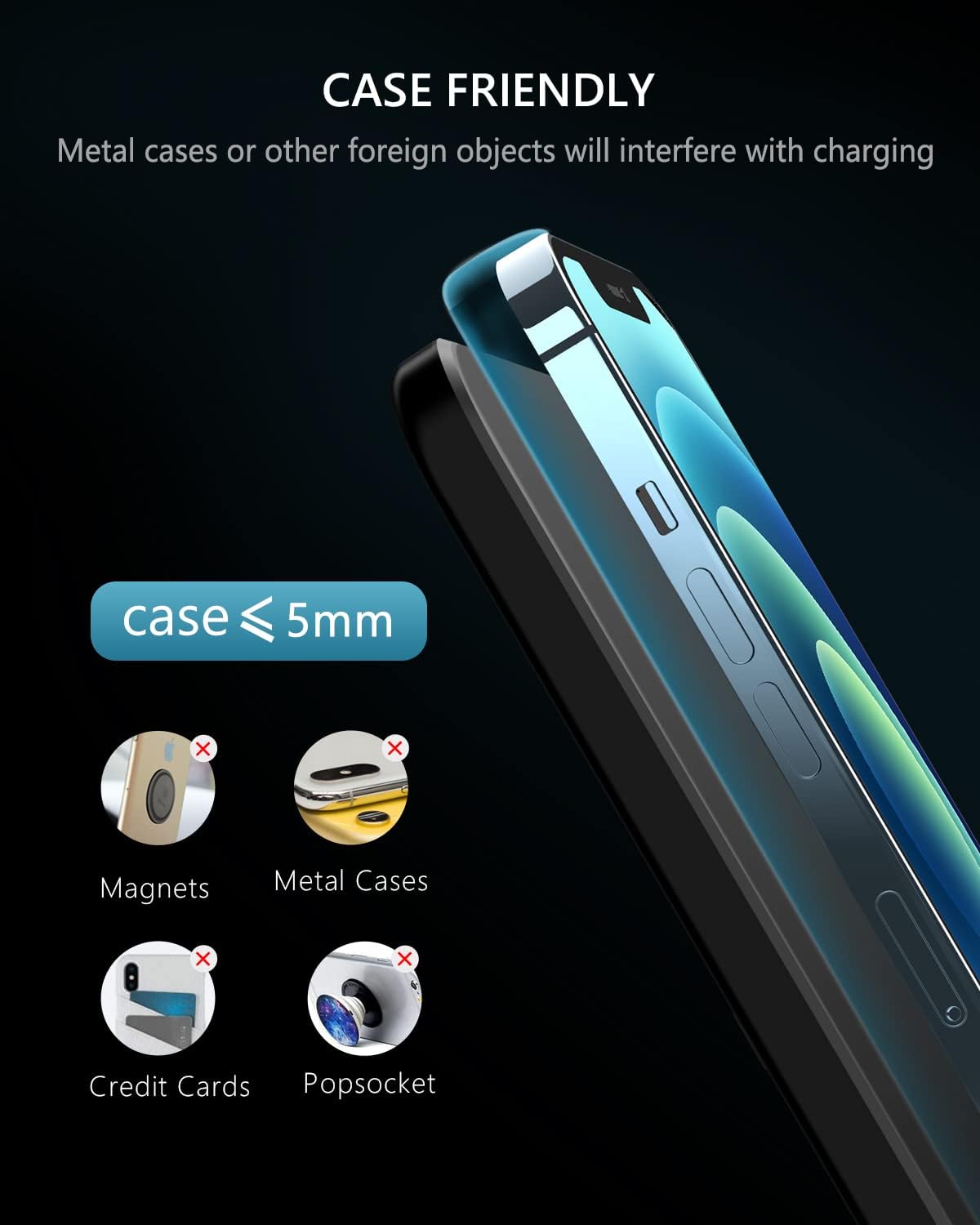
Image 7: Guidelines for case compatibility and objects to avoid during charging.
7. Wartung
- Reinigung: Vor der Reinigung die Stromzufuhr unterbrechen. Die Oberfläche der Ladestation mit einem weichen, trockenen Tuch abwischen. Keine Scheuermittel oder Lösungsmittel verwenden.
- Lagerung: When not in use for extended periods, store the charging station in a cool, dry place away from direct sunlight.
8. Fehlerbehebung
| Problem | Mögliche Ursache | Lösung |
|---|---|---|
| Gerät lädt nicht | Incorrect power adapter; Device not properly aligned; Thick phone case; Foreign object on pad. | Ensure a 9V/2A adapter is used. Realign device. Remove phone case if over 5mm. Remove any metal objects. |
| Langsames Laden | Underpowered adapter; Device misalignment; High ambient temperature. | Use a 9V/2A adapter. Ensure proper alignment. Charge in a cooler environment. |
| Apple Watch stops charging | Watch temperature too high. | This is a safety feature. Charging will resume automatically once the watch cools down. |
| LED-Anzeige funktioniert nicht | No power; Faulty unit. | Prüfen Sie die Stromverbindung. Sollte das Problem weiterhin bestehen, wenden Sie sich bitte an den Kundendienst. |
9. Spezifikationen
- Modell: C1
- Produktabmessungen: 6.4 x 5.4 x 1 Zoll
- Artikelgewicht: 8.4 Unzen
- Eingangslautstärketage: 9 Volt
- AmpZeitalter: 2 Amps
- USB-Anschlüsse insgesamt: 2 (for internal power distribution, not external use)
- Farbe: Schwarz
- Enthaltene Komponenten: Charging station, USB charging cable. (Note: Power adapter not included)
- Konnektivitätstechnologien: Wireless (Qi Wireless)
- Besondere Merkmale: Wireless Charging, Adjustable Support Angle
10. Garantie und Support
Specific warranty information for the QI-EU 4-in-1 Fast Wireless Charging Station Model C1 is not provided in this document. For warranty details, technical support, or customer service inquiries, please refer to the product packaging, the seller's website, or contact the manufacturer directly.
Manufacturer: TJDZUS


