
Einführung
This manual provides detailed instructions for the setup, operation, and maintenance of your CAMRY CR 1166 Weather Station. Please read this manual thoroughly before using the device to ensure proper function and longevity.
Sicherheitshinweise
- Halten Sie das Gerät von Wasser und hoher Luftfeuchtigkeit fern.
- Setzen Sie das Gerät keinen extremen Temperaturen oder direkter Sonneneinstrahlung über längere Zeiträume aus.
- Verwenden Sie ausschließlich das angegebene Netzteil oder die Batterien.
- Versuchen Sie nicht, das Gerät selbst zu zerlegen oder zu reparieren. Wenden Sie sich an qualifiziertes Servicepersonal.
- Außerhalb der Reichweite von Kindern aufbewahren.
Packungsinhalt
Überprüfen Sie, ob alle Komponenten im Paket vorhanden sind:
- CAMRY CR 1166 Weather Station (Main Unit)
- Fern-Außensensor
- Netzteil
- Bedienungsanleitung

Image: Main unit, remote sensor, and power adapter included in the package.
Aufstellen
1. Stromversorgung des Hauptgeräts
- Verwendung von Wechselstrom: Connect the provided AC power adapter to the main unit and plug it into a standard electrical outlet.
- Verwendung von Batterien (optional): Open the battery compartment on the back of the main unit and insert the required batteries (not included), observing polarity.
2. Setting up the Remote Outdoor Sensor
- Open the battery compartment of the remote sensor and insert the required batteries (not included), observing polarity.
- Place the remote sensor in a sheltered outdoor location, away from direct sunlight and rain, to ensure accurate temperature and humidity readings. Ensure it is within range of the main unit (connectivity technology: 433 MHz, 868 MHz).
3. Erste Synchronisierung
Once both the main unit and the remote sensor are powered, they should automatically synchronize. The outdoor temperature and humidity will appear on the main unit's display. If synchronization fails, refer to the Troubleshooting section.
Bedienungsanleitung
Anzeige überview
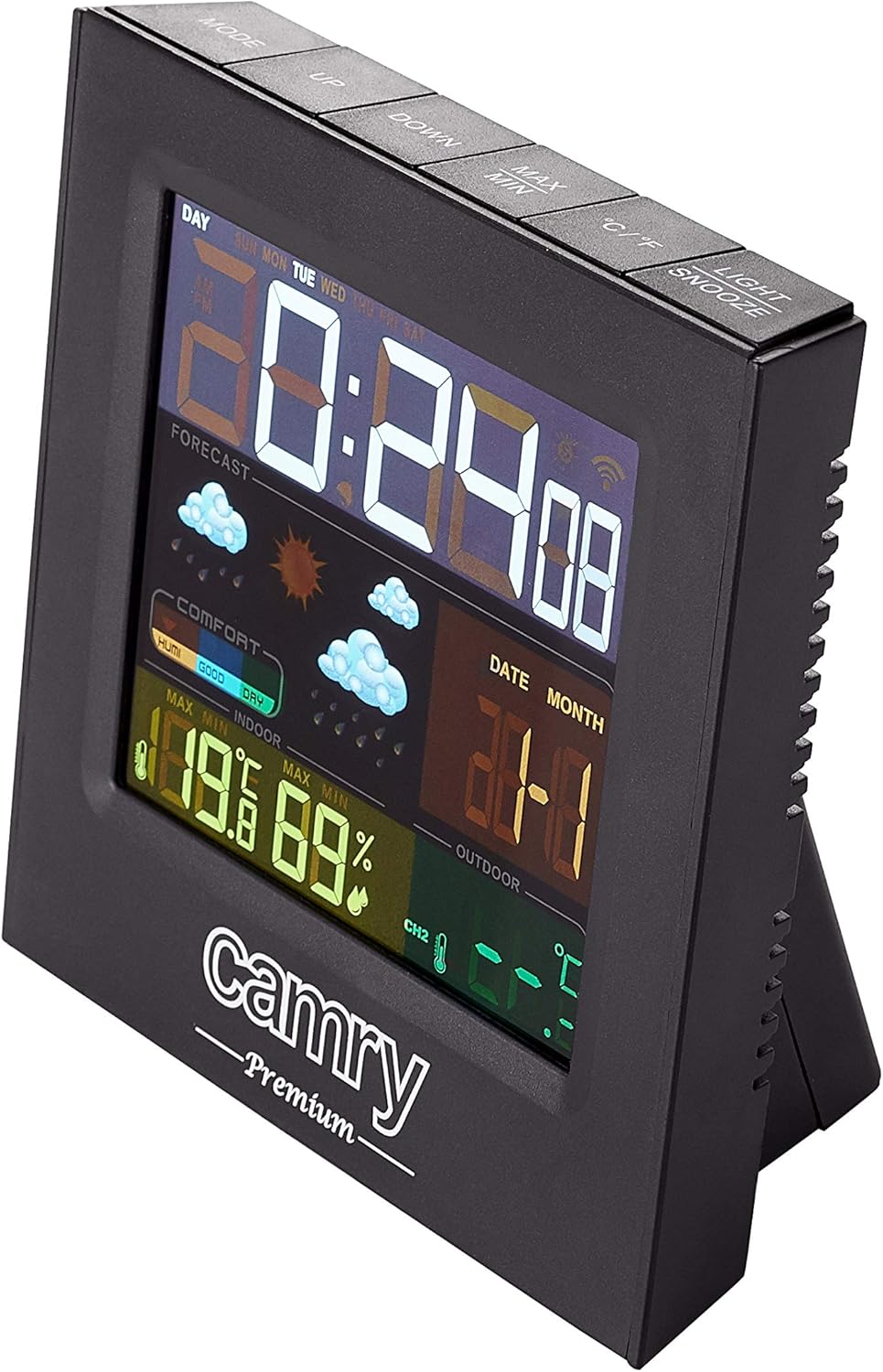
Bild: Detailliert view of the weather station's multi-colored LCD display.
The multi-colored LCD display shows various information:
- Uhrzeit und Datum: Zeigt die aktuelle Uhrzeit und das aktuelle Datum an.
- Wettervorhersage: Icons indicate predicted weather conditions (e.g., sunny, cloudy, rainy).
- Raumtemperatur und Luftfeuchtigkeit: Current readings for the indoor environment.
- Außentemperatur und Luftfeuchtigkeit: Aktuelle Messwerte des Fernsensors.
- Komfortstufenanzeige: Shows indoor comfort based on temperature and humidity.
Einstellen von Uhrzeit und Datum
Refer to the buttons on the top of the unit (e.g., MODE, UP, DOWN).
- Drücken Sie die MODUS button to enter time/date setting mode.
- Verwenden Sie die UP Und RUNTER Schaltflächen zum Anpassen von Werten.
- Drücken MODUS Um die Einstellung erneut zu bestätigen und zur nächsten zu gelangen.
Alarmfunktion
The device includes an alarm clock function.
- Drücken Sie die MODUS button repeatedly until the alarm time is displayed.
- Verwenden UP Und RUNTER um die Weckzeit einzustellen.
- Activate/deactivate the alarm using the designated button (e.g., ALARM ON/OFF or a long press of MODE).
Auswahl der Temperatureinheit (°C/°F)
Drücken Sie die ° C / ° F Taste zum Umschalten zwischen Celsius und Fahrenheit.
Wartung
- Reinigung: Reinigen Sie das Gerät mit einem weichen, trockenen Tuch. Verwenden Sie keine Scheuermittel oder Lösungsmittel.
- Batteriewechsel: Replace batteries in both the main unit and the remote sensor when the low battery indicator appears on the display.
- Sensorplatzierung: Überprüfen Sie regelmäßig den Standort des Außensensors, um sicherzustellen, dass er vor direkten Witterungseinflüssen geschützt ist und sich in Reichweite befindet.
Fehlerbehebung
| Problem | Mögliche Ursache | Lösung |
|---|---|---|
| Kein Display am Hauptgerät. | Kein Strom oder leere Batterien. | Überprüfen Sie den Anschluss des Netzteils oder tauschen Sie die Batterien aus. |
| Außenmesswerte werden nicht angezeigt oder sind ungenau. | Sensor out of range, dead sensor batteries, or interference. |
|
| Inaccurate indoor temperature/humidity. | Unit placed near heat/cold source or in high humidity. | Move the main unit to a location with stable ambient conditions. |
Technische Daten
| Modell: | CR 1166 |
| Marke: | CAMRY |
| Produktabmessungen (L x B x H): | 24 x 24 x 76 cm |
| Gewicht: | 384 Gramm |
| Material: | Plastik |
| Farbe: | Schwarz |
| Anzeigetyp: | LCD |
| Energiequelle: | AC Adapter or Battery |
| Konnektivitätstechnologie: | 433 MHz, 868 MHz |
| Temperaturgenauigkeit: | 1-2 °C |
| Enthaltene Komponenten: | Outdoor sensor, remote-controlled sensor |
| Ursprungsland: | China |
Garantie und Support
For warranty information or technical support, please refer to the documentation provided with your purchase or contact CAMRY customer service.