
Einführung
Thank you for choosing the Vector Optics SCRD-12 Maverick 1x22 Gen2 Red Dot Sight. This manual provides essential information for the safe and effective use of your red dot sight. Please read it thoroughly before installation and operation to ensure optimal performance and longevity of your device.
Produkteigenschaften
- Verbessertes Design: The Gen2 model features an updated design and a stylish mount for improved aesthetics and functionality.
- Optimal Magnification: 1x magnification for true-to-life, unmagnified viewing.
- Clear Reticle: 3 MOA red dot reticle for precise aiming.
- Weites Feld von View: 22mm objective lens diameter provides a broad sight picture.
- Einstellbare Helligkeit: 11 levels of red dot illumination for various lighting conditions, including daylight and night vision compatibility.
- Langlebige Konstruktion: Lightweight yet robust aluminum alloy body, weighing only 188g.
- Kompakte Größe: Overall length of 75mm, with a lens center height of 38mm.
- Vielseitige Montage: Compatible with Picatinny rails, includes both Quick Detach (QD) high mount and low mount options.
- Energieeffizient: Operates on a single CR2032 battery.
- Wasserdichtes Design: Engineered for reliable performance in various weather conditions.
Packungsinhalt
Bitte überprüfen Sie nach dem Öffnen des Pakets, ob alle Artikel vorhanden und in einwandfreiem Zustand sind:
- Vector Optics SCRD-12 Maverick 1x22 Gen2 Red Dot Sight
- Quick Detach (QD) High Mount
- Niedrige Montierung
- Rubber Lens Cover
- CR2032 Batterie
- Adjustment Tools (Hex key, etc.)
- Reinigungstuch
- Bedienungsanleitung
Komponentenidentifikation
Familiarize yourself with the various parts of your red dot sight:

Abbildung 1: Gesamt view of the Vector Optics SCRD-12 Maverick 1x22 Gen2 Red Dot Sight, showing its compact design and integrated mount.

Abbildung 2: Seite view highlighting the elevation adjustment turret and the Quick Detach (QD) mount with safety lock button.

Abbildung 3: Abgewinkelt view displaying the windage adjustment turret (marked 'L' for left adjustment) and the rotary brightness control dial. The objective lens is visible with a slight tint.
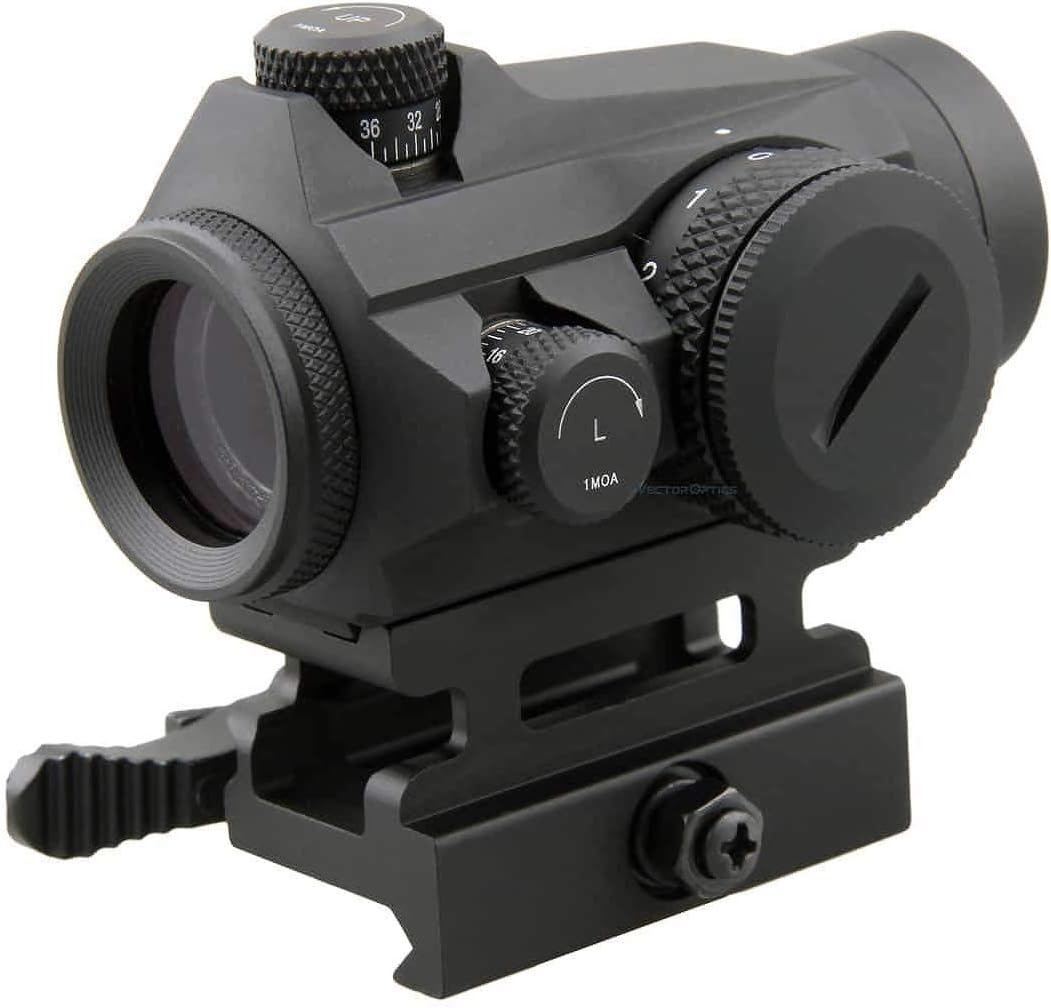
Abbildung 4: Hinteren view illustrating the 3 MOA red dot reticle and the sight's height of 38mm (1.5 inches) to the center of the lens. It also indicates 11 levels of red dot intensity, including 10 daylight and 1 night vision setting.
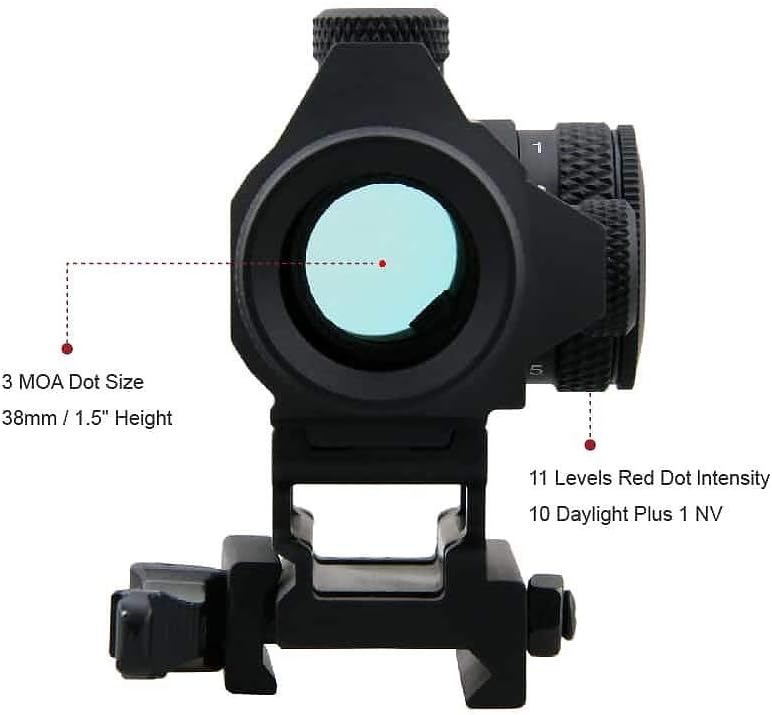
Abbildung 5: Nahaufnahme view of the windage and elevation adjustment turrets, each marked for 1 MOA clicks, allowing for precise zeroing.

Abbildung 6: Unten view of the red dot sight, showing the Quick Detach (QD) mount mechanism designed for secure attachment to Picatinny rails.
Aufstellen
1. Einlegen der Batterie
- Locate the battery compartment, typically on the side or top of the brightness adjustment dial.
- Den Batteriedeckel gegen den Uhrzeigersinn abschrauben.
- Insert one CR2032 battery with the positive (+) side facing outwards (towards the cap).
- Schrauben Sie den Batteriedeckel vorsichtig im Uhrzeigersinn wieder fest, bis er handfest sitzt. Nicht zu fest anziehen.
2. Mounting the Red Dot Sight
- Stellen Sie sicher, dass Ihre Waffe entladen ist und in eine sichere Richtung zeigt.
- Choose the appropriate mount (high or low QD mount) for your application.
- Loosen the QD lever on the mount.
- Place the red dot sight onto your Picatinny rail at your desired position.
- Close the QD lever firmly until it locks into place. Ensure the sight is securely attached and does not wobble.
- Adjust the eye relief to a comfortable position. This red dot sight offers unlimited eye relief.
Bedienungsanleitung
1. Ein-/Ausschalten und Helligkeitseinstellung
- To turn on the red dot sight, rotate the brightness adjustment dial (located on the side) clockwise from the "0" (OFF) position.
- Continue rotating the dial clockwise to increase the brightness level. There are 11 distinct brightness settings.
- To decrease brightness, rotate the dial counter-clockwise.
- To turn off the red dot sight, rotate the dial counter-clockwise until it clicks into the "0" (OFF) position.
2. Zeroing the Red Dot Sight
Zeroing is the process of aligning the red dot with your point of impact. This should be done at a controlled range with proper safety precautions.
- Mount the red dot sight securely on your firearm.
- Stellen Sie ein Ziel in bekannter Entfernung auf (z. B. 25 Yards/Meter).
- Fire a group of shots. Observe where the shots impact relative to your aiming point.
- Höhenverstellung: The top turret adjusts elevation. Turning the dial clockwise moves the point of impact RUNTER. Turning it counter-clockwise moves the point of impact UP. Each click represents 1 MOA (Minute of Angle) adjustment.
- Seitenverstellung: The side turret adjusts windage. Turning the dial clockwise moves the point of impact RECHTS. Turning it counter-clockwise moves the point of impact LINKS. Each click represents 1 MOA adjustment.
- Make small adjustments, fire another group, and repeat until your point of aim matches your point of impact.
Wartung
1. Reinigung
- Linsen: Use the provided cleaning cloth or a soft, lint-free cloth with lens cleaning solution. Gently wipe the lenses to remove dust and smudges. Avoid harsh chemicals or abrasive materials.
- Körper: Wipe the exterior of the sight with a soft, damp cloth. For stubborn dirt, a mild soap solution can be used, followed by a clean, damp Tuch. Achten Sie darauf, dass keine Feuchtigkeit in die elektronischen Bauteile eindringt.
2. Speicherung
- When not in use, turn the red dot sight OFF to conserve battery life.
- Store the sight in a cool, dry place, away from direct sunlight and extreme temperatures.
- Use the rubber lens cover to protect the lenses from dust and scratches during storage.
- For long-term storage (several months or more), it is recommended to remove the CR2032 battery to prevent potential leakage and damage to the electronics.
Fehlerbehebung
| Problem | Mögliche Ursache | Lösung |
|---|---|---|
| Red dot does not appear. | Battery is dead or incorrectly installed. Brightness setting is too low or OFF. | Check battery orientation and replace if necessary. Increase brightness using the dial. |
| Der rote Punkt ist schwach oder flackert. | Low battery. Loose battery cap. | Replace battery. Ensure battery cap is securely tightened. |
| Red dot is blurry or distorted. | Dirty lens. Astigmatism (user's eye condition). | Clean lenses with a soft cloth. If the issue persists, it may be due to astigmatism; consult an eye care professional. |
| Point of impact shifts after zeroing. | Sight not securely mounted. Mount screws loose. | Ensure QD lever is fully engaged. Check and tighten any mounting screws with appropriate tools. |
Technische Daten
| Besonderheit | Detail |
|---|---|
| Marke | Vektoroptik |
| Modell | SCRD-12 Maverick 1x22 Gen2 |
| Vergrößerung | 1x |
| Objektivlinsendurchmesser | 22 mm |
| Absehentyp | 3 MOA Roter Punkt |
| Helligkeitseinstellungen | 11 levels (10 Daylight + 1 NV) |
| Windage/Elevation Adjustment | 1 MOA per click, Total 100 MOA Range |
| Eye Relief | Unbegrenzt |
| Parallax-Einstellung | Parallaxe frei |
| Material | Hochwertige Aluminiumlegierung |
| Gewicht | 188g |
| Länge | 75 mm |
| Height to Lens Center | 38 mm |
| Montagetyp | Picatinny Rail (QD High & Low Mounts included) |
| Akku-Typ | CR2032 |
| Wasserdicht | Ja |
| UPC | 192687275892 |
Garantieinformationen
The Vector Optics SCRD-12 Maverick 1x22 Gen2 Red Dot Sight is covered by a 5 Jahr Herstellergarantie from the date of purchase. This warranty covers defects in materials and workmanship under normal use. Please retain your proof of purchase for warranty claims. For specific terms and conditions, refer to the warranty card included in your package or contact Vector Optics customer service.
Unterstützung
Should you encounter any issues not covered in this manual or require further assistance, please contact Vector Optics customer support. Visit the official Vector Optics website for contact details, FAQs, and additional product resources.