
Einführung
This manual provides essential information for setting up, operating, maintaining, and troubleshooting your Xiaomi Redmi Note 8 Pro smartphone. Please read this guide carefully to ensure optimal performance and longevity of your device.
Aufstellen
Packungsinhalt
Überprüfen Sie, ob Ihr Paket die folgenden Artikel enthält:
- Xiaomi Redmi Note 8 Pro Smartphone
- Earphone Kit
- Ladeblock
- USB-Typ-C-Kabel
- Benutzerhandbuch
Einlegen von SIM-Karten
The Redmi Note 8 Pro supports dual Nano-SIM cards. Use the provided SIM ejector tool to open the SIM tray located on the side of the device. Carefully place your Nano-SIM cards into the designated slots, ensuring the gold contacts face downwards. Reinsert the tray firmly.
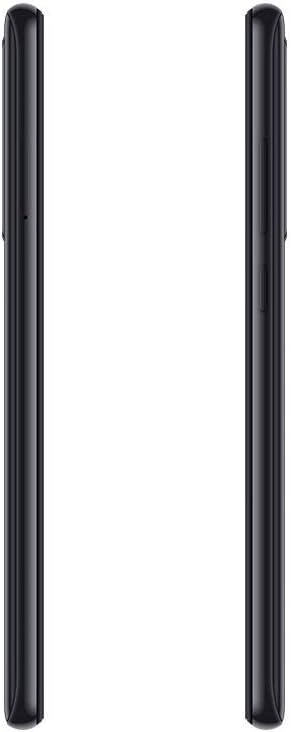
Abbildung: Seite view of the Redmi Note 8 Pro, illustrating the location of the SIM card tray and physical buttons.
Initial Power On and Basic Configuration
Press and hold the Power button until the Xiaomi logo appears. Follow the on-screen instructions to select your language, connect to a Wi-Fi network, and set up your Google account. This process will guide you through essential settings to prepare your device for use.
Betrieb Ihres Geräts
Anzeige und Navigation
Your Redmi Note 8 Pro features a 6.53-inch FHD+ Dot Drop Display with a resolution of 2340 x 1080 pixels. Navigate the interface using touch gestures. The power button is located on the right side, along with the volume rocker. The device runs on Android with Xiaomi's MIUI interface, offering a customizable user experience.

Bild: Vorderseite view of the Redmi Note 8 Pro, showcasing its 6.53-inch FHD+ Dot Drop Display.
Kamerafunktionen
The device is equipped with a 64MP AI Quad Camera system on the rear, allowing for versatile photography in various scenarios. The camera module includes multiple lenses for wide-angle, macro, and depth sensing. Open the Camera app to explore different modes and settings.

Bild: Rückseite view of the Redmi Note 8 Pro, highlighting the 64MP AI Quad Camera system.
Akku und Laden
The Redmi Note 8 Pro features a 4500mAh high-capacity battery. Use the provided USB Type-C cable and charging block to charge your device. For optimal battery life, avoid extreme temperatures and fully discharging the battery frequently.
Konnektivität
The smartphone supports 4G cellular networks and NFC (Near Field Communication) for contactless payments and quick pairing with compatible devices. Bluetooth and Wi-Fi connectivity are also available for wireless communication and internet access.

Abbildung: Oben und unten view of the Redmi Note 8 Pro, showing the USB-C port, 3.5mm headphone jack, and speaker grille.
Wartung
Reinigen Ihres Geräts
Use a soft, lint-free cloth to clean the screen and body of your smartphone. Avoid using harsh chemicals or abrasive materials, as these can damage the device's finish. For stubborn smudges, lightly dampBefeuchten Sie das Tuch mit Wasser oder einem Bildschirmreiniger, der speziell für Elektronikgeräte entwickelt wurde.
Wasserbeständigkeit
The Xiaomi Redmi Note 8 Pro is nicht wasserdicht. Avoid exposing the device to water, rain, or excessive humidity. Liquid damage is not covered under warranty.
Software-Updates
Regularly check for and install software updates to ensure your device has the latest features, security patches, and performance improvements. You can usually find this option in the device's settings under "About phone" or "System updates."
Fehlerbehebung
Häufige Probleme und Lösungen
- Gerät lässt sich nicht einschalten: Stellen Sie sicher, dass der Akku geladen ist. Schließen Sie das Gerät an das Ladegerät an und warten Sie einige Minuten, bevor Sie versuchen, es erneut einzuschalten. Sollte es sich weiterhin nicht einschalten lassen, halten Sie den Ein-/Ausschalter länger (10–15 Sekunden) gedrückt.
- Probleme beim Aufladen: Check if the charging cable and adapter are securely connected. Try using a different cable or adapter to rule out faulty accessories. Ensure the charging port is clean and free of debris.
- Camera focus problems: Ensure the camera lens is clean and free from smudges. In some low-light conditions, autofocus may be slower. Try tapping on the screen to manually focus on your subject.
- Langsame Leistung: Close unused applications running in the background. Clear cache data for apps that are frequently used. Consider restarting your device periodically. If performance issues persist, a factory reset might be necessary (back up your data first).
Werksrücksetzung
A factory reset will erase all data from your device and restore it to its original factory settings. This can resolve persistent software issues. Before performing a factory reset, ensure you have backed up all important data. The option is typically found in Settings > System > Reset options.
Technische Daten
| Marke | XIAOMI |
| Modellname | Redmi Note 8 Pro |
| Betriebssystem | Android |
| RAM | 6 GB |
| Speicherkapazität | 128 GB |
| Bildschirmgröße | 6.53 Zoll |
| Bildschirmauflösung | 2340 x 1080 (FHD+) |
| Zellulartechnologie | 4G |
| Konnektivitätstechnologie | NFC |
| SIM-Kartensteckplätze | Dual-SIM |
| SIM-Kartengröße | Nano |
| Wasserbeständigkeit | Nicht wasserdicht |
| Kopfhöreranschluss | 3.5 mm |
| Auflösung der Rückkamera | 64 Megapixels (Quad Camera) |
| Batteriekapazität | 4500 mAh |
| Prozessor | G90T liquidcool System |
Garantieinformationen
The Xiaomi Redmi Note 8 Pro comes with a 2 Jahr Herstellergarantie from the date of purchase. This warranty covers defects in materials and workmanship under normal use. It does not cover damage caused by accidents, misuse, unauthorized modifications, or liquid exposure. Please retain your proof of purchase for warranty claims.
Unterstützung
For further assistance, technical support, or to inquire about service and repairs, please visit the official Xiaomi website or contact their customer service. You can find detailed support resources, FAQs, and contact information on their official support pages.
Offizielles Xiaomi WebWebsite: www.mi.com/global/support