
Einführung
The Power Dynamics PDM25 is a compact and versatile 100V amplifier designed for small installations such as shops, restaurants, and offices. It offers easy operation, reliable performance, and a range of features including Bluetooth connectivity, an integrated MP3 player, USB input, AUX input, and a wireless remote control. This manual provides essential information for the safe and efficient use of your PDM25 ampschwerer.
Sicherheitshinweise
- Lesen Sie dieses Handbuch sorgfältig durch, bevor Sie das Produkt verwenden.
- Bewahren Sie dieses Handbuch zum späteren Nachschlagen auf.
- Beachten Sie alle Warnungen und befolgen Sie alle Anweisungen.
- Verwenden Sie dieses Gerät nicht in der Nähe von Wasser.
- Nur mit trockenem Tuch reinigen.
- Die Lüftungsöffnungen dürfen nicht blockiert werden. Die Installation muss gemäß den Anweisungen des Herstellers erfolgen.
- Installieren Sie das Gerät nicht in der Nähe von Wärmequellen wie Heizkörpern, Heizregistern, Öfen oder anderen Geräten (einschließlich ampKonverter (Lüfter), die Wärme erzeugen.
- Machen Sie den Sicherheitszweck des polarisierten oder geerdeten Steckers nicht zunichte. Ein polarisierter Stecker hat zwei Stifte, von denen einer breiter als der andere ist. Ein geerdeter Stecker hat zwei Stifte und einen dritten Erdungsstift. Der breite Stift oder der dritte Stift dienen Ihrer Sicherheit. Wenn der mitgelieferte Stecker nicht in Ihre Steckdose passt, wenden Sie sich an einen Elektriker, um die veraltete Steckdose auszutauschen.
- Schützen Sie das Netzkabel vor Beschädigungen oder Beschädigungen durch Fußgänger, insbesondere an den Steckern, Steckdosen und an der Stelle, an der es aus dem Gerät austritt.
- Verwenden Sie nur vom Hersteller angegebene Zusatzgeräte/Zubehör.
- Trennen Sie das Gerät bei Gewitter oder längerer Nichtbenutzung vom Stromnetz.
- Überlassen Sie alle Wartungsarbeiten qualifiziertem Servicepersonal. Eine Wartung ist erforderlich, wenn das Gerät auf irgendeine Weise beschädigt wurde, z. B. wenn das Netzkabel oder der Stecker beschädigt sind, Flüssigkeit in das Gerät verschüttet wurde oder Gegenstände hineingefallen sind, das Gerät Regen oder Feuchtigkeit ausgesetzt war, nicht normal funktioniert oder fallengelassen wurde.
- WARNUNG: Um das Risiko eines Brandes oder Stromschlags zu verringern, darf das Gerät nicht Regen oder Feuchtigkeit ausgesetzt werden.
- VORSICHT: Do not open the cover. No user-serviceable parts inside. Refer servicing to qualified personnel only.
Produkt überview
The PDM25 amplifier features a user-friendly front panel with controls for various audio sources and volume adjustments, along with a clear digital display. The rear panel provides all necessary connections for speakers, external audio sources, and power.

Abbildung 1: Vorderseiteview of the PDM25 Ampschwerer.

Figure 2: Rear Panel Connections of the PDM25 Ampschwerer.
Aufstellen
1. Auspacken
Entfernen Sie vorsichtig die ampNehmen Sie den Verstärker aus der Verpackung. Prüfen Sie das Gerät auf Transportschäden. Bewahren Sie die Originalverpackung für späteren Transport oder Lagerung auf.
2. Platzierung
Platzieren Sie die amplifier on a stable, flat surface. Ensure adequate ventilation around the unit to prevent overheating. Avoid placing it near heat sources or in direct sunlight.
3. Lautsprecheranschluss
The PDM25 supports both 100V line speakers and low impedance (4-16 Ohm) speakers.
- For 100V Line Speakers: Connect the positive (+) terminal of your 100V speaker system to the "100V" terminal on the amplifier's rear panel. Connect the negative (-) terminal to the "COM" terminal.
- For Low Impedance Speakers (4-16 Ohm): Connect the positive (+) terminal of your speaker to the "4-16 Ohm" terminal on the amplifier's rear panel. Connect the negative (-) terminal to the "COM" terminal.
Ensure correct polarity (+ to + and - to -) for optimal sound quality. Do not connect both 100V and low impedance speakers simultaneously to the same output.
4. Audioquellenanschluss
- AUX-Eingang: Connect external audio devices (e.g., CD player, mixer) to the RCA "AUX" input jacks on the rear panel using an RCA cable.
- Mikrofoneingang: Connect a microphone to the 6.3mm jack on the front panel.
- USB Eingang: Stecken Sie einen USB-Stick mit MP3 ein files in den USB-Anschluss an der Vorderseite.
5. Stromanschluss
Schließen Sie das mitgelieferte Netzkabel an den Netzanschluss auf der Rückseite des Geräts an. amplifier and then to a suitable mains power outlet (230 Vac/50 Hz).
Bedienungsanleitung
1. Ein-/Ausschalten
Press the "ON/OFF" switch on the front panel to power on or off the ampschwerer.
2. Quellenauswahl
Use the "MODE" button on the front panel or the remote control to cycle through available input sources: Bluetooth, USB/MP3, AUX, and Radio. The selected mode will be displayed on the digital screen.

Figure 3: Front Panel Controls and USB Input.
3. Lautstärkeregelung
- Master-Lautstärke: Adjust the main output volume using the large "VOLUME" knob on the front panel.
- Individual Source Volume: Adjust the volume for MP3, AUX, and MIC inputs using their respective smaller "VOLUME" knobs.
4. Klangregelung
Use the "TREBLE" and "BASS" knobs on the front panel to adjust the high and low frequencies of the audio output.
5. Bluetooth-Betrieb
- Select "Bluetooth" mode using the "MODE" button. The display will show "BLUE".
- On your Bluetooth-enabled device (smartphone, tablet, etc.), search for available devices and select "PDM25".
- Nach der Kopplung können Sie Audio drahtlos an das ampschwerer.
6. USB/MP3 Player Operation
- Insert a USB flash drive into the USB port. The amplifier will automatically switch to USB mode and begin playing MP3 files.
- Use the play/pause, next, and previous track buttons on the front panel or remote control to manage playback.
7. Radiobetrieb
In Radio mode, use the control buttons to scan for and select radio stations.
8. Fernbedienung
The included remote control provides convenient access to power, mode selection, volume, track control, and equalizer presets.
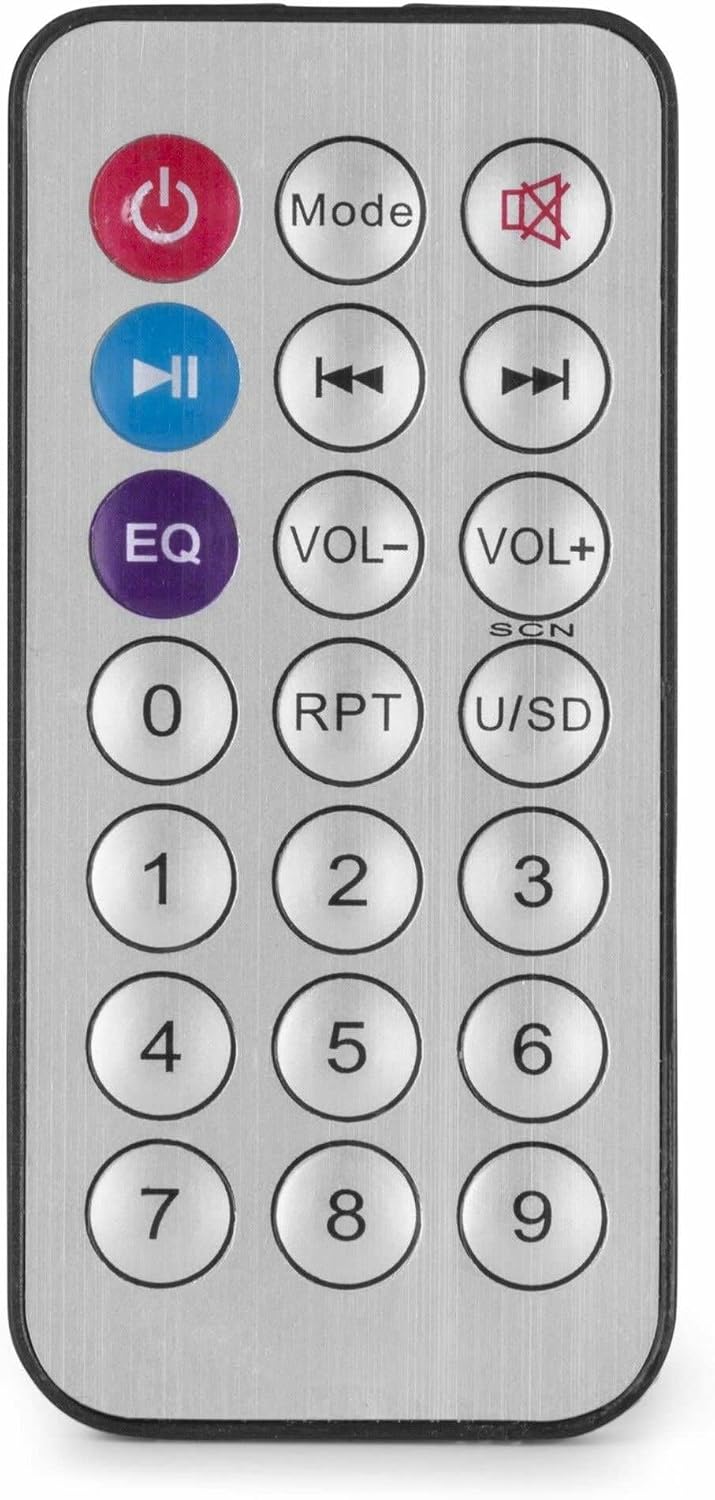
Abbildung 4: Drahtlose Fernbedienung.
Wartung
- Reinigung: Vor der Reinigung die Stromzufuhr unterbrechen. Die Außenseite des Geräts mit einem weichen, trockenen Tuch abwischen. ampVerstärker. Verwenden Sie keine flüssigen Reiniger oder Aerosole.
- Belüftung: Ensure that the ventilation openings are clear of dust and debris to maintain proper airflow.
- Lagerung: Wenn Sie das Gerät über einen längeren Zeitraum lagern, trennen Sie es vom Stromnetz und bewahren Sie es an einem kühlen, trockenen Ort auf, vorzugsweise in der Originalverpackung.
Fehlerbehebung
| Problem | Mögliche Ursache | Lösung |
|---|---|---|
| Kein Strom | Stromkabel nicht angeschlossen; Steckdose defekt; AmpAusschalten des Reinigers. | Check power cable connection; Test power outlet; Ensure amplifier switch is ON. |
| Keine Tonausgabe | Incorrect source selected; Volume too low; Speaker connections faulty; Mute activated. | Select correct input source; Increase master and source volume; Check speaker wiring; Deactivate mute function on remote. |
| Bluetooth stellt keine Verbindung her | AmpVerstärker nicht im Bluetooth-Modus; Gerät zu weit entfernt; Gerät bereits mit einem anderen Gerät gekoppelt. | Sicherstellen amplifier is in Bluetooth mode ("BLUE" displayed); Move device closer; Disconnect from other devices and try again. |
| USB-Wiedergabeprobleme | USB-Laufwerk nicht korrekt formatiert; Inkompatibel file Formatierung; USB-Laufwerk defekt. | Stellen Sie sicher, dass der USB-Stick im FAT32-Format formatiert ist; verwenden Sie MP3. files; Versuchen Sie es mit einem anderen USB-Laufwerk. |
| Verzerrter Ton | Volume too high; Incorrect impedance matching for speakers; Faulty audio source. | Lautstärke reduzieren; Impedanzanpassung der Lautsprecher prüfen amplifier output; Test with a different audio source. |
Technische Daten
- Ausgangsleistung: 25 Watt
- Lautsprecherausgang: 100V and 4-16 Ohm
- Frequenzbereich: 50 Hz - 18 kHz
- Signal-Rausch-Verhältnis: >75 dB
- Anschlusslautstärketage: 230 Vac/50 Hz
- Abmessungen (L x B x H): 205 x 285 x 65 mm
- Gewicht: 1.5 kg
- Merkmale: Bluetooth, USB MP3 Player, Radio, AUX Input, Microphone Input, Bass/Treble Control, Integrated Equalizer, Remote Control
- Modellnummer: PDM25
- Hersteller: Tronios BV
Garantie und Support
For warranty information and technical support, please refer to the documentation provided with your purchase or visit the official Power Dynamics webBewahren Sie Ihren Kaufbeleg für eventuelle Garantieansprüche auf.
Hersteller: Tronios BV
WebWebsite: www.power-dynamics.eu