
1. Einleitung und Produktübersichtview
This manual provides comprehensive instructions for the assembly, operation, and maintenance of your Hemudu HT07B-002P Universal Swivel Tabletop TV Stand. This stand is designed to securely hold televisions ranging from 19 to 39 inches, with a maximum weight capacity of 35 kg (77 lbs). It features a 90-degree swivel capability (45 degrees left and 45 degrees right) and 4 levels of height adjustment to optimize your viewing experience. The robust construction includes a durable steel elliptical panel and an 8mm tempered glass base, ensuring stability and safety for your television.

Figure 1: Hemudu HT07B-002P Universal Swivel Tabletop TV Stand.
2. Sicherheitshinweise
- Gewichtskapazität: Die maximale Tragfähigkeit von 35 kg (77 lbs) darf nicht überschritten werden. Stellen Sie sicher, dass das Gewicht Ihres Fernsehers innerhalb dieser Grenze liegt.
- Kompatibilität der TV-Größe: This stand is suitable for TVs between 19 and 39 inches. Verify your TV's screen size and VESA mounting pattern before assembly.
- VESA-Kompatibilität: The stand supports VESA patterns from 75x75mm to 200x200mm. Check your TV's VESA pattern.
- Stabile Oberfläche: Um ein Umkippen zu verhindern, stellen Sie den TV-Ständer immer auf eine ebene, stabile und waagerechte Fläche.
- Kinder und Haustiere: Halten Sie Kinder und Haustiere während der Montage vom Fernsehständer fern und stellen Sie sicher, dass der Fernseher sicher befestigt ist, um Unfälle zu vermeiden.
- Richtige Montage: Follow all assembly instructions carefully. Incorrect assembly can lead to product failure and injury.
- Befestigungselemente festziehen: Stellen Sie sicher, dass alle Schrauben und Befestigungselemente fest angezogen sind. Ziehen Sie sie nicht zu fest an.
- Kabelmanagement: Utilize the integrated cable management system to prevent tripping hazards and maintain a tidy setup.
3. Packungsinhalt
Bitte prüfen Sie vor der Montage, ob alle Komponenten vorhanden und unbeschädigt sind. Sollten Teile fehlen oder beschädigt sein, wenden Sie sich bitte an den Kundendienst.
- Basis aus gehärtetem Glas
- Hauptstützsäule
- VESA-Montageplatte
- VESA Extension Arms (if applicable for larger VESA patterns)
- Montagesatz (verschiedene Schrauben, Unterlegscheiben, Abstandshalter für die TV-Montage)
- Montagewerkzeuge (z. B. Inbusschlüssel)
- Anti-slip Rubber Feet for Base
- Kabelmanagement-Clips/Kabelbinder
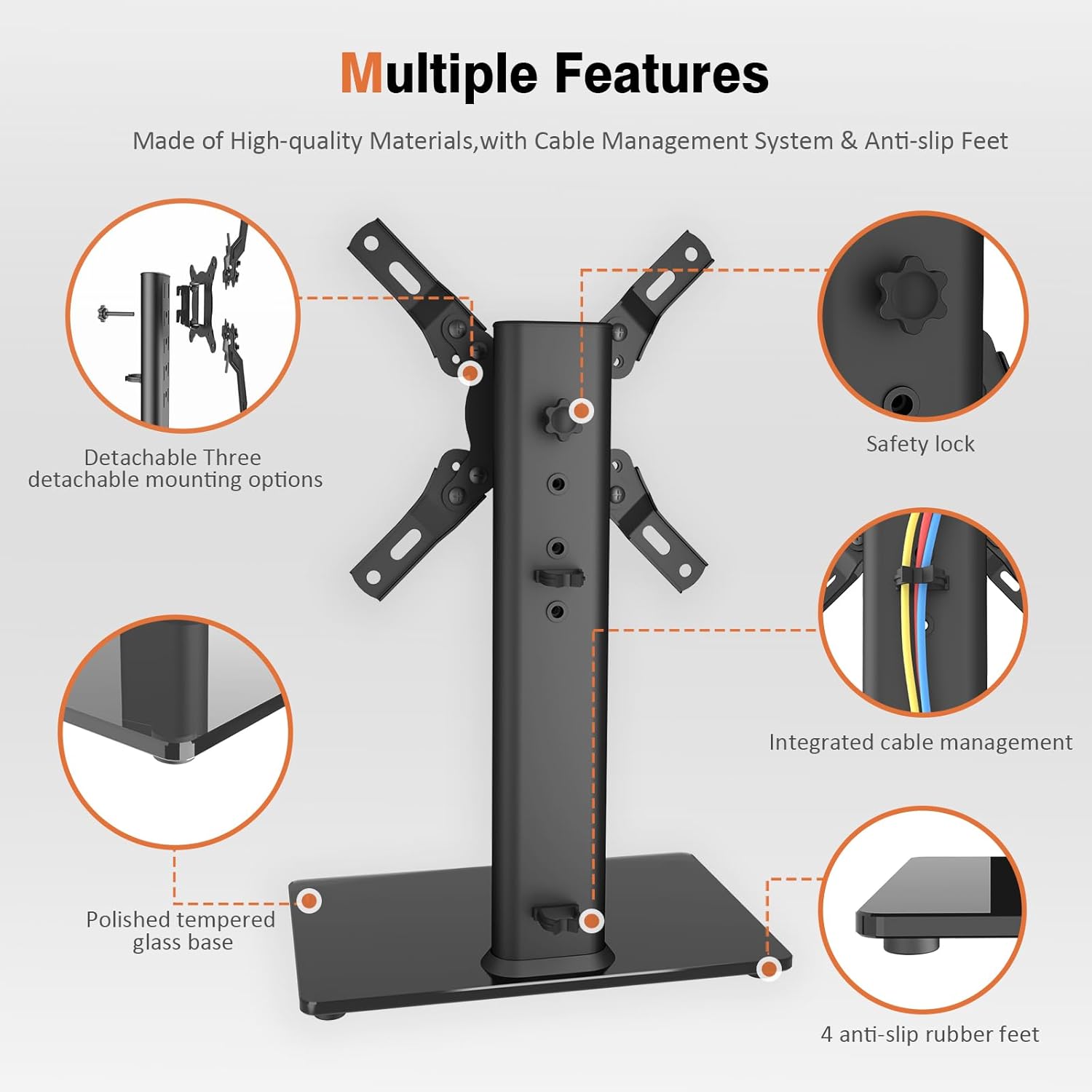
Figure 2: Key components of the TV stand, including the polished tempered glass base, safety lock, integrated cable management, and anti-slip rubber feet.
4. Aufbau- und Montageanleitung
Follow these steps carefully to assemble your Hemudu HT07B-002P TV Stand. It is recommended to have a second person assist with mounting the TV.
- Attach the Main Support Column to the Base:
Place the tempered glass base (A) on a soft, clean surface to prevent scratches. Align the main support column (B) with the holes on the base. Secure it using the provided screws and washers. Ensure the column is oriented correctly for cable management access.

Figure 3: Illustration of attaching the main support column to the tempered glass base.
- Assemble the VESA Mounting Plate:
Attach the VESA arms to the central VESA plate using the designated screws. Ensure the arms are configured to match your TV's VESA pattern (e.g., 75x75mm, 100x100mm, 200x100mm, 200x200mm). The stand supports various VESA patterns.

Figure 4: Different configurations for the VESA mounting plate to accommodate various VESA patterns.
- Attach the VESA Mounting Plate to Your TV:
Carefully place your TV face down on a soft, clean surface. Align the assembled VESA mounting plate with the mounting holes on the back of your TV. Select the appropriate screws, washers, and spacers from the hardware kit that fit your TV's specific requirements. Securely fasten the VESA plate to the TV. Do not overtighten.
- Montieren Sie den Fernseher auf dem Ständer:
With assistance, carefully lift the TV with the attached VESA plate. Hook the VESA plate onto the main support column. Ensure it is properly seated and engaged. Secure the TV to the column using the safety lock mechanism (typically a screw or knob) to prevent accidental dislodgement.
- Kabelmanagement:
Route your TV cables through the integrated cable management system on the main support column. Use the provided clips or ties to keep cables neat and organized, preventing tangles and improving aesthetics.


