
August AUD E1
August AUDAR E1 Smartwatch – Benutzerhandbuch
Model: AUD E1
1. Einleitung
The August AUDAR E1 Smart Health Watch is designed to help you monitor your health and fitness activities. It features advanced sensors for heart rate, blood pressure, and ECG measurements, along with comprehensive fitness tracking capabilities. This manual provides detailed instructions to help you get the most out of your device.
2. Lieferumfang
Upon unboxing your August AUDAR E1 Smart Health Watch, please ensure all the following items are present:
- August AUDAR E1 Smart Health Watch
- USB-Ladekabel
- Benutzerhandbuch (dieses Dokument)

Figure 2.1: Contents of the AUDAR E1 packaging, showing the smartwatch, charging cable, and documentation.
3. Produktüberschreitungview
The AUDAR E1 features a sleek design with a circular display and a comfortable silicone strap. Key components include the display, side button, and health sensors on the rear.

Abbildung 3.1: Vorderseite view of the AUDAR E1 Smart Health Watch, showing the display with an ECG reading.

Figure 3.2: Dimensions of the AUDAR E1 Smart Health Watch.
4. Einrichtung
4.1 Aufladen des Geräts
Before first use, fully charge your AUDAR E1. Connect the magnetic USB charging cable to the charging points on the back of the watch and plug the USB end into a power source (e.g., computer USB port, USB wall adapter).

Figure 4.1: Charging the AUDAR E1 Smart Health Watch.
4.2 Downloading the AUDAR App
The AUDAR E1 requires the companion AUDAR app for full functionality. Download the app from your smartphone's app store:
- Für Android-Geräte: Suchen nach "AUDAR" on the Google Play Store.
- For Apple iOS devices: Suchen nach "AUDAR" on the Apple App Store.
4.3 Koppeln mit Ihrem Smartphone
- Stellen Sie sicher, dass Bluetooth auf Ihrem Smartphone aktiviert ist.
- Open the AUDAR app.
- Follow the in-app instructions to search for and connect to your AUDAR E1 device. The app will guide you through the pairing process.
- Nach der Kopplung synchronisiert die Uhr Zeit und Daten mit Ihrem Telefon.

Figure 4.2: AUDAR E1 compatibility with iOS and Android devices via the Audar app.
5. Bedienungsanleitung
5.1 Grundlegende Navigation
The AUDAR E1 features a touch-sensitive display and a side button for navigation:
- Nach oben/unten wischen: Durch Menüs und Benachrichtigungen scrollen.
- Nach links/rechts wischen: Access different data screens (e.g., heart rate, steps, calories).
- Klopfen: Wählen Sie einen Artikel aus oder rufen Sie ein Menü auf.
- Seitentaste: Drücken Sie diese Taste, um zum Startbildschirm zurückzukehren oder das Gerät zu aktivieren.
6. Funktionen zur Gesundheitsüberwachung
The AUDAR E1 provides comprehensive health data monitoring:
- Herzfrequenzmesser: The watch regularly measures your heart rate. Manual measurements can be taken via the enhanced ECG function for a deeper understanding of your heart health. Daily and weekly reports are available in the AUDAR app.
- Blutdruckmessgerät: Measure and visualize systolic and diastolic blood pressure throughout the day. Weekly reports provide clear insights into your blood pressure trends.
- Schlaf-Tracking: Monitor your sleep patterns, including sleep duration and quality. This feature helps you understand your rest routine.
- Fatigue Levels: The watch tracks and reports on your fatigue levels, contributing to a holistic view of your current health and fitness routine.

Figure 6.1: The AUDAR E1 monitoring heart rate, blood pressure, and ECG during activity.
7. Fitness-Tracking-Funktionen
The AUDAR E1 can be used as a fitness tracker for various activities:
- Übungsmodus: Activate exercise mode for activities such as walking, running, and cycling.
- Aktivitätsverfolgung: Track steps taken, calories burned, and GPS route data (utilizes your phone's GPS). The watch adapts to your personal profile for accurate data.
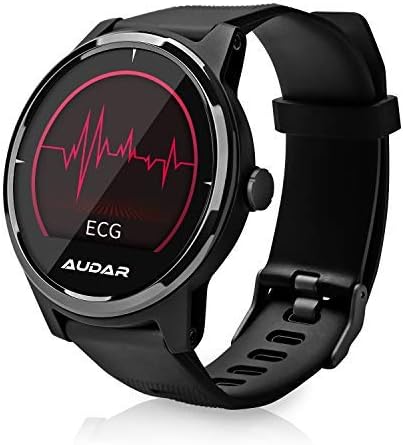
Figure 7.1: Fitness tracking metrics displayed on the AUDAR E1.
8. Benachrichtigungen und intelligente Funktionen
Stay connected with your AUDAR E1:
- Message and Call Reception: Receive notifications for SMS messages, incoming calls, and alarms directly on your watch.
- Erinnerungen und Alarme: Set reminders and alarms through the app, which will vibrate on your wrist, ensuring you don't miss important events.

Figure 8.1: Message and call notifications on the AUDAR E1.
9. CareMate Function
The AUDAR app provides access to the innovative CareMate network. This feature allows you to designate a trusted responder to receive your health data, enabling remote care for vulnerable or elderly individuals while maintaining their independence.

Figure 9.1: The CareMate function allows monitoring of loved ones' health data.
10. Akku und Aufladen
The AUDAR E1 is designed for extended use, offering significant battery life:
- Akkulaufzeit: The E1 can last up to 10 days on a single 2-hour charge. In standby mode, it can last up to 20 days.
- Laden: Use the provided magnetic USB charging cable. Ensure the charging pins align correctly with the contacts on the back of the watch.
11. Wartung
To ensure the longevity and optimal performance of your AUDAR E1 Smart Health Watch, follow these maintenance guidelines:
- Reinigung: Reinigen Sie Uhr und Armband regelmäßig mit einem weichen, trockenen Tuch. Verwenden Sie bei Bedarf ein leicht öliges Tuch.amp Mit einem Tuch und milder Seife abwischen und anschließend gründlich trocknen. Scharfe Chemikalien oder scheuernde Materialien vermeiden.
- Wasserbeständigkeit: The AUDAR E1 has an IPX7 water resistance rating, meaning it can withstand splashes, rain, and brief immersion in water (up to 1 meter for 30 minutes). It is suitable for daily use but not recommended for swimming, showering, or diving. Avoid exposing the watch to hot water or steam.
- Lagerung: Bei längerer Nichtbenutzung sollte die Uhr an einem kühlen, trockenen Ort, geschützt vor direkter Sonneneinstrahlung und extremen Temperaturen, aufbewahrt werden.
12. Fehlerbehebung
If you encounter issues with your AUDAR E1, please refer to the following common solutions:
| Problem | Mögliche Ursache/Lösung |
|---|---|
| Die Uhr lässt sich nicht einschalten und reagiert nicht. | Battery may be depleted. Charge the watch for at least 30 minutes. Ensure the charging cable is properly connected. |
| Kopplung mit Smartphone nicht möglich. | Ensure Bluetooth is enabled on your phone. Make sure the watch is charged and within range. Restart both the watch and your phone. Try unpairing and re-pairing in the app. |
| Inaccurate health readings (HR, BP, ECG). | Ensure the watch is worn snugly on your wrist, not too tight or too loose. Clean the sensors on the back of the watch. Avoid excessive movement during measurements. Readings are for reference and not medical diagnoses. |
| Benachrichtigungen werden nicht angezeigt. | Check app permissions on your phone to ensure the AUDAR app has access to notifications. Verify notification settings within the AUDAR app. Ensure the watch is connected via Bluetooth. |
| Kurze Akkulaufzeit. | Frequent use of certain features (e.g., continuous heart rate monitoring, bright screen) can drain the battery faster. Reduce screen brightness or turn off unnecessary features. Ensure the watch is fully charged. |
| Watch strap breaks or deteriorates. | Contact August customer support for replacement strap options. |
13. Spezifikationen
| Besonderheit | Detail |
|---|---|
| Marke | August |
| Modellnummer | AUD E1 |
| Farbe | Schwarz |
| Betriebssystem | Android (kompatibel mit iOS) |
| Bildschirmgröße | 1 Zoll |
| Konnektivität | Bluetooth |
| Besondere Merkmale | Heart Rate Monitor, Sleep Monitor, Notification, Blood Pressure Monitor, Calorie Tracker, ECG |
| Kompatible Geräte | Smartphone |
| Akku-Typ | Lithium-Ionen |
| Batteriekapazität | 220 mAh (ca.) |
| Wasserbeständigkeit | IPX7 |
| GPS | Uses phone's GPS |
| Form | Runden |
14. Garantie und Support
For warranty information and technical support, please refer to the August brand's official website or contact their customer service directly. Details can typically be found on the August support page or within the product packaging.
You can visit the August brand store on Amazon for more information: August Brand Store
Ask a question about this manual
Ask about setup, troubleshooting, compatibility, parts, safety, or missing instructions. Manuals+ will review the question and use this page’s manual context to help answer it.