
1. Einleitung
The Audison SR 4.300 is a high-performance D-Class 4-channel amplifier designed for car audio systems. This amplifier delivers 85 W x 4 at 4 Ohms and features Audison D-Class Technology (ADT) for compact size without compromising audio quality. Its design incorporates extruded aluminum with rounded corners for easy installation in confined spaces, and generous heat sinks eliminate the need for internal cooling fans. This manual provides essential information for proper installation, operation, and maintenance of your SR 4.300 ampschwerer.
2. Hauptmerkmale
- ADC (Audison D-Class) Technology: Ensures high audio performance in a compact size with a 2 Ohm stable output stage.
- Kompaktes Design: Extruded aluminum construction with fanless convection cooling.
- Universal Speakers Simulator (USS): Built-in for compatibility with various head units.
- Flexible Eingänge: Balanced high-noise rejection Speaker-In for OEM head units and RCA-In for aftermarket head units.
- Automatic Remote Turn-On/Off (ART): Automatically powers the amplifier on/off with the OEM head unit (can be enabled/disabled with Speaker-In inputs).
- Vorverstärkerausgänge: Available even when using Speaker-In level inputs.
3. Sicherheitshinweise
Please read all instructions carefully before installing and operating the amplifier. Failure to follow these guidelines may result in damage to the product, vehicle, or personal injury.
- Vor Beginn jeglicher elektrischer Arbeiten muss immer der Minuspol der Fahrzeugbatterie abgeklemmt werden.
- Ensure proper wiring gauge and fusing are used for power connections to prevent fire hazards.
- Montieren Sie die ampDer Verstärker sollte sicher an einem Ort aufgestellt werden, der für ausreichende Belüftung sorgt und vor Feuchtigkeit und übermäßiger Hitze geschützt ist.
- Vermeiden Sie die Installation amplifier in areas where it could interfere with vehicle safety systems or driver visibility.
- Ziehen Sie einen professionellen Installateur zu Rate, wenn Sie sich bezüglich irgendeines Aspekts des Installationsprozesses unsicher sind.
4. Packungsinhalt
Überprüfen Sie, ob alle Artikel im Paket vorhanden sind:
- Audison SR 4.300 D-Klasse 4-Kanal Amplifier (Model: SR4.300-FBA)
- Benutzerhandbuch (dieses Dokument)
- Befestigungsmaterial (Schrauben usw.)
- Connection Terminals/Plugs (as supplied by manufacturer)
5. Installation und Einrichtung
Proper installation is crucial for optimal performance and safety. The Audison SR 4.300 ampDer Verstärker ist für die Oberflächenmontage ausgelegt.
5.1. Montageort
Choose a mounting location that is dry, well-ventilated, and secure. Ensure sufficient space around the amplifier for air circulation, especially around the heat sinks.
5.2. Verbindungen überview
Der amplifier features various input and output terminals for power, signal, and speaker connections. Refer to the images below for a visual guide.

Beschreibung: This image displays the Audison SR 4.300 amplifier from a front-side perspective. Visible are the Audison logo, model number, and various input/output terminals including RCA inputs, speaker inputs, and power connections. The ribbed heat sink design is also prominent.

Beschreibung: Dieses Bild bietet eine Draufsicht view des Audison SR 4.300 amplifier. The control panel is clearly visible, featuring switches and potentiometers for channel selection, input mode, filter settings (LP/HP/BP), and gain adjustments for channels A and B. Power and speaker terminals are also visible along the edges.
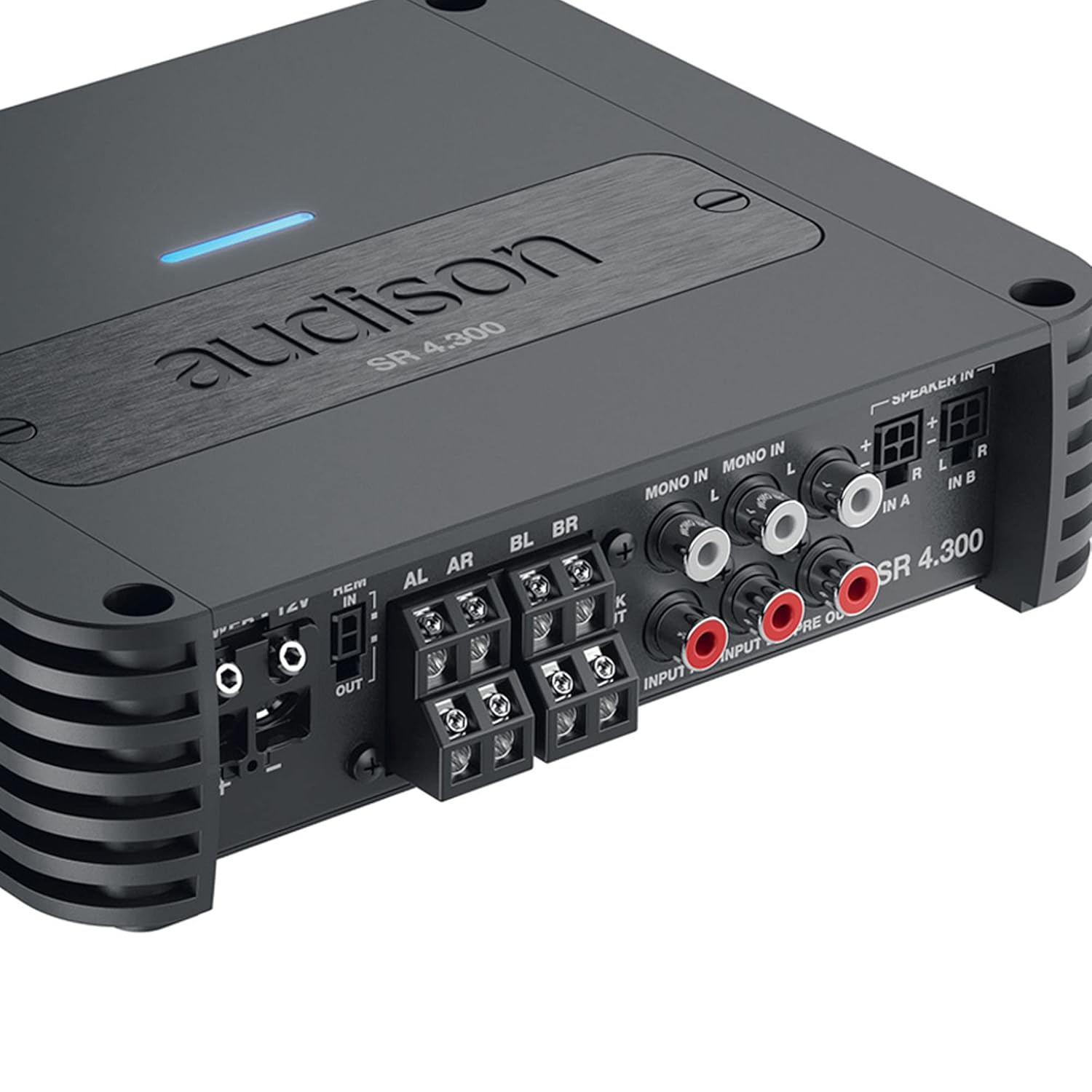
Beschreibung: This close-up image focuses on the input and output section of the Audison SR 4.300 amplifier. It shows the RCA input jacks (MONO IN, IN A, IN B), speaker-level inputs, and pre-out connections. The power and remote turn-on terminals are also visible, along with the speaker output terminals.
5.3. Stromanschlüsse
- Connect the main power cable (positive +12V) to the amplifier's +12V terminal. Ensure an appropriate fuse (1 x 30A) is installed close to the vehicle's battery.
- Verbinden Sie das Erdungskabel mit dem amplifier's GND terminal and to a clean, unpainted metal point on the vehicle chassis.
- Connect the remote turn-on wire from your head unit to the amplifier's REM IN terminal. If using Speaker-In inputs with an OEM head unit, the ART (Automatic Remote Turn-On/Off) feature can be utilized, eliminating the need for a separate remote wire.
5.4. Signaleingänge
- Cinch-Eingänge: Bei Nachrüst-Autoradios verbinden Sie die Vorverstärkerausgänge des Autoradios mit Cinch-Kabeln mit dem/der/den amplifier's RCA-In terminals (IN A, IN B).
- Lautsprechereingänge: For OEM head units without RCA outputs, connect the speaker wires directly to the amplifier's Speaker-In terminals. The built-in USS (Universal Speakers Simulator) ensures compatibility.
5.5. Lautsprecherausgänge
Verbinden Sie Ihre Lautsprecher mit dem amplifier's speaker output terminals (AL, AR, BL, BR). Ensure correct polarity (+/-) for each speaker. The amplifier supports 2 Ohm stable operation.
6. Bedienungsanleitung
Nach der Installation konfigurieren Sie die amplifier settings using the controls on the top panel (refer to Figure 2).
- Eingabemodus: Select the appropriate input mode (e.g., 2-channel, 4-channel) based on your system configuration.
- Filtereinstellungen: Adjust the High-Pass (HP), Low-Pass (LP), or Band-Pass (BP) filters for each channel pair to optimize sound reproduction for your speakers.
- Verstärkungseinstellung: Carefully set the gain levels for channels A and B to match the output voltagStellen Sie die Verstärkung an Ihrem Autoradio ein. Beginnen Sie mit der minimalen Verstärkungseinstellung und erhöhen Sie diese langsam, bis die gewünschte Lautstärke ohne Verzerrungen erreicht ist.
7. Wartung
Der Audison SR 4.300 ampDer Verstärker benötigt nur minimalen Wartungsaufwand, um eine langfristige Leistungsfähigkeit zu gewährleisten.
- Behalten Sie die ampReinigen Sie den Verstärker gründlich und entfernen Sie Staub und Schmutz. Verwenden Sie zum Reinigen ein weiches, trockenes Tuch.
- Ensure that the heat sinks are not obstructed to allow for proper cooling.
- Periodically check all connections for tightness and corrosion.
8. Fehlerbehebung
Wenn Sie Probleme mit Ihrem ampBei Problemen mit dem Verstärker sollten Sie die folgenden allgemeinen Schritte zur Fehlerbehebung beachten:
- Kein Strom: Check the main fuse, power connections (+12V, GND, REM), and ensure the vehicle battery is charged.
- Kein Ton: Verify all input and output signal connections. Check head unit settings and amplifier gain levels. Ensure speakers are properly connected and functional.
- Verzerrter Klang: Reduce gain levels. Check for proper filter settings. Ensure speaker impedance matches ampVerstärkerleistung.
- AmpVerstärkerüberhitzung: Sorgen Sie für ausreichende Belüftung um das amplifier. Check speaker impedance. Reduce volume levels.
If problems persist, consult an authorized Audison service center.
9. Spezifikationen
| Parameter | Wert |
|---|---|
| Modellnummer | SR4.300-FBA |
| Netzteil Voltage / Sicherung | 11 ÷ 15 VDC / 1 x 30A |
| Betriebsstromversorgung Voltage | 6.5V ÷ 17 VDC |
| Leerlaufstrom | 1.6 A |
| Idling Current when off | 0.03 mA |
| Consumption @ 14.4 VDC, 2Ω, Max Musical Power | 25 A |
| Verpackungsabmessungen | 10.2 x 7.91 x 3.7 Zoll |
| Gewicht | 4 Pfund |
| Hersteller | Audison |
| Montagetyp | Oberflächenmontage |
10. Garantie und Support
Audison products are manufactured to the highest quality standards. For warranty information, please refer to the warranty card included with your product or visit the official Audison website. For technical support or service inquiries, please contact your authorized Audison dealer or distributor.