
1. Einleitung
Vielen Dank für Ihren Einkauf.asing der Moukey MAMP1 220W Bluetooth Dual Channel Power Amplifier. Dies amplifier is designed to provide powerful and versatile audio amplification for various applications, including karaoke, home theater systems, and general audio playback. It features multiple input options, Bluetooth 5.0 connectivity, and intuitive controls for an enhanced audio experience. Please read this manual thoroughly before use to ensure proper operation and to maximize the product's performance.
2. Sicherheitshinweise
Um Stromschläge, Brände oder Schäden am Gerät zu vermeiden, beachten Sie bitte die folgenden Sicherheitsvorkehrungen:
- Setzen Sie dieses Gerät nicht Regen oder Feuchtigkeit aus.
- Öffnen Sie nicht das casing. Im Inneren befinden sich keine vom Benutzer wartbaren Teile. Alle Wartungsarbeiten dürfen nur von qualifiziertem Fachpersonal durchgeführt werden.
- Stellen Sie sicher, dass die Stromversorgungslautstärketage entspricht den auf dem Gerät angegebenen Anforderungen.
- Place the unit on a stable, flat surface with adequate ventilation. Do not block ventilation openings.
- Halten Sie das Gerät von Wärmequellen, direkter Sonneneinstrahlung und übermäßigem Staub fern.
- Disconnect the power plug from the outlet if the unit will not be used for an extended period.
- Bedienen Sie das Gerät nicht mit nassen Händen.
3. Packungsinhalt
Überprüfen Sie, ob alle Artikel im Paket vorhanden sind:
- Mouky MAMP1 Leistung AmpLifier-Einheit
- Fernbedienung
- FM-Antenne
- Benutzerhandbuch (dieses Dokument)
4. Produktüberschreitungview
4.1 Bedienelemente und Funktionen auf der Vorderseite
The front panel provides access to all primary controls and input ports for easy operation.

Image: Detailed diagram of the Moukey MAMP1 front panel, highlighting each control and port with corresponding numbers.
- Stromschalter: Schaltet das Gerät ein oder aus.
- USB / SD Slot: Zum Abspielen von Audio files from USB drives (max 32GB) or SD cards (max 16GB).
- Modus-Taste: Schaltet die Eingangsmodi durch (Bluetooth, USB, SD, AUX, FM).
- BT-Taste: Schaltet direkt in den Bluetooth-Modus.
- Prev Button: Springt zum vorherigen Titel/Sender.
- Wiedergabe-/Pause-Taste: Startet oder pausiert die Audiowiedergabe.
- Nächster Knopf: Springt zum nächsten Track/Bahnhof.
- LED-Anzeige: Shows current mode, track information, or frequency.
- Folder / Track: Navigates through folders or tracks on USB/SD.
- Master-Lautstärkeregler: Passt die Gesamtausgabelautstärke an.
- Kopfhöreranschluss: 3.5mm output for monitor headphones.
- Microphone 1 Input: 6.35-mm-Klinkenbuchse für Mikrofonanschluss.
- Microphone 2 Input: 6.35-mm-Klinkenbuchse für den Anschluss eines zweiten Mikrofons.
- Mikrofon-Lautstärkeregler: Regelt die Lautstärke angeschlossener Mikrofone.
- Echo-Knopf: Steuert den Echoeffekt für Mikrofone.
- Bass-Knopf: Passt die Audioausgabe im Tieftonbereich an.
- Höhenregler: Passt die Hochfrequenz-Audioausgabe an.
- Balance-Knopf: Passt die Balance zwischen linkem und rechtem Kanal an.
- AUX-Eingangsbuchse: 3.5-mm-Eingang für externe Audiogeräte.
- Eingangsauswahl: Rotary switch to select between CD, AUX, DVD, and MP3/W inputs.
4.2 Anschlüsse auf der Rückseite
The rear panel houses the main audio input and output connections.

Bild: Rückseite view der Moukey MAMP1 ampVerstärker, der alle Eingangs- und Ausgangsanschlüsse anzeigt.

Image: Detailed diagram of the Moukey MAMP1 rear panel, highlighting each connection point.
- Audio Input for DVD (RCA): Connect DVD players or other audio sources.
- Audio Input for CD (RCA): Connect CD players or other audio sources.
- Line-Out-Buchse (RCA): Zum Verbinden mit einem anderen amplifier oder Aufnahmegerät.
- FM-Antennenanschluss: Schließen Sie die mitgelieferte FM-Antenne für den Radioempfang an.
- Speaker Output Jacks: Connect passive speakers (4-16 Ohm impedance).
- Stromkabeleingang: Schließen Sie das Netzkabel an.
5. Einrichtung
5.1 Platzierung
Platzieren Sie die amplifier on a flat, stable surface. Ensure there is sufficient space around the unit for proper ventilation to prevent overheating.
5.2 Stromanschluss
Connect the power cable to the Power Cable Input on the rear panel of the amplifier, then plug the other end into a suitable AC power outlet (115V AC).
5.3 Lautsprecheranschluss
IhnenAMP1 amplifier supports two sets of passive speakers with an impedance of 4-16 Ohms. Use appropriate speaker wire to connect your speakers to the Speaker Output Jacks on the rear panel.

Image: Diagram illustrating how to connect speakers to the amplifier's binding posts.
- Rotate and loosen the speaker knob on the binding post.
- Insert the bare wire (remove approximately 10mm of insulation) into the hole. Ensure correct polarity (+ to + and - to -).
- Tighten the knobs to secure the wires firmly.
5.4 Anschluss von Eingabegeräten
Connect your audio sources (CD player, DVD player, tuner, etc.) to the corresponding RCA Audio Input jacks on the rear panel. For microphones, use the 6.35mm jacks on the front panel. For 3.5mm AUX devices, use the front panel AUX Input Jack.
6. Bedienungsanleitung
6.1 Ein-/Ausschalten
Drücken Sie die Netzschalter auf der Vorderseite, um die ampVerstärker ein- oder ausgeschaltet. Die LED-Anzeige leuchtet auf, wenn das Gerät eingeschaltet ist.
6.2 Eingangsauswahl
Verwenden Sie die Modustaste on the front panel or the remote control to cycle through available input sources (Bluetooth, USB, SD, AUX, FM). Alternatively, use the Eingangsauswahl knob on the front panel for RCA inputs (CD, AUX, DVD, MP3/W).
6.3 Lautstärkeregelung
- Master-Lautstärke: Drehen Sie den Master-Lautstärkeregler to adjust the overall output level of the ampschwerer.
- Mikrofonlautstärke: Verwenden Sie die Mikrofon-Lautstärkeregler to control the volume of connected microphones independently.
6.4 Klangregler
Adjust the audio characteristics using the Bass-Knopf Und Höhenregler to suit your preference. The Balance-Knopf allows adjustment of the left and right channel output levels.

Image: Close-up of the Moukey MAMP1 showing the Bass and Treble adjustment knobs.
6.5 Echo-Steuerung
Drehen Sie den Echo-Knopf to add or reduce the echo effect on the microphone inputs, suitable for karaoke applications.
6.6 Bluetooth-Kopplung
So verbinden Sie ein Bluetooth-Gerät:
- Drücken Sie die BT-Taste or cycle through modes until "BLUE" appears on the LED display.
- Aktivieren Sie Bluetooth auf Ihrem Smartphone, Tablet oder Computer.
- Suchen nach "Moukey MAMP1" in your device's Bluetooth settings and select it to pair.
- Once paired, you can stream audio wirelessly. Playback will temporarily pause during phone calls to protect privacy.
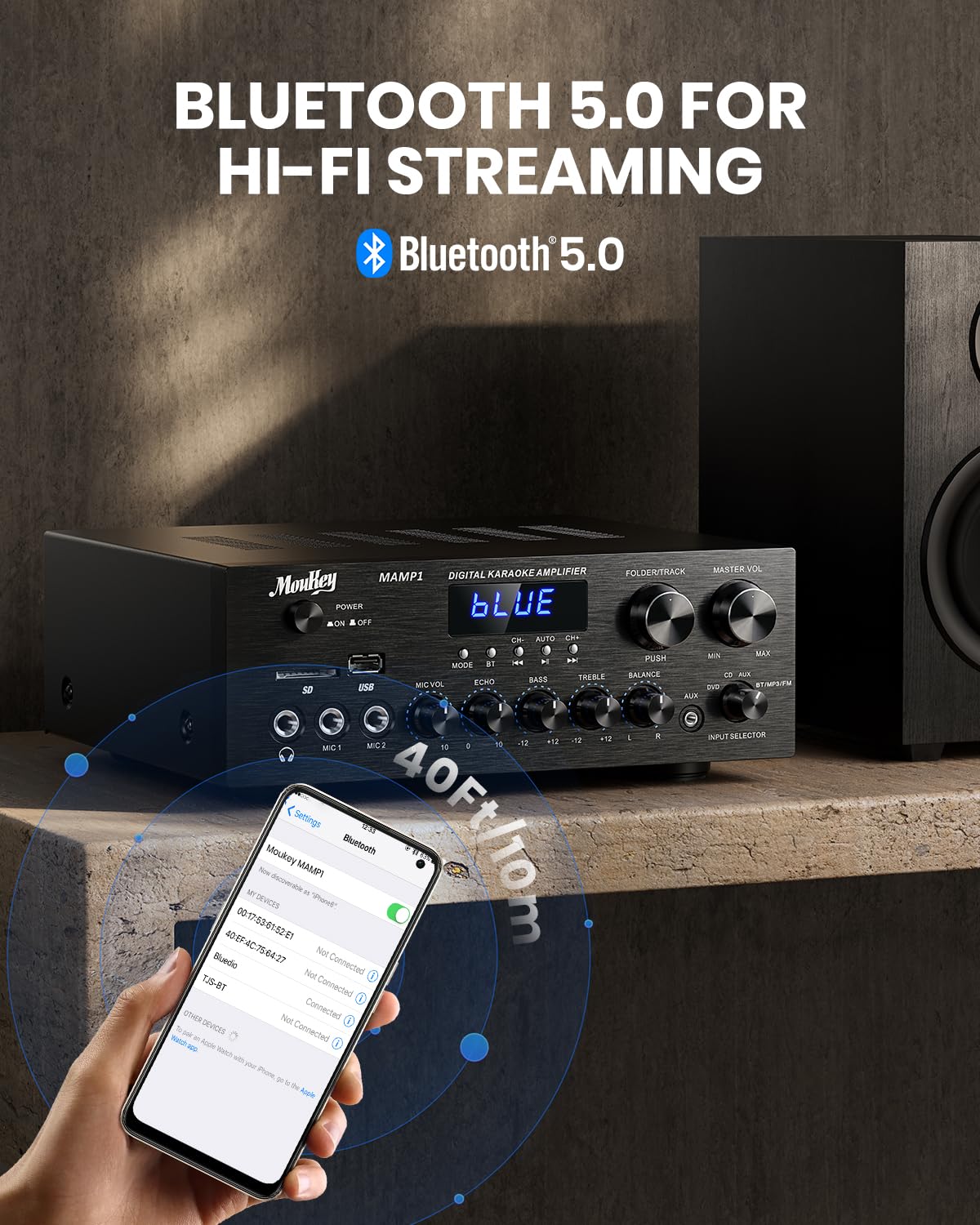
Bild: Das Moukey MAMP1 amplifier displaying "BLUE" on its screen, indicating Bluetooth mode, with a smartphone showing pairing options.
6.7 USB/SD-Wiedergabe
Insert a USB drive (max 32GB) or SD card (max 16GB) into the respective slot on the front panel. The ampDer Verstärker schaltet automatisch in den USB/SD-Modus und beginnt mit der Wiedergabe. Zurück, Abspielen/Pause, Nächste, Und Ordner/Spur Tasten zur Steuerung der Wiedergabe.
6.8 UKW-Radio
Ensure the FM antenna is connected to the rear panel. Select FM mode using the ModustasteVerwenden Sie die Zurück Und Nächste buttons to tune to radio stations. The LED display will show the current frequency.
7. Wartung
Um die Leistung und das Aussehen Ihres ampReiniger:
- Reinigung: Wischen Sie die Außenseite des Geräts mit einem weichen, trockenen Tuch ab. Verwenden Sie keine flüssigen Reiniger oder Scheuermittel.
- Belüftung: Stellen Sie sicher, dass die Lüftungsöffnungen frei von Staub und Schmutz sind.
- Lagerung: Wenn Sie das Gerät über einen längeren Zeitraum lagern, trennen Sie es vom Stromnetz und bewahren Sie es an einem kühlen, trockenen Ort auf.
8. Fehlerbehebung
Sollten Sie Probleme mit Ihrem Moukey M habenAMP1 amplifier, in der folgenden Tabelle finden Sie häufige Probleme und Lösungen:
| Problem | Mögliche Ursache | Lösung |
|---|---|---|
| Kein Strom | Netzkabel nicht angeschlossen; Steckdose defekt; Netzschalter ausgeschaltet. | Ensure power cable is securely connected. Try a different power outlet. Press the power switch to ON. |
| Keine Tonausgabe | Incorrect input selected; Volume too low; Speakers not connected; Speaker wires loose; Mute function active. | Select the correct input source. Increase Master Volume. Check speaker connections and polarity. Ensure mute is off. |
| Bluetooth stellt keine Verbindung her | Amplifier not in Bluetooth mode; Device too far; Device already paired to another unit. | Sicherstellen ampDer Verstärker befindet sich im Bluetooth-Modus („BLAU“ im Display). Bringen Sie das Gerät näher an den Verstärker heran. amplifier. Disconnect from other devices. |
| Mikrofon funktioniert nicht | Microphone not connected; Mic volume too low; Echo knob set to minimum. | Connect microphone securely. Increase Microphone Volume. Adjust Echo knob. |
| USB/SD-Wiedergabeprobleme | Nicht unterstützt file format; USB drive/SD card corrupted; Capacity exceeded. | Sicherstellen der Audioqualität files are in supported formats (e.g., MP3). Try a different USB drive/SD card. Check capacity limits (USB max 32G, SD max 16G). |
Wenn das Problem nach dem Ausprobieren dieser Lösungen weiterhin besteht, wenden Sie sich bitte an den Kundensupport.
9. Spezifikationen
| Besonderheit | Spezifikation |
|---|---|
| Marke | Moukey |
| Modell | MAMP1 |
| Ausgangsleistung | 220 Watt |
| Kanäle | 2 |
| Bandtage | 115 Volt (Wechselstrom) |
| Lautsprecherimpedanz | 4-16 Ohm |
| Bluetooth-Version | 5.0 |
| Bluetooth-Reichweite | Über 12 Meter (40 Fuß) |
| USB-/SD-Kartenunterstützung | USB: Max 32GB, SD: Max 16GB |
| Abmessungen (L x B x H) | 25 cm x 21.3 cm x 9.5 cm (ca. 10 Zoll x 8 Zoll x 4 Zoll) |
| UPC | 715802779039 |
| Ursprungsland | China |

Bild: Das Moukey MAMP1 amplifier with its dimensions labeled.
10. Garantie und Support
This Moukey MAMP1 Leistung AmpDer lifier verfügt über eine 1 Jahr Garantie Ab Kaufdatum. Diese Garantie deckt Herstellungsfehler und Verarbeitungsfehler bei normalem Gebrauch ab.
Von der Garantie ausgeschlossen sind:
- Damage caused by accident, abuse, misuse, flood, fire, or other natural causes.
- Schäden, die durch unautorisierte Änderungen oder Reparaturen verursacht wurden.
- Damage caused by improper installation or connection.
- Cosmetic damage, such as scratches, dents, and broken plastic on ports.
For warranty claims or technical support, please contact the retailer where you purchased the product or visit the official Moukey website for contact information. Please have your purchase receipt and product model number (MAMP1) ready when contacting support.