
Andoer HDV-201LM
Andoer HDV-201LM 1080p Digital Video Camera User Manual
Model: HDV-201LM
1. Einleitung
This manual provides detailed instructions for the safe and effective use of your Andoer HDV-201LM Digital Video Camera. Please read this manual thoroughly before operating the device and retain it for future reference.
The Andoer HDV-201LM is a 1080p Full HD digital video camera featuring a 5-megapixel CMOS sensor, capable of capturing video at 1920x1080p at 30 frames per second and still images up to 24 megapixels (interpolated). It includes a 16X digital zoom, a 3.0-inch TFT-LCD screen with 270-degree rotation, and supports external accessories via a hot shoe mount.
2. Packungsinhalt
Bitte prüfen Sie, ob alle unten aufgeführten Artikel in Ihrem Paket enthalten sind. Sollten Artikel fehlen oder beschädigt sein, wenden Sie sich bitte an Ihren Händler.
- 1 x Andoer HDV-201LM Digital Video Camera
- 1 x Kameratasche
- 2 x Rechargeable 3.7V 800mAh Batteries (one pre-installed)
- 1 x USB-Kabel
- 1 x AV-Kabel
- 1 x Fernbedienung
- 1 x Camera User Manual (English)
- 1 x 0.39X Wide-Angle Lens
- 1 x externes Mikrofon
- 1 x Microphone Connection Cable
- 1 x Microphone User Manual (Chinese)
Note: A memory card is not included. A Class 10 or higher SD card (up to 32GB) is strongly recommended for optimal performance.
3. Teileidentifikation
Familiarize yourself with the various components of your digital video camera.

Abbildung 3.1: Vorderseite view of the Andoer HDV-201LM camera with attached wide-angle lens and external microphone.

Abbildung 3.2: Ausführlich views highlighting the hot shoe mount, control buttons, battery compartment, and 1/4-inch tripod thread.
- Linse: Optische Hauptkomponente zur Aufnahme von Bildern und Videos.
- LCD Bildschirm: 3.0-inch TFT-LCD display for viewing and menu navigation. Rotates 270 degrees.
- Netzschalter: Schaltet die Kamera ein oder aus.
- Record/Stop Button: Startet oder beendet die Videoaufnahme.
- Foto-Button: Erstellt Standbilder.
- Zoomhebel (W/T): Adjusts digital zoom (Wide/Telephoto).
- Menü-Schaltfläche: Greift auf die Kameraeinstellungen zu.
- Navigationstasten: Wird zur Menünavigation und -auswahl verwendet.
- Blitzschuhanschluss: Zum Anbringen von externem Zubehör wie Mikrofonen oder LED-Leuchten.
- Stativgewinde: 1/4-inch thread for mounting the camera on a tripod.
- Batteriefach: Beherbergt den wiederaufladbaren Akku.
- SD-Kartensteckplatz: Zum Einlegen einer Speicherkarte.
- USB-Anschluss: For connecting to a computer or charging.
- AV-Ausgang: For connecting to a television.
- LED-Fülllicht: Sorgt für zusätzliche Beleuchtung bei schwachen Lichtverhältnissen.
4. Einrichtung
4.1. Laden des Akkus
- Öffnen Sie die Abdeckung des Batteriefachs.
- Insert the provided 3.7V 800mAh battery, ensuring correct polarity. If an insulator tab is present, remove it before insertion.
- Schließen Sie den Batteriefachdeckel.
- Connect the camera to a power source using the USB cable. The charging indicator will illuminate.
- Sobald der Akku vollständig geladen ist, ändert sich die Anzeigeleuchte oder schaltet sich ab.
4.2. Einlegen einer Speicherkarte
- Stellen Sie sicher, dass die Kamera ausgeschaltet ist.
- Suchen Sie den SD-Kartensteckplatz.
- Stecken Sie eine SD-Karte der Klasse 10 oder höher (bis zu 32 GB) in den Steckplatz, bis sie einrastet.
- Zum Herausnehmen die Karte vorsichtig drücken, bis sie herausspringt.
4.3. Attaching the Wide-Angle Lens
- Remove the protective cap from the camera lens.
- Carefully screw the 0.39X wide-angle lens onto the camera's main lens thread until secure.

Figure 4.1: The camera with the 0.39X super wide-angle lens attached, demonstrating its expanded field of view.
4.4. Anschließen des externen Mikrofons
- Slide the external microphone into the hot shoe mount on top of the camera.
- Connect the microphone cable to the camera's external microphone input port.
5. Bedienung der Kamera
5.1. Ein-/Ausschalten
- Zum Einschalten den LCD-Bildschirm öffnen oder die Taste drücken Leistung Taste.
- Zum Ausschalten den LCD-Bildschirm schließen oder die Taste gedrückt halten. Leistung Taste.
5.2. Videos aufnehmen
- Ensure the camera is in video mode (indicated on the LCD screen). If not, press the Modus Taste zum Wechseln.
- Drücken Sie die Aufnahme/Stopp button to start recording. A red indicator will typically flash.
- Drücken Sie die Aufnahme/Stopp erneut, um die Aufnahme zu stoppen.
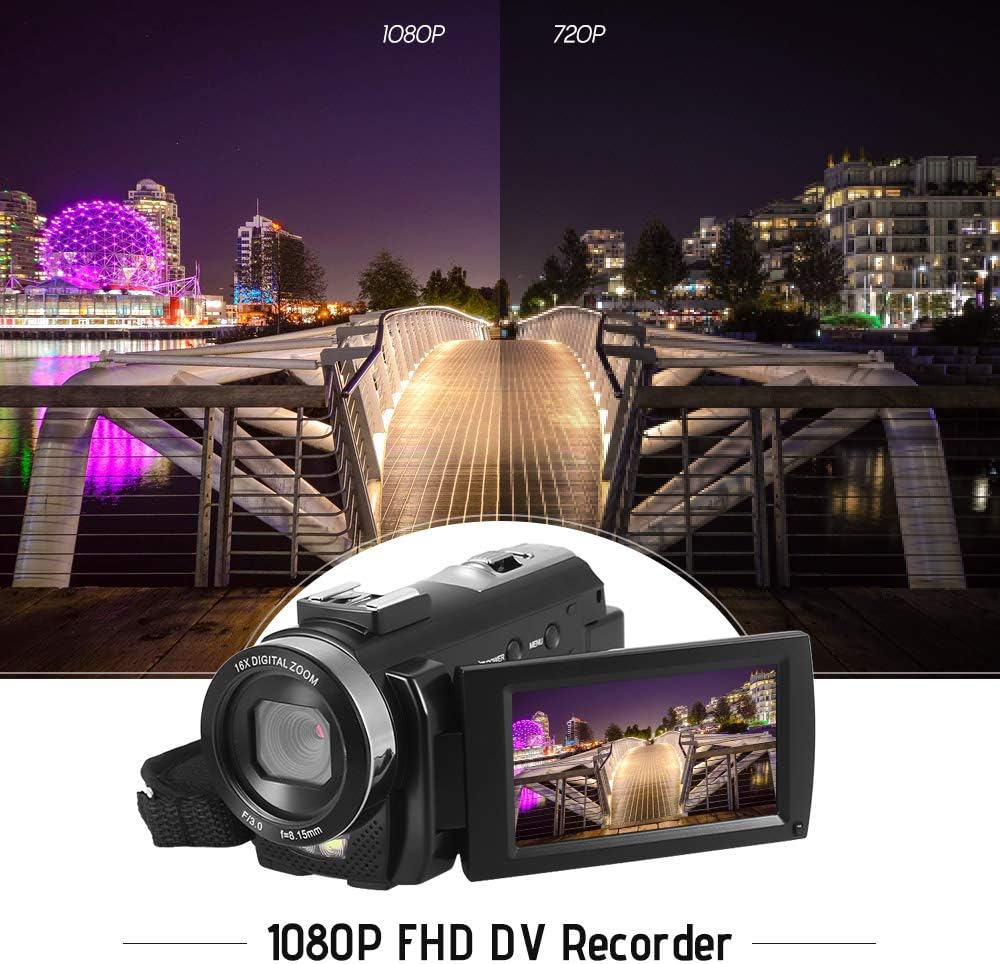
Figure 5.1: The camera is capable of recording in 1080p Full HD and 720p HD resolutions.
5.3. Fotos machen
- Ensure the camera is in photo mode. If not, press the Modus Taste zum Wechseln.
- Verwenden Sie den LCD-Bildschirm, um den Bildausschnitt festzulegen.
- Drücken Sie die Foto button to capture an image.
5.4. Digitalzoom verwenden
- Verwenden Sie die W (Wide) Und T (Teleobjektiv) lever to adjust the 16X digital zoom.

Figure 5.2: The camera's 16X digital zoom allows for closer views von Probanden.
5.5. Menüeinstellungen
- Drücken Sie die Speisekarte Schaltfläche zum Aufrufen der Einstellungen.
- Use the navigation buttons to scroll through options such as:
- Weißabgleich: Auto, Daylight, Cloudy, Fluorescent, Tungsten.
- Szenenmodus: Auto, Night, Portrait, Landscape, Backlight, Sport, Party, Beach, High Sensitivity.
- Aufnahmemodus: Single, Continuous.
- Belichtung: Adjust ±3.0EV.
- Selbstauslöser: Off, 2s, 5s, 10s.
- Automatisches Ausschalten: Off, 1min, 3min, 5min.
- Sprache: English, German, French, Spanish, Italian, Turkish, Russian, Portuguese, Dutch, Simplified Chinese, Traditional Chinese, Japanese, Polish.
- Weitere Funktionen: Face Detection, Smile Capture, Beauty Face, Anti-Shake.
- Drücken Sie die OK or Aufnahme/Stopp Taste, um die Auswahl zu bestätigen.
- Drücken Sie die Speisekarte Zum Beenden die Taste erneut drücken.
5.6. Anschluss an einen Fernseher
- Use the provided AV cable to connect the camera's AV output to your television's AV input.
- Select the correct AV input channel on your TV to view camera content.
6. Wartung
6.1. Reinigung der Kamera
- Verwenden Sie ein weiches, trockenes Tuch, um das Kameragehäuse zu reinigen.
- Verwenden Sie für die Reinigung von Linse und LCD-Bildschirm ein spezielles Linsenreinigungstuch und eine entsprechende Reinigungslösung. Vermeiden Sie aggressive Chemikalien.
6.2. Speicherung
- Bewahren Sie die Kamera an einem kühlen, trockenen Ort fern von direkter Sonneneinstrahlung und extremen Temperaturen auf.
- Wenn die Kamera längere Zeit nicht verwendet wird, entnehmen Sie die Batterie.
7. Fehlerbehebung
| Problem | Mögliche Ursache | Lösung |
|---|---|---|
| Die Kamera lässt sich nicht einschalten. | Die Batterie ist leer oder nicht richtig eingesetzt. | Charge the battery fully. Ensure the battery is inserted with correct polarity and the insulator tab is removed. |
| Es können keine Videos aufgenommen oder Fotos gemacht werden. | Die Speicherkarte ist voll, nicht eingelegt oder beschädigt. | Legen Sie eine Speicherkarte ein. Löschen Sie unnötige Inhalte. fileLöschen Sie die Daten oder formatieren Sie die Karte (dadurch werden alle Daten gelöscht). Ersetzen Sie die Karte, falls sie beschädigt ist. |
| Schlechte Video-/Bildqualität. | Unzureichende Beleuchtung, verschmutzte Linse oder falsche Einstellungen. | Ensure adequate lighting. Use the LED fill light if necessary. Clean the lens. Adjust white balance and scene mode settings. |
| Die Kamera friert ein oder reagiert nicht mehr. | Softwarefehler oder schwache Batterie. | Remove and reinsert the battery to reset the camera. Ensure the battery is charged. |
8. Spezifikationen
| Besonderheit | Spezifikation |
|---|---|
| Marke | Andoer |
| Modell | HDV-201LM |
| Bildsensor | 5 Megapixel CMOS Sensor |
| Videoauflösung | 1920x1080P (FHD 30fps), 1280x720 (HD 30fps), 640x480 (VGA 30fps), 320x240 (VGA 30fps) |
| Videoformat | AVI |
| Bildauflösung | 24MP (Interpolated), 20MP (Interpolated), 16MP (Interpolated), 12MP (Interpolated), 10MP (Interpolated), 7M Wide (Interpolated), 5MP, 3MP, 2M Wide, VGA |
| Bildformat | JPG |
| Digital Zoom | 16X |
| Linse | ff (F/3.0 f=8.15mm) |
| Max. Blenden | 8.15 F |
| LCD Bildschirm | 3.0-inch TFT-LCD (16:9), 270-degree rotation |
| Lagerung | SD-Karte (bis zu 32 GB, Klasse 10 empfohlen) |
| Konnektivität | USB 2.0, AV Output (NTSC/PAL) |
| Stromversorgung | 1 x 3.7 V 800 mAh wiederaufladbarer Akku |
| Batterie der Fernbedienung | 1 x 3V CR2025 Battery |
| Betriebssystemunterstützung | Windows XP/Vista/7/8/10 |
| Besondere Merkmale | Anti-shake, Face Detection, Smile Capture, Beauty Face, Self-Timer, LED Fill Light, Hot Shoe Mount |
| Maße | 13.5 x 5.5 x 6.5 cm (5.3 x 2.2 x 2.6 in) |
| Gewicht | 273 g (9.6 oz) mit Batterie |
| Farbe | Schwarz |
9. Garantie und Support
Informationen zur Garantie und zum technischen Support finden Sie in der mitgelieferten Dokumentation oder wenden Sie sich an Ihren Händler. Bewahren Sie Ihren Kaufbeleg für eventuelle Garantieansprüche auf.
Ask a question about this manual
Ask about setup, troubleshooting, compatibility, parts, safety, or missing instructions. Manuals+ will review the question and use this page’s manual context to help answer it.