
GLIDiC TW-5000s
GLIDiC Sound Air TW-5000s True Wireless Earbuds Instruction Manual
Model: TW-5000s
1. Einleitung
Vielen Dank für Ihren Einkauf.asing the GLIDiC Sound Air TW-5000s True Wireless Earbuds. This manual provides essential information for the safe and effective use of your device. Please read it thoroughly before use and retain it for future reference.
2. Sicherheitshinweise
- Die Ohrhörer und das Ladecase dürfen keinen extremen Temperaturen, direkter Sonneneinstrahlung oder hoher Luftfeuchtigkeit ausgesetzt werden.
- Avoid dropping, impacting, or disassembling the device. This may cause damage and void the warranty.
- Keep the device away from water and liquids. While sweatproof, immersion can cause damage.
- Verwenden Sie ausschließlich das mitgelieferte Ladekabel oder ein zertifiziertes gleichwertiges Kabel.
- Längeres Hören bei hoher Lautstärke kann zu Gehörschäden führen. Stellen Sie die Lautstärke auf ein sicheres Niveau ein.
- Achten Sie beim Tragen von Ohrhörern auf Ihre Umgebung, insbesondere im Straßenverkehr oder in gefährlichen Umgebungen.
3. Packungsinhalt
Überprüfen Sie, ob alle Artikel in Ihrem Paket vorhanden sind:
- GLIDiC Sound Air TW-5000s True Wireless Earbuds (Left and Right)
- Ladeetui
- USB-Ladekabel (Typ-A auf Micro-USB)
- Mehrere Größen von Ohrstöpseln (S, M, L)
- Bedienungsanleitung (dieses Dokument)
4. Produktüberschreitungview
Familiarize yourself with the components of your GLIDiC Sound Air TW-5000s earbuds and charging case.

Figure 4.1: GLIDiC Sound Air TW-5000s Earbuds and Charging Case. The image displays the black charging case with the GLIDiC logo on top, positioned next to the two black earbuds.
Ohrhörerkomponenten
- Multifunktionstaste: Located on the outer surface of each earbud, used for playback control, call management, and voice assistant activation.
- LED-Anzeige: Provides status information (pairing, charging, power).
- Mikrofon: For voice calls and voice assistant commands.
- Ladekontakte: Located on the underside of each earbud, for charging within the case.
- Ohrspitze: Silicone tip for in-ear comfort and sound isolation.
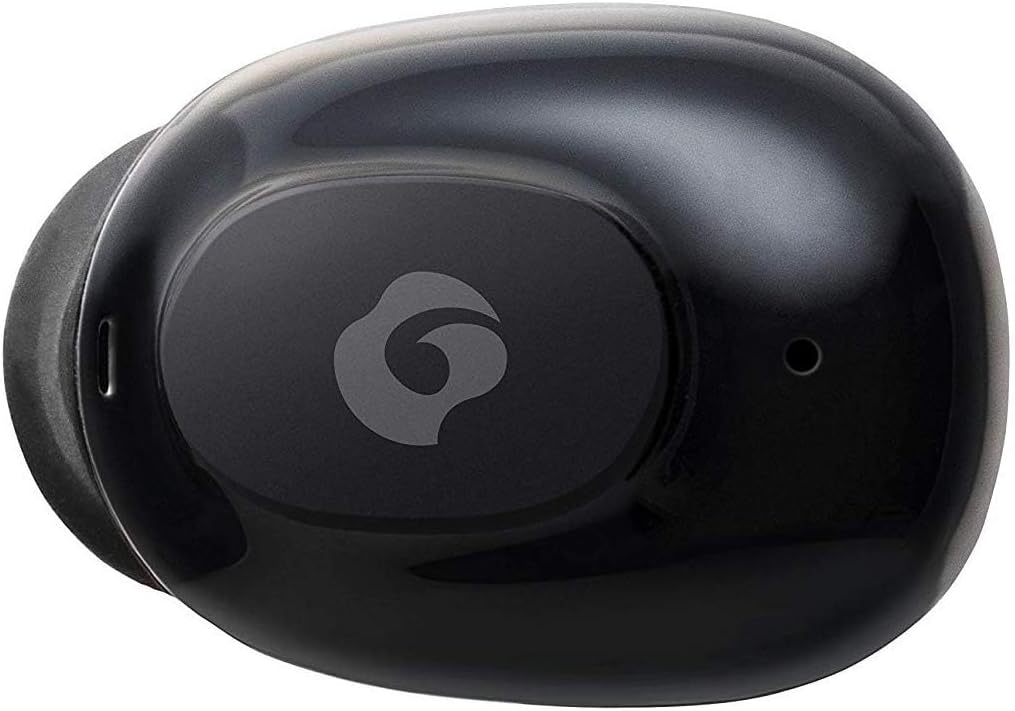
Abbildung 4.2: Nahaufnahme view of a single GLIDiC earbud, highlighting the multifunction button with the GLIDiC logo and the microphone opening.
Komponenten des Ladegehäuses
- Ladeanschlüsse: Internal contacts for earbuds, external port for case charging.
- Gehäuse-LED-Anzeige: Zeigt den Ladestatus des Gehäuses an.
- Deckel: Protects earbuds and secures them during charging.
5. Einrichtung
5.1 Erstaufladung
- Place both earbuds into the charging case. Ensure they are correctly seated, and the LED indicators on the earbuds illuminate.
- Verbinden Sie das USB-Ladekabel mit dem Ladeanschluss am Gehäuse und stecken Sie das andere Ende in eine USB-Stromquelle (z. B. Computer, Netzteil).
- The case LED indicator will show charging status. Allow approximately 2 hours for a full charge of both earbuds and the case.
- Once fully charged, disconnect the charging cable. The earbuds offer up to 60 days of standby time when stored in the fully charged case.
5.2 Koppeln mit einem Bluetooth-Gerät
- Stellen Sie sicher, dass die Ohrhörer aufgeladen sind.
- Öffnen Sie das Ladecase. Die Ohrhörer wechseln automatisch in den Kopplungsmodus, und ihre LED-Anzeigen blinken.
- Gehen Sie auf Ihrem Bluetooth-fähigen Gerät (Smartphone, Tablet usw.) zu den Bluetooth-Einstellungen.
- Suchen nach available devices. Select "GLIDiC TW-5000s" from the list.
- Once connected, the earbud LED indicators will stop flashing and may show a solid light or turn off, depending on the model. A voice prompt may also confirm the connection.
- Falls die Kopplung fehlschlägt, legen Sie die Ohrhörer zurück in das Ladecase, schließen Sie den Deckel, warten Sie einige Sekunden und wiederholen Sie dann die Schritte.
6. Bedienungsanleitung
6.1 Ein-/Ausschalten
- Einschalten: Open the charging case, or press and hold the multifunction button on each earbud for approximately 3 seconds.
- Ausschalten: Place the earbuds back into the charging case and close the lid, or press and hold the multifunction button on each earbud for approximately 5 seconds.
6.2 Musikwiedergabe
- Abspielen/Pause: Drücken Sie einmal die Multifunktionstaste an einem der Ohrhörer.
- Nächster Titel: Drücken Sie die Multifunktionstaste am rechten Ohrhörer zweimal.
- Vorheriges Lied: Drücken Sie die Multifunktionstaste am linken Ohrhörer zweimal.
- Lautstärke erhöhen: Triple-press the multifunction button on the right earbud.
- Lautstärke runter: Triple-press the multifunction button on the left earbud.
6.3 Anrufmanagement
- Anruf annehmen/beenden: Drücken Sie einmal die Multifunktionstaste an einem der Ohrhörer.
- Anruf ablehnen: Drücken und halten Sie die Multifunktionstaste an einem der Ohrhörer etwa 2 Sekunden lang.
6.4 Sprachassistent
- Sprachassistenten aktivieren: Press and hold the multifunction button on either earbud for approximately 2 seconds (when not on a call).
6.5 Multi-Communication Mode
The GLIDiC Sound Air TW-5000s features a multi-communication mode that allows select ambient sounds to be heard without compromising audio quality. This enhances user awareness and safety.
- Activate/Deactivate Multi-Communication Mode: Consult the specific instructions provided with your device, as activation methods can vary. Typically, this involves a specific press sequence on the multifunction button or an option within a companion app if available.
7. Wartung
7.1 Reinigung
- Wischen Sie die Ohrhörer und das Ladecase mit einem weichen, trockenen, fusselfreien Tuch ab.
- Verwenden Sie keine Scheuermittel, Alkohol oder chemische Lösungsmittel.
- Gently remove ear tips and clean them with mild soap and water if necessary. Ensure they are completely dry before reattaching.
- Reinigen Sie die Ladekontakte sowohl an den Ohrhörern als auch am Ladecase vorsichtig mit einem trockenen Wattestäbchen.
7.2 Speicherung
- Bewahren Sie die Ohrhörer bei Nichtgebrauch im Ladecase auf, um sie zu schützen und sicherzustellen, dass sie geladen bleiben.
- Bewahren Sie das Gerät an einem kühlen, trockenen Ort auf, schützen Sie es vor direkter Sonneneinstrahlung und extremen Temperaturen.
8. Fehlerbehebung
If you encounter issues with your GLIDiC Sound Air TW-5000s, refer to the following common problems and solutions:
| Problem | Mögliche Lösung |
|---|---|
| Die Ohrhörer lassen sich nicht einschalten. | Stellen Sie sicher, dass die Ohrhörer aufgeladen sind. Legen Sie sie in das Ladecase und schließen Sie das Case an eine Stromquelle an. |
| Die Ohrhörer lassen sich nicht mit dem Gerät koppeln. |
|
| Nur ein Ohrhörer hat Ton. |
|
| Ladecase lädt nicht. |
|
| Die Tonqualität ist schlecht oder tritt nur zeitweise auf. |
|
9. Spezifikationen
| Besonderheit | Detail |
|---|---|
| Modellname | TW-5000 |
| Konnektivitätstechnologie | Kabellos (Bluetooth) |
| Bluetooth-Reichweite | 10 Meter |
| Frequenzbereich | 20 Hz – 20,000 Hz |
| Battery Life (Carrying Case Standby) | Bis zu 60 Tage |
| Wasserbeständigkeit | Wasserabweisend (schweißfest) |
| Steuerungstyp | Media Control, Touch, Voice |
| Besondere Merkmale | Microphone Included, Noise Cancellation, Multi-communication mode |
| Material | Plastic, TPE, and Silicone |
| Abmessungen (Ohrhörer) | 0.98 x 0.67 x 0.91 Zoll (ungefähr) |
| Artikelgewicht | 9.6 Unzen (Gesamtgewicht der Verpackung) |
| UPC | 811559030024 |
10. Garantie und Support
GLIDiC products are designed for reliability and performance. For specific warranty details, please refer to the warranty card included with your purchase or visit the official GLIDiC website. If you require technical support or have questions not covered in this manual, please contact GLIDiC customer service through their official channels.
Bitte bewahren Sie Ihren Kaufbeleg für Garantieansprüche auf.
Ask a question about this manual
Ask about setup, troubleshooting, compatibility, parts, safety, or missing instructions. Manuals+ will review the question and use this page’s manual context to help answer it.