
Einführung
Thank you for choosing the HONOR Magic Watch 2. This smartwatch is designed to enhance your daily life with advanced fitness tracking, communication features, and a long-lasting battery. It features a vibrant 1.39-inch AMOLED display, a durable metal and plastic body, and a range of sensors to monitor your health and activities. This manual provides essential information for setting up, operating, maintaining, and troubleshooting your device.
Aufstellen
1. Auspacken und erste Aufladung
Upon unboxing, ensure all standard components are present. It is recommended to fully charge your HONOR Magic Watch 2 before first use. The watch is equipped with a 455 mAh battery, providing up to 14 days of typical usage on a single charge.

Bild: Vorderseite view of the HONOR Magic Watch 2, showcasing its round AMOLED display and black strap.
2. Koppeln mit Ihrem Smartphone
- Download the official HONOR Health or Huawei Health app from your smartphone's app store (compatible with iOS and Android devices).
- Öffnen Sie die App und folgen Sie den Anweisungen auf dem Bildschirm, um ein Konto zu erstellen oder sich anzumelden.
- Stellen Sie sicher, dass Bluetooth auf Ihrem Smartphone aktiviert ist.
- In the app, navigate to 'Devices' and select 'Add device'. Choose your HONOR Magic Watch 2 from the list of available devices.
- Bestätigen Sie die Kopplungsanfrage sowohl auf Ihrer Smartwatch als auch auf Ihrem Smartphone.
3. Erstkonfiguration
After successful pairing, the app will guide you through initial settings such as personal information, notification preferences, and watch face selection.
Bedienung Ihrer Smartwatch
1. Grundlegende Navigation
- Touch-Screen: Wischen Sie nach oben, unten, links oder rechts, um durch Menüs und Benachrichtigungen zu navigieren. Tippen Sie, um Elemente auszuwählen.
- Tasten: The watch features push buttons for various functions, typically a power/home button and a function button. Refer to the on-screen prompts for specific button actions.
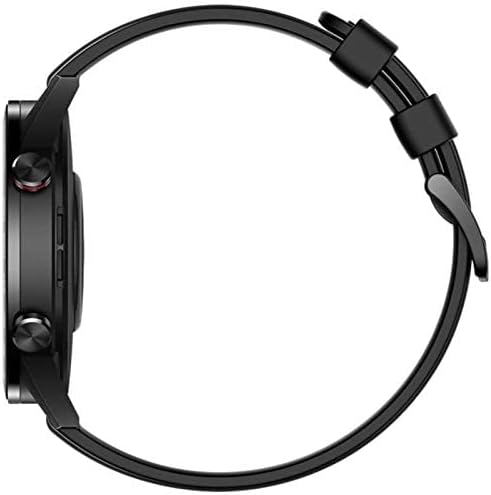
Abbildung: Seite view of the HONOR Magic Watch 2, showing the two physical buttons on the right side of the watch case.
2. Kommunikationsfunktionen
- Bluetooth-Anrufe: Make and receive calls directly from your watch when connected to your smartphone via Bluetooth. The watch includes a microphone for hands-free communication.
- Benachrichtigungen: Receive alerts for incoming calls, text messages, and app notifications directly on your watch display.
3. Fitness- und Gesundheits-Tracking
The HONOR Magic Watch 2 offers comprehensive tracking capabilities:
- 15 Fitness Modes: Track various sports activities including climbing, running, walking, long-distance walking, and cycling.
- Herzfrequenzmesser: An optical heart rate sensor continuously monitors your heart rate.
- SpO2-Monitor: Misst den Sauerstoffsättigungsgrad im Blut.
- Schlaf-Tracking: Monitors your sleep patterns and provides insights for improvement.
- Stressüberwachung: Helps you manage stress levels throughout the day.
- Geographisches Positionierungs System: Integrated GPS provides accurate route tracking for outdoor activities.
- Distanzmesser: Records distances covered during your workouts.
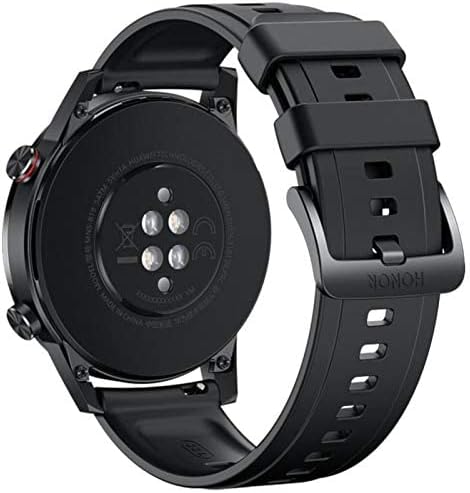
Abbildung: Rückseite view of the HONOR Magic Watch 2, showing the heart rate sensors and charging contacts.
4. Musikwiedergabe
Store and play music directly from your watch (4GB storage capacity) or control music playback on your connected smartphone.
Wartung
1. Reinigen Sie Ihre Uhr
- Reinigen Sie den Bildschirm und das Gehäuse der Uhr mit einem weichen, fusselfreien Tuch.
- Bei hartnäckigen Flecken, dampBefeuchten Sie das Tuch leicht mit Wasser. Vermeiden Sie die Verwendung von scharfen Chemikalien oder scheuernden Materialien.
- Reinigen Sie die Ladekontakte regelmäßig, um ein ordnungsgemäßes Laden zu gewährleisten.
2. Wasserbeständigkeit
The HONOR Magic Watch 2 is water-resistant up to 50 meters. This means it can be used for shallow-water activities like swimming in a pool or ocean. It is not suitable for diving, waterskiing, or other activities involving high-velocity water or submersion below shallow depth.
- Spülen Sie die Uhr nach Kontakt mit Salzwasser oder chloriertem Wasser mit Süßwasser ab.
- Drücken Sie unter Wasser keine Knöpfe.
- Ensure the watch is dry before charging to prevent damage to the charging contacts.
3. Batteriepflege
- Vermeiden Sie es, die Uhr extremen Temperaturen auszusetzen, da dies die Batterielebensdauer beeinträchtigen kann.
- Für die Langzeitlagerung laden Sie die Uhr auf etwa 50 % auf und bewahren Sie sie an einem kühlen, trockenen Ort auf.
Fehlerbehebung
Häufige Probleme und Lösungen
| Ausgabe | Mögliche Lösung |
|---|---|
| Uhr lässt sich nicht einschalten | Stellen Sie sicher, dass die Uhr vollständig aufgeladen ist. Schließen Sie sie für mindestens 30 Minuten an das Ladegerät an. |
| Kopplung mit Smartphone nicht möglich | Check if Bluetooth is enabled on both devices. Restart both the watch and smartphone. Ensure the app is updated to the latest version. |
| Inaccurate heart rate/activity data | Achten Sie darauf, dass die Uhr eng am Handgelenk sitzt, weder zu eng noch zu locker. Reinigen Sie den Sensor auf der Rückseite der Uhr. |
| Kurze Akkulaufzeit | Reduzieren Sie die Bildschirmhelligkeit, deaktivieren Sie das Always-on-Display, begrenzen Sie die Aktualisierung von Apps im Hintergrund und schalten Sie unnötige Benachrichtigungen ab. |
| Uhr lädt nicht | Ensure the charging cable and adapter are working correctly. Clean the charging contacts on both the watch and the charger. |
If you encounter issues not listed here, try restarting your watch and smartphone. For persistent problems, refer to the support section.
Technische Daten
| Besonderheit | Detail |
|---|---|
| Modellname | Magische Uhr 2 |
| Modellnummer | Minos-B19S |
| Anzeigegröße | 1.39 Zoll |
| Anzeigetyp | AMOLED |
| Auflösung | 454 x 454 Pixel |
| Max Screen Brightness | 600 Nits |
| Betriebssystem | Android Wear (Compatible with iOS and Android) |
| Speicherkapazität | 4 GB |
| Batteriekapazität | 455 mAh |
| Akkulaufzeit | Bis zu 336 Stunden (14 Tage) |
| Konnektivität | Bluetooth |
| GPS | Yes (Global Positioning System) |
| Wasserbeständigkeit | 50 Meter |
| Artikelabmessungen | 46 x 46 x 11 mm |
| Gehäusematerial | Metall |
| Armbandmaterial | Silicone (standard), Stainless Steel (variant dependent) |
| Sensoren | Accelerometer, Optical Heart Rate Sensor |
| Eingabe der menschlichen Schnittstelle | Buttons, Microphone |
| Besondere Merkmale | Phone calls, Notifications, SMS, Music Player, Calendar Mode |
Garantieinformationen
This product comes with a manufacturer's warranty of 18 months from the date of purchase. For service or further details, you may contact the manufacturer or its authorized service agent. Alternatively, you may contact Amazon for assistance.
Unterstützung
For additional support, frequently asked questions, or to download the latest version of the user manual, please visit the official HONOR support website. You can also find troubleshooting tips and community forums online.
- Online-Ressourcen: Visit the HONOR official webWebsite für Produktsupport.
- Kundendienst: Contact HONOR customer service for direct assistance.