
1. Einleitung
Thank you for choosing the Spacetronik SPE-114 Electric Height Adjustable Desk Frame. This manual provides essential information for the safe and efficient assembly, operation, and maintenance of your new desk frame. Please read these instructions carefully before use and retain them for future reference.
This electric height adjustable desk frame is designed to promote a healthier work environment by allowing seamless transitions between sitting and standing positions. Its advanced features, including memory presets, ensure a personalized and ergonomic workspace.
2. Sicherheitshinweise
- Vor der Montage sicherstellen, dass alle Komponenten vorhanden und unbeschädigt sind. Nicht verwenden, wenn Teile fehlen oder defekt sind.
- Halten Sie Kinder und Haustiere während des Betriebs vom Schreibtisch fern, um Verletzungen durch bewegliche Teile zu vermeiden.
- Do not place hands or other body parts near the moving parts of the frame to avoid pinching.
- Ensure the power cord is not damaged or pinched. Only use the provided power adapter.
- Überladen Sie den Schreibtisch nicht. Beachten Sie die Spezifikationen hinsichtlich der maximalen Tragfähigkeit.
- Vermeiden Sie es, Flüssigkeiten direkt auf das Bedienfeld oder das Motorgehäuse zu bringen.
- If the desk frame makes unusual noises, stops moving, or shows error codes, discontinue use and consult the troubleshooting section or contact customer support.
- Dieses Produkt ist nur für den Gebrauch in Innenräumen vorgesehen.
3. Packungsinhalt
Please verify that all the following components are included in your package. If any parts are missing or damaged, please contact customer support.
- Desk Frame Legs (2)
- Querträger/Stützbalken
- Motormontage
- Bedienfeld
- Netzteil und Kabel
- Hardware-Set (Schrauben, Bolzen, Werkzeuge)
- Bedienungsanleitung
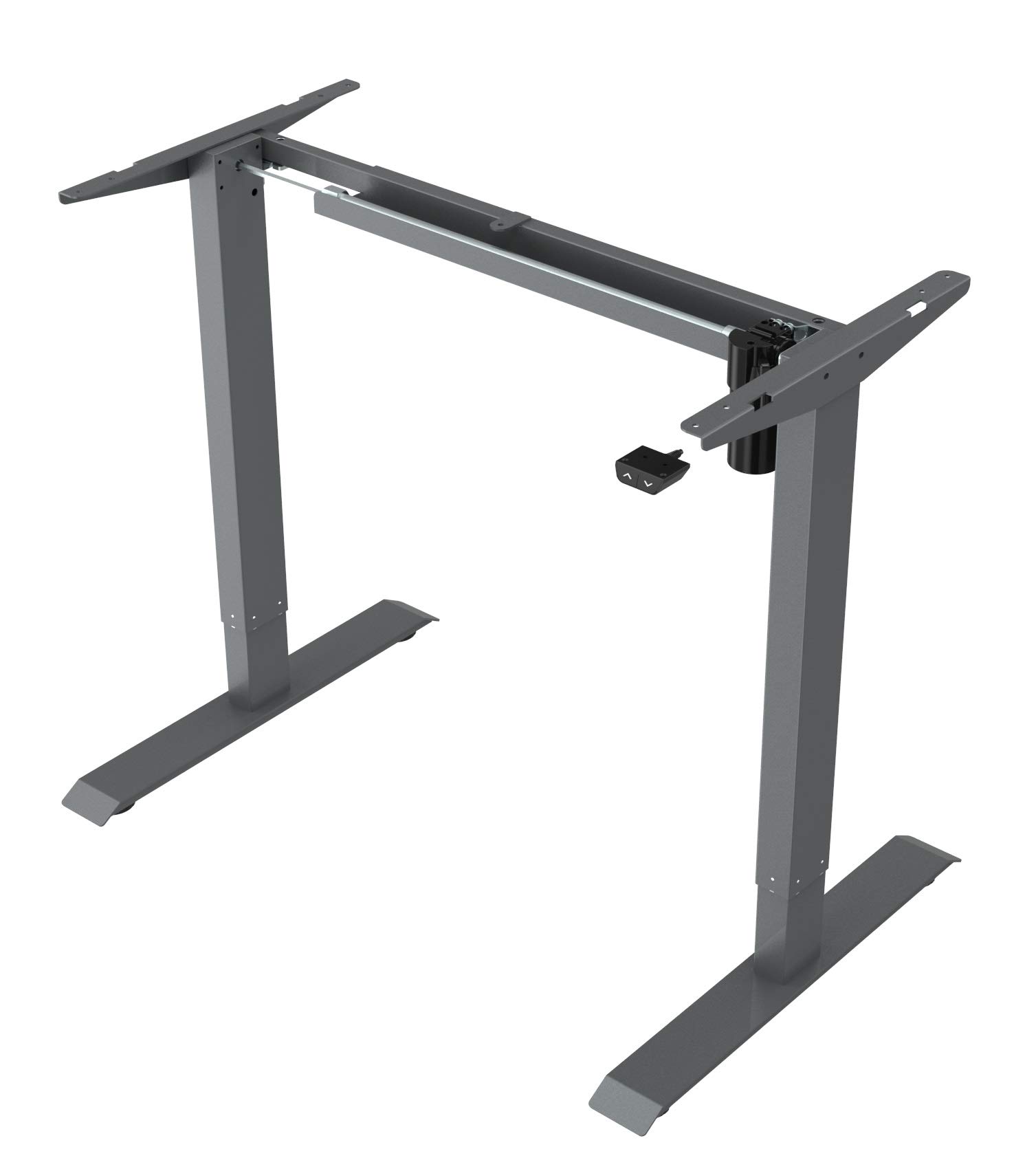
This image displays the main components of the Spacetronik SPE-114 electric height adjustable desk frame, including the legs, crossbar, and motor assembly, ready for assembly.
4. Aufbau und Montage
Assembly typically requires two people. Ensure you have enough space and the necessary tools (usually included in the hardware kit).
- Komponenten auspacken: Nehmen Sie alle Teile vorsichtig aus der Verpackung und legen Sie sie auf eine saubere, weiche Unterlage, um Kratzer zu vermeiden.
- Assemble Legs and Crossbar: Attach the desk legs to the crossbar/support beam using the provided screws and tools. Ensure all connections are secure.
- Motor und Steuerkasten einbauen: Mount the motor assembly and control box to the designated positions on the frame, following the diagrams in the detailed assembly guide (if provided separately).
- Bedienfeld anhängen: Secure the control panel to the underside of your chosen desktop or to the frame in an easily accessible location.
- Kabel anschließen: Connect the motor cable, control panel cable, and power adapter to the control box. Ensure all connections are firm.
- Mount Desktop (Not Included): Carefully place your desktop onto the assembled frame. Align the desktop with the pre-drilled holes (if applicable) or mark and drill new pilot holes. Secure the desktop to the frame using appropriate screws.
- Erstes Einschalten: Plug the power adapter into a wall outlet. The desk may perform an initial reset or calibration.

Ein abgewinkelter view of the fully assembled Spacetronik SPE-114 desk frame, showcasing its sturdy construction and grey finish.
5. Bedienungsanleitung
5.1 Bedienfeld vorbeiview

Eine detaillierte view of the control panel for the Spacetronik SPE-114 desk, featuring up/down buttons and memory preset buttons for three height positions.
The control panel typically features:
- Aufwärts (▲) / Abwärts (▼) Tasten: Press and hold to adjust the desk height. Release to stop.
- Speichervoreinstellungen (1, 2, 3): Buttons to save and recall preferred height settings.
- Anzeige: Shows the current desk height in centimeters or inches.
5.2 Höhenverstellung
Um die Schreibtischhöhe anzupassen, drücken und halten Sie die Taste Nach oben (▲) or Runter (▼) button until the desk reaches your desired height. Release the button to stop the movement.
5.3 Einstellen von Speichervoreinstellungen
The desk frame allows you to save up to three preferred height positions:
- Stellen Sie den Schreibtisch mithilfe der Auf-/Ab-Tasten auf die gewünschte Höhe ein.
- Press the 'M' or 'SET' button (if available, otherwise proceed to step 3). The display may flash.
- Immediately press one of the memory preset buttons (1, 2, or 3). The current height is now saved to that button.
- Repeat for other desired height positions.
5.4 Abrufen von Speichervoreinstellungen
To move the desk to a saved height, simply press the corresponding memory preset button (1, 2, or 3). The desk will automatically move to the saved position.

A person is shown working at a Spacetronik height adjustable desk while using an under-desk exercise bike, illustrating the desk's support for active work styles.
6. Wartung
- Reinigung: Wischen Sie das Tischgestell mit einem weichen, fusselfreien Tuch ab.amp cloth. Avoid abrasive cleaners or solvents that could damage the finish. Ensure the desk is unplugged before cleaning.
- Kabelmanagement: Regularly check all cables for wear or damage. Ensure they are neatly organized to prevent tripping hazards or accidental disconnections.
- Überprüfung der Befestigungselemente: Überprüfen Sie regelmäßig alle Schrauben und Bolzen, um sicherzustellen, dass sie fest sitzen. Ziehen Sie sie gegebenenfalls nach.
- Schmierung: The moving parts of the desk frame are generally maintenance-free and do not require lubrication.
7. Fehlerbehebung
| Problem | Mögliche Ursache | Lösung |
|---|---|---|
| Der Schreibtisch bewegt sich nicht. | Stromkabel nicht angeschlossen, Motorkabel locker, Überlastung oder Systemfehler. | Check all cable connections. Reduce weight on the desk. Perform a reset (unplug for 30 seconds, then plug back in). |
| Der Schreibtisch wackelt ungleichmäßig. | Uneven weight distribution, loose fasteners, or calibration issue. | Distribute weight evenly. Check and tighten all fasteners. Perform a system reset. |
| Fehlercode angezeigt. | Spezifische Systemstörung. | Refer to the detailed error code list in a separate technical manual (if available) or contact customer support with the specific code. Often, a power cycle (unplug, wait, plug in) can resolve minor errors. |
| Der Schreibtisch stoppt mitten in der Bewegung. | Overheat protection, obstruction, or power interruption. | Allow the motor to cool down for 20 minutes. Check for any obstructions. Ensure stable power supply. |
8. Spezifikationen
- Produktabmessungen (L x B x H): 65 x 129 x 121 cm (25.6 x 50.8 x 47.6 Zoll)
- Gewicht: 22.5 kg
- Hersteller: Raumfahrttechnik
- ASIN: B084HFPW2N
- Artikelmodellnummer: SPE-243
- Teilenummer: SPE114
- Marke: Raumfahrttechnik
- Form: Rechteckig
- Farbe: Grau
- Besondere Merkmale: Ergonomic, Electric height adjustment
- Anzahl der Schubladen: 1 (Note: This specification might refer to an optional accessory or a complete desk model, as the product is a frame without a worktop.)
- Montage erforderlich: Ja
9. Garantie und Support
Spacetronik products are manufactured to high-quality standards. For information regarding warranty coverage, please refer to the warranty card included with your purchase or visit the official Spacetronik webWebsite.
If you encounter any issues or have questions not covered in this manual, please contact Spacetronik customer support for assistance. Have your model number (SPE-243) and purchase details ready when contacting support.