
Einführung
The EVOLVEO EASYPHONE FM is a user-friendly mobile phone designed for straightforward communication. It features large, separated keys, a clear display, and essential functions to ensure ease of use. This manual provides instructions for setting up, operating, and maintaining your device.
1. Packungsinhalt
Bitte prüfen Sie das Paket auf folgende Artikel:
- EVOLVEO EASYPHONE FM Mobile Phone
- Ladestation
- Netzteil
- Li-ion 1000 mAh Battery
- Bedienungsanleitung
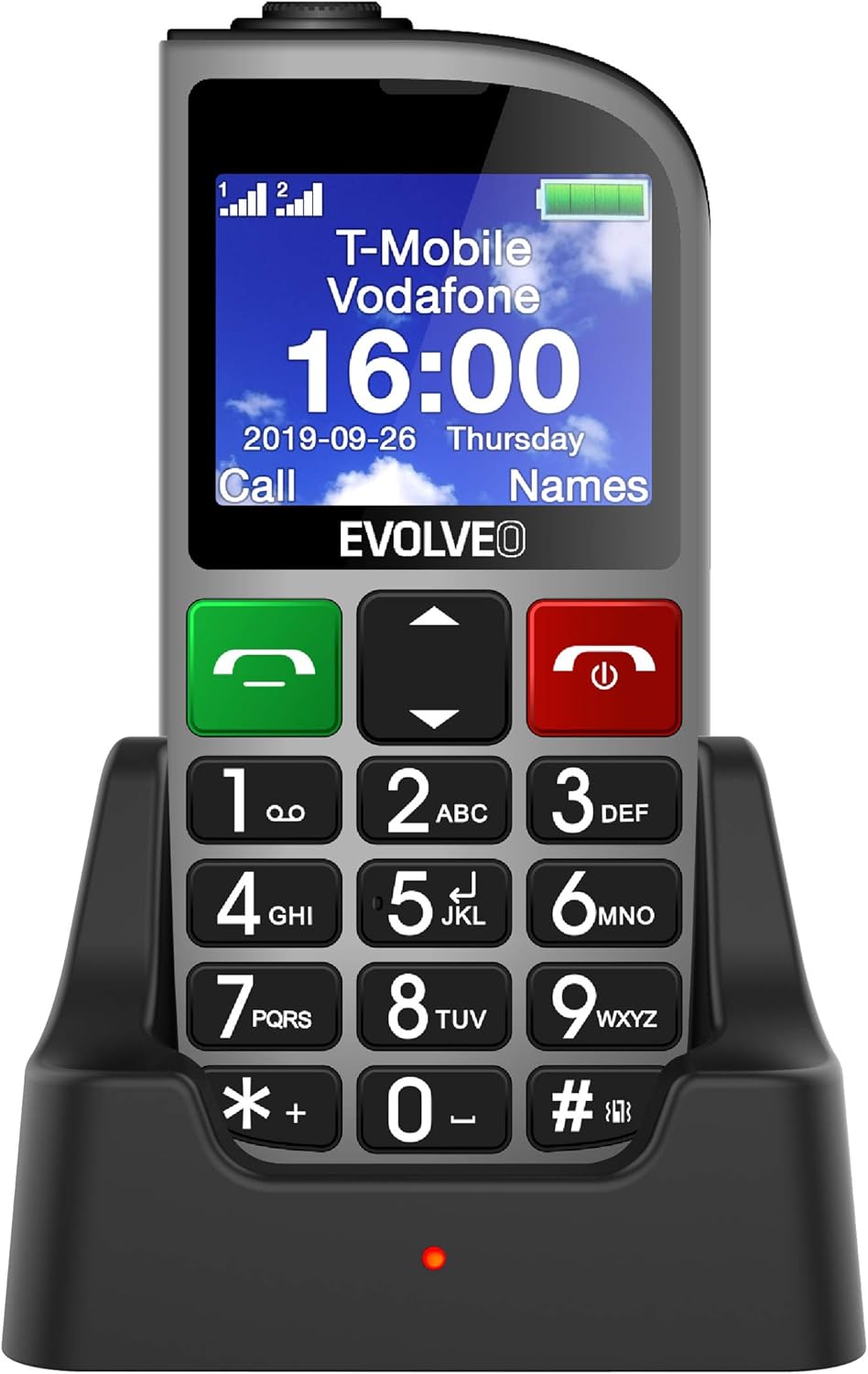
Abbildung 1.1: EVOLVEO EASYPHONE FM placed in its charging dock. The phone features a large display showing time and network information, with prominent green call and red end call buttons, and a numeric keypad below.
2. Einrichtung
2.1. Einbau und Aufladen der Batterie
- Entfernen Sie die hintere Abdeckung des Telefons.
- Insert the Li-ion 1000 mAh battery, ensuring the contacts align correctly.
- Bringen Sie die hintere Abdeckung wieder an.
- Connect the AC adapter to the charging dock.
- Place the phone into the charging dock. The charging indicator light will illuminate.
- Laden Sie das Telefon vor der ersten Benutzung vollständig auf.
2.2. Einlegen der SIM-Karte(n)
The phone supports two SIM cards (Dual SIM) for GSM/GPRS 850/900/1800/1900 MHz networks.
- Stellen Sie sicher, dass das Telefon ausgeschaltet ist.
- Entfernen Sie die hintere Abdeckung und die Batterie.
- Suchen Sie die SIM-Karten-Steckplätze.
- Insert your SIM card(s) into the designated slots, ensuring correct orientation.
- Setzen Sie den Akku und die hintere Abdeckung wieder ein.
2.3. Inserting a MicroSDHC Card
You can expand the phone's storage for music, photos, and other files by inserting a MicroSDHC card.
- Stellen Sie sicher, dass das Telefon ausgeschaltet ist.
- Entfernen Sie die hintere Abdeckung und die Batterie.
- Locate the MicroSDHC card slot.
- Gently insert the MicroSDHC card until it clicks into place.
- Setzen Sie den Akku und die hintere Abdeckung wieder ein.
3. Bedienungsanleitung
3.1. Ein-/Ausschalten
- Zum Einschalten: Die Taste gedrückt halten Red End Call/Power gedrückt, bis der Bildschirm aufleuchtet.
- Zum Ausschalten: Die Taste gedrückt halten Red End Call/Power button until the power off options appear, then confirm.

Abbildung 3.1: Front view of the EVOLVEO EASYPHONE FM, highlighting the large display, call buttons, and numeric keypad for easy dialing.
3.2. Anrufe tätigen und entgegennehmen
- Einen Anruf tätigen: Dial the number using the numeric keypad and press the Grüner Anruf Taste.
- Kurzwahl: The phone supports quick access to 8 popular contacts. Assign numbers to keys 2-9 for speed dialing. Press and hold the assigned key to dial.
- Empfangen eines Anrufs: Drücken Sie die Grüner Anruf Taste, um einen eingehenden Anruf anzunehmen.
- Anruf beenden: Drücken Sie die Red End Call/Power button to end an active call.
3.3. Senden und Empfangen von SMS-Nachrichten
The separated keyboard keys facilitate easy writing of SMS messages.
- Navigate to the Messaging menu.
- Wählen Sie „Nachricht schreiben“, um eine neue SMS zu verfassen.
- Geben Sie die Nummer des Empfängers ein oder wählen Sie eine Nummer aus den Kontakten aus.
- Geben Sie Ihre Nachricht über die Tastatur ein.
- Drücken Sie auf „Senden“, um die Nachricht zu übermitteln.
3.4. Lautstärkeregelung
Adjust the call and ringtone volume using the dedicated volume control button located on the left side of the phone.

Abbildung 3.2: Left side of the phone, showing the volume control buttons and the FM radio activation button.
3.5. SOS-Notfalltaste
The SOS button, located on the back of the device, allows for quick emergency calls and messages.
- Before use, configure up to five emergency contact numbers in the phone settings.
- Im Notfall die Taste gedrückt halten SOS Taste.
- The phone will automatically dial the predefined emergency numbers sequentially and send an emergency message to these contacts.

Abbildung 3.3: Hinteren view of the EVOLVEO EASYPHONE FM, showing the prominent red SOS emergency button and the camera lens.
3.6. UKW-Radio
The phone includes an FM radio with a dedicated activation button.
- To turn on the FM radio, press the independent FM button on the side of the device.
- The radio can play in the background, allowing you to use other phone functions.
- During an incoming or outgoing call, the radio will automatically mute and resume playback after the call ends.
3.7. Taschenlampe
A powerful flashlight is integrated into the phone, activated by a dedicated button.
- Press the dedicated flashlight button on the side of the phone to turn the flashlight on or off.

Abbildung 3.4: Right side of the phone, showing the dedicated flashlight button.
3.8. Weitere Funktionen
- Kamera: Das Telefon verfügt über eine VGA-Kamera für einfache Fotoaufnahmen.
- Musikspieler: Musik abspielen files stored on your MicroSDHC card.
- Digital Recorder (Dictaphone): Sprachnotizen aufnehmen.
- Kalender: Behalten Sie wichtige Termine und Ereignisse im Auge.
- Wecker: Stellen Sie Alarme zur Erinnerung ein.
- Taschenrechner: Führen Sie grundlegende Berechnungen durch.
- Lupe: Utilize the screen as a magnifying glass.
4. Wartung
4.1. Reinigen des Geräts
- Use a soft, dry cloth to clean the phone's surface and screen.
- Vermeiden Sie die Verwendung von flüssigen Reinigungsmitteln oder Scheuermitteln, da diese das Gerät beschädigen können.
- Achten Sie darauf, dass keine Feuchtigkeit in den Ladeanschluss oder andere Öffnungen eindringt.
4.2. Batteriepflege
- Um die Batterielebensdauer zu verlängern, vermeiden Sie es, das Telefon extremen Temperaturen auszusetzen.
- Charge the battery regularly, but avoid overcharging or letting it completely drain for extended periods.
- Wenn das Telefon längere Zeit nicht benutzt wird, laden Sie den Akku vor der Lagerung auf etwa 50 % auf.
5. Fehlerbehebung
If you encounter issues with your EVOLVEO EASYPHONE FM, refer to the following common problems and solutions:
5.1. Das Telefon lässt sich nicht einschalten
- Stellen Sie sicher, dass die Batterie richtig eingesetzt und geladen ist.
- Connect the phone to the charger and wait a few minutes before attempting to power it on again.
- Prüfen Sie, ob die Batteriekontakte sauber sind.
5.2. Kann keine Anrufe tätigen oder empfangen
- Check if the SIM card(s) are correctly inserted and activated.
- Stellen Sie sicher, dass Sie Netzabdeckung haben.
- Verify that the phone is not in airplane mode (if applicable).
- Check your account balance or subscription status with your service provider.
5.3. FM Radio Not Working
- Stellen Sie sicher, dass Sie sich in einem Gebiet mit gutem FM-Signalempfang befinden.
- Check if the FM radio is properly activated using its dedicated button.
5.4. Anzeigeprobleme
- If the display is dim, check the brightness settings.
- If the screen is unresponsive, try restarting the phone.
6. Spezifikationen
| Marke | Evolveo |
| Modell | EASYPHONE FM |
| Anzeigegröße | 1.8 Zoll |
| Bildschirmauflösung | 320 x 240 px |
| Zellulartechnologie | 2G (GSM/GPRS 850/900/1800/1900 MHz) |
| SIM-Unterstützung | Dual-SIM |
| Konnektivität | Bluetooth, 3.5-mm-Klinkenbuchse |
| Batterie | Li-Ionen-Akku, 1000 mAh |
| Maße | 130 × 61 × 16.5 mm |
| Gewicht | 105 g (mit Akku) |
| Kamera | VGA |
| Speichererweiterung | MicroSDHC-Kartensteckplatz |
Hinweis: Spezifikationen können ohne vorherige Ankündigung geändert werden.
7. Garantie und Support
For warranty information and technical support, please refer to the warranty card included in your package or visit the official Evolveo webBewahren Sie Ihren Kaufbeleg für Garantieansprüche auf.