
FTVOGUE SVP912
FTVOGUE SVP912 Single-Phase 63A Automatic Reconnection Overvoltage Protector-Benutzerhandbuch
Model: SVP912 | Brand: FTVOGUE
1. Einleitung
This manual provides essential information for the safe and effective installation, operation, and maintenance of your FTVOGUE SVP912 Single-Phase Two-Wire 63A Adjustable Automatic Reconnection Overvoltage Protector. This device is designed to safeguard electrical equipment from damage caused by voltage fluctuations and overcurrents in single-phase AC systems.
The SVP series fully automatic overvoltage und Untervoltage protector is suitable for users or loads with single-phase AC voltage of 230V, 50/60Hz and a rated working current of 63A or less. Its primary functions include protection against overvoltage, Untervoltage, and overcurrent. The product can instantly cut off the power supply to protect electrical equipment from damage. When the line voltage returns to normal, the protector automatically resumes normal operation.
2. Sicherheitshinweise
WARNUNG: Elektrische Installationen und Wartungsarbeiten dürfen nur von qualifiziertem Fachpersonal durchgeführt werden. Die Nichtbeachtung dieser Anweisungen kann zu Stromschlag, Brand oder schweren Verletzungen führen.
- Vor der Installation oder Wartung des Geräts muss immer die Stromzufuhr unterbrochen werden.
- Ensure that line conductors comply with relevant standard current values. The load current must not exceed the protector's maximum protective current value (63A).
- The neutral line (N) must be connected correctly and securely. The live line (L) of the protector is directly connected and does not have a disconnection function.
- After the product is energized, do not touch live parts to avoid electric shock.
- The protector is not isolated or short-circuit protected. Always use a small circuit breaker or miniature circuit breaker upstream to prevent isolation and short circuits. When repairing the circuit, disconnect the front circuit breaker switch. If miniature circuit breaker protection is not used, short-circuit current cannot be interrupted if a short-circuit fault occurs at the input or output of the protector.
- Because the protector has an auto-reclosing function, remove the load element immediately after overcurrent protection activation and protector disconnection to prevent unexpected re-energization.
- Betreiben Sie das Gerät nicht bei Nässe oder damp Bedingungen.
- Do not attempt to modify or repair the device. Contact qualified service personnel.
3. Produktmerkmale
- Automatische Wiederverbindung: Stellt die Stromversorgung automatisch wieder her, sobald die LautstärketagEs kehrt zum Normalzustand zurück.
- Übervolumentage Schutz: Einstellbare Übersteuerungtage protection value and recovery value.
- Untervoltage Schutz: Schützt vor niedrigen Volatilitättage Bedingungen.
- Überstromschutz: Adjustable overcurrent protection and action time.
- Einstellbare Parameter: Customizable protection values and response times.
- Bandtage Anzeige: Integrated display for real-time voltage Überwachung.
- DIN-Schienenmontage: Standard DIN rail mounting for easy installation in electrical panels.

Figure 1: FTVOGUE SVP912 Adjustable Voltage Protector showing its display, adjustment buttons, and standard DIN rail mounting clip.
4. Installation und Verkabelung
Before installation, ensure the main power supply is disconnected. This device is designed for DIN rail mounting within an electrical enclosure.
4.1 Schaltplan
Connect the protector according to the following diagram. Ensure all connections are tight and secure.
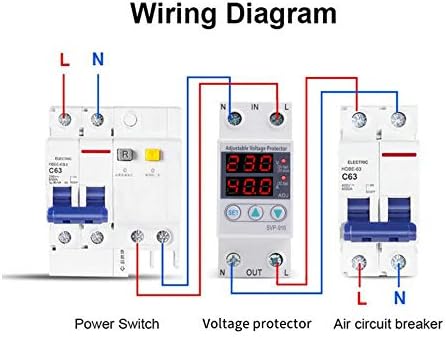
Figure 2: Wiring diagram for the voltage protector. Note the connections for Line (L) and Neutral (N) at both input (IN) and output (OUT) terminals. A power switch and an air circuit breaker are shown in series with the protector.
Wichtige Installationshinweise:
- Line conductors must comply with relevant standard current values, and the load current must not exceed the protector's maximum protective current value.
- The neutral line (N) cannot be connected incorrectly and must be secured. The live line (L) of the protector is directly connected and does not have a disconnection function.
- After the product is energized, do not touch live parts to avoid electric shock.
- The protector is not isolated or short-circuit protected. Use a small circuit breaker or miniature circuit breaker upstream to prevent isolation and short circuits. When repairing the circuit, disconnect the front circuit breaker switch. If miniature circuit breaker protection is not used, short-circuit current cannot be interrupted if a short-circuit fault occurs at the input or output of the protector.
- Because the protector has an auto-reclosing function, remove the load element immediately after overcurrent protection activation and protector disconnection.

Abbildung 3: Ausführlich view of the protector's terminals.
5. Bedienungsanleitung
The FTVOGUE SVP912 features a digital display and adjustment buttons for setting protection parameters.
5.1 Display und Tasten

Figure 4: Front panel of the protector with display and control buttons.
- Digitaler Bildschirm: Zeigt Echtzeit-Voltage (V) and current (A) readings. Indicators for overvoltage (OV), undervoltage (UV), and overcurrent (OC) are also present.
- Set-Taste: Used to enter the parameter setting mode. Press and hold to access adjustable settings.
- Nach oben (▲)-Taste: Used to increase parameter values during setting.
- AB (▼)-Taste: Used to decrease parameter values during setting.
5.2 Parameter anpassen
- Halten Sie die SATZ button for approximately 3-5 seconds until the display starts flashing, indicating entry into setting mode.
- Verwenden Sie die AUF (▲) Und UNTEN (▼) buttons to adjust the desired parameter (e.g., overvoltage protection threshold, undervoltage threshold, overcurrent limit).
- Drücken Sie die SATZ button briefly to cycle through different adjustable parameters.
- Once all parameters are set, wait for a few seconds without pressing any buttons. The device will automatically save the settings and exit the setting mode.
Refer to the specific parameter codes and ranges provided in the full technical specifications for detailed adjustment options.
6. Wartung
The FTVOGUE SVP912 is designed for minimal maintenance. However, periodic checks are recommended to ensure optimal performance and safety.
- Sichtprüfung: Überprüfen Sie das Gerät regelmäßig auf Anzeichen von physischen Beschädigungen, Verfärbungen oder lockeren Verbindungen.
- Reinigung: Stellen Sie sicher, dass das Gerät und seine Umgebung frei von Staub und Schmutz sind. Verwenden Sie zum Reinigen ein trockenes, weiches Tuch. Verwenden Sie keine flüssigen Reinigungsmittel.
- Verbindungsprüfungen: Verify that all wiring connections remain tight and secure. Loose connections can lead to overheating or intermittent operation.
- Funktionstest: If possible and safe to do so, periodically test the protection functions by simulating an overvoltage oder undervoltage condition (e.g., using a variable power supply, if applicable and safe).
Vor jeglichen Wartungs- oder Inspektionsarbeiten muss die Stromzufuhr unterbrochen werden.
7. Fehlerbehebung
This section addresses common issues you might encounter with the FTVOGUE SVP912 protector.
| Problem | Mögliche Ursache | Lösung |
|---|---|---|
| Gerät lässt sich nicht einschalten. | Keine Eingangsspannung; falsche Verkabelung; interner Fehler. | Check main power supply. Verify wiring connections (L and N). If problem persists, contact support. |
| Das Gerät schaltet sich häufig ab. | Bandtage fluctuations (over/under); overcurrent condition; sensitive settings. | Eingangslautstärke prüfentage stability. Reduce load if overcurrent. Adjust protection thresholds (overvoltage, Untervoltage, overcurrent) to appropriate levels. |
| Das Display zeigt einen Fehlercode oder abnormale Messwerte an. | Sensorfehlfunktion; interner Fehler. | Power cycle the device. If the issue persists, contact technical support. |
| Der Einstellungsmodus kann nicht aufgerufen werden. | SET button not held long enough; button malfunction. | Ensure the SET button is pressed and held for 3-5 seconds. If unresponsive, contact support. |
For issues not listed here, or if troubleshooting steps do not resolve the problem, please contact FTVOGUE customer support.
8. Technische Daten
| Parameter | Wert |
|---|---|
| Modell | SVP912 (FTVOGUEufgad5g32y-02) |
| Nennvolumentage | 230 V Wechselstrom |
| Frequenz | 50/60 Hz |
| Nennstrom | 63 Amperes |
| Übervolumentage-Schutz | Einstellbar |
| Untervoltage-Schutz | Einstellbar |
| Überstromschutz | Einstellbar |
| Reconnection Type | Automatisch |
| Anzeige | Digital Voltage/Current Display |
| Montage | DIN-Schiene |
| Abmessungen (L x B) | 8.1 cm x 3.6 cm (approx. 85 x 65 x 36 mm) |
| Gewicht | 150 g |
| Herkunft | China |

Abbildung 5: Produktabmessungen.
9. Produktüberschreitungview Video
Video 1: Ein kurzer Überblickview of the FTVOGUE SVP912 Adjustable Voltage Protector, showcasing sein Design und seine wichtigsten Merkmale.
10. Garantie und Support
FTVOGUE products are manufactured to high-quality standards. For warranty information, technical support, or service inquiries, please refer to the contact details provided with your purchase or visit the official FTVOGUE webWebsite.
Bitte bewahren Sie Ihren Kaufbeleg für Garantieansprüche auf.
Ask a question about this manual
Ask about setup, troubleshooting, compatibility, parts, safety, or missing instructions. Manuals+ will review the question and use this page’s manual context to help answer it.