
Einführung
Thank you for choosing the Donerton P32 Smartwatch. This manual provides essential information for setting up, operating, maintaining, and troubleshooting your device. Please read it carefully to ensure optimal performance and longevity of your smartwatch.
Lieferumfang
- Donerton P32 Smartwatch
- Magnetisches USB-Ladekabel
- Bedienungsanleitung
Installationshandbuch
1. Aufladen der Smartwatch
Laden Sie Ihre Smartwatch vor der ersten Verwendung vollständig auf. Verbinden Sie das magnetische Ladekabel mit den Ladekontakten auf der Rückseite der Uhr und stecken Sie das USB-Ende in ein Standard-USB-Netzteil (nicht im Lieferumfang enthalten) oder einen USB-Anschluss Ihres Computers.
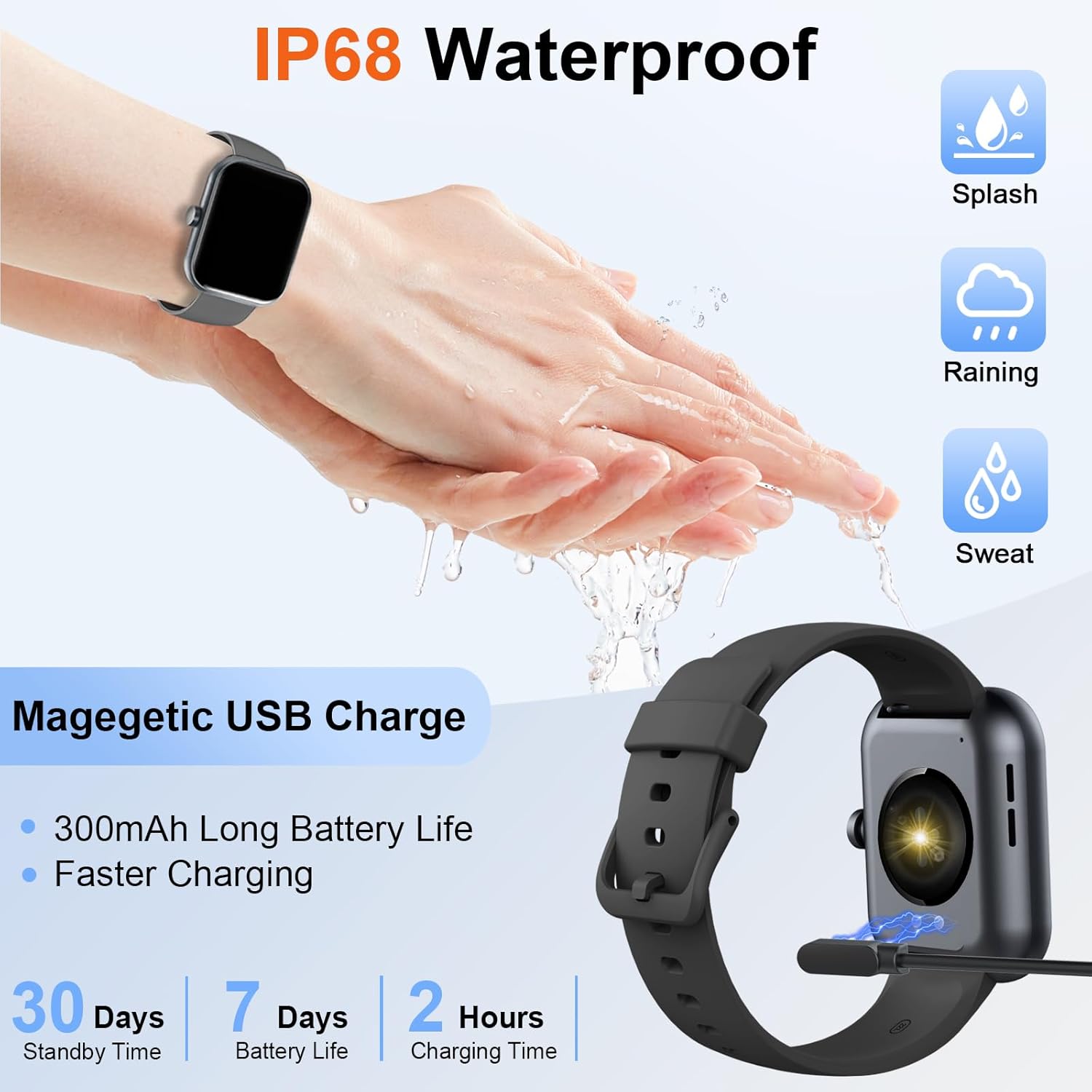
Image: The Donerton P32 Smartwatch connected to its magnetic USB charging cable, illustrating the charging process. Icons for IP68 waterproof rating and battery life are also visible.
A full charge typically takes approximately 1.5 to 2 hours. The battery indicator on the screen will show the charging status.
2. App Installation (Glory Fit)
To unlock all features and synchronize data, download the "Glory Fit" app on your smartphone. You can find it on the App Store (for iOS devices) or Google Play Store (for Android devices).
- Scan the QR code in the manual or on the watch screen (if available) to directly download the app.
- Alternatively, search for "Glory Fit" in your phone's app store.
- Installieren Sie die App und erteilen Sie die erforderlichen Berechtigungen für Bluetooth, Benachrichtigungen und Standortdienste.
3. Gerätekopplung
Stellen Sie sicher, dass Bluetooth auf Ihrem Smartphone aktiviert ist.
- Open the "Glory Fit" app on your smartphone.
- Navigate to the "Device" or "Mine" section within the app.
- Tap "Add Device" or "Bind Device" and select your Donerton P32 Smartwatch from the list of available Bluetooth devices. The watch name usually appears as "P32" or similar.
- Bestätigen Sie die Kopplungsanfrage sowohl auf Ihrem Smartphone als auch auf der Smartwatch.
- Nach der Kopplung synchronisiert die Uhr Zeit und Daten mit Ihrem Telefon.
Bedienungsanleitung
Grundlegende Navigation
- Touch-Screen: Durch Wischen nach links/rechts oder nach oben/unten navigieren Sie durch Menüs und Funktionen. Zum Auswählen tippen.
- Seitentaste: Press to wake up the screen, return to the previous screen, or go to the main watch face.
- Handgelenkssinn: The screen will illuminate automatically when you raise your wrist.

Image: The Donerton P32 Smartwatch showcasing its main features through a series of icons, including alarm, sedentary reminder, stopwatch, calorie tracking, step counting, multiple sports modes, find phone function, and a full touch screen interface.
Hauptmerkmale
- Activity Tracking (Pedometer, Distance, Calories): The integrated high-performance motion sensor accurately records your steps, distance covered, and calories burned throughout the day. View detailed statistics in the Glory Fit app.
- Herzfrequenzmesser: The smartwatch continuously tracks your heart rate in real-time. This data helps you monitor your cardiovascular health and optimize workout intensity.
- Schlaf-Tracking: Automatically monitors your sleep duration and quality, distinguishing between light, deep, and REM sleep stages. Access comprehensive sleep analysis in the Glory Fit app to understand your sleep patterns.
- 24 Sportmodi: Select from a variety of sports modes to track specific activities. The watch records relevant data for each mode, such as duration, calories, and heart rate.

Image: A man running outdoors, wearing the Donerton P32 Smartwatch. The image highlights the '100+ Sport Modes Fitness Tracker' feature, displaying activity tracking metrics such as steps, distance, and calories on the watch face and a smartphone screen.
- Nachrichtenbenachrichtigungen: Receive alerts for incoming calls, SMS messages, and notifications from social media apps (Facebook, Messenger, Twitter, WhatsApp, Instagram) direkt auf Ihrem Handgelenk.
- Bluetooth Call and Answer: Tätigen und empfangen Sie Anrufe direkt über Ihre Smartwatch, wenn diese über Bluetooth mit Ihrem Telefon verbunden ist.

Image: A man interacting with the Donerton P32 Smartwatch to manage a Bluetooth call. The watch screen displays options for dialing, an incoming call, call history, and contacts, demonstrating its call management capabilities.
- Wettervorhersage: After setting your location in the app, view current and upcoming weather conditions directly on your smartwatch.
- Wecker: Set alarms through the Glory Fit app to wake you up or remind you of important events.
- Musiksteuerung: Steuern Sie die Musikwiedergabe auf Ihrem Smartphone (Wiedergabe, Pause, Titel überspringen) direkt von Ihrer Uhr aus.
- Sitzende Erinnerung: The watch can remind you to move if you've been inactive for too long, promoting a healthier lifestyle.
- Stoppuhr & Timer: Nutzen Sie die integrierten Stoppuhr- und Timerfunktionen für verschiedene Aktivitäten.
- Telefon finden: Falls Sie Ihr Telefon verlegt haben, können Sie mit dieser Funktion Ihrer Uhr Ihr Telefon klingeln lassen (sofern es sich in Bluetooth-Reichweite befindet).
- Kamerasteuerung: Remotely control your smartphone's camera by shaking your wrist while the camera function is active in the app.

Image: The Donerton P32 Smartwatch interface showing a selection of its multifunctional capabilities, including weather forecasts, alarm clock settings, camera remote control, timer, flashlight, and the 'Find Phone' feature.
Wartung
Wasserbeständigkeit (IP68)
The Donerton P32 Smartwatch is IP68 waterproof, meaning it is resistant to daily moisture such as hand washing, bathing, and swimming. It is not necessary to remove it frequently for these activities.
Wichtiger Hinweis: Do not use the smartwatch for diving or in hot water environments like hot springs or saunas, as extreme temperatures and high-pressure water can compromise the seal and cause damage.
Reinigung
- Reinigen Sie das Uhrendisplay und das Armband regelmäßig mit einem weichen, trockenen Tuch.
- Bei hartnäckigem Schmutz verwenden Sie ein leichtamp Tuch ab und trocknen Sie es anschließend gründlich ab.
- Vermeiden Sie die Verwendung von aggressiven Chemikalien oder Scheuermitteln, da diese die Oberfläche beschädigen können.
Batteriepflege
- Vermeiden Sie häufiges vollständiges Entladen des Akkus.
- Charge the watch when the battery level is low.
- Bewahren Sie die Uhr an einem kühlen, trockenen Ort auf, wenn Sie sie längere Zeit nicht tragen.
Fehlerbehebung
| Problem | Mögliche Lösung |
|---|---|
| Uhr lässt sich nicht einschalten | Stellen Sie sicher, dass die Uhr vollständig aufgeladen ist. Schließen Sie sie für mindestens 10 Minuten an das Ladegerät an. |
| Kopplung mit Telefon nicht möglich | 1. Stellen Sie sicher, dass Bluetooth auf Ihrem Telefon aktiviert ist. 2. Make sure the watch is within Bluetooth range. 3. Starten Sie sowohl die Uhr als auch Ihr Telefon neu. 4. Löschen Sie gegebenenfalls den Bluetooth-Cache Ihres Telefons. 5. Ensure the "Glory Fit" app has necessary permissions. |
| Nicht erhaltene Benachrichtigungen | 1. Check if the watch is successfully paired with the app. 2. Ensure notification permissions are granted to the "Glory Fit" app on your phone. 3. Verify that app notifications are enabled within the "Glory Fit" app settings. 4. Make sure your phone's notification settings allow the app to display alerts. |
| Ungenaue Gesundheitsdaten | 1. Achten Sie darauf, dass die Uhr eng am Handgelenk anliegt, etwa eine Fingerbreite vom Handgelenkknochen entfernt. 2. Keep the sensor clean and free from sweat or dirt. 3. Bitte beachten Sie, dass Smartwatches keine medizinischen Geräte sind und die Daten nur zu Referenzzwecken dienen. |
| Kurze Akkulaufzeit | 1. Reduzieren Sie die Bildschirmhelligkeit. 2. Limit frequent screen wake-ups. 3. Turn off unnecessary features if not in use. 4. Stellen Sie sicher, dass die Uhr vollständig aufgeladen ist. |
Technische Daten
| Besonderheit | Detail |
|---|---|
| Marke | Donerton |
| Modellnummer | P32 |
| Bildschirmgröße | 1.69 Zoll TFT-LCD |
| Betriebssystem | Proprietär (Kompatibel mit Android, iOS) |
| Konnektivität | Bluetooth 5.0 |
| Kompatible Geräte | Smartphones with iOS 9.0+ / Android 5.0+ |
| Akku-Typ | Lithium-Polymer |
| Akkulaufzeit (typische Nutzung) | Bis zu 7 Tage |
| Standby-Zeit | Bis zu 30 Tage |
| Ladezeit | Ca. 1.5 - 2 Stunden |
| Wasserbeständigkeit | IP68 |
| App-Name | Herrlichkeit fit |
Garantie und Support
For warranty information and customer support, please refer to the documentation provided with your purchase or contact Donerton customer service directly. Details are typically available on the official Donerton webWebsite oder über Ihren Händler.