
Einführung
Thank you for choosing the EMB 12V Household Lithium Battery Cordless Drill Driver. This manual provides essential information for the safe and efficient operation, maintenance, and troubleshooting of your new power tool. Please read this manual thoroughly before first use and keep it for future reference.

Figure 1: The EMB 12V Cordless Drill Driver shown with an assortment of drill and driver bits, highlighting its versatility for various tasks.
Sicherheitshinweise
Beachten Sie beim Umgang mit Elektrowerkzeugen stets die grundlegenden Sicherheitsvorkehrungen, um das Risiko von Bränden, Stromschlägen und Verletzungen zu verringern.
- Sicherheit am Arbeitsplatz: Halten Sie Ihren Arbeitsbereich sauber und gut beleuchtet. Unordnung oder Dunkelheit erhöhen die Unfallgefahr. Betreiben Sie Elektrowerkzeuge nicht in explosionsgefährdeten Bereichen, z. B. in der Nähe von brennbaren Flüssigkeiten, Gasen oder Stäuben.
- Elektrische Sicherheit: Vermeiden Sie Körperkontakt mit geerdeten Oberflächen wie Rohren, Heizkörpern, Herden und Kühlschränken. Setzen Sie Elektrowerkzeuge weder Regen noch Nässe aus.
- Persönliche Sicherheit: Always wear eye protection. Use safety glasses, goggles, or a face shield. Wear hearing protection when operating noisy tools. Dress properly; do not wear loose clothing or jewelry. Keep hair, clothing, and gloves away from moving parts.
- Werkzeuggebrauch und -pflege: Wenden Sie keine Gewalt an. Verwenden Sie das für Ihren Anwendungszweck geeignete Elektrowerkzeug. Trennen Sie den Netzstecker und/oder entfernen Sie den Akku aus dem Elektrowerkzeug, bevor Sie Einstellungen vornehmen, Zubehör wechseln oder Elektrowerkzeuge lagern.
- Verwendung und Pflege des Akkus: Laden Sie den Akku nur mit dem vom Hersteller angegebenen Ladegerät auf. Verwenden Sie die Akkus nicht zusammen mit anderen Elektrowerkzeugen. Bewahren Sie den Akku bei Nichtgebrauch fern von anderen Metallgegenständen auf.
Packungsinhalt
Carefully unpack your new EMB Cordless Drill Driver. Ensure all items listed below are present and in good condition. If any items are missing or damaged, please contact customer support.
- EMB 12V Cordless Drill Driver
- 12V Lithium-Ion Battery Pack (1300mA)
- Battery Charger (100-240V input)
- Bedienungsanleitung
Aufstellen
1. Laden des Akkus
The battery pack is not fully charged at the time of purchase. It is recommended to fully charge the battery before first use.
- Connect the charger to a standard 100-240V AC power outlet.
- Setzen Sie den Akku in das Ladegerät ein. Achten Sie darauf, dass er hörbar einrastet.
- The charging indicator light on the charger will illuminate (typically red for charging, green for fully charged).
- Allow the battery to charge completely. Charging time may vary.

Figure 2: The 12V Lithium-Ion battery pack and its dedicated charger, essential for powering the drill.
2. Einsetzen und Entfernen des Akkus
- So installieren Sie: Align the battery pack with the base of the drill handle. Slide the battery pack into the handle until it clicks securely into place.
- So entfernen Sie: Press the battery release button (usually located on the side of the battery pack) and slide the battery pack out of the handle.
3. Installing and Removing Drill Bits (Keyless Chuck)
- So installieren Sie: Rotate the chuck counter-clockwise until the jaws are open wide enough to insert the drill bit. Insert the drill bit fully into the chuck. Rotate the chuck clockwise to tighten the jaws firmly around the bit. Ensure the bit is centered and secure.
- So entfernen Sie: Rotate the chuck counter-clockwise to loosen the jaws and remove the drill bit.
Bedienungsanleitung
1. Ein-/Ausschalten und Drehzahlregelung
- Um den Bohrer zu drehen ONDrücken Sie den Auslöseschalter.
- Um den Bohrer zu drehen AUS, release the trigger switch.
- The drill features a variable speed trigger. The further you press the trigger, the faster the drill bit will rotate (0-1300 RPM). This allows for precise control depending on the material and task.
2. Vorwärts-/Rückwärtsdrehung
A rotational switch (forward/reverse lever) is located above the trigger. This switch controls the direction of rotation.
- Push the lever to the links for forward (clockwise) rotation, used for drilling and driving screws.
- Push the lever to the Rechts for reverse (counter-clockwise) rotation, used for removing screws or backing out drill bits.
- When the lever is in the Center position, the trigger is locked, preventing accidental starting. Always set the lever to the center position when not in use or when changing bits.
3. Clutch Settings (Torque Adjustment)
The clutch ring, located behind the chuck, allows you to adjust the torque (twisting power) of the drill. This drill features 17+1 clutch positions.
- Rotate the clutch ring to select the desired torque setting. Lower numbers are for driving small screws or working with soft materials to prevent over-tightening or stripping.
- Higher numbers provide more torque for driving larger screws or drilling into harder materials.
- Der Bohrsymbol setting (often the highest number or a dedicated drill symbol) bypasses the clutch for maximum torque, ideal for drilling applications.
4. Built-in LED Front Light
The drill is equipped with a built-in LED light that illuminates the work area. This light automatically activates when the trigger is pressed, providing improved visibility in dark or confined spaces.
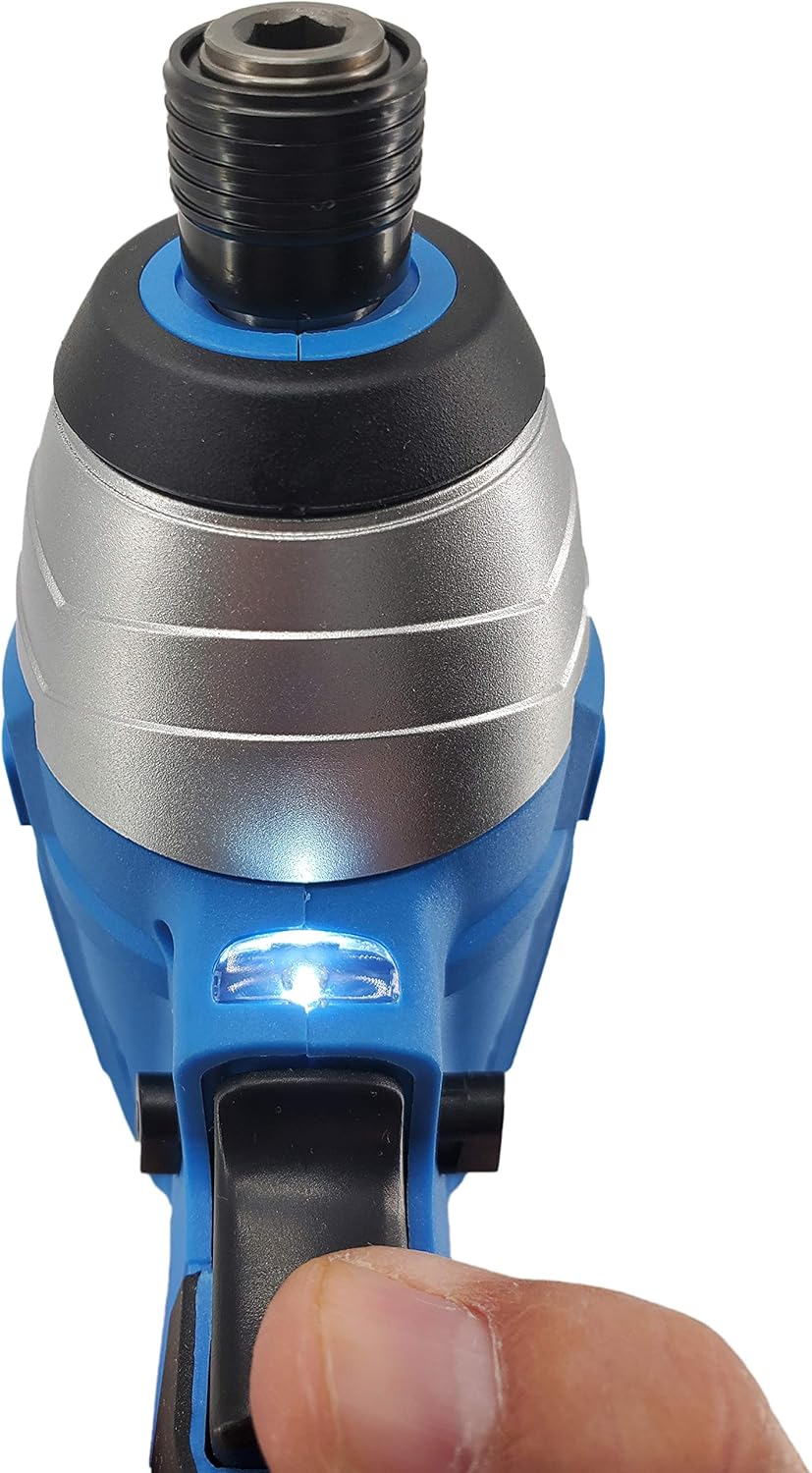
Abbildung 3: Eine Nahaufnahme view of the drill's integrated LED light, which illuminates the work surface for better visibility.
Wartung
Regelmäßige Wartung gewährleistet die Langlebigkeit und optimale Leistung Ihrer Bohrmaschine.
- Reinigung: Nach jedem Gebrauch den Bohrer mit einem sauberen Tuch abwischen.amp cloth. Do not use harsh chemicals or abrasive cleaners. Keep ventilation openings free of dust and debris.
- Batteriepflege: Bewahren Sie Akkus an einem kühlen, trockenen Ort, geschützt vor direkter Sonneneinstrahlung und extremen Temperaturen, auf. Lagern Sie vollständig entladene Akkus nicht über längere Zeit.
- Wartung des Spannfutters: Reinigen Sie die Spannbacken regelmäßig, um einen sicheren Halt der Bohrer zu gewährleisten.
- Lagerung: Store the drill and accessories in a dry, secure location out of reach of children.
Fehlerbehebung
Sollten Sie Probleme mit Ihrer Bohrmaschine haben, beachten Sie bitte die folgenden häufig auftretenden Probleme und Lösungen:
| Problem | Mögliche Ursache | Lösung |
|---|---|---|
| Der Bohrer startet nicht. | Battery not charged; Battery not properly inserted; Forward/Reverse switch in center (locked) position. | Charge the battery; Re-insert battery securely; Move the F/R switch to forward or reverse position. |
| Stromausfall während des Betriebs. | Die Batterieladung ist niedrig. | Laden Sie den Akku auf. |
| Der Bohrer rutscht im Bohrfutter ab. | Das Bohrfutter ist nicht ausreichend festgezogen; der Schaft des Bohrers ist verschmutzt oder beschädigt. | Tighten chuck firmly; Clean or replace the drill bit. |
| Drill stops unexpectedly. | Overload protection activated; Battery overheated. | Reduce pressure on the drill; Allow battery to cool down before resuming use. |
Technische Daten
Technical specifications for the EMB 12V Cordless Drill Driver:
- Modell: ET-06
- Marke: EMB
- Energiequelle: Batteriebetrieben
- Arbeitsvolumentage: 12 V
- Verwandte Voltage (Charger Input): 100-240 V
- Batteriekapazität: 1300 mA (Lithium Ion)
- Spannfuttergröße: 3/8 Inch Keyless Chuck
- Clutch Positions: 17+1
- No-Load Speed (RPM): 0-350 / 0-1300 RPM (Variable Speed)
- Max. Drehmoment: 24 Nm
- Besondere Merkmale: Built-in LED Front Light, Variable Speed, Lightweight, Compact, Motor Reverse
- Artikelabmessungen: 7.4 Zoll L x 2 Zoll B x 9.5 Zoll H (ca.)
- Artikelgewicht: 2.85 Pfund (ca.)
- Material: Metall, Gummi
- UPC: 613464940654
Garantie und Support
EMB products are manufactured to high-quality standards. For information regarding warranty coverage, technical support, or service, please refer to the warranty card included with your purchase or contact your retailer. You may also visit the official EMB webWebsite für weitere Unterstützung.
For customer service inquiries, please have your model number (ET-06) and purchase date available.