
1. Einleitung
This manual provides detailed instructions for the safe and efficient installation, operation, and maintenance of your LogiLink BP0100 Aluminium Monitor Desk Stand. This desk mount is designed for 17-32 inch touch screens, offering a full range of motion for optimal positioning. It features a gas lift mechanism for easy height adjustment and balancing of monitor weight. Please read this manual thoroughly before assembly and use.
2. Sicherheitshinweise
- Vor der Montage sicherstellen, dass alle Komponenten vorhanden und unbeschädigt sind. Nicht verwenden, wenn Teile fehlen oder defekt sind.
- Verify that the desk surface can support the combined weight of the stand and your monitor.
- Überschreiten Sie nicht die maximale Tragfähigkeit von 10 kg (22 lbs).
- Always follow the assembly steps in the correct order. Incorrect installation may result in injury or equipment damage.
- Halten Sie Kinder und Haustiere während der Installation fern. Kleinteile können verschluckt werden und eine Erstickungsgefahr darstellen.
- Adjust the gas spring tension carefully according to your monitor's weight to ensure stable positioning.
- Überprüfen Sie regelmäßig alle Schrauben und Verbindungen, um sicherzustellen, dass sie fest sitzen.
3. Packungsinhalt
Bitte prüfen Sie das Paket auf folgende Artikel:
- 1 x LogiLink BP0100 Touchscreen Monitor Desk Stand
- 1 x Screw Pack (various screws for monitor attachment)
- 1 x Benutzerhandbuch (dieses Dokument)
- Necessary tools for assembly (e.g., Allen keys)
4. Spezifikationen
| Modell | BP0100 |
| Kompatible Geräte | Monitors (17-32 inches) |
| Material | Aluminium |
| Montagetyp | Tischmontage |
| Tragfähigkeit | Max. 10 kg (22 Pfund) |
| VESA-Kompatibilität | 75x75 mm, 100x100 mm |
| Neigungsbereich | -90° bis +90° |
| Schwenkbereich | -40° bis +40° |
| Drehbereich | -180° bis +180° |
| Produktabmessungen (L x B x H) | 38.2 x 30.6 x 32.5 cm |
| Artikelgewicht | 3.96 kg |
5. Einrichtung und Installation
Follow these steps to assemble and install your monitor desk stand:
- Befestigen Sie die Basis: Place the stand base on a stable desk surface. Ensure it is positioned securely and does not wobble.
- Bereiten Sie den Monitor vor: Lay your monitor face down on a soft, clean surface to prevent scratches. Locate the VESA mounting holes on the back of your monitor.
- Befestigen Sie die VESA-Platte am Monitor: Align the VESA mounting plate from the stand with the VESA holes on your monitor (75x75mm or 100x100mm). Use the appropriate screws from the provided screw pack to secure the plate to the monitor. Do not overtighten.
- Monitor an Arm befestigen: Carefully lift the monitor with the attached VESA plate and slide it onto the arm's mounting head. Ensure it clicks into place or is secured with the provided locking mechanism.


- Kabelmanagement: Route your monitor cables through the integrated cable management channels on the stand arm to keep your workspace tidy.

6. Betrieb und Anpassungen
The LogiLink BP0100 stand offers various adjustments for optimal viewKomfort:
- Höhenverstellung (Gasdruckfeder): The integrated gas lift allows for smooth and effortless vertical positioning of your monitor. Gently push or pull the monitor to the desired height. If the monitor drifts or is difficult to move, adjust the gas spring tension using the provided tool (usually an Allen key) at the designated adjustment point on the arm.

- Neigungseinstellung: Tilt your monitor forward or backward to reduce glare and find the best viewing angle. The stand supports a tilt range of -90° to +90°.


- Schwenkeinstellung: Swivel the monitor left or right to share your screen with others or adjust your viewing position. The stand allows for a swivel range of -40° to +40°.
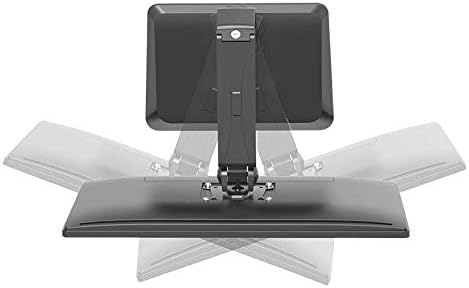
- Rotationseinstellung: Rotate your monitor 360° to switch between landscape and portrait orientations. This is particularly useful for coding, document viewing, or specific applications. The stand supports a rotation range of -180° to +180°.

The stand is also ideal for touchscreen use, allowing easy interaction with the display.

7. Wartung
- Reinigung: Verwenden Sie ein weiches,amp cloth to clean the stand. Avoid abrasive cleaners or solvents that could damage the finish.
- Inspektion: Periodically inspect all mounting hardware and connections to ensure they are tight and secure. Retighten any loose screws as necessary.
- Gasfeder: The gas spring is designed for long-term use and generally requires no maintenance. If you notice a significant change in its performance, refer to the troubleshooting section or contact support.
8. Fehlerbehebung
| Problem | Mögliche Ursache | Lösung |
|---|---|---|
| Der Monitor hängt durch oder bleibt nicht auf der gewünschten Höhe. | Die Gasfederspannung ist für das Gewicht des Monitors zu gering. | Adjust the gas spring tension using the provided Allen key. Turn clockwise to increase tension for heavier monitors, counter-clockwise for lighter monitors. |
| Der Monitor lässt sich nur schwer nach oben oder unten bewegen. | Die Gasfederspannung ist für das Gewicht des Monitors zu hoch. | Adjust the gas spring tension using the provided Allen key. Turn counter-clockwise to decrease tension. |
| Der Ständer wirkt instabil oder wackelig. | Mounting screws are loose or desk surface is uneven. | Ensure all assembly screws are tightened. Verify the desk surface is flat and stable. |
9. Garantieinformationen
For specific warranty details regarding your LogiLink BP0100 Monitor Desk Stand, please refer to the warranty card included with your product or visit the official LogiLink webBewahren Sie Ihren Kaufbeleg für Garantieansprüche auf.
10. Kundendienst
If you have any questions, require technical assistance, or need to report a problem with your LogiLink BP0100 Monitor Desk Stand, please contact LogiLink customer support through their official webWebsite oder die Kontaktinformationen, die auf Ihrer Produktverpackung angegeben sind.