
Einführung
This manual provides instructions for the safe and efficient operation of your Forty4 10000mAh Battery Operated Clip Fan. Please read this manual thoroughly before use and retain it for future reference.
Wichtige Sicherheitshinweise
- Führen Sie bei laufendem Ventilator keine Finger oder andere Gegenstände in das Lüftergitter ein.
- Keep hair, clothing, and jewelry away from the fan blades.
- Do not expose the fan to water or excessive humidity.
- Use only the provided charging cable or a compatible 5V/2A adapter.
- Versuchen Sie nicht, den Lüfter selbst zu zerlegen oder zu reparieren. Wenden Sie sich an den Kundendienst.
- Außerhalb der Reichweite von Kindern aufbewahren.
- Ensure the fan is placed on a stable surface or securely clipped before operation.
Packungsinhalt
- 1 x Forty4 10000mAh Battery Operated Clip Fan
- 1 x USB-Ladekabel
- 1 x Benutzerhandbuch
Produkt überview
The Forty4 10000mAh Battery Operated Clip Fan features a versatile design for various applications. It includes a powerful motor, a large capacity battery, and multiple speed settings.

Image: The fan in a tent, illustrating its 10000mAh battery capacity and working hours: Speed 1 (40H), Speed 2 (18H), Speed 3 (7.5H), Natural Wind (18H).

Image: The fan clipped to a wall in a horse stall, providing airflow to a horse. This highlights its utility in various environments.
Aufstellen
Aufladen des Lüfters
- Connect the provided USB charging cable to the fan's charging port (Type-C or Micro USB).
- Connect the other end of the cable to a 5V/2A USB power adapter (not included) or a compatible power source.
- The indicator light will remain red during charging. Note: The indicator stays red even after a full charge.
- A full charge takes approximately 7.3 hours with fast charging technology.
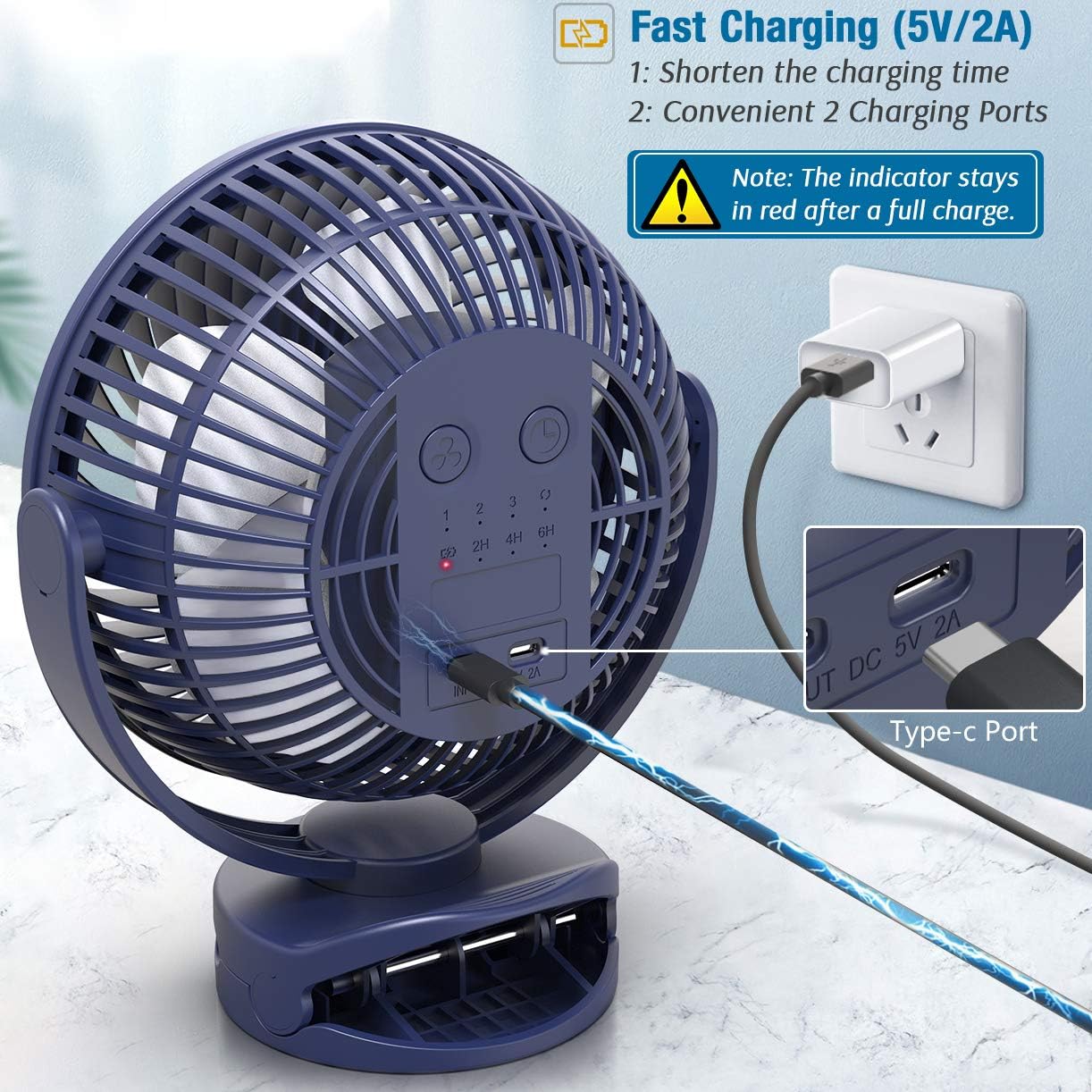
Image: The fan connected to a power adapter via its Type-C charging port, illustrating the fast charging capability and dual charging options.
Platzierungsoptionen
The fan offers multiple placement options:
- Ansteckbar: Use the sturdy clamp to attach the fan to surfaces up to 2.5 inches thick, such as desks, shelves, or treadmill handles.
- Hängend: Utilize the integrated hook for hanging the fan in tents, golf carts, or other suitable locations.
- Tischplatte: Place the fan on any flat surface using its stable base.

Image: The fan securely clipped to the handle of a treadmill, showcasing its strong clamp and powerful airflow for personal cooling during exercise.

Image: The fan hanging from the ceiling inside a tent, illustrating its unique hook design for overhead placement.
Bedienungsanleitung
Ein-/Ausschalten und Geschwindigkeitseinstellung
- Press the power button once to turn the fan on at Speed 1 (Low).
- Press the power button repeatedly to cycle through Speed 2 (Medium), Speed 3 (High), and Natural Wind mode.
- Press the power button again after Natural Wind mode to turn the fan off.
The fan offers 4 speeds: Low, Medium, High, and Natural Wind.
Timerfunktion
- While the fan is operating, press the timer button to set the auto-off timer.
- Each press cycles through 2 hours, 4 hours, and 6 hours.
- The fan will automatically shut off after the selected duration.

Image: The fan on a bedside table, showing the control panel with timer settings (2H, 4H, 6H) and speed indicators, ideal for use during sleep.
360-Grad-Rotation
The fan head can be manually rotated 360 degrees horizontally and vertically to direct airflow as needed.
Wartung
Reinigung
- Stellen Sie vor der Reinigung sicher, dass der Lüfter ausgeschaltet und vom Netz getrennt ist.
- Verwenden Sie ein weiches,amp Tuch zum Abwischen der Außenflächen des Ventilators.
- For the fan blades, use a dry cloth or a soft brush to gently remove dust. Do not use abrasive cleaners or solvents.
- Ensure the fan is completely dry before resuming operation.
Lagerung
When not in use for extended periods, store the fan in a cool, dry place away from direct sunlight.
Fehlerbehebung
Lüfter schaltet sich nicht ein
- Check if the battery is charged. Connect the fan to a power source and allow it to charge.
- Stellen Sie sicher, dass der Einschaltknopf richtig gedrückt ist.
Schwacher Luftstrom
- Erhöhen Sie die Lüftergeschwindigkeit.
- Check for any obstructions around the fan grill.
- Clean the fan blades if they are dusty.
Ungewöhnliches Geräusch
- Stellen Sie sicher, dass der Ventilator auf einer stabilen Oberfläche steht.
- Prüfen Sie, ob sich Fremdkörper in den Lüfterflügeln verfangen haben.
- Sollten die Geräusche weiterhin bestehen, stellen Sie die Nutzung ein und kontaktieren Sie den Kundendienst.
Technische Daten
| Besonderheit | Detail |
|---|---|
| Marke | Vierzig4 |
| Modellnummer | d52b67e1-8a10-4105-a8bc-fee6f7552eee |
| Batteriekapazität | 10000 mAh |
| Anzahl der Geschwindigkeiten | 4 (Low, Medium, High, Natural Wind) |
| Ladezeit | Ca. 7.3 Stunden (mit 5V/2A-Adapter) |
| Betriebsdauer | 7.5 - 40 hours (depending on speed) |
| Geräuschpegel | Less than 60 Decibels |
| Stromquelle | Batteriebetrieben |
| Montagetyp | Hanging, Clamp Mount, Tabletop, Freestanding |
| Drehung | 360-degree manual rotation |
| Maße | 8x9x4.3 Zoll |
Garantie und Support
For warranty information or technical support, please contact Forty4 customer service through the retailer where the product was purchased. Please have your model number (d52b67e1-8a10-4105-a8bc-fee6f7552eee) and purchase details available.
Produktvideos
Forty4 10000mAh Clip Fan with Super Strong Airflow
Video: An official product video from Forty4 demonstrating the powerful airflow and features of the 10000mAh Clip Fan. This video showcases the fan's performance and versatility.