
1. Produktüberschreitungview
The Alecto WS-1560 is a wireless weather station designed to provide accurate indoor and outdoor environmental data. Featuring a clear color display and a remote outdoor sensor, it offers comprehensive weather information and additional useful functions for your home.
Hauptmerkmale:
- Measures indoor and outdoor temperature and humidity.
- Long-range wireless outdoor sensor (up to 100 meters).
- 5.7-inch well-lit color display with animated weather forecast icons.
- Temperature and ice alarm functions.
- Wecker mit Schlummerfunktion.
- Memory function for latest and highest readings.
- Moon phase indicator, date, day, and time display.
- Battery-operated main unit and outdoor sensor with backup batteries.

Figure 1.1: Alecto WS-1560 Main Unit and Wireless Outdoor Sensor.
2. Packungsinhalt
Ensure all components are present and in good condition upon unpacking:
- Alecto WS-1560 Main Unit (Indoor Display)
- Drahtloser Außensensor
- Bedienungsanleitung
- (Power adapter and batteries may be included depending on package)
Video 2.1: Illustrative video showing typical weather station components and basic setup. (Note: This video is for a related product and may not show the exact Alecto WS-1560 model.)
3. Einrichtung und Installation
3.1. Einlegen der Batterie
Both the main unit and the outdoor sensor require batteries for operation. Ensure you use the correct type and polarity.
- Außensensor:
- Öffnen Sie das Batteriefach auf der Rückseite des drahtlosen Außensensors.
- Legen Sie 2 AA-Batterien (nicht im Lieferumfang enthalten) entsprechend den Polaritätsmarkierungen (+/-) ein.
- Verschließen Sie das Batteriefach fest.
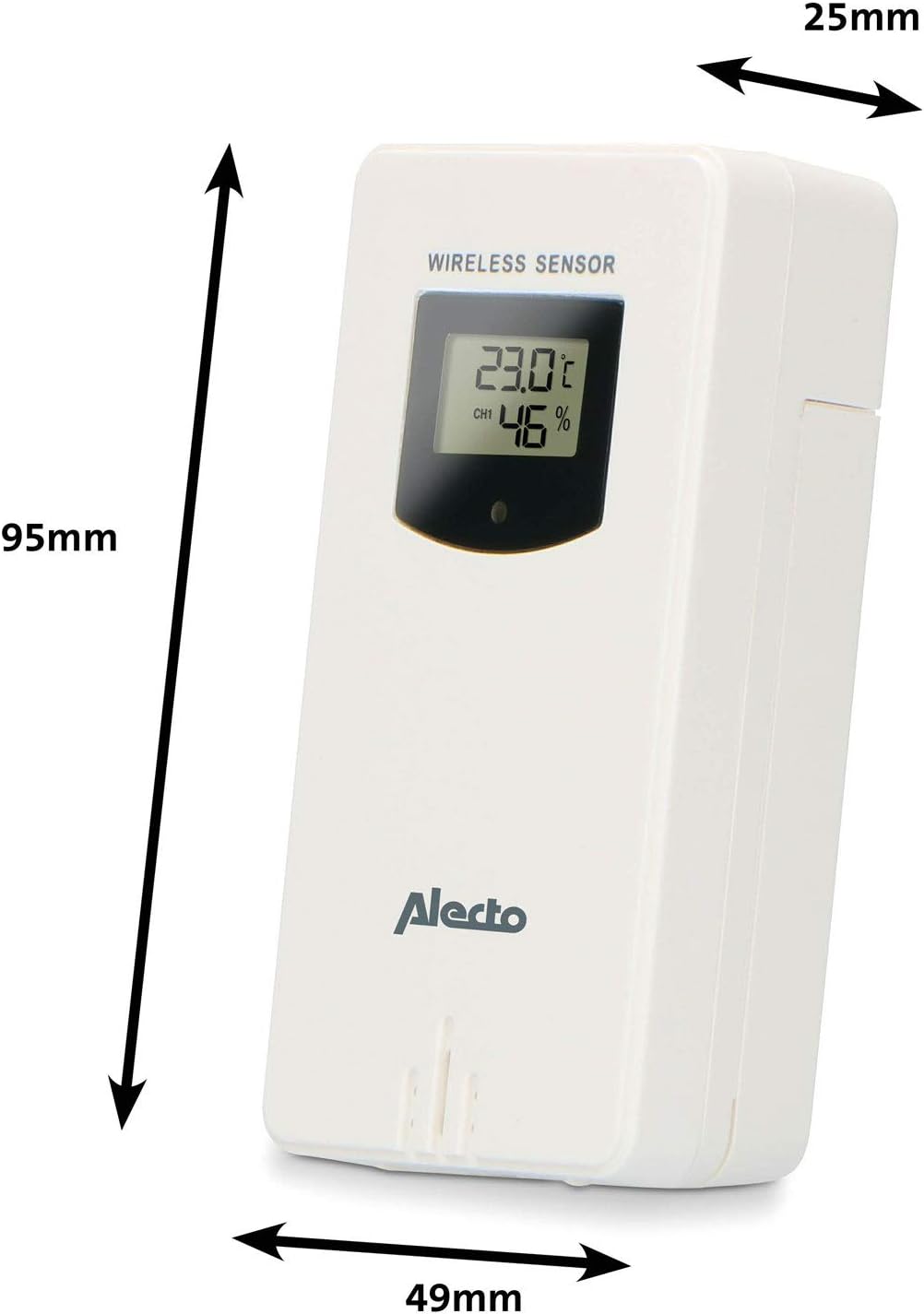
Figure 3.1: Wireless Outdoor Sensor dimensions and battery compartment location.
- Haupteinheit:
- Öffnen Sie das Batteriefach auf der Rückseite des Hauptgeräts.
- Insert 2x AA batteries (not included) according to the polarity markings (+/-). These serve as backup batteries.
- Verschließen Sie das Batteriefach fest.
- Connect the main unit to a power outlet using the provided power adapter (if included).

Figure 3.2: Main Unit dimensions and power input.
3.2. Sensorplatzierung
For accurate outdoor readings, proper placement of the wireless sensor is crucial:
- Place the sensor in a shaded area, away from direct sunlight, to prevent inaccurate temperature readings.
- Ensure good air circulation around the sensor.
- Mount the sensor vertically, approximately 1.5 to 2.5 meters (5 to 8 feet) above the ground.
- Avoid placing the sensor near heat sources (e.g., vents, windows) or moisture sources.
- The maximum transmission range is 100 meters (328 feet) in open air. Walls and other obstacles will reduce this range.

Abbildung 3.3: Bspample of outdoor sensor placement on a wall.
3.3. Koppeln des Sensors mit der Haupteinheit
The main unit and sensor should automatically pair once both are powered on. If pairing does not occur:
- Ensure both units have fresh batteries and are within range.
- Press the "TX" button inside the outdoor sensor's battery compartment to manually send a signal.
- On the main unit, you may need to initiate a search for the outdoor sensor (refer to the "Operation" section for specific button functions).
4. Bedienung
4.1. Layout anzeigen
Das 5.7-Zoll-Farbdisplay bietet eine klare Darstellung überview of all measured data. Key areas include:
- Außentemperatur und Luftfeuchtigkeit: Displays current outdoor conditions.
- Raumtemperatur und Luftfeuchtigkeit: Displays current indoor conditions.
- Animierte Wettervorhersage: Icons predict upcoming weather (sunny, partly cloudy, cloudy, rainy, snowy).
- Zeit Datum: Aktuelle Uhrzeit, Wochentag und Datum.
- Luftdruck: Aktueller Luftdruck.
- Mond Phase: Grafische Darstellung der aktuellen Mondphase.
- Temperature/Ice Alarm Indicators: Alerts for specific temperature thresholds or potential ice conditions.

Abbildung 4.1: Ausführlich view of the main unit's color display.
4.2. Tastenfunktionen
The main unit features several buttons for setting and adjusting functions. Common buttons include:
- EINSTELLEN: Wechselt in den Einstellungsmodus für Uhrzeit, Datum und weitere Einstellungen.
- MODUS: Switches between display modes or confirms settings.
- AUF/AB (oder +/-): Adjusts values during setup or cycles through channels.
- ALARM: Stellt die Alarmfunktion ein oder aktiviert sie.
- SPEICHER: Displays maximum/minimum temperature and humidity records. Long press to clear records.
- SCHLAFEN/LICHT: Aktiviert die Schlummerfunktion während eines Alarms oder passt die Helligkeit der Hintergrundbeleuchtung an.
Video 4.2: Illustrative video demonstrating various features and settings of a weather station. (Note: This video is for a related product and may not show the exact Alecto WS-1560 model.)
4.3. Uhrzeit und Datum einstellen
- Press and hold the "SET" button until the time display starts flashing.
- Use the "UP" or "DOWN" buttons to adjust the hour, then press "SET" to confirm and move to minutes.
- Wiederholen Sie dies für Minuten, Jahr, Monat und Tag.
- Press "SET" again to exit the setting mode.
4.4. Alarmeinstellungen
- Drücken Sie die Taste "ALARM" einmal, um view die Weckzeit.
- Press and hold the "ALARM" button until the alarm time starts flashing.
- Use the "UP" or "DOWN" buttons to set the desired alarm hour and minute.
- Drücken Sie „ALARM“, um zu bestätigen.
- Um den Alarm zu aktivieren/deaktivieren, drücken Sie kurz die Taste „ALARM“, wenn die Alarmzeit angezeigt wird. Ein Alarmsymbol erscheint/verschwindet.
4.5. Maximale/Minimale Rekorde
The weather station automatically records the maximum and minimum temperature and humidity values over a 24-hour period.
- Press the "MEM" button briefly to view die maximal aufgezeichneten Werte.
- Press "MEM" again to view die minimal aufgezeichneten Werte.
- Drücken Sie ein drittes Mal auf „MEM“, um zu den aktuellen Messwerten zurückzukehren.
- To clear the records, press and hold the "MEM" button for a few seconds.
5. Wartung
- Reinigung: Wischen Sie die Display- und Geräteoberflächen mit einem weichen, fusselfreien Tuch ab.amp Tuch. Keine Scheuer- oder Lösungsmittel verwenden.
- Batteriewechsel: Tauschen Sie die Batterien sowohl im Hauptgerät als auch im Außensensor aus, sobald die Anzeige für niedrigen Batteriestand erscheint. Ersetzen Sie immer alle Batterien gleichzeitig durch neue Batterien desselben Typs.
- Sensorpflege: Periodically check the outdoor sensor for debris or obstructions that might affect its readings. Ensure it remains in a shaded, well-ventilated area.
6. Fehlerbehebung
| Problem | Mögliche Ursache | Lösung |
|---|---|---|
| No outdoor temperature/humidity reading (or "---" displayed) |
|
|
| Ungenaue Temperatur-/Feuchtigkeitsmesswerte |
|
|
| Die Anzeige ist dunkel oder leer |
|
|
7. Spezifikationen
| Modellnummer | WS-1560 |
| Marke | Alecto |
| Stromversorgung (Haupteinheit) | Power Adapter (if included) + 2x AA batteries (backup) |
| Stromversorgung (Außensensor) | 2x AA-Batterien |
| Produktabmessungen (Haupteinheit) | 5.1 x 16.5 x 12.3 cm |
| Produktgewicht | 440 g |
| Reichweite des drahtlosen Sensors | Bis zu 100 Meter (im Freien) |
| Anzeigegröße | 5.7 Zoll / 14.5 cm |
| Herkunft | China |
8. Garantie und Support
Informationen zur Garantie, zum technischen Support oder zu Serviceanfragen finden Sie auf der Ihrem Produkt beiliegenden Garantiekarte oder auf der offiziellen Alecto-Website. webBewahren Sie Ihren Kaufbeleg als Kaufnachweis auf.
Alecto WebWebsite: www.alecto.nl (General Alecto web(die genaue Supportseite kann von der Website abweichen)