
1. Einleitung
This manual provides detailed instructions for the safe and efficient operation of your Fenton AV360BT Stereo Amplifier. Please read this manual thoroughly before using the device and retain it for future reference. The AV360BT is a compact Hi-Fi mini amplifier featuring Bluetooth connectivity, an integrated MP3 player with USB/SD inputs, and an FM radio tuner, designed for versatile audio playback.
2. Sicherheitshinweise
- Stellen Sie sicher, dass ampDer Verstärker ist an ein Netzteil angeschlossen, dessen Spannung der Spannung entspricht.tage auf dem Gerät angegeben.
- Um Stromschläge oder Brände zu vermeiden, setzen Sie das Gerät weder Regen noch Feuchtigkeit aus.
- Vermeiden Sie es, das Gerät in der Nähe von Wärmequellen oder in direktem Sonnenlicht aufzustellen.
- Öffnen Sie nicht das casing. Alle Wartungsarbeiten sind qualifiziertem Personal zu überlassen.
- Bewahren Sie das Gerät außerhalb der Reichweite von Kindern auf.
- Disconnect the power plug during thunderstorms or when unused for long periods.
3. Packungsinhalt
Prüfen Sie beim Auspacken, ob alle Artikel vorhanden sind:
- Fenton AV360BT Stereo Ampschwerer
- Fernbedienung
- Benutzerhandbuch (dieses Dokument)
4. Produktmerkmale
- 2 x 40W Stereo Ampschwerer
- Integrated Bluetooth for wireless audio streaming
- MP3 player with USB port and SD/MMC card slot
- Built-in FM radio tuner (87.5 - 108.5 MHz)
- Line input (AUX) for connecting external audio sources
- Bass, Treble, and Master Volume controls
- Output protection circuitry
- Includes remote control for MP3 player functions
5. Bedienelemente und Anschlüsse
5.1 Frontplatte
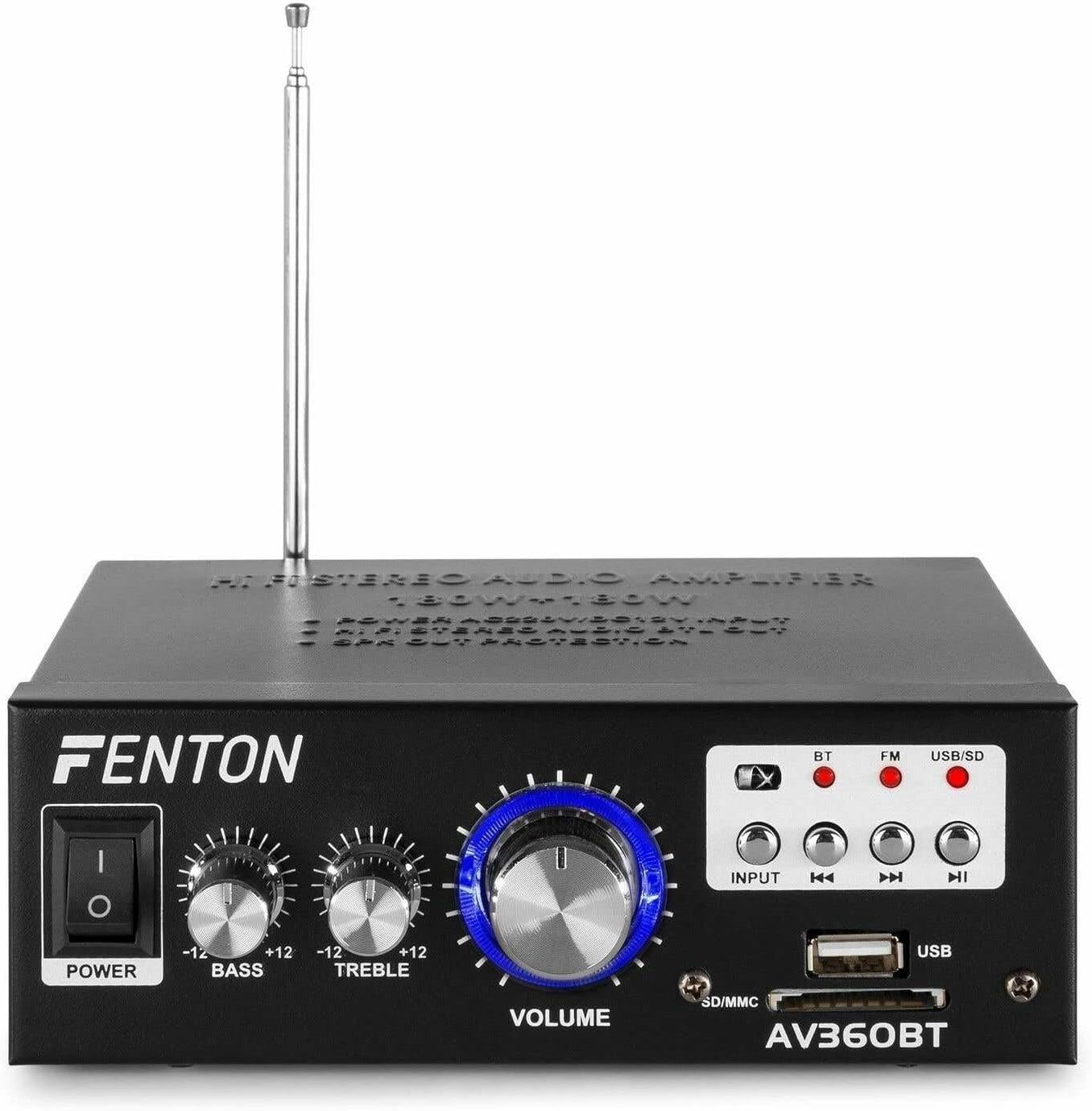
Bild: Vorderseite view of the Fenton AV360BT amplifier, showing the power switch, bass, treble, and volume knobs, input selection buttons, playback controls, USB port, and SD/MMC card slot.
- Stromschalter: Schaltet den amplifier ein oder aus.
- BASS-Steuerung: Passt die Audioausgabe im Tieftonbereich an.
- TREBLE-Regler: Passt die Hochfrequenz-Audioausgabe an.
- Lautstärkeregelung: Passt die Gesamtausgabelautstärke an.
- INPUT-Taste: Selects the audio source (Bluetooth, FM, USB/SD).
- Playback Controls (Previous, Play/Pause, Next): Used for MP3 playback and FM radio tuning.
- USB-Anschluss: Schließen Sie USB-Sticks zur MP3-Wiedergabe an.
- SD/MMC-Kartensteckplatz: Insert SD or MMC cards for MP3 playback.
5.2 Rückseite

Bild: Rückseite view of the Fenton AV360BT amplifier, displaying the audio input (RCA), speaker connectors, FM antenna, and power input.
- AUDIO-EINGANG (RCA): Connect external audio devices (e.g., CD player, TV) using RCA cables.
- LAUTSPRECHERANSCHLÜSSE: Connect passive speakers (8-16 ohms impedance). Ensure correct polarity (+ to + and - to -).
- ANTENNE: Extend for optimal FM radio reception.
- Gleichstromeingang 12 V/5 A: For external 12V DC power supply (if applicable).
- Wechselstromeingang: Connect the supplied AC power cord.
5.3-Fernbedienung

Image: The remote control for the Fenton AV360BT, showing buttons for power, mode, mute, playback, EQ, volume, repeat, and numeric selection.
The remote control allows for convenient operation of the MP3 player and other functions from a distance. Refer to the button labels for specific functions such as power, mode selection, mute, playback controls, equalizer, volume adjustment, repeat, and direct track selection.
6. Einrichtung
- Platzierung: Platzieren Sie die amplifier on a stable, flat surface, ensuring adequate ventilation around the unit.
- Lautsprecheranschluss: Connect your passive speakers to the SPEAKER CONNECTORS on the rear panel. Ensure the positive (+) terminal of the amplifier connects to the positive (+) terminal of the speaker, and the negative (-) to the negative (-). Incorrect polarity can affect sound quality.
- External Audio Source (Optional): If connecting an external device via RCA, use appropriate cables to connect its audio output to the AUDIO INPUT (RCA) on the ampRückseite des Verstärkers.
- Stromanschluss: Connect the AC power cord to the AC Power Input on the rear panel, then plug it into a suitable wall outlet.
- Antenne: Für besseren Radioempfang die FM-Antenne ausziehen.
7. Bedienungsanleitung
7.1 Ein-/Ausschalten
Drücken Sie die LEISTUNG Den Schalter an der Vorderseite betätigen, um den amplifier ein oder aus.
7.2 Lautstärke-, Bass- und Höhenregelung
Verwenden Sie die VOLUMEN, BASS, Und VERDREIFACHEN knobs on the front panel to adjust the sound output to your preference.
7.3 Bluetooth-Betrieb
- Schalten Sie den ampschwerer.
- Drücken Sie die EINGANG button until the Bluetooth (BT) indicator light is illuminated.
- Aktivieren Sie Bluetooth auf Ihrem Smartphone, Tablet oder Computer.
- Suchen nach available devices and select "AV360BT" from the list.
- Nach der Kopplung können Sie Audio drahtlos an das ampschwerer.
7.4 USB/SD MP3 Playback
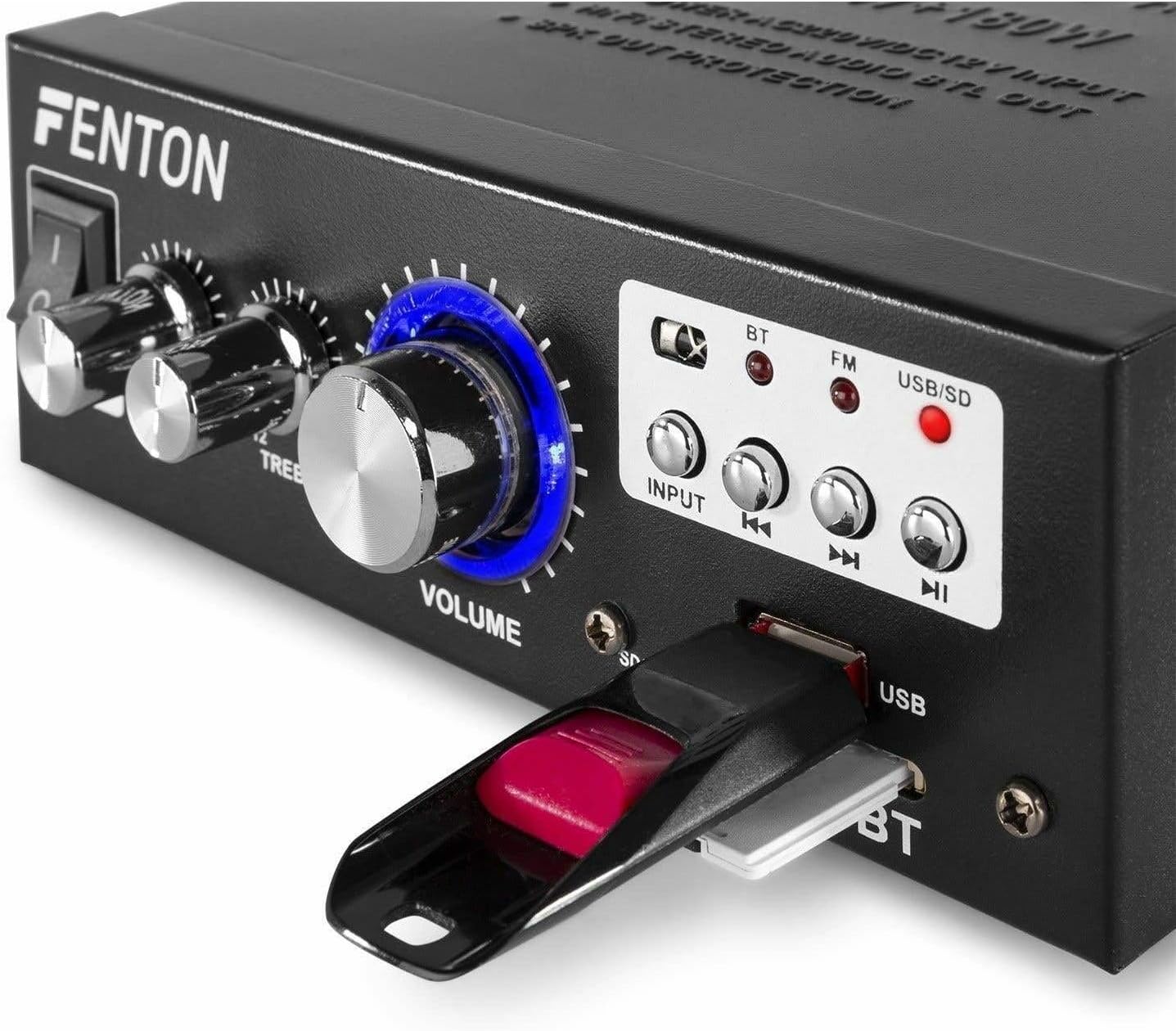
Bild: Nahaufnahme view of the Fenton AV360BT's front panel, showing a USB flash drive inserted into the USB port and an SD card in the SD/MMC slot.
- Stecken Sie einen USB-Speicherstick in das USB-Anschluss oder eine SD/MMC-Karte in den SD-/MMC-Kartensteckplatz.
- Drücken Sie die EINGANG button until the USB/SD indicator light is illuminated. The amplifier will automatically detect and begin playing MP3 files.
- Verwenden Sie die Wiedergabesteuerung (Previous, Play/Pause, Next) on the front panel or remote control to manage playback.
7.5 FM-Radiobetrieb
- Drücken Sie die EINGANG button until the FM indicator light is illuminated.
- Verwenden Sie die Vorherige Und Nächste Tasten zum Suchen von Radiosendern.
- Ensure the antenna is fully extended for optimal reception.
7.6 AUX-Eingang
When an external device is connected to the RCA AUDIO INPUT, select the AUX input mode using the EINGANG Schaltfläche. Die amplifier will play audio from the connected device.
8. Wartung
- Reinigung: Reinigen Sie die Außenseite des ampVerstärker. Verwenden Sie keine scheuernden Reinigungs- oder Lösungsmittel.
- Lagerung: Bewahren Sie das Gerät an einem kühlen, trockenen Ort auf, wenn es längere Zeit nicht benutzt wird.
- Belüftung: Stellen Sie sicher, dass die Lüftungsöffnungen nicht blockiert sind, um eine Überhitzung zu verhindern.
9. Fehlerbehebung
| Problem | Mögliche Ursache | Lösung |
|---|---|---|
| Keine Tonausgabe | Power off; incorrect input selected; speaker connections loose; volume too low. | Ensure power is on; select correct input; check speaker wiring; increase volume. |
| Bluetooth stellt keine Verbindung her | Amplifier not in Bluetooth mode; device too far; device already paired with another unit. | Select Bluetooth input; move device closer; disconnect from other devices and try again. |
| Schlechter UKW-Radioempfang | Antenne nicht ausgefahren; schwaches Signal. | Fully extend the FM antenna; try repositioning the unit for better signal. |
| USB/SD-Wiedergabeprobleme | Nicht unterstützt file Format; beschädigt files; incorrect input selected. | Sicherstellen files are MP3 format; try different USB/SD media; select USB/SD input. |
10. Spezifikationen
| Besonderheit | Spezifikation |
|---|---|
| Ausgangsleistung | 2 x 40 W (80 W total) |
| Impedanz | 8~16 Ohm |
| Input Sensitivity (Line) | 0 ~ 2 V / 47 kohm |
| Anschlusslautstärketage | 220-240Vac/50Hz // 12Vdc-5A |
| FM-Radiofrequenz | 87.5 - 108.5 MHz |
| Abmessungen (L x B x H) | 145 x 160 x 55 mm |
| Gewicht | Ca. 950 g |
| Anschlüsse | RCA, Bluetooth, USB, SD |
| Kompatible Geräte | Lautsprecher |
| Stromversorgung (Fernbedienung) | 1 non-standard battery (included) |
| Hersteller | Tronios BV |
| Ursprungsland | China |
11. Garantie und Support
Informationen zur Garantie und technische Unterstützung finden Sie in der mit Ihrem Kauf gelieferten Dokumentation oder wenden Sie sich an Ihren Händler. Bewahren Sie Ihren Kaufbeleg für eventuelle Garantieansprüche auf.