
1. Einleitung
Thank you for choosing the COMICA BoomX-D D2 2.4G Wireless Microphone System. This manual provides detailed instructions for the proper setup, operation, and maintenance of your new wireless microphone system. Please read this manual thoroughly before use to ensure optimal performance and to prevent damage to the device. Keep this manual for future reference.
2. Produktüberschreitungview
2.1 Hauptmerkmale
- 2.4G Digital Wireless Technology: Gewährleistet eine stabile und zuverlässige Audioübertragung.
- Dual Transmitters, One Receiver: Allows simultaneous recording from two sources.
- Visual Power & Audio Dynamic Monitor: Real-time display of battery status and audio levels.
- Internal & External MIC Input Modes: Flexibility to use built-in microphone or external lavalier.
- Mono/Stereo Switchable Output: Adaptable for various recording needs.
- Broadcasting-Quality Audio: Delivers clear and crisp sound.
- Geringe Latenz: Less than 20ms for synchronized audio and video.
- Arbeitsbereich: Bis zu 50 Meter (164 Fuß) im Freien.
- Multi-functional Belt Clip: For easy attachment and portability.
- Kompaktes und leichtes Design: Ideal for on-the-go recording.
- USB-C-Aufladung: Bequemes und universelles Laden.
2.2 Enthaltene Komponenten
The COMICA BoomX-D D2 system typically includes the following components:
- 1 x Empfänger (RX)
- 2 x Sender (TX)
- 2 x 3.5mm TRS Lavalier Microphones
- 2 x Wind Muffs for Lavalier Microphones
- 1 x 3.5mm TRS-TRS Audio Cable (for cameras)
- 1 x 3.5mm TRS-TRRS Audio Cable (for smartphones)
- 1 x USB-C to USB-A Charging Cable (may include multiple for simultaneous charging)
- 1 x Benutzerhandbuch
- 1 x Storage Case (or packaging)
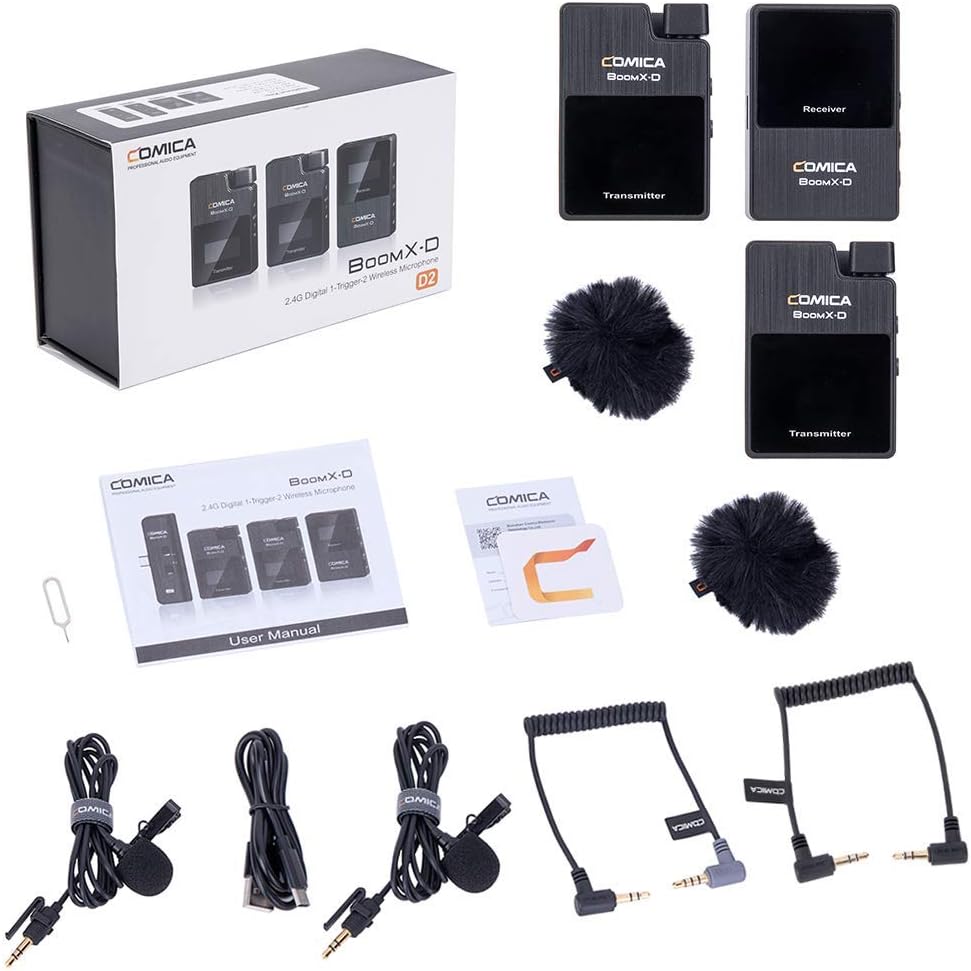
Figure 1: Complete contents of the COMICA BoomX-D D2 package, showing the receiver, two transmitters, lavalier microphones, wind muffs, various audio cables, and charging cable.
3. Installationsanleitung
3.1 Aufladen der Geräte
Before initial use, fully charge the receiver and both transmitters using the provided USB-C charging cable. Connect the USB-C end to the device and the USB-A end to a compatible USB power adapter (not included) or a computer USB port.
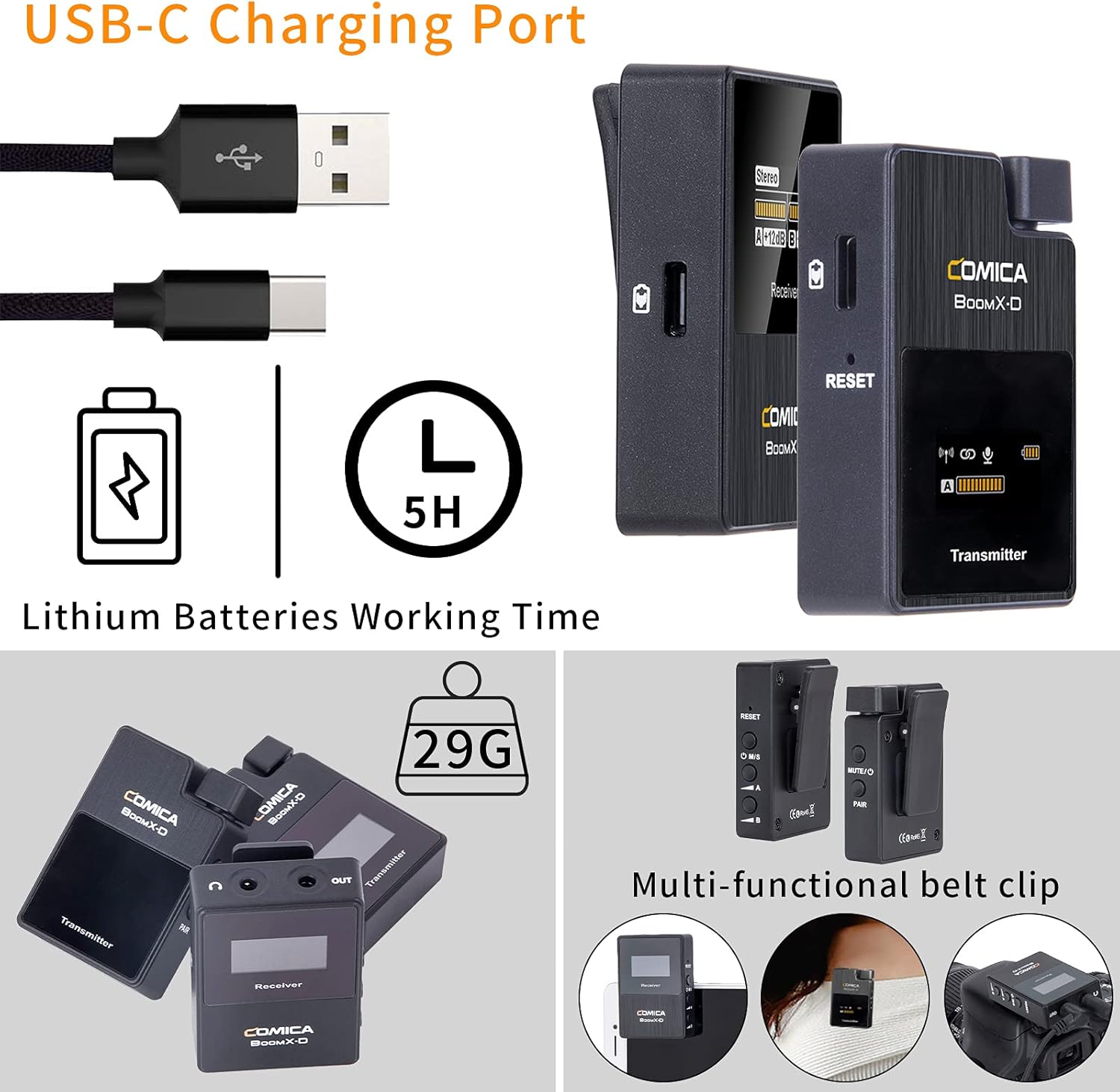
Figure 2: Illustration of the USB-C charging port on the COMICA BoomX-D D2 units, highlighting the charging process and battery life indication.
3.2 Ein-/Ausschalten und Koppeln
- Einschalten: Press and hold the power button on both the receiver and transmitters until the screen illuminates.
- Automatische Kopplung: The units are designed to pair automatically upon power-on. Observe the screens for connection indicators. If pairing fails, refer to the troubleshooting section or the seller video for manual pairing instructions.
Video 1: A seller-provided video demonstrating the setup and pairing process of the COMICA BoomX-D D2 wireless microphone system, including how to connect to various devices.
3.3 Anschluss an Aufnahmegeräte
Use the appropriate audio cable to connect the receiver to your recording device (camera, smartphone, etc.).
- Für Kameras (DSLR/Spiegellos): Use the 3.5mm TRS-TRS audio cable. Connect one end to the receiver's output and the other to your camera's microphone input.
- Für Smartphones/Tablets: Use the 3.5mm TRS-TRRS audio cable. Connect one end to the receiver's output and the other to your smartphone's headphone/microphone jack. For devices without a 3.5mm jack, an appropriate adapter (e.g., USB-C to 3.5mm or Lightning to 3.5mm) may be required (not included).

Figure 3: The COMICA BoomX-D D2 receiver connected to a smartphone, illustrating its use for mobile video recording with low latency and a 50-meter range.

Figure 4: A visual guide to the compatibility of the COMICA BoomX-D D2 with various devices, including Canon, Nikon, Sony, Panasonic, Fujifilm cameras, and iPhone, Huawei, Samsung smartphones, using different audio cables.
4. Bedienungsanleitung
4.1 Using the Lavalier Microphone or Built-in Mic
Each transmitter has a built-in omnidirectional microphone. For discreet placement or improved audio quality, you can connect the included 3.5mm TRS lavalier microphone to the transmitter's MIC input port.
- With Lavalier Mic: Plug the lavalier microphone into the 3.5mm MIC input on the transmitter. Clip the lavalier mic to clothing, approximately 6-8 inches from the speaker's mouth.
- Without Lavalier Mic (Built-in): Ensure no external microphone is plugged in. Clip the transmitter directly onto clothing, ensuring the built-in microphone faces the sound source.

Figure 5: Demonstrates the flexibility of the COMICA BoomX-D D2, allowing users to choose between the external lavalier microphone or the built-in microphone on the transmitter, depending on their recording needs.
4.2 Mono/Stereo Output Switching
The receiver allows you to switch between mono and stereo output modes. This is useful for post-production flexibility or specific recording scenarios.
- Mono-Modus: Combines audio from both transmitters into a single mono track.
- Stereomodus: Records audio from each transmitter to separate left and right channels.
Refer to the receiver's display and control buttons to switch between these modes. The display will clearly indicate the selected mode.
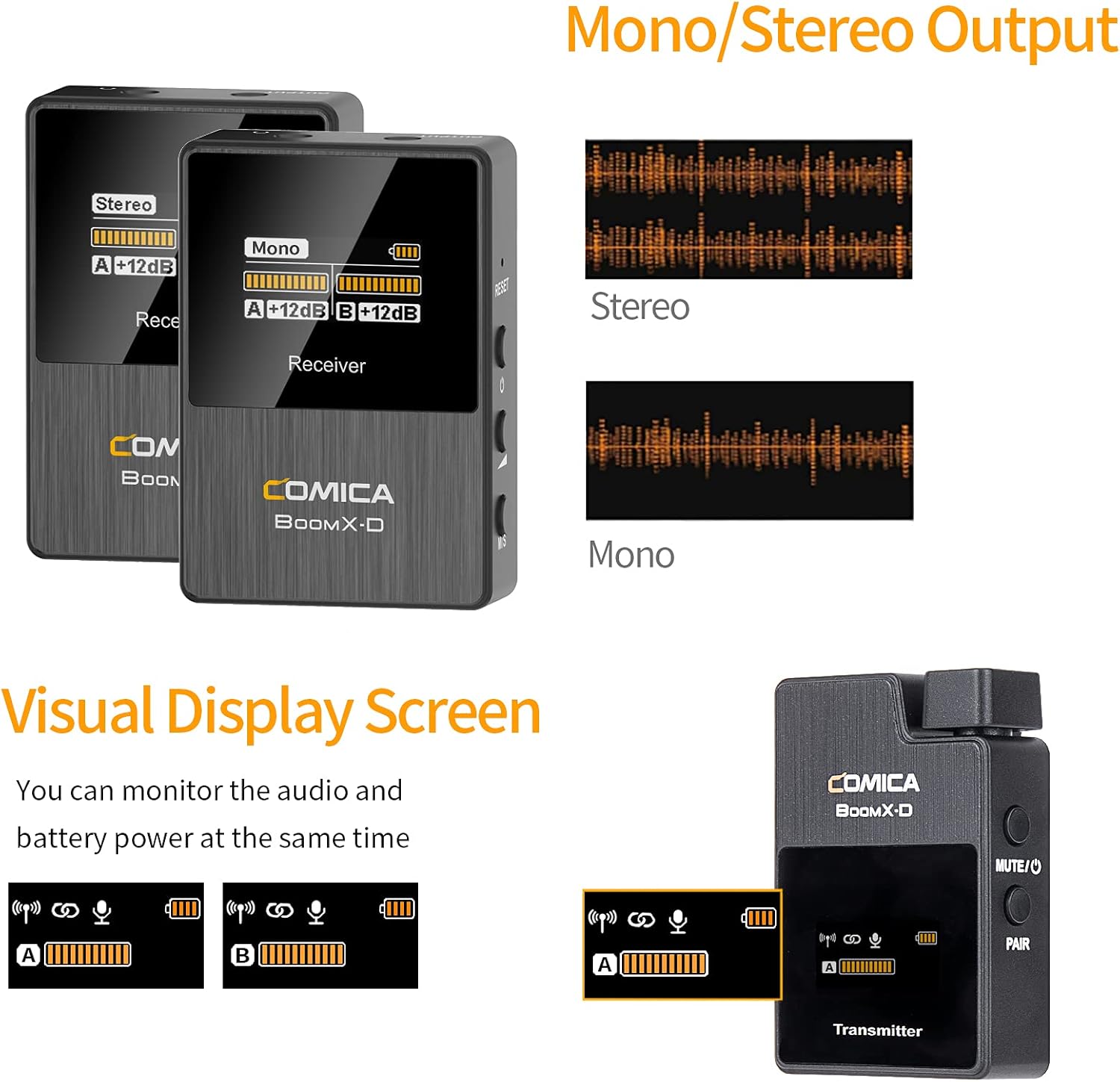
Figure 6: The visual display screen of the COMICA BoomX-D D2 receiver, showing options for Mono/Stereo output and real-time monitoring of audio levels and battery status for both transmitters.
4.3 Echtzeit-Audioüberwachung
Connect headphones to the receiver's 3.5mm headphone output jack to monitor your audio in real-time. This ensures that your audio is being recorded correctly and helps identify any potential issues during recording.

Figure 7: A user monitoring real-time audio through headphones connected to the COMICA BoomX-D D2 receiver, which is mounted on a camera, ensuring sound quality during recording.
5. Wartung
- Reinigung: Use a soft, dry cloth to clean the devices. Do not use harsh chemicals or abrasive materials.
- Lagerung: Lagern Sie das Mikrofonsystem an einem kühlen, trockenen Ort, geschützt vor direkter Sonneneinstrahlung und extremen Temperaturen.
- Batteriepflege: Um eine optimale Akkulaufzeit zu gewährleisten, sollten Sie die Geräte nicht häufig vollständig entladen. Laden Sie sie regelmäßig auf, auch wenn sie längere Zeit nicht benutzt werden.
- Feuchtigkeit vermeiden: Um Beschädigungen zu vermeiden, halten Sie die Geräte von Wasser und hoher Luftfeuchtigkeit fern.
6. Fehlerbehebung
| Problem | Mögliche Ursache | Lösung |
|---|---|---|
| Keine Tonausgabe | Low battery; Incorrect cable connection; Unpaired devices; Muted microphone. | Charge devices; Ensure cables are securely connected; Re-pair transmitter and receiver; Check if transmitter is muted. |
| Störungen/Schlechte Klangqualität | Obstructions between TX/RX; Too far from receiver; Strong electromagnetic interference. | Reduce distance between TX/RX; Ensure clear line of sight; Move away from other wireless devices; Check external microphone connection. |
| Geräte lassen sich nicht koppeln | Out of range; Pairing mode not activated. | Bring devices closer; Follow manual pairing instructions (if automatic fails); Ensure both are powered on. |
| Kurze Akkulaufzeit | Old battery; Frequent full discharge. | Ensure full charge before use; Avoid frequent full discharge; Consider battery replacement if significantly degraded. |
7. Spezifikationen
- Marke: COMICA
- Modellnummer: D2
- Konnektivitätstechnologie: USB, Wireless (2.4G Digital)
- Steckertyp: USB-C, 3.5mm (TRS/TRRS)
- Besonderheit: Clip-on-Design
- Richtcharakteristik: Omnidirektional
- Audioempfindlichkeit: 86 Dezibel
- Mikrofon-Formfaktor: Mikrofonsystem
- Energiequelle: USB-C
- Signal-Rausch-Verhältnis: 86 dB
- Anzahl der Kanäle: 2
- Arbeitsbereich: Bis zu 50 m (164 Fuß)
- Latenz: <20 ms
8. Garantie und Support
COMICA products are covered by a limited warranty against defects in materials and workmanship. For specific warranty terms, registration, and technical support, please visit the official COMICA webBesuchen Sie die Website oder kontaktieren Sie den Kundenservice. Bewahren Sie Ihren Kaufbeleg als Kaufnachweis für Garantieansprüche auf.
Offiziell WebWebsite: www.comica-audio.com