
1. Einleitung
This manual provides essential information for the safe and efficient operation of your Amazon Basics 10W Qi Certified Wireless Charging Stand. Please read these instructions thoroughly before use and retain them for future reference.

Image 1: Amazon Basics 10W Qi Certified Wireless Charging Stand.
2. Lieferumfang
- 10W kabelloser Ladeständer
- 4-foot USB 2.0 A to C cable
- Willkommensleitfaden

Image 2: Included components: Wireless Charging Stand and USB-A to C Cable.
3. Einrichtungsanweisungen
- Schließen Sie das Kabel an: Insert the USB-C end of the provided 4-foot USB 2.0 A to C cable into the charging port on the back of the wireless charging stand.
- An die Stromversorgung anschließen: Insert the USB-A end of the cable into a compatible power adapter. For 10W and 7.5W fast charging, use a Quick Charger 3.0 (QC 3.0) or Power Delivery 3.0 (PD 3.0) adapter (at least 9V/2A). A standard 5V/2A charger will provide 5W output. Note: An AC adapter is NOT included.
- Platzierung: Stellen Sie die Ladestation auf eine stabile, ebene Fläche.

Image 3: Connect the charging stand to a compatible power adapter for optimal performance.
4. Bedienungsanleitung
4.1 Aufladen Ihres Geräts
- Gerät platzieren: Position your Qi-compatible smartphone or other device centrally on the charging stand. The stand supports both vertical and horizontal charging orientations.
- Ladeanzeige: A blue LED indicator light on the front of the stand will illuminate to confirm that your device is charging.

Image 4: Ensure proper alignment of your device on the charging stand for effective charging.
4.2 Gehäusekompatibilität
The charging stand is designed to transmit power through most protective cases (rubber, plastic, or TPU cases under 5mm thickness only). For faster charging with iPhones, it is recommended to remove all cases before charging. Avoid charging with magnetic and metal cases or credit cards attached to your device, as these will prevent proper operation.

Image 5: Guidelines for case compatibility and items to avoid during wireless charging.
4.3 Lademodi
- 10W Schnellladung: Optimized for LG/Samsung devices when used with a QC 3.0 / PD 3.0 adapter (at least 9V/2A).
- 7.5W Schnellladung: Optimized for iPhones when used with a QC 3.0 / PD 3.0 adapter (at least 9V/2A).
- 5W Standardladung: For all Qi-enabled phones and Qi-enabled AirPods when used with a standard 5V/2A charger.
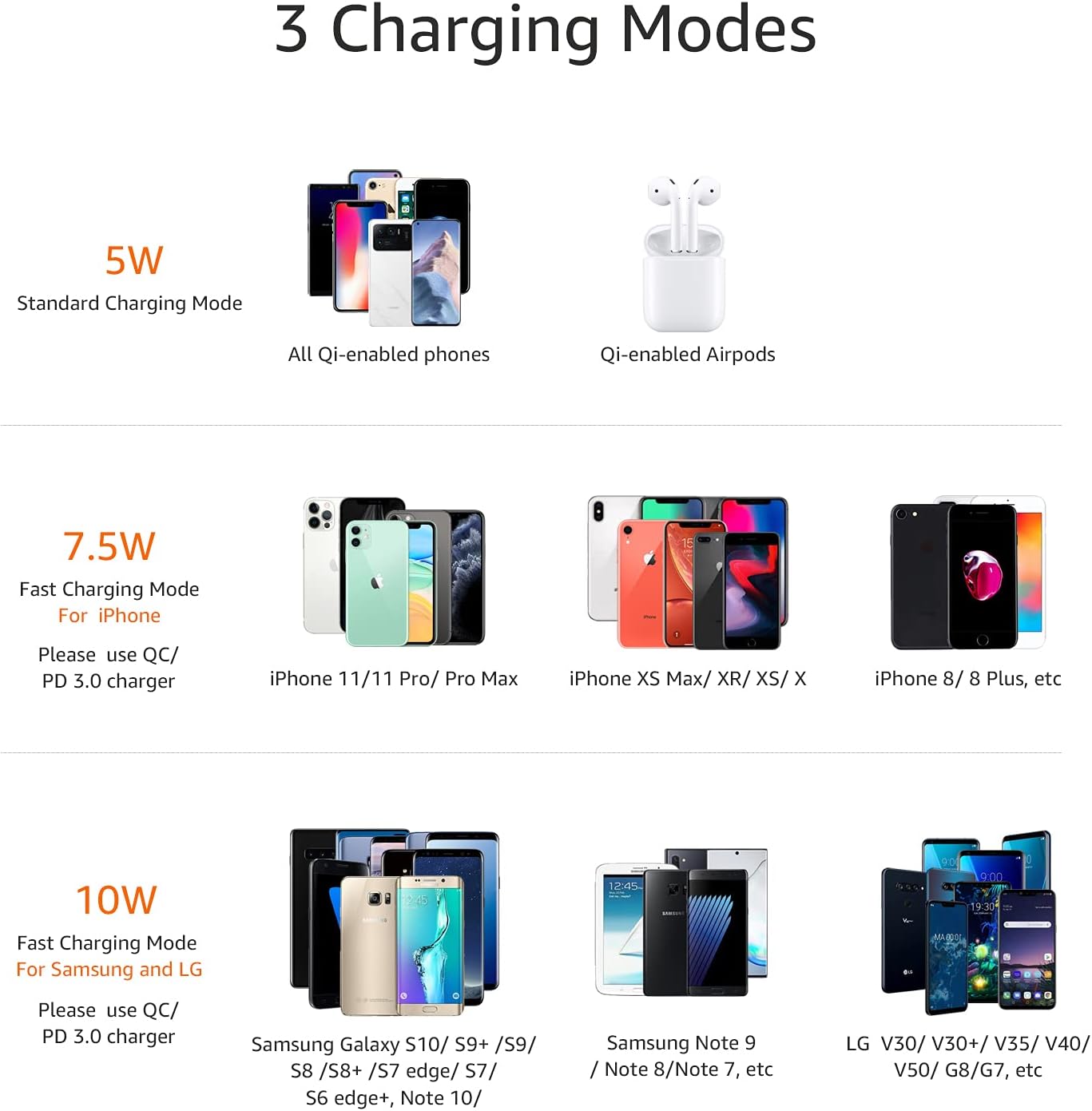
Image 6: Different charging modes and their compatibility with various devices.
5. Sicherheitshinweise
This Qi-certified wireless charging stand incorporates Intelligent Protection Technology to ensure safe operation. Features include:
- Übertemperaturschutz
- Überlautstärketage-Schutz
- Überstromschutz
- Fremdkörpererkennung
To prevent potential hazards, avoid placing metal objects, magnets, or credit cards between your device and the charging stand.
6. Fehlerbehebung
| Problem | Lösung |
|---|---|
| Gerät lädt nicht oder nur langsam. |
|
| LED indicator blinking green. | This may indicate an incompatible charger or foreign object detection. Ensure you are using a compatible power adapter and remove any foreign objects. |
| Device or charger overheating. |
|
7. Spezifikationen
| Besonderheit | Detail |
|---|---|
| Modellnummer | WPC10-3CCOA |
| Technische Daten | 2.9 x 3.1 x 4.4 Zoll |
| Artikelgewicht | 7.2 Unzen |
| Eingangslautstärketage | 9 Volt |
| AmpAlter | 1.1 Amps |
| Steckertyp | Kabellos |
| Besondere Merkmale | Charging Indicator, Fast Charging, Short Circuit Protection, Wireless Charging |
| Kompatible Geräte | iPhone 15/14/13/12/11/X/XR/XS/8/SE3/SE2, iPhone Pro 15/14/13/12/11, iPhone Pro Max 15/14/13/12/11/XS, iPhone Plus 15/14/8, iPhone Mini 13/12, Apple Watch 9/SE/8-1, Apple Watch Ultra 2/Ultra, AirPods Pro 2/1, AirPods 3/2; Samsung Galaxy S23 Ultra/S23/S22/S21, and other Qi compatible devices |
8. Produktdemonstrationsvideo
Video 1: Official product demonstration of the Amazon Basics Wireless Charging Stand by Amazon Product Imaging.
9. Garantie und Support
This product is covered by the Amazon Basics 1-Year Standard Limited Warranty. For warranty claims or technical support, please refer to the contact information provided in the Welcome Guide or visit the Amazon Basics support page.