
1. Einleitung
Thank you for choosing the Fat Shark FSV3023 Attitude V5 5G8 OLED Receiver. This module is designed to enhance your FPV experience by providing reliable 5.8GHz video reception for compatible Fat Shark Attitude V5 goggles. It features an OLED display for clear information and supports both Master and Slave receiver configurations.
2. Sicherheitshinweise
- Always ensure proper antenna connection before powering on the receiver to prevent damage.
- Betreiben Sie den Receiver innerhalb der angegebenen Lautstärke.tage Reichweite.
- Avoid exposing the module to extreme temperatures, moisture, or direct sunlight.
- Halten Sie das Gerät von starken Magnetfeldern fern.
- This product is not a toy. Recommended for users 14 years and older.
3. Packungsinhalt
Überprüfen Sie, ob alle Artikel in Ihrem Paket vorhanden sind:
- Fat Shark FSV3023 Attitude V5 5G8 OLED Receiver Module
- Antenna (typically a dipole or patch antenna, depending on the kit)
- Bedienungsanleitung (dieses Dokument)
4. Produktüberschreitungview
The FSV3023 receiver module integrates directly into compatible Fat Shark Attitude V5 goggles. It features an OLED screen for displaying critical information such as frequency, band, and signal strength. Control buttons allow for easy navigation and selection.
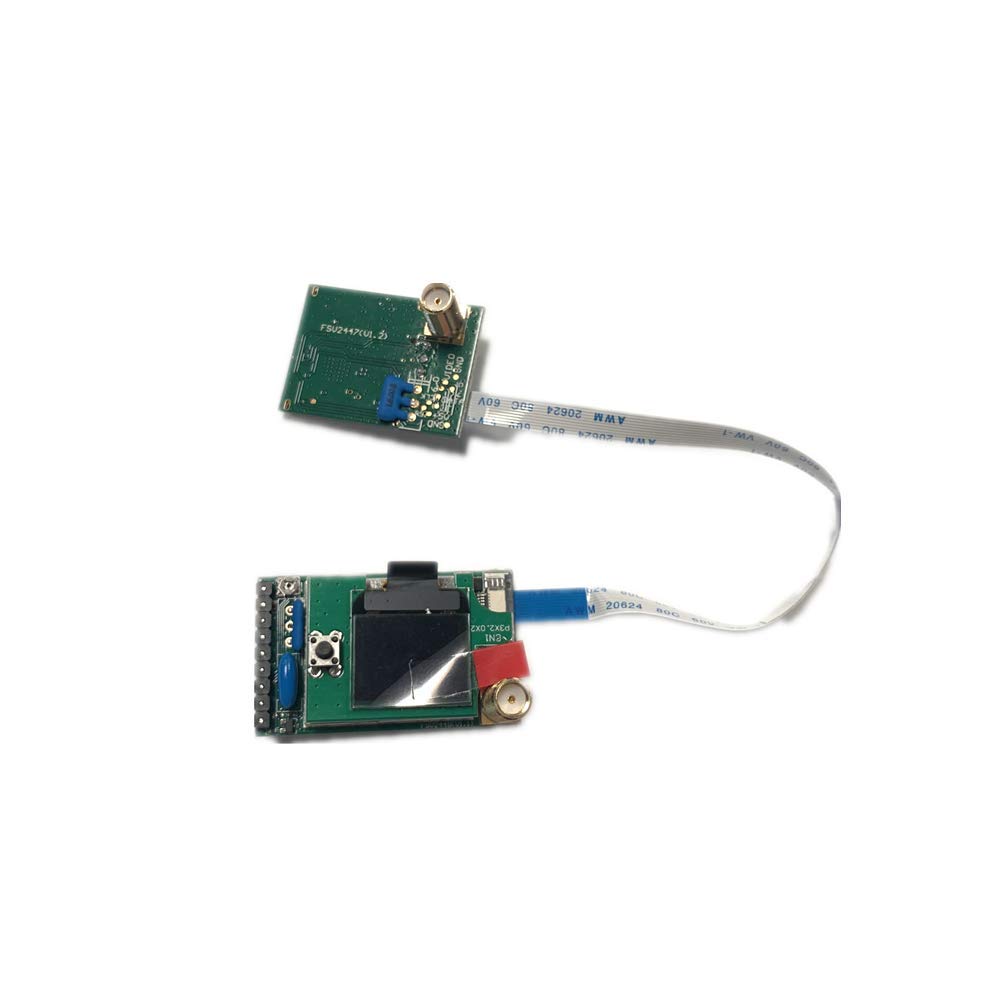
Bild 1: Vorderseite view of the Fat Shark FSV3023 Attitude V5 5G8 OLED Receiver module. This image shows the compact design of the receiver, highlighting the OLED display screen and the control buttons typically located on the front face. The antenna connectors are usually on the top or side.
5. Einrichtung
5.1. Modulinstallation
- Ensure your Fat Shark Attitude V5 goggles are powered off.
- Locate the receiver module bay on the side of your goggles.
- Carefully slide the FSV3023 module into the bay until it is fully seated. Ensure the connectors align properly. Do not force the module.
5.2. Antennenanschluss
- Identify the SMA/RP-SMA connectors on the receiver module.
- Gently screw your 5.8GHz FPV antennas onto the connectors. Hand-tighten only; do not overtighten.
- For optimal performance, use two antennas of the same type (e.g., two omnidirectional or one omnidirectional and one patch).
5.3. Einschalten
Once the module and antennas are installed, connect the battery to your Fat Shark goggles. The receiver module will power on automatically with the goggles.
6. Bedienungsanleitung
6.1. OLED Display Navigation
The OLED display shows current frequency, band, and signal strength (RSSI). Use the control buttons (typically a joystick or multiple buttons) on the receiver module to navigate menus and make selections.
6.2. Kanal- und Bandauswahl
- Band Auswahl: Press the designated button (often a 'Band' button or a short press on the joystick) to cycle through available 5.8GHz bands (e.g., Fat Shark, Raceband, B, E, F).
- Kanalauswahl: Press the designated button (often a 'Channel' button or a long press/directional input on the joystick) to cycle through channels within the selected band.
- Auto-Scan: Some modules feature an auto-scan function. Refer to the module's specific button layout for initiating an auto-scan to find the strongest signal.
6.3. Master and Slave Module Functionality
The FSV3023 supports both Master and Slave configurations, allowing for advanced setups:
- Master-Modus: When operating as the primary receiver, it outputs video directly to the goggles' display.
- Slave-Modus: This mode allows the module to act as a secondary receiver, potentially feeding its signal to another device or for diversity setups with external modules. Consult your goggles' manual for specific instructions on enabling and utilizing Master/Slave modes.
7. Wartung
7.1. Reinigung
Gently wipe the module and OLED screen with a soft, dry, lint-free cloth. Do not use liquid cleaners or solvents, as they may damage the electronics or screen coating.
7.2. Speicherung
When not in use, store the receiver module in a cool, dry place, away from direct sunlight and extreme temperatures. It is recommended to remove the module from the goggles if storing for extended periods.
7.3. Firmware-Updates
Periodically check the Fat Shark official website for any available firmware updates for the FSV3023 module. Firmware updates can improve performance, add features, or fix bugs. Follow the instructions provided with the firmware update package carefully.
8. Fehlerbehebung
- Kein Videosignal:
- Ensure antennas are securely connected.
- Verify that the receiver is on the correct band and channel matching your video transmitter.
- Check that the video transmitter on your drone is powered on and functioning.
- Confirm the module is fully seated in the goggle bay.
- Schlechte Videoqualität/Rauschen:
- Check for interference from other 5.8GHz devices or Wi-Fi networks.
- Ensure antennas are not obstructed and are oriented correctly.
- Try different channels or bands.
- Inspect antennas for damage. Consider using higher-quality antennas.
- OLED-Display funktioniert nicht:
- Ensure the goggles are powered on.
- Remove and re-insert the module to ensure proper connection.
- If the issue persists, contact Fat Shark support.
9. Spezifikationen
| Besonderheit | Spezifikation |
|---|---|
| Modell | FSV3023 |
| Kompatibilität | Fat Shark Attitude V5 Goggles |
| Frequenz | 5.8GHz (Multiple Bands/Channels) |
| Anzeige | OLED |
| Antennenanschlüsse | 2x SMA/RP-SMA (Diversity) |
| Betriebsarten | Master, Slave |
| Empfohlenes Alter | Ab 14 Jahren |
10. Garantie und Support
Fat Shark products are covered by a limited warranty against manufacturing defects. For specific warranty terms, duration, and to initiate a warranty claim, please refer to the official Fat Shark website or contact your authorized dealer. For technical support, troubleshooting assistance beyond this manual, or spare parts, visit the Fat Shark support portal or contact their customer service directly.
WebWebsite: www.fatshark.com