
1. Einleitung
This manual provides essential instructions for the safe and efficient operation of your Multilaser MINI TORRE 900W SP380 audio system. Please read this manual thoroughly before using the product and retain it for future reference. Proper use will ensure optimal performance and extend the lifespan of your device.
2. Sicherheitshinweise
- Energiequelle: Stellen Sie sicher, dass das Netzteil mit der Lautstärke übereinstimmttagDie auf dem Produktetikett angegebenen Anforderungen.
- Belüftung: Die Lüftungsöffnungen dürfen nicht blockiert werden. Um eine ordnungsgemäße Luftzirkulation zu gewährleisten, muss um das Gerät herum ausreichend Platz vorhanden sein.
- Wasser und Feuchtigkeit: Das Gerät vor Wasser, Regen und übermäßiger Luftfeuchtigkeit schützen. Nicht mit nassen Händen bedienen.
- Wärmequellen: Vermeiden Sie es, das Gerät in der Nähe von Wärmequellen wie Heizkörpern, Öfen oder anderen wärmeerzeugenden Geräten aufzustellen.
- Reinigung: Vor der Reinigung die Stromzufuhr unterbrechen. Ein trockenes, weiches Tuch verwenden. Keine flüssigen Reiniger oder Sprays verwenden.
- Wartung: Versuchen Sie nicht, das Gerät selbst zu reparieren. Überlassen Sie alle Wartungsarbeiten qualifiziertem Fachpersonal.
- Kinder: Bewahren Sie das Gerät und sein Zubehör außerhalb der Reichweite von Kindern auf.
- Platzierung: Stellen Sie das Gerät auf eine stabile, ebene Fläche, um ein Umfallen zu verhindern.
3. Produktüberschreitungview
The Multilaser MINI TORRE 900W SP380 is a powerful audio system designed for versatile sound reproduction. It features dual speakers, LED lighting, and multiple connectivity options.
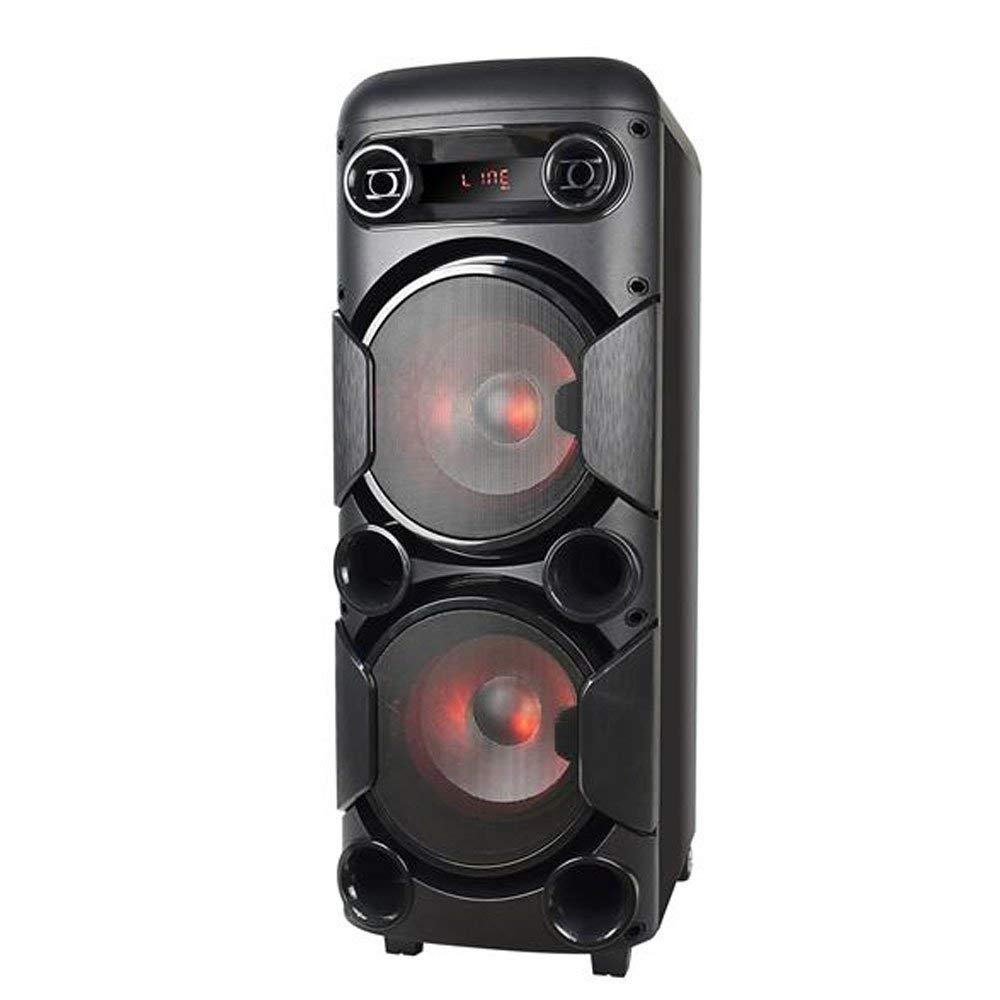
Abbildung 3.1: Front view of the Multilaser MINI TORRE 900W SP380, showcasing its dual speaker design and illuminated LED woofers.
The control panel, located on the top of the unit, provides access to all functions and inputs.

Abbildung 3.2: Detaillierte view of the control panel, including volume knob, equalizer sliders, input ports (USB, TF/Memory Card, Line, Mic 1, Mic 2), and control buttons for mode, light, and playback.
4. Einrichtung
- Auspacken: Carefully remove the MINI TORRE from its packaging. Retain the packaging for future transport or storage.
- Platzierung: Position the speaker on a flat, stable surface. Ensure there is adequate space around the unit for ventilation. The integrated wheels facilitate easy transport.
- Stromanschluss: Connect the power cable to the AC input on the unit and then to a suitable power outlet. The device supports bivolt automatic voltage.
- Erstes Einschalten: Flip the power switch (usually located on the control panel) to the "ON" position. The display will illuminate.
5. Bedienungsanleitung
5.1. Ein-/Ausschalten
To power on the device, locate the power switch on the control panel and set it to the "ON" position. To power off, set the switch to "OFF".
5.2. Lautstärkeregelung
Adjust the main volume using the large central VOLUMEN knob on the control panel. Turn clockwise to increase volume and counter-clockwise to decrease.
5.3. Modusauswahl
Drücken Sie die MODUS button repeatedly to cycle through available input modes: Bluetooth (BT), FM Radio, USB, Memory Card (TF), and Auxiliary (LINE).
5.4. LED-Beleuchtung
Drücken Sie die LICHT button to toggle the LED lighting effects on the speakers. Multiple light modes may be available.
5.5. Mikrofoneingang
Connect a microphone to either the Mikrofon 1 or Mikrofon 2 input. Adjust the microphone volume using the MIKROFONLAUTSTÄRKE slider and add echo effect with the ECHO Schieberegler.
5.6. Sound Equalization
Verwenden Sie die VERDREIFACHEN Und BASS sliders to adjust the high and low frequencies of the audio output, respectively, to suit your preference.
6. Konnektivität
6.1. Bluetooth-Kopplung
- Turn on the MINI TORRE and select Bluetooth (BT) Modus unter Verwendung des MODUS button. The display will show "BT" and a pairing indicator.
- Aktivieren Sie Bluetooth auf Ihrem Smartphone, Tablet oder einem anderen kompatiblen Gerät.
- Suchen nach available devices and select "MULTILASER SP380" (or similar name) from the list.
- Sobald die Kopplung hergestellt ist, bestätigt das Gerät die Verbindung, und Sie können mit der drahtlosen Audiowiedergabe beginnen.
6.2. USB / Memory Card Playback
Stecken Sie einen USB-Speicherstick in das USB port or a TF (MicroSD) card into the TF / USB slot. The unit will automatically switch to USB or TF mode and begin playing compatible audio files. Use the playback control buttons (WIEDERGABE/PAUSE, VORHERIGE, NÄCHSTE) to manage your music.
6.3. Auxiliary Input (LINE IN)
Schließen Sie ein externes Audiogerät (z. B. MP3-Player, Laptop) an den/die/das an. LINIE input using a 3.5mm audio cable. Select LINIE Modus mit dem MODUS Drücken Sie diese Taste. Die Audiowiedergabe vom angeschlossenen Gerät startet.
6.4. UKW-Radio
Wechseln zu FM Modus unter Verwendung des MODUS Taste. Drücken und halten Sie die WIEDERGABE/PAUSE button to initiate an automatic scan for FM stations. The unit will save detected stations. Use the VORHERIGE Und NÄCHSTE -Tasten, um durch gespeicherte Sender zu navigieren.
7. Wartung
- Reinigung: Before cleaning, ensure the device is powered off and unplugged. Use a soft, dry, lint-free cloth to wipe the exterior surfaces. Do not use abrasive cleaners, waxes, or solvents.
- Lagerung: Wenn Sie das Gerät über einen längeren Zeitraum lagern, ziehen Sie den Netzstecker und bewahren Sie es an einem kühlen, trockenen Ort, fern von direkter Sonneneinstrahlung und extremen Temperaturen, auf.
- Vermeiden Sie Hindernisse: Regularly check that the speaker grilles and ventilation openings are free from dust and debris.
8. Fehlerbehebung
| Problem | Mögliche Ursache | Lösung |
|---|---|---|
| Kein Strom | Power cable not connected; Power outlet not working; Power switch off. | Ensure power cable is securely connected. Test the outlet with another device. Turn the power switch to "ON". |
| Kein Ton | Volume too low; Incorrect input mode selected; External device not playing. | Lautstärke erhöhen. Drücken MODUS to select the correct input. Ensure the external device is playing and its volume is up. |
| Bluetooth nicht gekoppelt | Device too far; Bluetooth not enabled on external device; Incorrect mode. | Move devices closer. Ensure Bluetooth is enabled on your external device. Select BT -Modus am Lautsprecher. |
| USB-/TF-Karte wird nicht abgespielt | Karte/Laufwerk nicht korrekt eingesetzt; Inkompatibel file format; Incorrect mode. | Reinsert the USB drive or TF card. Ensure audio files are in a compatible format (e.g., MP3). Select USB or TF Modus. |
| FM-Radio-Rauschen | Schwaches Signal; Keine Antenne angeschlossen (falls zutreffend). | Reposition the unit or extend the antenna (if present). Perform an auto-scan for stations again. |
9. Spezifikationen
Below are the technical specifications for the Multilaser MINI TORRE 900W SP380:

Abbildung 9.1: Packaging of the Multilaser MINI TORRE 900W SP380, highlighting its main features and technical specifications.
| Besonderheit | Detail |
|---|---|
| Marke | Multilaser |
| Modell | SP380 |
| Maximale Lautsprecherausgangsleistung | 900 Watt RMS |
| Konnektivitätstechnologie | Auxiliary, Bluetooth 5.0 |
| Lautsprechertyp | Tower (2x 8" drivers) |
| Besondere Merkmale | USB Port, LED Lighting, Microphone Input, Memory Card Slot, FM Radio, Bass Boost, Transport Wheels |
| Artikelabmessungen (T x B x H) | 33 cm x 37 cm x 82 cm |
| Artikelgewicht | 11.95 Kilogramm |
| Kompatible Geräte | Notebook, Smartphone, Tablet |
| Stromquelle | Bivolt automatic (AC) |
| Frequenzgang | 60 Hz bis 20 kHz |
| Empfindlichkeit | 89 dB |
| Impedanz | 4 Ohm |
| Bestandteile umfaßten | 1x Mini Torre 900W SP380, 1x Cable Set, 1x User Manual |
10. Garantie und Support
The Multilaser MINI TORRE 900W SP380 comes with a 1 Jahr Garantie Ab Kaufdatum. Diese Garantie deckt Herstellungsfehler bei normalem Gebrauch ab.
For warranty claims, technical support, or service inquiries, please contact Multilaser customer support through their official channels. Please have your proof of purchase and product model number (SP380) ready when contacting support.
Notiz: Die Garantie deckt keine Schäden ab, die durch Missbrauch, Unfälle, nicht autorisierte Änderungen oder Nichtbeachtung der Anweisungen in diesem Handbuch verursacht wurden.