
Produkt überview
The iKKEGOL Upgraded USB Triple Foot Pedal Switch is a versatile, programmable HID device designed to enhance computer interaction by providing hands-free control. It features three durable, sensitive optical switches with minimal resistance, ensuring long-lasting comfort and reliable performance. This device can be programmed to mimic keyboard functions, mouse clicks, multimedia controls, or custom strings, making it suitable for various applications from gaming and transcription to medical facilities and industrial control.
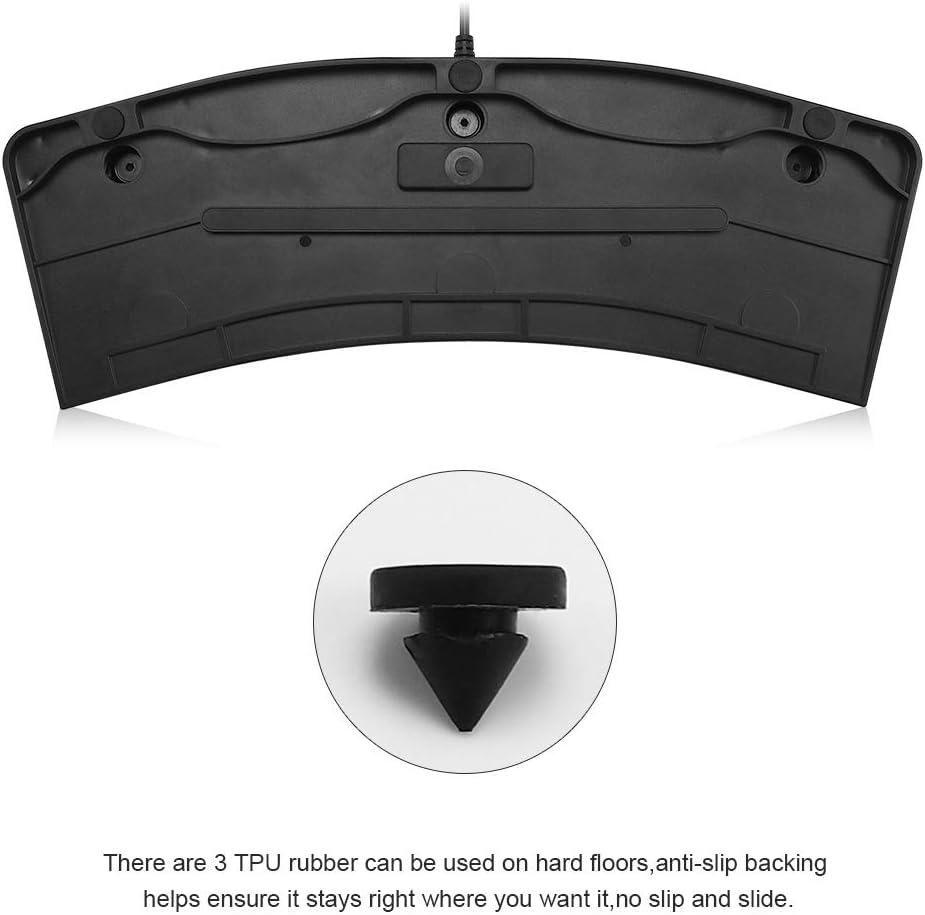
The ergonomic design includes a wide pedal and anti-slip TPU rubber feet on the base to prevent sliding during use. It supports multiple operating systems including Windows, Mac, Linux, and Android, though initial configuration requires a Windows PC.
Packungsinhalt
- 1x iKKEGOL Upgraded USB Triple Foot Pedal Switch
Installationsanweisungen
- Software herunterladen: Download the latest configuration software from the official PCsensor webWebsite: http://software.pcsensor.com/pc_en.html.
- Pedal anschließen: Plug the USB foot pedal into an available USB port on your Windows computer.
- Software installieren: Install the downloaded software on your Windows PC.
- Configure Functions: Open the software and select the desired function for each pedal from the available options (e.g., keyboard key, mouse click, string, multimedia control, game action).
- Einstellungen speichern: Once configured, save the settings to the foot pedal. The settings are stored directly on the device.
- Plug-and-Play: After configuration, the foot pedal can be plugged into any compatible system (Mac, Linux, Android, etc.) and will function as programmed without needing additional software installation on those systems.
Visual Guide: Connecting and Configuring the Foot Pedal
Videobeschreibung: This video demonstrates how to configure a PCsensor foot pedal using the Elfkey software. It shows the process of downloading the software, connecting the pedal, and assigning various functions to the pedal buttons. This is crucial for customizing the triple foot pedal to your specific needs.
Videobeschreibung: Dieses Video bietet ein Overview of a mechanical wireless Bluetooth USB triple foot pedal switch. While this product is primarily USB, the video highlights the versatility of triple pedal designs and their potential for various applications, including those with Bluetooth connectivity options as listed in the product's specifications.
Bedienungsanleitung
Once configured, operate the foot pedal by pressing the individual pedals with your foot. The optical switches provide a quiet and responsive action. The assigned functions will execute on your computer as if you were using the corresponding keyboard key or mouse action.
- Einzelabzug: For functions like a single key press or mouse click.
- Continuous Trigger: For functions that require holding down a key, such as push-to-talk in communication applications.
- Multi-key Combination: Program complex key combinations for shortcuts or macros.
Visual Guide: Product Features and Usage
Videobeschreibung: This video, titled "Hands Busy? Control Everything with Your Feet!", showcases the practical applications and benefits of using the iKKEGOL triple foot pedal. It illustrates how the device allows users to perform various computer actions hands-free, improving efficiency in tasks like gaming, transcription, and more.
Eigenschaften und Funktionen
- Multifunktional: Assign single keyboard functions, shortcut keys, hotkeys, combined keys, mouse clicks, custom strings, multimedia controls, or game actions.
- Quiet Optical Switches: Utilizes upgraded optical switches for quiet operation, suitable for office or home environments.
- Ergonomisches Design: Wide pedals and large size provide long-lasting comfort for your feet.
- Langlebige Konstruktion: Built with sensitive switches and capable of bearing over 100kg of weight.
- Rutschfeste Basis: Equipped with 4 TPU rubber feet to ensure stability on hard floors.
- Systemkompatibilität: Supports DOS, Windows (2000, XP, 7, 8, 10), Linux, Mac, and Android.
- USB-Konnektivität: Standard USB connection with a 1.8M/6ft cable length.
Produktbilder




Ask a question about this manual
Ask about setup, troubleshooting, compatibility, parts, safety, or missing instructions. Manuals+ will review the question and use this page’s manual context to help answer it.