
BESDER ZX-X2-W/200W
BESDER Smart Home Security FULL HD 1080P IP WiFi Camera User Manual
Model: ZX-X2-W/200W
Einführung
Thank you for choosing the BESDER Smart Home Security Camera. This manual provides detailed instructions for setting up, operating, and maintaining your camera. Please read this manual carefully before use to ensure proper functionality and safety.
This camera offers Full HD 1080P resolution, Pan/Tilt functionality, Two-Way Audio, and IR Night Vision for comprehensive home surveillance. It supports both wired and WiFi connections, mobile monitoring via iOS and Android apps, and cloud services.
Packungsinhalt
Bitte überprüfen Sie den Packungsinhalt nach dem Öffnen. Sollten Artikel fehlen oder beschädigt sein, kontaktieren Sie bitte unseren Kundenservice.
- 1 x BESDER IP Camera 1080P
- 1 x Benutzerhandbuch
- 1 x DC 5V Netzteil
- 1 x kleine Halterung
- Befestigungsschrauben und Dübel
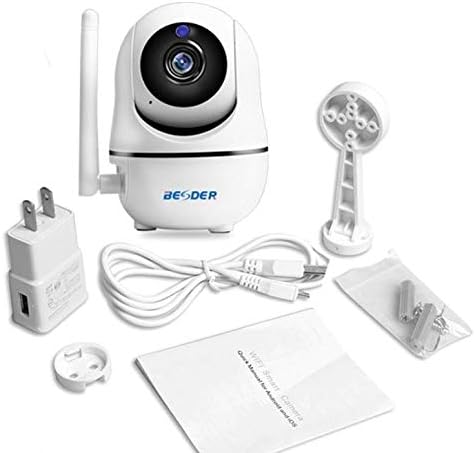
Abbildung 1: Package contents of the BESDER Smart Home Security Camera, showing the camera unit, power adapter, USB cable, mounting bracket, screws, and the user manual.
Produkt überview
Familiarize yourself with the various components of your BESDER Smart Home Security Camera.
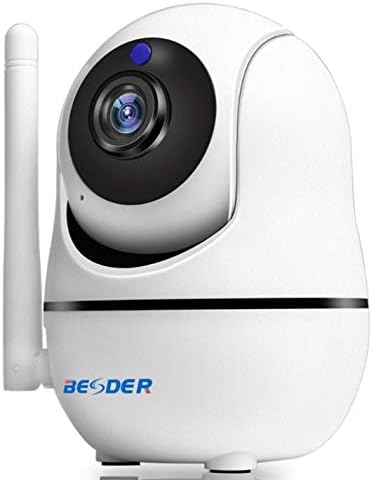
Abbildung 2: Front view of the BESDER Smart Home Security Camera, highlighting the camera lens, infrared LEDs for night vision, and the status indicator light.

Abbildung 3: Hinteren view of the BESDER Smart Home Security Camera, detailing the memory card slot (for microSD up to 128GB), reset button, built-in speaker, DC 5V power input, and the Ethernet network port for wired connection.
Schlüsselkomponenten:
- Kameraobjektiv: Nimmt Videoaufnahmen auftage.
- IR-LEDs: Infrarotbeleuchtung für Nachtsicht bereitstellen.
- Statusanzeigeleuchte: Indicates camera status (e.g., power on, network connection).
- Mikrofon: For audio input and two-way audio communication.
- Lautsprecher: For audio output and two-way audio communication.
- Speicherkartensteckplatz: Supports microSD cards up to 128GB for local storage.
- Reset-Taste: Dient zum Wiederherstellen der Werkseinstellungen.
- DC 5V Stromeingang: Wird an das mitgelieferte Netzteil angeschlossen.
- Network Port (RJ45): Für kabelgebundene Ethernet-Verbindungen.
Aufstellen
1. Einschalten
- Connect the DC 5V power adapter to the camera's power input port.
- Stecken Sie das Netzteil in eine Wandsteckdose.
- The camera will power on, and the status indicator light will illuminate. Wait for the camera to complete its self-test (it may pan and tilt).
2. Network Connection (Wired or Wireless)
The camera supports both wired (Ethernet) and wireless (Wi-Fi) connections.
Kabelverbindung:
- Connect one end of an Ethernet cable (not included) to the camera's network port.
- Verbinden Sie das andere Ende des Ethernet-Kabels mit Ihrem Router oder Netzwerk-Switch.
- Die Kamera verbindet sich automatisch mit dem Netzwerk.
Drahtlose (Wi-Fi) Verbindung:
- Download the recommended mobile application (e.g., XMEYE or iCsee) from your device's app store (iOS or Android).
- Registrieren Sie ein Konto und melden Sie sich an.
- Follow the in-app instructions to add your camera. This typically involves scanning a QR code on the camera or using a Wi-Fi configuration method (e.g., AP mode, SmartLink).
- Ensure your mobile device is connected to the 2.4GHz Wi-Fi network you intend to connect the camera to.
- Enter your Wi-Fi password when prompted by the app.
- The camera will attempt to connect to your Wi-Fi network. Once connected, the status indicator light will change (refer to app or camera manual for specific light indications).
3. Installation der microSD-Karte (optional)
- Ensure the camera is powered off before inserting or removing the microSD card.
- Locate the microSD card slot (refer to Figure 3).
- Schieben Sie die microSD-Karte vorsichtig mit den goldenen Kontakten nach unten in den Steckplatz, bis sie einrastet.
- Power on the camera. You may need to format the SD card via the mobile app settings for optimal performance.
Bedienungsanleitung
1. Mobile Monitoring (iOS/Android)
- Open the XMEYE or iCsee app on your smartphone.
- Wählen Sie Ihre Kamera aus der Geräteliste aus, um view das Live-Feed.
- Use the on-screen controls to pan (horizontal rotation) and tilt (vertical rotation) the camera lens.
- Wiedergabe von aufgezeichneten Lebensmittelntage stored on the microSD card or cloud service.
2. Zwei-Wege-Audio
- Während viewWenn Sie den Live-Feed in der App sehen, tippen Sie auf das Mikrofonsymbol, um über den Lautsprecher der Kamera zu sprechen.
- Tippen Sie auf das Lautsprechersymbol, um den Ton vom Mikrofon der Kamera zu hören.
3. Infrarot-Nachtsicht
- The camera automatically switches to IR night vision mode in low-light conditions.
- The IR LEDs will illuminate, providing clear black and white video up to 15 meters.
4. Bewegungserkennung und Alarme
- Aktivieren Sie die Bewegungserkennung in den App-Einstellungen.
- Configure sensitivity levels and detection zones as needed.
- When motion is detected, the camera can send push notifications to your phone and/or record footage.
5. Cloud-Dienst
- The camera supports cloud storage services (subscription may be required).
- Refer to the mobile app for details on activating and managing cloud storage.
Wartung
- Reinigung: Reinigen Sie Objektiv und Gehäuse der Kamera mit einem weichen, trockenen Tuch. Verwenden Sie keine flüssigen Reiniger oder Sprays.
- Firmware-Updates: Regularly check for firmware updates via the mobile app to ensure optimal performance and security.
- Platzierung: Ensure the camera is placed in a location where it is protected from direct water exposure and extreme temperatures.
- SD-Kartenverwaltung: Periodically check the status of your microSD card. If it becomes full, older recordings may be overwritten, or recording may stop.
Fehlerbehebung
| Problem | Mögliche Ursache | Lösung |
|---|---|---|
| Kamera offline/Kann keine WLAN-Verbindung herstellen | Falsches WLAN-Passwort; Kamera zu weit vom Router entfernt; Routerprobleme; 5-GHz-WLAN-Netzwerk. |
|
| Kein Bild/Schwarzer Bildschirm | Power issue; Network issue; Lens obstruction. |
|
| Zwei-Wege-Audio funktioniert nicht | Mikrofon/Lautsprecher in der App deaktiviert; Lautstärke zu niedrig; Netzwerkverzögerung. |
|
| Bewegungserkennung löst nicht aus | Motion detection disabled; Sensitivity too low; Incorrect detection zone. |
|
| SD-Karte zeichnet nicht auf | SD-Karte voll/beschädigt; Falsches Format; SD-Karte nicht richtig eingesetzt. |
|
Technische Daten
| Besonderheit | Detail |
|---|---|
| Modellname | BESDER Smart Home Security |
| Herstellerreferenz | ZX-X2-W/200W |
| Videoauflösung | Full HD 1080P (1920x1080) |
| Sensor | 1/2.8'' F22 CMOS sensor (for 1080P) |
| Videokomprimierung | H.264, supports dual stream, 0.1 – 6 Mpbs |
| Linse | 3.6 mm G7 (default) |
| IR-Nachtsichtentfernung | Max 15 meters (6 IR LEDs) |
| Konnektivität | WLAN (2.4 GHz), kabelgebundenes Ethernet |
| Lagerung | MicroSD card up to 128GB (not included), Cloud Service |
| Audio | Zwei-Wege-Audio (eingebautes Mikrofon und Lautsprecher) |
| Mobile Überwachung | iOS, Android (APP: XMEYE or iCsee) |
| Stromversorgung | Gleichstrom 5 V, 2 A |
| Arbeitstemperatur | -5 bis 60 °C (23 - 140 °F) |
| Maße | 6.39 x 4.33 x 3.11 cm (ungefähre Verpackungsabmessungen) |
Garantie und Support
For warranty information and technical support, please refer to the contact details provided with your purchase or visit the official BESDER webBewahren Sie Ihren Kaufbeleg als Kaufnachweis auf.
Hersteller: BESDER
Ask a question about this manual
Ask about setup, troubleshooting, compatibility, parts, safety, or missing instructions. Manuals+ will review the question and use this page’s manual context to help answer it.