
1. Produktüberschreitungview
The AMD Ryzen 5 3600XT is a high-performance 6-core, 12-thread desktop processor designed for the AM4 platform. It features a base clock speed of 3.8 GHz and a maximum boost clock of 4.5 GHz. This processor is unlocked for overclocking and supports PCIe 4.0 on compatible X570 and B550 motherboards. It also includes 35 MB of GameCache and supports DDR4-3200 memory.
The AMD Ryzen 5 3600XT comes bundled with the AMD Wraith Spire cooler, an air cooling solution designed to maintain optimal operating temperatures under typical workloads.

Abbildung 1.1: Retail packaging for the AMD Ryzen 5 3600XT processor. The box displays the Ryzen logo and processor series.
2. Einrichtung und Installation
Proper installation is crucial for the functionality and longevity of your processor. Ensure your motherboard is compatible with the AM4 socket and supports Ryzen 3000 series processors. For optimal performance, X570 or B550 chipsets are recommended to utilize PCIe 4.0 capabilities.
2.1. Motherboard-Kompatibilität
The AMD Ryzen 5 3600XT processor requires a motherboard with an AM4 socket. It is compatible with various chipsets, including X570, B550, X470, B450, X370, B350, and A320. For full feature support, including PCIe 4.0, X570 or B550 motherboards are recommended. Ensure your motherboard's BIOS is updated to support Ryzen 3000 series processors.
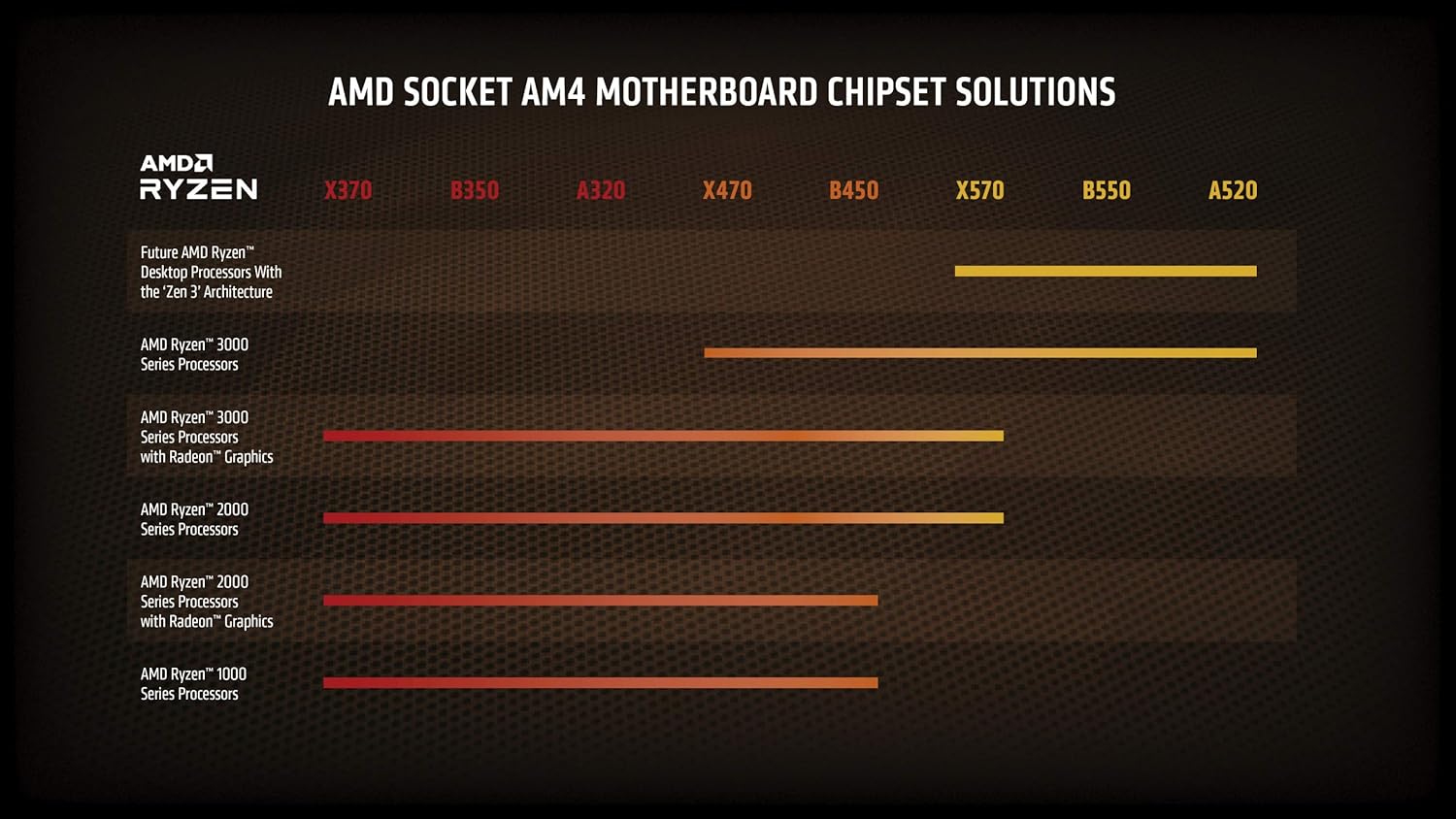
Abbildung 2.1: Chart illustrating AMD Socket AM4 motherboard chipset compatibility with different Ryzen processor generations. The Ryzen 3000 series is compatible with a wide range of chipsets.
2.2. Prozessorinstallation
- Bereiten Sie das Motherboard vor: Stellen Sie sicher, dass der Hebel des CPU-Sockels geöffnet ist.
- Prozessor ausrichten: Carefully align the gold triangle on the corner of the processor with the corresponding triangle on the motherboard's AM4 socket.
- Prozessor einsetzen: Senken Sie den Prozessor vorsichtig und gerade in den Sockel ab. Wenden Sie keine Gewalt an. Falls er sich nicht leicht einsetzen lässt, überprüfen Sie die Ausrichtung erneut.
- Prozessor sichern: Schließen Sie den Sockelhebel, um den Prozessor an seinem Platz zu befestigen.

Abbildung 2.2: Spitze view of the AMD Ryzen processor, showing the integrated heat spreader (IHS) and branding.

Abbildung 2.3: Abgewinkelt view of the AMD Ryzen processor, highlighting its physical form factor and pin grid array (PGA) design.
2.3. Cooler Installation (Wraith Spire)
The AMD Ryzen 5 3600XT includes a Wraith Spire cooler. This cooler comes with pre-applied thermal paste. If you are reusing a cooler or applying new thermal paste, ensure the CPU surface is clean before application.
- Motherboard-Halterungen entfernen: For AM4 sockets, remove the plastic retention brackets on either side of the CPU socket. Keep the backplate installed.
- Positionieren Sie den Kühler: Place the Wraith Spire cooler onto the CPU, aligning the four spring-loaded screws with the holes on the motherboard's backplate.
- Sichern Sie die Kühlbox: Tighten the screws in a diagonal pattern (e.g., top-left, bottom-right, top-right, bottom-left) until they are finger-tight. Do not overtighten.
- Lüfterkabel anschließen: Connect the cooler's 4-pin fan cable to the "CPU_FAN" header on your motherboard.

Abbildung 2.4: The AMD Wraith Spire CPU cooler, included with the Ryzen 5 3600XT processor, featuring a fan and heatsink assembly.
3. Bedienungsanleitung
Once installed, the AMD Ryzen 5 3600XT processor operates automatically within your system. Ensure your operating system and drivers are up to date for optimal performance.
3.1. Treiberinstallation
After installing your operating system, download and install the latest chipset drivers from the AMD official webWebsite. These drivers ensure proper communication between the processor and the motherboard, optimizing performance and stability.
3.2. Leistungsüberwachung
You can monitor your processor's temperature, clock speeds, and utilization using various software tools. AMD provides the Ryzen Master utility for advanced monitoring and configuration, including overclocking.
3.3. Übertakten (Für fortgeschrittene Benutzer)
The Ryzen 5 3600XT processor is unlocked for overclocking, allowing experienced users to potentially achieve higher clock speeds. Overclocking can increase performance but also increases power consumption and heat output. It may also void your warranty if not performed correctly. Refer to advanced guides and ensure adequate cooling before attempting to overclock.
4. Wartung
Regular maintenance helps ensure the longevity and optimal performance of your processor and cooling solution.
- Staubentfernung: Periodically clean dust from the Wraith Spire cooler's heatsink fins and fan blades using compressed air. Ensure the system is powered off and unplugged before cleaning.
- Wärmeleitpaste: The thermal paste applied between the CPU and cooler may degrade over several years. If you notice consistently high temperatures, consider reapplying fresh thermal paste. This requires carefully removing the cooler, cleaning both surfaces, and applying a new layer of thermal paste before reinstallation.
- Software-Updates: Keep your motherboard BIOS and chipset drivers updated to benefit from performance improvements and bug fixes.
5. Fehlerbehebung
In diesem Abschnitt werden häufig auftretende Probleme behandelt.
5.1. System startet nicht / Keine Anzeige
- Stromanschlüsse prüfen: Stellen Sie sicher, dass alle Stromkabel (24-Pin ATX, 8-Pin CPU) fest mit dem Motherboard und dem Netzteil verbunden sind.
- Komponenten neu einsetzen: Carefully reseat the CPU, RAM modules, and graphics card.
- Überprüfen Sie die Installation des Kühlers: Ensure the CPU cooler is properly installed and its fan cable is connected to the CPU_FAN header.
- BIOS/UEFI: Confirm your motherboard's BIOS/UEFI version supports the Ryzen 3000 series processor. An outdated BIOS can prevent booting.
5.2. Überhitzungsprobleme
- Check Cooler Contact: Ensure the CPU cooler is making proper contact with the CPU's integrated heat spreader (IHS). Verify screws are tightened correctly.
- Wärmeleitpaste: Confirm thermal paste was applied correctly and is not dried out.
- Luftstrom: Ensure adequate airflow within your PC case. Clean any dust buildup from the cooler and case fans.
- Lüftergeschwindigkeit: Check fan speed settings in your motherboard's BIOS/UEFI or using monitoring software.
5.3. Performance Degradation
- Drivers and BIOS: Ensure all chipset drivers and motherboard BIOS are up to date.
- Hintergrundprozesse: Check for excessive background applications consuming CPU resources.
- Thermische Drosselung: Monitor CPU temperatures. High temperatures can cause the CPU to reduce its clock speed to prevent damage.
- Energieeinstellungen: Verify your operating system's power plan is set to "High Performance" or a similar setting that allows the CPU to boost.
6. Spezifikationen
| Besonderheit | Detail |
|---|---|
| CPU Modell | AMD Ryzen 5 3600XT |
| CPU Cores / Threads | 6 Kerne / 12 Threads |
| Basistaktfrequenz | 3.8 GHz |
| Maximaler Boost-Takt | Bis zu 4.5 GHz |
| CPU-Sockel | AM4 |
| Gesamter L3-Cache | 32 MB |
| Gesamter L2-Cache | 3 MB |
| Standard-TDP | 95 W |
| Freigeschaltet für Übertaktung | Ja |
| PCIe-Version | PCIe 4.0 |
| Systemspeichertyp | DDR4 |
| Speicherkanal | 2 |
| Maximale Speichergeschwindigkeit | 3200 MHz |
| Inklusive Kühlbox | AMD Wraith Spire |
| Product Dimensions (Processor) | 1.57 x 0.24 x 5.28 Zoll |
| Item Weight (Processor) | 1.1 Pfund |

Abbildung 6.1: Performance comparison chart for the AMD Ryzen 5 3600XT, illustrating its capabilities in various computing tasks such as 3D rendering, video rendering, gaming, and single-thread performance.
7. Garantieinformationen
AMD processors typically come with a limited manufacturer's warranty. The duration and terms of the warranty may vary by region and retailer. Please retain your proof of purchase for warranty claims.
For detailed warranty information, including terms and conditions, please visit the official AMD webSiehe die Website oder die Ihrem Produkt beiliegende Garantiedokumentation.
8. Unterstützung
For further assistance, technical support, driver downloads, and additional product information, please visit the official AMD support resources:
- AMD-Unterstützung WebWebsite: Access drivers, software, and troubleshooting guides.
- AMD Ryzen Master-Dienstprogramm: For advanced processor control and monitoring.
- AMD Community Forums: Engage with other users and AMD experts.