
1. Einleitung
Thank you for choosing the MEDIACOM MCI 899 UHF PRO Wireless Microphone System. This system is designed to provide high-quality audio transmission with excellent reliability and ease of use. Featuring dual handheld microphones and a robust receiver, it is suitable for a variety of applications including home entertainment, stage performances, karaoke, and public speaking events. Please read this manual carefully to ensure proper setup, operation, and maintenance of your new wireless microphone system.
2. Produktüberschreitungview
2.1 Hauptmerkmale
- UHF Wireless Microphone System with Dual Handsets for Multifunctional Use
- 96 Selectable Frequency Channels to minimize interference in all environments
- Smooth Wireless Operation with a wide range of over 50 meters
- Each Handset has a display screen to indicate channel number and signal strength
- Ideal for indoor and outdoor use including home, stage shows, karaoke parties, educational and religious gatherings, etc.
- Cardioid and Omni Polar Patterns
2.2 Komponenten
The MEDIACOM MCI 899 UHF PRO system includes the following components:
- 1 x UHF-Funkempfänger
- 2 x Handfunkmikrofone
- 1 x Netzteil für Empfänger
- 1 x 6.35-mm-Audiokabel.
- 1 x Kurzanleitung

Image: The complete MEDIACOM MCI 899 UHF PRO Wireless Microphone System, showing the receiver unit and two handheld microphones.
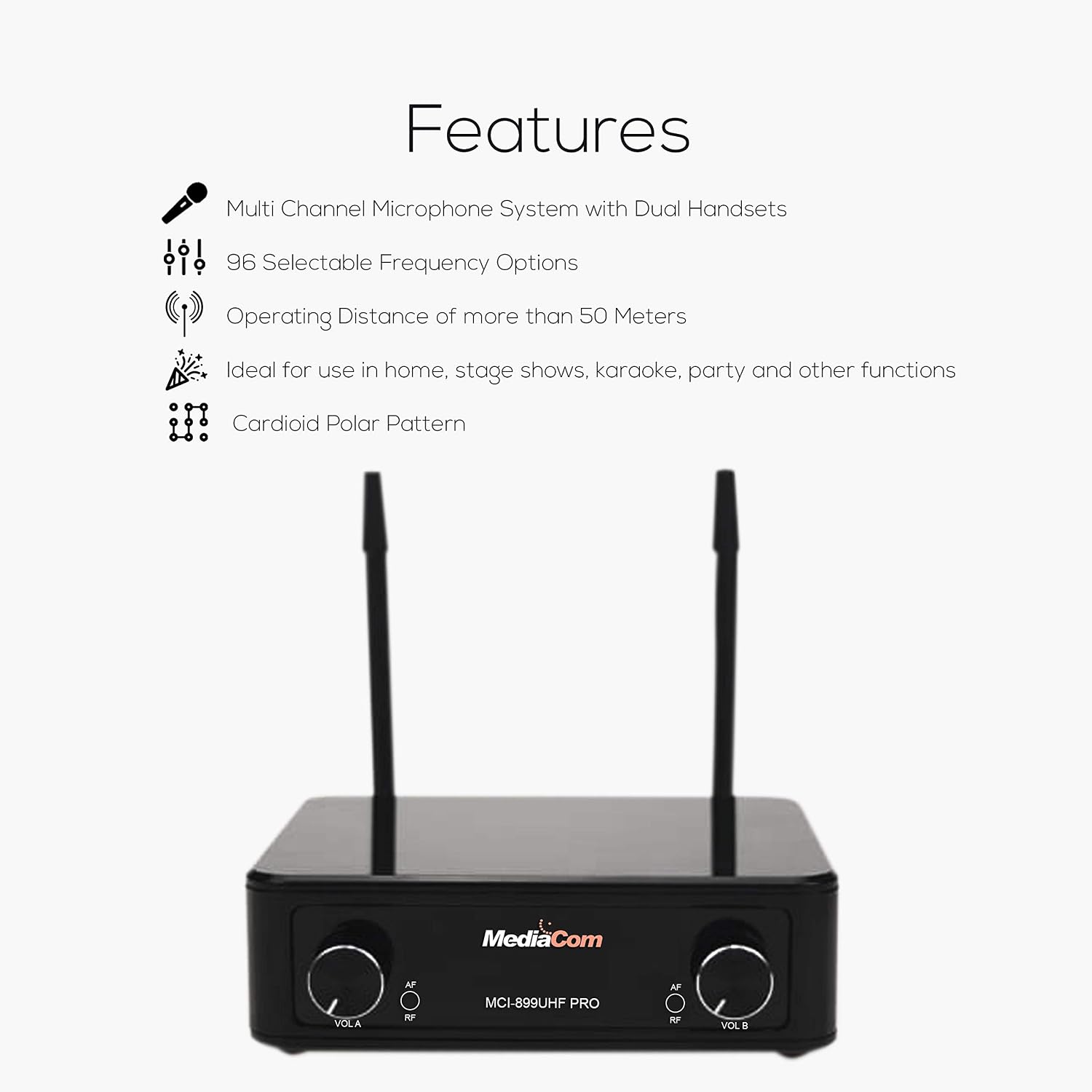
Image: Diagram illustrating the key features of the microphone system, including multi-channel support, selectable frequencies, and operating distance.
3. Einrichtungsanweisungen
3.1 Empfängeranschluss
- Stromanschluss: Connect the provided power adapter to the 'DC IN' port on the back of the receiver. Plug the adapter into a suitable power outlet.
- Audioausgang: Connect one end of the 6.35mm audio cable to the 'MIX OUT' port on the receiver. Connect the other end to the audio input (e.g., 'MIC IN', 'AUX IN') of your mixer, power amplifier, karaoke machine, or active speaker.
- Antennenaufbau: Ensure both antennas ('ANT-A' and 'ANT-B') are securely attached to the receiver and positioned vertically for optimal signal reception.
- Einschalten: Flip the 'ON/OFF' switch on the receiver to the 'ON' position. The power indicator light should illuminate.
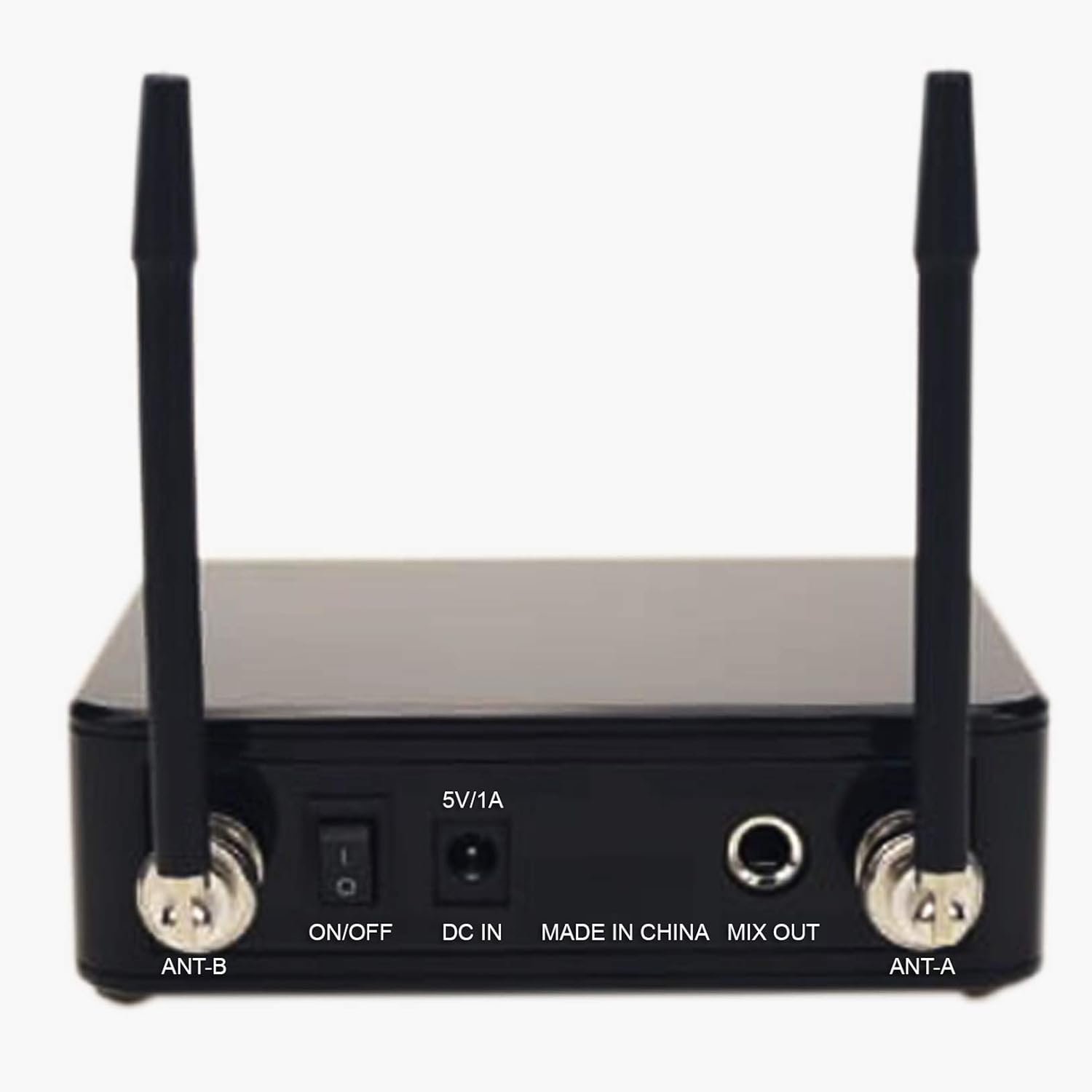
Image: Rear panel of the receiver, highlighting the ON/OFF switch, DC IN, MIX OUT, and antenna connections.

Image: A visual guide demonstrating how to connect the receiver to various audio devices such as a mixer, power amplifier, karaoke machine, or active speaker.
3.2 Mikrofon-Setup
- Einlegen der Batterie: Unscrew the bottom part of each microphone to access the battery compartment. Insert two AA batteries (not included) into each microphone, ensuring correct polarity (+/-).
- Einschalten: Slide the power switch on each microphone to the 'ON' position. The microphone display should light up, showing the channel number and signal strength.
- Kanalpaarung: The microphones should automatically pair with the receiver. If interference occurs, you can change the frequency channel on the microphone. Refer to the 'Operating Instructions' section for details on changing channels.

Bild: Eine detaillierte view of one of the handheld microphones, showing its power switch and display area.
4. Bedienungsanleitung
4.1 Grundlegende Bedienung
- Ein-/Ausschalten: Use the 'ON/OFF' switch on the receiver and the power switch on each microphone to turn the units on or off.
- Lautstärkeregelung: Adjust the volume for each microphone independently using the 'VOL A' and 'VOL B' knobs on the receiver.
- Signalanzeigen: The 'RF' (Radio Frequency) indicator on the receiver will light up when a microphone is connected and transmitting. The 'AF' (Audio Frequency) indicator will light up when audio is being received.
4.2 Changing Frequency Channels
If you experience interference, you can change the operating frequency of the microphones:
- On the microphone, locate the channel selection button (usually near the display).
- Press the button to cycle through the available 96 frequency channels.
- Observe the receiver's 'RF' indicator. When a clear channel is selected, the 'RF' indicator should be stable, and the audio quality should improve.
- Ensure both the microphone and receiver are on the same channel for proper operation.
4.3 Tipps für optimale Leistung
- Maintain a clear line of sight between the microphones and the receiver whenever possible.
- Vermeiden Sie es, den Empfänger in der Nähe von großen Metallgegenständen oder anderen elektronischen Geräten aufzustellen, die Störungen verursachen könnten.
- Keep the operating distance within 50 meters for best performance.
- Regularly check microphone battery levels to prevent unexpected power loss during use.
5. Wartung
5.1 Reinigung
- Empfänger und Mikrofone mit einem weichen, trockenen Tuch abwischen.
- Verwenden Sie keine flüssigen Reinigungsmittel oder Scheuermittel, da diese die Oberfläche oder die internen Bauteile beschädigen können.
5.2 Batteriewechsel
- Replace batteries in the microphones when the display indicates low power or when audio quality degrades.
- Always use fresh AA batteries and dispose of old batteries responsibly.
5.3 Speicherung
- Wenn die Mikrofone längere Zeit nicht benutzt werden, sollten die Batterien entfernt werden, um ein Auslaufen zu verhindern.
- Lagern Sie das System an einem kühlen, trockenen Ort, geschützt vor direkter Sonneneinstrahlung und extremen Temperaturen.
6. Fehlerbehebung
6.1 Keine Tonausgabe
- Überprüfen Sie die Leistung: Ensure both the receiver and microphones are powered on.
- Lautstärkepegel: Verify that the volume knobs on the receiver and the connected audio device are turned up.
- Kabelverbindung: Confirm the 6.35mm audio cable is securely connected from the receiver's 'MIX OUT' to the audio input of your sound system.
- Batteriestand: Check microphone battery levels and replace if low.
6.2 Interference or Poor Sound Quality
- Kanal wechseln: Select a different frequency channel on the microphone to avoid interference from other wireless devices.
- Distanz: Ensure the microphones are within the effective operating range (up to 50 meters) of the receiver.
- Hindernisse: Remove any large metal objects or other electronic devices between the microphones and the receiver.
- Antennenposition: Ensure receiver antennas are positioned vertically and unobstructed.
6.3 Microphone Not Pairing
- Aus- und Wiedereinschalten: Turn off both the microphone and receiver, then turn them back on.
- Batterieprüfung: Stellen Sie sicher, dass die Batterien richtig eingelegt sind und ausreichend geladen sind.
- Kanalkonflikt: Verify that the microphone and receiver are attempting to connect on compatible channels.
7. Spezifikationen
| Spezifikation | Detail |
|---|---|
| Marke | MEDIACOM |
| Modellname | MCI 899 |
| Teilenummer | MCI899U |
| Produkttypname | UHF Multi-Channel Wireless Microphones |
| Konnektivitätstechnologie | Kabellos |
| Steckertyp | 6.35 mm Klinke |
| Besonderheit | Kabellos |
| Im Lieferumfang enthaltene Komponenten | Kurzanleitung |
| Richtcharakteristik | Cardioid, Omni |
| Mikrofon-Formfaktor | Handgerät |
| Stromquelle | Batteriebetrieben |
| Material | Semi-metal |
| Signal-Rausch-Verhältnis | 80 dB |
| Hardware-Plattform | Karaoke Maschine |
| Anzahl der Kanäle | 96 |
| Frequenzbereich | 20 Hz - 20 kHz |
| Hersteller | MEDIACOM |
8. Garantie und Support
8.1 Garantieinformationen
This MEDIACOM MCI 899 UHF PRO Wireless Microphone System comes with a manufacturer's warranty of two years from the date of purchase. This warranty covers defects in materials and workmanship under normal use. Please retain your proof of purchase for warranty claims.
Die Garantie erstreckt sich nicht auf Schäden aufgrund von:
- Unsachgemäße Installation oder Bedienung.
- Unfallschäden, Missbrauch, Zweckentfremdung oder Vernachlässigung.
- Repairs or modifications performed by unauthorized service personnel.
- Normale Abnutzung.
8.2 Kundendienst
For technical assistance, troubleshooting beyond this manual, or warranty inquiries, please contact MEDIACOM customer support. Refer to the contact information provided with your product packaging or visit the official MEDIACOM webWebsite für Supportdetails.