
Einführung
This manual provides essential instructions for the safe and efficient use of your Otech rechargeable battery, specifically designed for the Sennheiser HDI 550 wireless headset. Please read this manual thoroughly before installation and operation.
Produkt überview
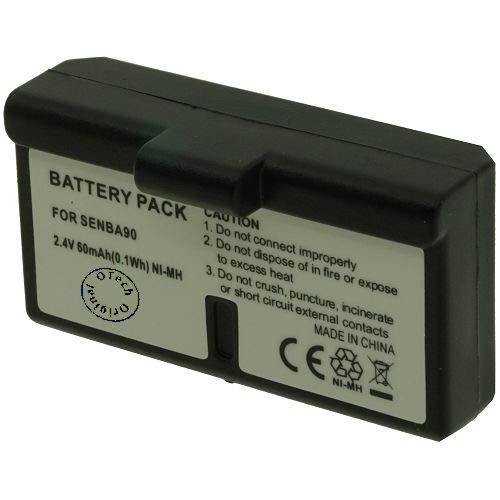
Abbildung 1: The Otech rechargeable battery, model 2SNH02-13106668, designed for Sennheiser HDI 550 wireless headsets. This image shows the compact black casing with visible battery cells and the 'Otech Original' logo.
The Otech battery (Model: 2SNH02-13106668) is a 2.4 Volt rechargeable power source intended as a replacement or spare for the Sennheiser HDI 550 wireless headset. It is designed to provide reliable power for extended listening sessions.
Setup und Installation
- Power Off Headset: Ensure your Sennheiser HDI 550 wireless headset is completely powered off before attempting battery installation or removal.
- Suchen Sie das Batteriefach: Refer to your Sennheiser HDI 550 headset's original manual to locate and open the battery compartment. This is typically found on one of the earcups.
- Alte Batterie entfernen (falls zutreffend): Carefully remove the existing battery, noting its orientation.
- Neue Batterie einlegen: Insert the Otech battery into the compartment, ensuring the polarity (+ and - terminals) matches the indicators inside the compartment. Do not force the battery.
- Fach schließen: Schließen Sie den Batteriefachdeckel sicher.
- Grundgebühr: It is recommended to fully charge the new battery before its first use. Place the headset on its charging base or connect it to its charger as per the Sennheiser HDI 550 instructions.
Wichtig: Always handle batteries with care. Do not short-circuit, puncture, or expose the battery to extreme temperatures.
Bedienungsanleitung
Laden des Akkus
- Use only the original Sennheiser HDI 550 charging base or charger.
- Place the headset on the charging base. Ensure the charging indicator on your headset or base illuminates, indicating proper connection and charging.
- A full charge typically takes several hours. Refer to your headset's manual for specific charging times and indicator meanings.
- Avoid overcharging by removing the headset from the charger once fully charged, especially for prolonged periods.
Akkulaufzeit und Nutzung
- The battery provides power for your wireless headset. Actual operating time varies based on usage volume, distance from the transmitter, and other environmental factors.
- When the headset indicates low battery, recharge it promptly to avoid interruption of use.
Wartung und Pflege
- Lagerung: If storing the battery for an extended period, ensure it is partially charged (around 50%) and stored in a cool, dry place. Avoid full discharge or full charge during long-term storage.
- Reinigung: Keep the battery contacts clean and dry. Use a soft, dry cloth to wipe away any dust or debris.
- Temperatur: Avoid exposing the battery to extreme temperatures (hot or cold), as this can degrade performance and shorten its lifespan.
- Entsorgung: Entsorgen Sie alte oder beschädigte Batterien umweltgerecht gemäß den örtlichen Bestimmungen. Batterien dürfen nicht im Hausmüll entsorgt werden.
Fehlerbehebung
| Problem | Mögliche Ursache | Lösung |
|---|---|---|
| Headset not powering on after battery installation. | Battery not inserted correctly; Battery not charged; Faulty battery. |
|
| Akku lädt nicht. | Improper connection to charging base; Dirty contacts; Faulty charging base/cable; Faulty battery. |
|
| Kurze Akkulaufzeit. | Battery not fully charged; Battery nearing end of lifespan; High volume usage. |
|
Technische Daten
- Marke: Otech
- Modellnummer: 2SNH02-13106668
- Kompatibilität: Sennheiser HDI 550 Wireless Headset
- Bandtage: 2.4 Volt
- Anzahl der Artikel: 1
- ASIN: B08C7583K9
- Als Erstes verfügbar: 25. September 2021
Garantie und Support
Informationen zur Garantie und zum technischen Support finden Sie in der mitgelieferten Dokumentation oder wenden Sie sich direkt an den Händler/Hersteller. Bewahren Sie Ihren Kaufbeleg für Garantieansprüche auf.