
1. Einleitung
This manual provides comprehensive instructions for the proper use, setup, and maintenance of your SMARTEK SW-832 Smartwatch. Please read this manual thoroughly before operating the device to ensure optimal performance and longevity.
The SMARTEK SW-832 is a versatile smartwatch designed to integrate with your mobile communication and activity tracking needs. It features Bluetooth connectivity, a touchscreen interface, and the capability to function as a standalone mobile device with a Micro-SIM card.
2. Packungsinhalt
Prüfen Sie, ob alle Artikel in Ihrer Produktverpackung enthalten sind:
- SMARTEK SW-832 Smartwatch
- Ladekabel
- Benutzerhandbuch (dieses Dokument)
- 32GB Micro SD Card (if included in your specific package)
3. Gerät überview
Familiarize yourself with the physical components of your SMARTEK SW-832 Smartwatch.
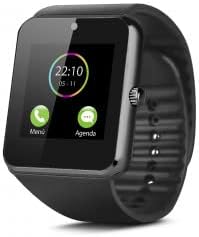
This image displays the SMARTEK SW-832 Smartwatch from the front. The square touchscreen shows a digital clock (22:10) and two icons labeled 'Menú' (Menu) and 'Agenda' (Calendar). A circular physical button is visible on the right side of the watch casing. The watch features a black silicone strap.
- Touchscreen-Display: Hauptschnittstelle für die Interaktion.
- Ein-/Ausschalter/Home-Taste: Typically located on the side, used for powering on/off and returning to the home screen.
- Mikrofon: For calls and voice input.
- Lautsprecher: For call audio and notifications.
- Ladeanschluss: Zum Anschließen des Ladekabels.
- SIM-Kartensteckplatz: For inserting a Micro-SIM card.
- Micro-SD-Kartensteckplatz: Zur Erweiterung des Speicherplatzes.
- Kamera: Integrated camera for capturing images.
4. Einrichtung
4.1 Aufladen des Geräts
- Schließen Sie das Ladekabel an den Ladeanschluss der Smartwatch an.
- Verbinden Sie das andere Ende des Kabels mit einem kompatiblen USB-Netzteil oder einem USB-Anschluss Ihres Computers.
- Laden Sie das Gerät vor der ersten Verwendung vollständig auf. Eine vollständige Ladung dauert in der Regel etwa 2–3 Stunden. Der Ladestatus wird auf dem Display angezeigt.
4.2 Inserting SIM Card (Optional)
To use the smartwatch as a standalone phone, insert a Micro-SIM card.
- Ensure the smartwatch is powered off.
- Locate the SIM card slot, usually on the side or under the back cover. Refer to the device diagram for exact location.
- Öffnen Sie vorsichtig die Abdeckung des SIM-Kartensteckplatzes.
- Insert a Micro-SIM card with the gold contacts facing down and the notched corner aligned correctly.
- Drücken Sie die SIM-Karte vorsichtig hinein, bis sie einrastet.
- Schließen Sie die Abdeckung des SIM-Kartensteckplatzes sorgfältig.
4.3 Inserting Micro SD Card (Optional)
To expand storage for photos, music, and other files, insert a Micro SD card (up to 32GB supported).
- Ensure the smartwatch is powered off.
- Locate the Micro SD card slot, often adjacent to the SIM card slot.
- Carefully open the Micro SD card slot cover.
- Insert the Micro SD card with the gold contacts facing down.
- Drücken Sie vorsichtig auf die Karte, bis sie einrastet.
- Close the Micro SD card slot cover securely.
4.4 Ein-/Ausschalten
- So schalten Sie das Gerät ein: Halten Sie den Ein-/Ausschalter gedrückt, bis der Bildschirm aufleuchtet.
- So schalten Sie das Gerät aus: Press and hold the Power button until a power-off menu appears. Select "Power Off" or similar option on the screen.
4.5 Kopplung mit Smartphone (Bluetooth)
To extend functionality and receive notifications from your smartphone, pair the smartwatch via Bluetooth.
- Stellen Sie sicher, dass Bluetooth sowohl auf Ihrer Smartwatch als auch auf Ihrem Smartphone aktiviert ist.
- On your smartwatch, navigate to the Bluetooth settings menu.
- Suchen Sie auf Ihrem Smartphone nach verfügbaren Bluetooth-Geräten.
- Select "SW-832" or a similar device name from the list on your smartphone.
- Bestätigen Sie die Kopplungsanfrage auf beiden Geräten, falls Sie dazu aufgefordert werden.
- For full functionality, you may need to install a companion application on your smartphone. Refer to the smartwatch's on-screen instructions or packaging for app details.
5. Bedienung der Smartwatch
5.1 Grundlegende Navigation
- Touch-Screen: Tap to select items, swipe left/right/up/down to navigate through menus and screens.
- Ein-/Ausschalter/Home-Taste: Press once to return to the home screen.
5.2 Anrufe tätigen und entgegennehmen
- With SIM Card: Access the Dialer application to make calls directly from the smartwatch.
- Via Bluetooth (Paired with Smartphone): When paired, you can answer incoming calls or initiate calls through the smartwatch, which will route audio through its speaker and microphone.
5.3 Senden und Empfangen von Nachrichten
- With SIM Card: Use the Messaging application to send and receive SMS messages.
- Via Bluetooth (Paired with Smartphone): Receive notifications for incoming messages from your smartphone. Some functionality may allow for quick replies or viewing full messages.
5.4-Kamera-Funktionalität
Access the Camera application from the main menu. Tap the screen to take a photo. Images are saved to the internal memory or the inserted Micro SD card.
5.5 Musiksteuerung
When paired with your smartphone, the smartwatch can control music playback (play, pause, skip tracks) on your phone. If a Micro SD card with music files is inserted, the smartwatch can play music directly.
5.6 Aktivitäts-Tracker
The smartwatch includes an activity tracker to monitor steps, distance, and calories. Access the dedicated application to view Ihre täglichen Aktivitätsdaten.
5.7 Benachrichtigungen
When paired with your smartphone, the smartwatch will display notifications for calls, messages, and other applications. Manage notification settings through the companion app on your smartphone.
5.8 Internet Browsing (with SIM)
If a SIM card with data connectivity is inserted, you can access basic internet browsing functionality through the built-in browser application.
6. Wartung
6.1 Reinigung
- Reinigen Sie Bildschirm und Gehäuse der Smartwatch mit einem weichen, fusselfreien Tuch.
- Vermeiden Sie die Verwendung von aggressiven Chemikalien, Scheuermitteln oder Aerosolsprays.
- Tauchen Sie das Gerät nicht in Wasser.
6.2 Batteriepflege
- Vermeiden Sie extreme Temperaturen, da diese die Batterielebensdauer beeinträchtigen können.
- Laden Sie den Akku regelmäßig auf, vermeiden Sie es jedoch, ihn über längere Zeiträume vollständig entladen zu lassen.
- Verwenden Sie ausschließlich das mitgelieferte Ladekabel oder ein zertifiziertes, kompatibles Ladegerät.
6.3 Speicherung
When storing the smartwatch for an extended period, ensure it is partially charged (around 50%) and stored in a cool, dry place.
7. Fehlerbehebung
| Problem | Mögliche Lösung |
|---|---|
| Gerät lässt sich nicht einschalten. | Stellen Sie sicher, dass der Akku geladen ist. Schließen Sie ihn an das Ladegerät an und versuchen Sie es erneut. |
| Kopplung mit Smartphone nicht möglich. |
|
| SIM-Karte nicht erkannt. |
|
| Der Bildschirm reagiert nicht. | Perform a soft reset by pressing and holding the Power button until the device restarts. If unresponsive, allow the battery to fully discharge and then recharge. |
| Schlechte Akkulaufzeit |
|
8. Spezifikationen
| Besonderheit | Detail |
|---|---|
| Modell | SMARTEK SW-832 |
| Prozessor | MTK626111D |
| Anzeige | 1.54 inch IPS LCD, 240 x 240 pixels |
| GSM-Bänder | 850/900/1800/1900 MHz |
| Bluetooth-Version | 4.0 |
| Batterie | 380 mAh 3.7V Lithium-Polymer |
| Nutzungsdauer | Bis zu 72 Stunden (bei normalem Gebrauch) |
| RAM | 64 MB |
| Interner Speicher (ROM) | 64 MB |
| Erweiterbarer Speicher | Bis zu 32 GB über Micro-SD-Karte |
| SIM-Kartentyp | Micro-SIM |
| Kamera | 1.3 Megapixel |
| Gewicht | 65 Gramm |
| Abmessungen (L x B x H) | 46 x 42 x 11.5 mm |
| Betriebssystem | Proprietary OS with smartphone connectivity features |
| Kompatible Geräte | Smartphones, Tablets (Android/iOS via Bluetooth) |
9. Garantie und Support
For warranty information, please refer to the warranty card included with your purchase or visit the official SMARTEK website. Support contact details are typically provided with your product documentation or on the manufacturer's webWebsite.
Bitte bewahren Sie Ihren Kaufbeleg für Garantieansprüche auf.