1. Produktüberschreitungview
The Philips SRP5016/10 is a modern and elegant 6-in-1 universal remote control designed to simplify your home entertainment experience. It allows you to control up to six different devices, such as televisions, DTVs, DVRs, home theater systems, soundbars, and streaming devices. This remote features a learning function, enabling it to receive and store infrared codes from your original remote controls, providing comprehensive control over various brands and models.
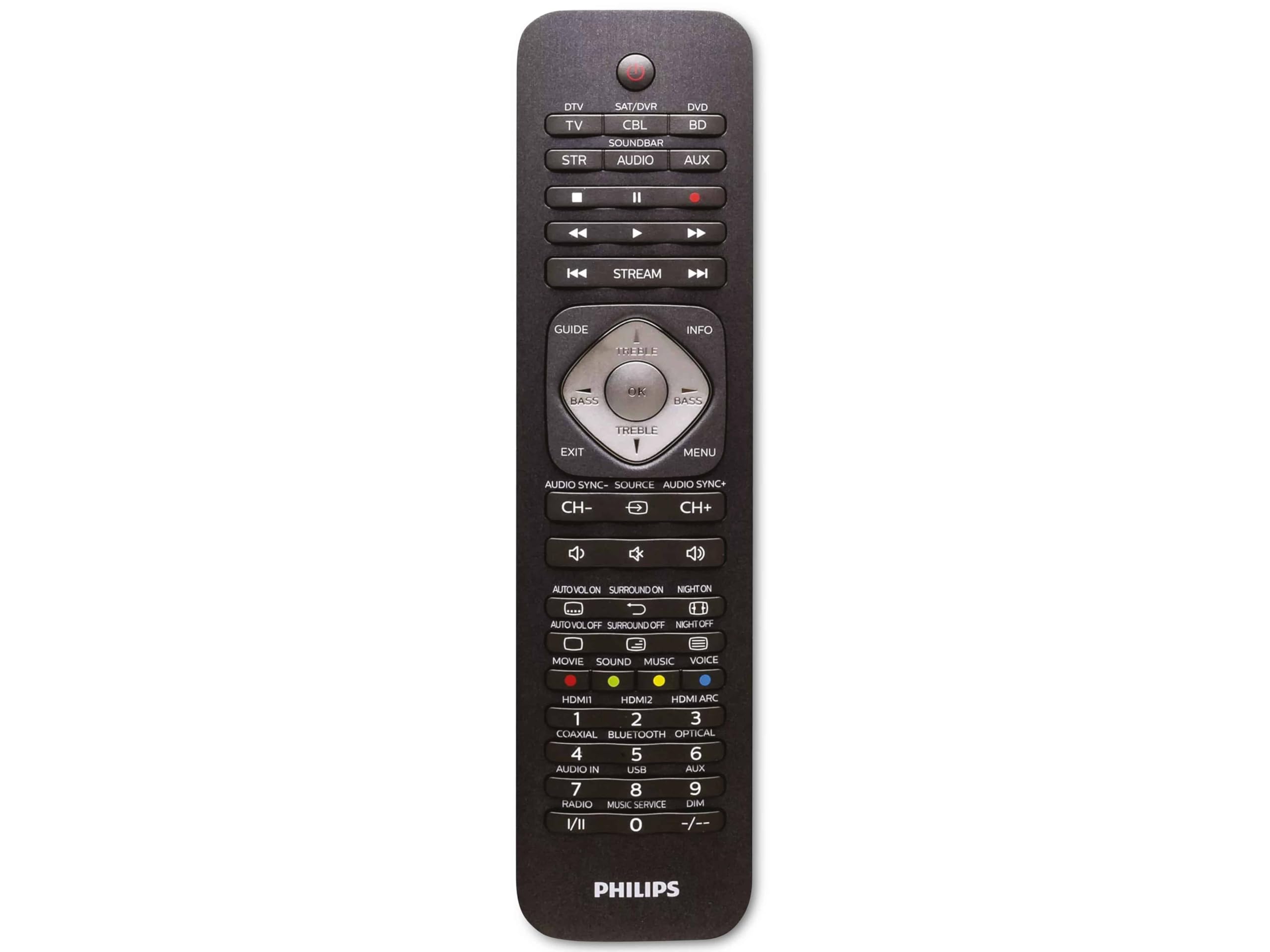
Image 1.1: Philips SRP5016/10 6-in-1 Universal Remote Control. This image displays the front view of the black universal remote control, highlighting its ergonomic design and button layout.
2. Einrichtung
2.1. Einlegen der Batterie
- Öffnen Sie die Abdeckung des Batteriefachs auf der Rückseite der Fernbedienung.
- Legen Sie zwei AAA-Batterien ein und achten Sie dabei auf die richtige Polarität (+ und -), wie im Batteriefach angegeben.
- Schließen Sie den Batteriefachdeckel fest.
Notiz: Batterien sind nicht im Lieferumfang enthalten und müssen separat erworben werden.
2.2. Programmiergeräte
The Philips SRP5016/10 can be programmed using either direct code entry or the learning function.
2.2.1. Direct Code Entry (Recommended for common brands)
- Schalten Sie das Gerät ein, das Sie steuern möchten (z. B. Fernseher, DVD-Player).
- Press and hold the desired device button on the universal remote (e.g., TV, DVD) for approximately 3 seconds until the device button lights up.
- Enter the 4-digit code for your device's brand (refer to the code list provided with your remote, if available, or search online for Philips universal remote codes).
- If the device turns off or responds, the code is correct. Press the device button again to save the code. If not, try the next code for your brand.
2.2.2. Learning Function (For devices not in the code list or advanced functions)
- Place the universal remote and your original remote control head-to-head, approximately 1-3 cm apart.
- Press and hold the desired device button on the universal remote (e.g., TV) for approximately 3 seconds until the device button lights up.
- Halten Sie die LERNEN button on the universal remote until the device button starts blinking.
- On your original remote, press the button you wish to teach (e.g., LEISTUNG). The device button on the universal remote will blink rapidly and then stay solid, indicating successful learning.
- Repeat step 4 for all other buttons you wish to learn.
- Drücken Sie die LERNEN button again to exit learning mode.
3. Bedienungsanleitung
3.1. Selecting a Device
To control a specific device, press the corresponding device button (e.g., TV, DVD, SA, AUX, SOUNDBAR, STROM) once. The selected device button will light up briefly to confirm your selection. You can then use the remote's buttons to control that device.
3.2. Grundfunktionen
- LEISTUNG: Schaltet das ausgewählte Gerät ein oder aus.
- LAUTSTÄRKE +/-: Adjusts the volume of the selected audio device.
- KANAL +/-: Changes channels on the selected TV or DTV device.
- STUMM: Schaltet den Ton stumm.
- ZAHLTASTEN (0-9): Für direkte Kanaleingabe oder andere numerische Eingaben.
- NAVIGATION (Arrow buttons, OK): Zur Menünavigation und -auswahl.
4. Wartung
4.1. Batteriewechsel
When the remote control's range decreases or buttons become unresponsive, it is time to replace the batteries. Follow the battery installation steps in Section 2.1. Always replace both AAA batteries simultaneously with new ones.
4.2. Reinigung
Reinigen Sie die Fernbedienung mit einem weichen, trockenen Tuch. Bei hartnäckigem Schmutz leicht andrücken.ampen the cloth with water or a mild cleaning solution. Avoid using abrasive cleaners, solvents, or alcohol, as these can damage the remote's surface or internal components.
5. Fehlerbehebung
- Fernbedienung funktioniert nicht:
- Prüfen Sie, ob die Batterien richtig eingelegt und nicht leer sind. Tauschen Sie sie gegebenenfalls aus.
- Stellen Sie sicher, dass sich zwischen der Fernbedienung und dem Gerät keine Hindernisse befinden.
- Verify that the correct device button (e.g., TV, DVD) is selected.
- Gerät reagiert nicht auf Befehle:
- The device code may be incorrect. Try reprogramming the device using a different code from the code list or use the learning function.
- Ensure the remote's infrared emitter is pointed directly at the device's infrared receiver.
- Lernfunktion funktioniert nicht:
- Ensure the original remote's batteries are fresh and it is functioning correctly.
- Make sure the remotes are positioned correctly (head-to-head, 1-3 cm apart) during the learning process.
- Try learning the button again. Some original remotes have weaker IR signals that require multiple attempts.
6. Spezifikationen
| Besonderheit | Spezifikation |
|---|---|
| Marke | Philips |
| Modellname | 6-in-1 |
| Modellnummer | SRP5016/10 |
| Kompatible Geräte | Home Theater, DVD/Blu-ray Player, SoundBar, Television, Streaming Device |
| Besonderheit | Universelle Lernfunktion |
| Konnektivitätstechnologie | Infrarot |
| Maximum Number of Supported Devices | 6 |
| Controllertyp | Tastensteuerung |
| Anzahl der Tasten | Not specified (typical universal remote layout) |
| Maximale Reichweite | 10 Meter |
| Stromquelle | 2 x AAA-Batterien (nicht enthalten) |
| Materialtyp | Plastik |
| Technische Daten | 21.4 x 5.3 x 2.2 cm |
| Produktgewicht | 130 g |
7. Garantie und Support
For warranty information, please refer to the documentation provided at the time of purchase or contact your retailer. Philips offers customer support for their products. If you encounter issues that cannot be resolved using this manual, please visit the official Philips support webWebsite oder wenden Sie sich an den Kundendienst, um Unterstützung zu erhalten.
Bitte bewahren Sie Ihren Kaufbeleg für Garantieansprüche auf.