
1. Einleitung
This manual provides instructions for the Powerextra D-Tap Charger, designed for V Mount, V Lock, and Gold Mount batteries. It ensures efficient and safe charging for compatible camera batteries and other devices that utilize a D-Tap port for charging.

Image 1.1: Powerextra D-Tap Charger with its integrated D-Tap cable.
2. Packungsinhalt
Überprüfen Sie, ob alle Artikel in Ihrem Paket vorhanden sind:
- 1 x Powerextra D-Tap Charger
- 1 x 100cm AC Charging Cable
- 1 x Mikrofaser-Reinigungstuch.

Image 2.1: The D-Tap charger, AC power cable, and microfiber cloth included in the package.
3. Spezifikationen
| Besonderheit | Spezifikation |
|---|---|
| AC-Eingang | 100–240 V/0.8 A |
| DC-Ausgang | 16.8V-2.0A |
| Ausgangsvolumentage | 16.8 Volt |
| Artikelgewicht | 8.1 Unzen (ca. 230 g) |
| Verpackungsabmessungen | 6.14 x 3.58 x 1.46 Zoll |
| Zertifizierungen | CE |
4. Einrichtung
Follow these steps to set up your D-Tap Charger:
- Schließen Sie das Netzkabel an: Insert the included 100cm AC charging cable into the power input port on the charger unit.
- An die Steckdose anschließen: Plug the other end of the AC charging cable into a standard wall power outlet (100-240V).
- An die Batterie anschließen: Insert the D-Tap connector from the charger into the D-Tap port on your compatible V Mount, V Lock, or Gold Mount battery. Ensure a secure connection.

Image 4.1: The D-Tap connector for battery connection.


Abbildung 4.2: Beispielamples of compatible V-Mount, Gold Mount, and other D-Tap port batteries.
5. Bedienungsanleitung
Once the charger is connected to a power source and a compatible battery, it will begin charging automatically.
- Ladeanzeige: The charger features an LED indicator light to show the charging status.
- Rotlicht: Zeigt an, dass der Akku gerade geladen wird.
- Grünes Licht: Zeigt an, dass der Akku vollständig aufgeladen ist.
The charger utilizes automatic constant current control to optimize charging speed and prevent overcharging.
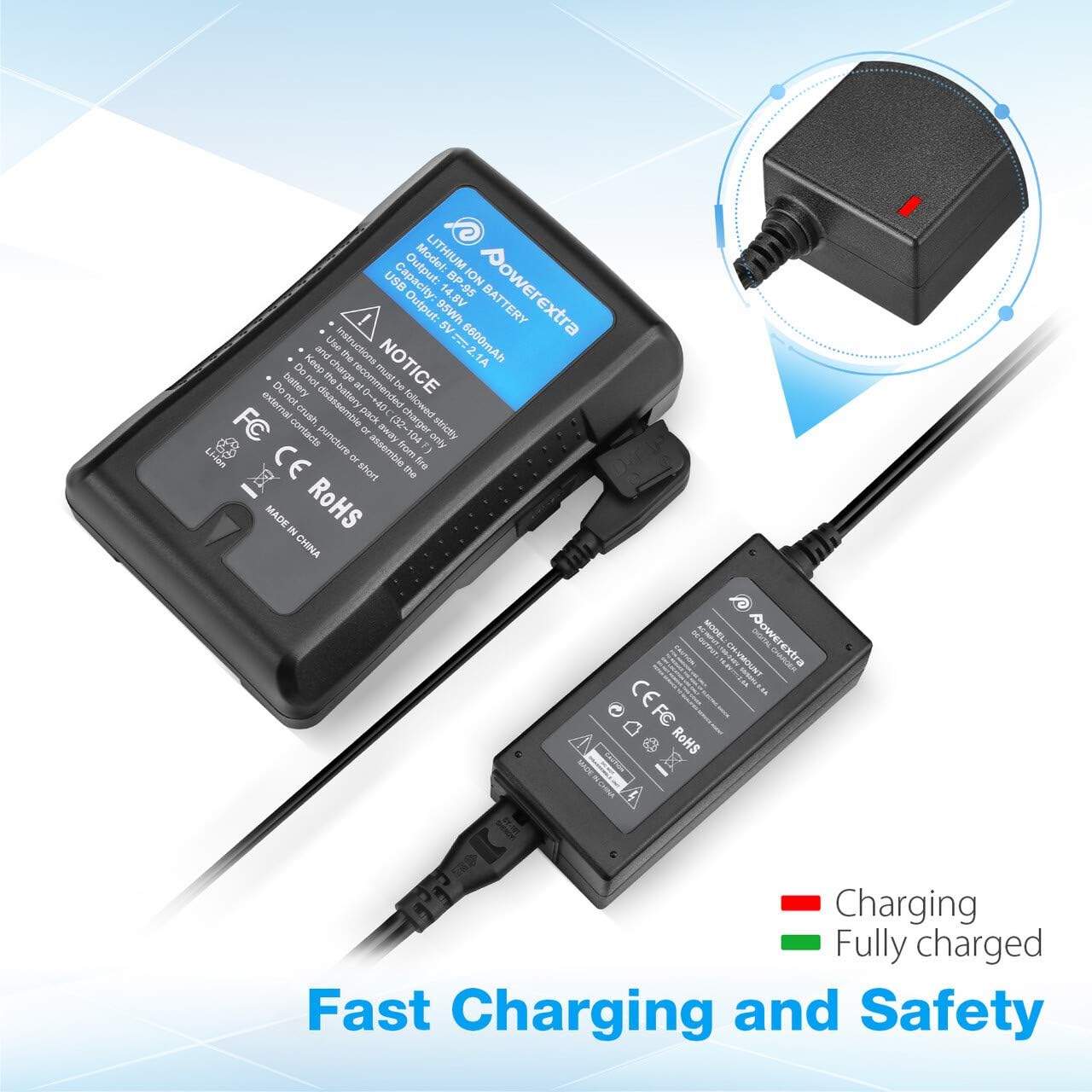
Image 5.1: Charger connected to a battery, with the red LED indicating active charging.
6. Sicherheitshinweise
To ensure safe operation and prolong the life of your charger and batteries, please observe the following safety precautions:
- Überladeschutz: The charger is designed to prevent batteries from overcharging.
- Kurzschlussschutz: Eingebaute Mechanismen schützen vor Kurzschlüssen.
- Überstromschutz: Schutzmaßnahmen gegen übermäßigen Stromfluss.
- Over Heating Protection: Verhindert eine Überhitzung des Ladegeräts während des Betriebs.
- Überentladungsschutz: (Note: This protection is typically a feature of the battery itself, but the charger is designed to work safely with such batteries.)
- Use the charger only with compatible V Mount, V Lock, or Gold Mount batteries.
- Das Ladegerät darf weder Feuchtigkeit, Regen noch extremen Temperaturen ausgesetzt werden.
- Das Ladegerät darf nicht zerlegt oder verändert werden. Alle Wartungsarbeiten dürfen nur von qualifiziertem Fachpersonal durchgeführt werden.
- Außerhalb der Reichweite von Kindern aufbewahren.

Image 6.1: Visual representation of the multi-protection features including short circuit, over discharge, over current, over charge, and over heating protection.
7. Wartung
Proper maintenance ensures optimal performance and longevity of your charger:
- Reinigung: Use the provided microfiber cleaning cloth to gently wipe the charger and cables. Do not use liquid cleaners or solvents.
- Lagerung: Bewahren Sie das Ladegerät bei Nichtgebrauch an einem kühlen, trockenen Ort fern von direkter Sonneneinstrahlung und extremen Temperaturen auf.
- Kabelpflege: Avoid bending or crimping the cables excessively. Always grasp the plug, not the cable, when disconnecting.
8. Fehlerbehebung
If you encounter issues with your Powerextra D-Tap Charger, refer to the following common problems and solutions:
- Ladegerät schaltet sich nicht ein:
- Ensure the AC power cable is securely connected to both the charger and the wall outlet.
- Prüfen Sie, ob die Wandsteckdose funktionsfähig ist, indem Sie sie mit einem anderen Gerät testen.
- Akku lädt nicht:
- Check that the D-Tap connector is fully and correctly inserted into the battery's D-Tap port.
- Confirm that the battery is compatible with the charger and is not fully charged already (green LED).
- Inspect the D-Tap cable and connector for any visible damage.
- Kontrollleuchte funktioniert nicht:
- If the charger is connected and the battery is not fully charged, but the light is off, contact customer support.
If the problem persists after attempting these solutions, please contact Powerextra customer support for further assistance.
9. Garantie und Support
Powerextra provides the following for this D-Tap Charger:
- Garantie: 12-month hassle-free warranty from the date of purchase.
- Unterstützung: Lebenslanger technischer Support.
For warranty claims, technical assistance, or any product-related inquiries, please contact Powerextra customer service through their official webWebsite oder den Händler, bei dem das Produkt gekauft wurde.