
1. Einleitung
This manual provides essential information for setting up, operating, maintaining, and troubleshooting your AVITA Essential NE14A2INC433-MB laptop. Please read this manual thoroughly before using your device to ensure proper functionality and longevity.
2. Produktüberschreitungview
The AVITA Essential NE14A2INC433-MB is a thin and light 14-inch laptop designed for everyday use. It features an aluminum body and a unique cloth design on the palm rest.

Figure 2.1: AVITA Essential Laptop (Matt Black) with screen and keyboard visible.
2.1 Anzeigefunktionen
The laptop is equipped with a 14-inch Full HD (1920x1080) anti-glare IPS display. The ultra-narrow bezels provide an immersive viewErfahrung.

Figure 2.2: Close-up of the AVITA Essential display, showcasing the FHD IPS Anti-Glare Panel and 4mm Narrow Bezels.
2.2 Anschlüsse und Konnektivität
The AVITA Essential laptop offers various ports for connectivity, including two USB 3.0 Type A ports, one full-size HDMI port, and a Micro SD card reader.
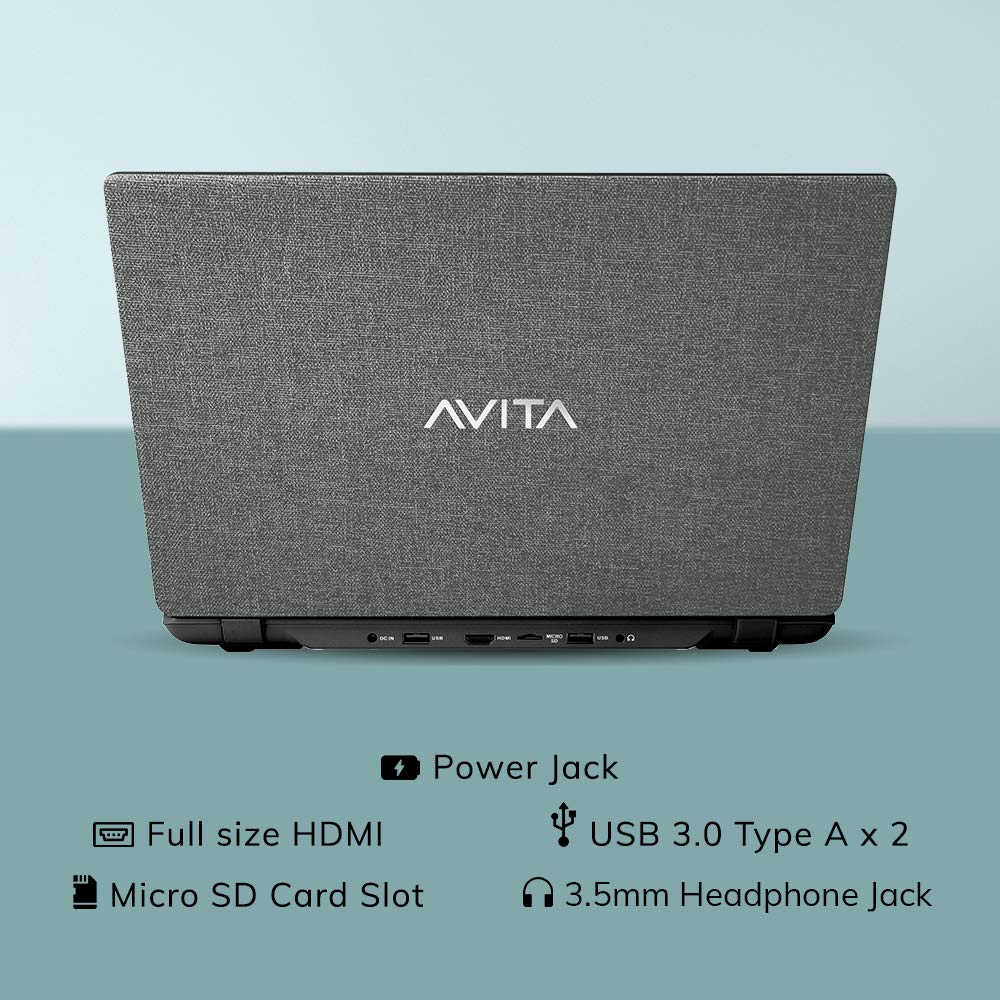
Abbildung 2.3: Rückseite view of the laptop detailing the available ports for external devices and power.
2.3 Keyboard and WebNocken
The laptop features a full-size island-style keyboard for comfortable typing and an integrated webKamera für Videokonferenzen.

Abbildung 2.4: Draufsicht view of the laptop's island-style keyboard and integrated webNocken.
2.4 Design-
The AVITA Essential boasts a unique cloth design, contributing to its aesthetic appeal.

Figure 2.5: The laptop in a closed position, highlighting its distinctive cloth design.
3. Einrichtung
- Auspacken: Carefully remove the laptop and all accessories from the packaging. Ensure all items listed in the "What's in the Box" section are present.
- Grundgebühr: Connect the AC adapter to the laptop's power jack and then to a power outlet. Allow the laptop to charge for at least 30 minutes before the first use, or until the battery indicator shows a sufficient charge.
- Einschalten: Open the laptop lid and press the power button. The laptop will begin the initial boot process.
- Windows 10 Home im S-Modus einrichten: Folgen Sie den Anweisungen auf dem Bildschirm, um die Einrichtung von Windows 10 Home im S-Modus abzuschließen. Dazu gehören die Auswahl Ihrer Region und Sprache, die Verbindung mit einem WLAN-Netzwerk und die Erstellung eines Benutzerkontos.
- Software-Updates: After initial setup, connect to the internet and allow Windows to download and install any available updates. This ensures optimal performance and security.
4. Bedienungsanleitung
4.1 Windows 10 Home im S-Modus
Your AVITA Essential laptop comes with Windows 10 Home in S Mode, which is designed for security and performance. In S Mode, you can only install apps from the Microsoft Store and must use Microsoft Edge for safe browsing. You can switch out of S Mode to regular Windows 10 Home at any time, but you cannot switch back.
The laptop is eligible for a free upgrade to Windows 11 when available. The upgrade rollout plan is scheduled to begin late in 2021 and continue into 2022, with specific timing varying by device.
4.2 Leistung und Speicherung
Powered by an Intel Celeron N4000 processor and 4GB DDR4 RAM, combined with a 128GB SSD, the laptop offers responsive performance for daily tasks. The Solid State Drive (SSD) ensures faster boot times and quicker application loading compared to traditional hard disk drives.
Video 4.1: This video highlights key features of the AVITA Essential laptop, including its FHD IPS display, narrow bezels, island-style keyboard, integrated webcam, and fast SSD storage. It demonstrates the laptop's sleek design and quick performance for everyday computing tasks.
Video 4.2: This video illustrates the benefits of a modern PC with Windows 10 and an SSD, emphasizing thin and light design, faster startups, improved efficiency, longer battery life, and enhanced durability and security due to fewer moving parts.
5. Wartung
- Reinigung: Verwenden Sie ein weiches, fusselfreies Tuch, um den Bildschirm und das Gehäuse zu reinigen. Hartnäckige Flecken lassen sich leicht mit einem feuchten Tuch entfernen.ampReinigen Sie das Tuch mit Wasser oder einem für Bildschirme geeigneten Reiniger. Vermeiden Sie aggressive Chemikalien.
- Batteriepflege: To maximize battery life, avoid fully discharging the battery frequently. It is recommended to keep the battery charged between 20% and 80%. Store the laptop in a cool, dry place when not in use for extended periods.
- Software-Updates: Prüfen Sie regelmäßig, ob Betriebssystem- und Treiberaktualisierungen verfügbar sind, und installieren Sie diese, um optimale Leistung und Sicherheit zu gewährleisten.
- Speicherverwaltung: In regelmäßigen Abständenview und löschen Sie unnötige files to free up storage space on the 128GB SSD. Consider using external storage or cloud services for large files.
- Belüftung: Ensure the laptop's vents are not obstructed to prevent overheating. Use the laptop on a hard, flat surface rather than soft furnishings.
6. Fehlerbehebung
6.1 Häufige Probleme und Lösungen
- Laptop lässt sich nicht einschalten:
- Stellen Sie sicher, dass das Netzteil sowohl mit dem Laptop als auch mit einer funktionierenden Steckdose fest verbunden ist.
- Überprüfen Sie die Funktionsfähigkeit der Steckdose, indem Sie ein anderes Gerät anschließen.
- If the battery is completely drained, allow it to charge for some time before attempting to power on.
- Langsame Leistung:
- Schließen Sie unnötige Anwendungen, die im Hintergrund laufen.
- Prüfen Sie, ob Windows-Updates ausstehen, und installieren Sie diese gegebenenfalls.
- Stellen Sie sicher, dass auf der SSD ausreichend freier Speicherplatz vorhanden ist.
- Führen Sie einen Systemscan auf Malware oder Viren durch.
- Probleme mit der Wi-Fi-Konnektivität:
- Starten Sie Ihren WLAN-Router und den Laptop neu.
- Prüfen Sie, ob WLAN in den Windows-Einstellungen aktiviert ist.
- Update Wi-Fi drivers from the AVITA support webWebsite.
- Windows 10 S Mode App Restrictions:
- Remember that in S Mode, only apps from the Microsoft Store can be installed.
- If you need to install apps from other sources, you must switch out of S Mode. This is a one-way process.
7. Spezifikationen
| Besonderheit | Detail |
|---|---|
| Marke | AVITA |
| Modellname | Essentiell |
| Modellnummer | NE14A2INC433-MB |
| Bildschirmgröße | 14 Zoll (35 cm) |
| Bildschirmauflösung | 1920 x 1080 (Full HD) |
| Anzeigetyp | FHD Anti-Glare IPS LED |
| Prozessor | Intel Celeron N4000 (1.10 GHz base, 2.60 GHz Max) |
| RAM-Speicher | 4 GB DDR4 |
| Lagerung | SSD mit 128 GB |
| Betriebssystem | Windows 10 Home im S-Modus |
| Grafik | Integrierte Intel UHD-Grafik 600 |
| Akkulaufzeit | Up to 6 Hours (as per MobileMark) |
| Gewicht | 1.37 kg |
| Häfen | 2x USB 3.0 Type A, 1x Full Size HDMI, Micro SD Card Reader |
| Kabellose Konnektivität | 802.11 b/g/n/ac Wi-Fi, Bluetooth 4.0 |
| WebNocken | Integrated Front Camera |
8. Garantie und Support
8.1 Garantieinformationen
Your AVITA Essential laptop comes with an 18+6 months onsite domestic warranty from AVITA. This warranty covers manufacturing defects and does not cover physical damage. For detailed terms and conditions, please refer to the warranty section provided with your product or visit the official AVITA support webWebsite.
8.2 Was ist in der Box?
Beim Auspacken sollten Sie die folgenden Artikel vorfinden:
- AVITA Essential Laptop
- Netzteil
- Benutzerhandbuch
- Benutzerhandbücher