
Einführung
Thank you for choosing the T'nB Feat True Wireless Bluetooth Earbuds. This manual provides essential information for the proper setup, operation, and maintenance of your device. Please read it carefully before use and retain it for future reference.
Packungsinhalt
Stellen Sie sicher, dass alle Artikel im Paket vorhanden sind:
- T'nB Feat True Wireless Bluetooth Earbuds (Left and Right)
- Ladeetui
- Micro-USB-Ladekabel
- Benutzerhandbuch (dieses Dokument)
Produkt überview
The T'nB Feat earbuds are designed for comfortable, wire-free audio. The compact charging case protects your earbuds and recharges them on the go.
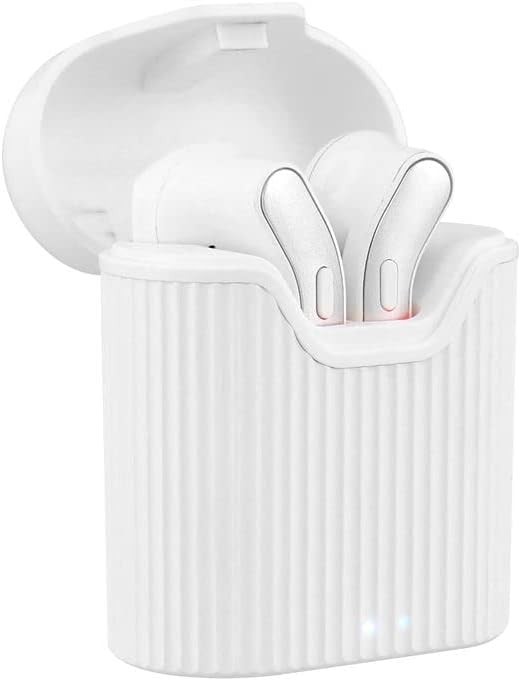
Image: T'nB Feat True Wireless Earbuds placed inside their open charging case, showing the earbuds and the interior of the case.

Image: The T'nB Feat True Wireless Earbuds charging case in a closed position, displaying its compact and portable design.
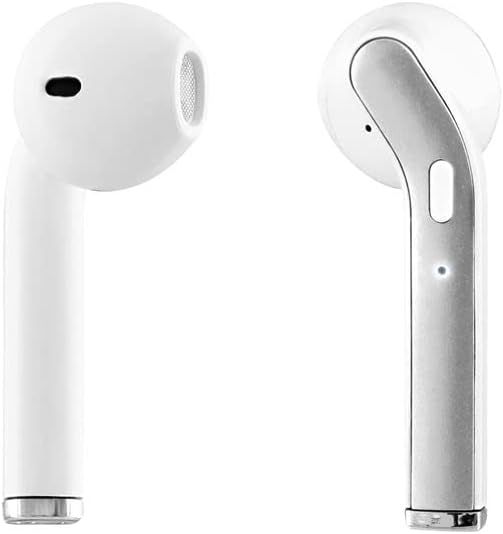
Bild: Eine Nahaufnahme view of the individual T'nB Feat True Wireless Earbuds, highlighting their ergonomic in-ear design.
Aufstellen
1. Aufladen der Ohrhörer und des Ladecase
Vor dem ersten Gebrauch die Ohrhörer und das Ladecase vollständig aufladen.
- Legen Sie die Ohrhörer in das Ladecase. Achten Sie darauf, dass sie richtig sitzen und Kontakt mit den Ladekontakten herstellen.
- Verbinden Sie das Micro-USB-Ladekabel mit dem Ladeanschluss am Gehäuse und das andere Ende mit einer USB-Stromquelle (z. B. USB-Anschluss am Computer, Netzteil).
- The indicator lights on the case and/or earbuds will show the charging status. Refer to the indicator light section for details (if applicable, otherwise assume standard behavior).
- Sobald das Gerät vollständig aufgeladen ist, trennen Sie das Ladekabel.
Notiz: A full charge provides approximately 5 hours of operating time for the earbuds.
2. Kopplung mit einem Bluetooth-Gerät
The earbuds use Bluetooth 5.0 for a stable wireless connection.
- Stellen Sie sicher, dass die Ohrhörer aufgeladen sind.
- Open the charging case and remove both earbuds. They will automatically power on and enter pairing mode. You may hear an audio prompt or see flashing indicator lights.
- Gehen Sie auf Ihrem Bluetooth-fähigen Gerät (Smartphone, Tablet usw.) zu den Bluetooth-Einstellungen und schalten Sie Bluetooth ein.
- Suchen nach available devices. You should see "T'nB FEAT" or a similar name appear in the list.
- Select "T'nB FEAT" to connect. Once connected, you will hear a confirmation tone or the indicator lights will change.
- The earbuds are now paired and ready for use. They will automatically reconnect to the last paired device when removed from the case, if Bluetooth is enabled on the device.
Bedienung der Ohrhörer
Ein-/Ausschalten
- Einschalten: Nehmen Sie die Ohrhörer aus dem Ladecase. Sie schalten sich automatisch ein.
- Ausschalten: Legen Sie die Ohrhörer zurück in das Ladecase. Sie schalten sich automatisch aus und beginnen mit dem Ladevorgang.
Musikwiedergabe
The earbuds feature intuitive controls for music management. (Specific control actions may vary slightly based on earbud design, typically involving taps or presses on the earbud surface.)
- Abspielen/Pause: Tippen Sie einmal auf einen der Ohrhörer.
- Nächster Titel: Doppeltippen Sie auf den rechten Ohrhörer.
- Vorheriges Lied: Doppeltippen Sie auf den linken Ohrhörer.
Anruf-Management
With the built-in microphone, you can manage calls directly from your earbuds.
- Anruf annehmen/beenden: Tap once on either earbud during an incoming call or an active call.
- Anruf ablehnen: Press and hold either earbud for approximately 2 seconds during an incoming call.
Wartung
To ensure the longevity and optimal performance of your T'nB Feat earbuds, follow these maintenance guidelines:
- Reinigung: Reinigen Sie die Ohrhörer und das Ladecase mit einem weichen, trockenen und fusselfreien Tuch. Verwenden Sie keine Scheuermittel, Alkohol oder chemische Lösungsmittel.
- Lagerung: Bewahren Sie die Ohrhörer bei Nichtgebrauch im Ladecase auf, um sie vor Staub und Beschädigungen zu schützen. Lagern Sie das Case an einem kühlen, trockenen Ort.
- Wasser vermeiden: Die Ohrhörer sind nicht wasserdicht. Vermeiden Sie den Kontakt mit Wasser, Feuchtigkeit und extremen Temperaturen.
- Laden: Laden Sie das Gerät regelmäßig auf, auch wenn Sie es nicht häufig benutzen, um die Batterieleistung zu erhalten.
Fehlerbehebung
Sollten Sie Probleme mit Ihren Ohrhörern haben, beachten Sie bitte die folgenden gängigen Lösungsansätze:
| Problem | Lösung |
|---|---|
| Ohrhörer verbinden sich nicht/koppeln nicht |
|
| Kein Ton aus den Ohrstöpseln |
|
| Ohrhörer trennen sich häufig |
|
| Ladeetui lädt nicht |
|
Technische Daten
- Modellname: EBFEATWH
- Konnektivität: Echtes drahtloses Bluetooth 5.0
- Formfaktor: In-Ear
- Impedanz: 32 Ohm
- Empfindlichkeit: 95 dB
- Betriebszeit: Ungefähr 5 Stunden
- Mikrofon: Built-in Universal Microphone
- Ladeanschluss: Micro-USB (für das Gehäuse)
- Besondere Merkmale: Universal application, Cable-free design

Image: The retail packaging for the T'nB Feat True Wireless Earbuds, displaying key features and specifications.
Garantie und Support
T'nB products are covered by a manufacturer's warranty. For specific warranty terms and conditions, please refer to the documentation provided with your purchase or visit the official T'nB website. For technical support or further assistance, please contact T'nB customer service through their official channels.