
1. Einleitung
The T'nB Mood in-ear headphones (Model ESMOODBK) are designed for audio playback and hands-free communication. Featuring an integrated universal microphone and a flat, tangle-free cable, these earphones offer a convenient and reliable audio experience for various devices with a 3.5mm audio jack.

Image 1: T'nB Mood in-ear headphones showing the earbuds, inline microphone, and 3.5mm audio jack.
2. Packungsinhalt
Bitte prüfen Sie das Paket auf folgende Artikel:
- 1 x T'nB Mood In-Ear Headphones (Model ESMOODBK)
- 1 x Benutzerhandbuch
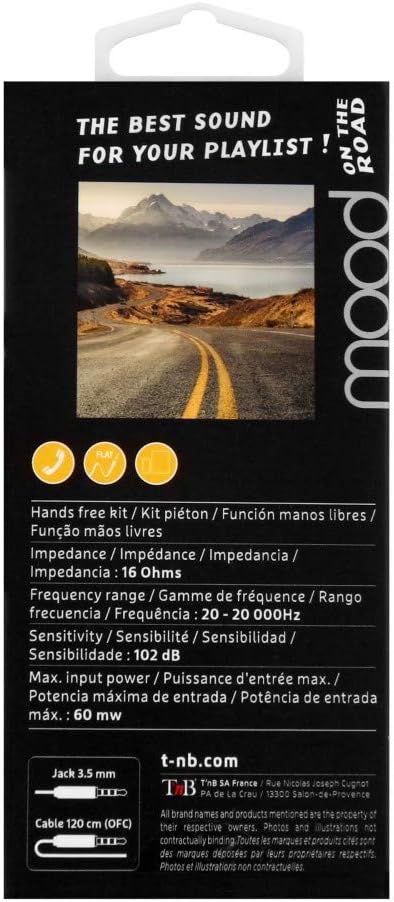
Image 2: Retail packaging for T'nB Mood headphones, highlighting key features and specifications.
3. Produktmerkmale
- Integrated Universal Microphone: Für Freisprechanrufe und Sprachbefehle.
- Flat OFC Cable: Designed to prevent tangles and enhance durability.
- 3.5mm Jack Connector: Kompatibel mit einer Vielzahl von Audiogeräten.
- 10mm Driver Diameter: Liefert eine klare Audioausgabe.
- Großer Frequenzbereich: 20 - 20,000 Hz for comprehensive sound reproduction.
- Optimal Impedance: 16 Ohms for efficient power usage.
- 120 cm Cable Length: Bietet ample Reichweite für bequeme Nutzung.
4. Einrichtung
- Kopfhörer auspacken: Carefully remove the T'nB Mood headphones and user guide from the packaging.
- Mit Audiogerät verbinden: Insert the 3.5mm audio jack firmly into the headphone port of your smartphone, tablet, computer, or other compatible audio device.
- Ohrhörer positionieren: Place the earbuds comfortably into your ears. Ensure a snug fit for optimal sound quality and bass response.
- Lautstärke anpassen: Adjust the volume on your connected device to a comfortable listening level before playing audio.
5. Bedienungsanleitung
5.1 Audiowiedergabe
- Once connected, play audio from your device. Sound will be routed through the headphones.
- Steuern Sie die Wiedergabe (Wiedergabe/Pause, Titel überspringen) und die Lautstärke direkt von Ihrem angeschlossenen Gerät aus.
5.2 Using the Universal Microphone
The T'nB Mood headphones feature an inline universal microphone for hands-free communication.
- Anrufe entgegennehmen / beenden: When a call comes in, press the button on the inline microphone to answer. Press it again to end the call.
- Sprachbefehle: Depending on your device, you may be able to activate voice assistants (e.g., Siri, Google Assistant) by pressing and holding the microphone button. Refer to your device's manual for specific instructions.
- Platzierung des Mikrofons: Ensure the microphone is positioned close to your mouth for clear voice transmission during calls.
6. Wartung
Durch die richtige Pflege verlängern Sie die Lebensdauer Ihrer Kopfhörer.
- Reinigung von Ohrhörern: Reinigen Sie die Ohrhörer vorsichtig mit einem weichen, trockenen und fusselfreien Tuch. Verwenden Sie keine scharfen Chemikalien oder scheuernden Materialien.
- Kabelpflege: Avoid excessive pulling, twisting, or bending of the cable. The flat design helps prevent tangles, but proper handling is still recommended.
- Lagerung: When not in use, store the headphones in a clean, dry place, away from extreme temperatures and direct sunlight. Avoid wrapping the cable too tightly.
- Feuchtigkeit vermeiden: Die Kopfhörer dürfen weder Wasser noch übermäßiger Feuchtigkeit ausgesetzt werden.
7. Fehlerbehebung
If you encounter issues with your T'nB Mood headphones, please refer to the following common solutions:
- Kein Ton oder geringe Lautstärke:
- Stellen Sie sicher, dass der 3.5-mm-Klinkenstecker vollständig in den Audioanschluss Ihres Geräts eingesteckt ist.
- Check the volume level on your connected device and ensure it is not muted.
- Testen Sie die Kopfhörer mit einem anderen Audiogerät, um ein gerätespezifisches Problem auszuschließen.
- Schlechte Tonqualität (Verzerrungen, Rauschen):
- Stellen Sie sicher, dass die Ohrhörer sauber und frei von Verunreinigungen sind.
- Verify the earbuds are properly seated in your ears for a good seal.
- Versuchen Sie eine andere Audioquelle oder file to check if the issue is with the content.
- Mikrofon funktioniert nicht:
- Ensure the 3.5mm jack is fully inserted. A loose connection can affect microphone functionality.
- Überprüfen Sie die Audioeingangseinstellungen Ihres Geräts, um sicherzustellen, dass das externe Mikrofon ausgewählt ist.
- Testen Sie das Mikrofon mit einer anderen Anwendung oder einem anderen Gerät.
8. Spezifikationen
| Marke | T'nB |
| Modellnummer | ESMOODBK |
| Farbe | Schwarz |
| Formfaktor | In-Ear |
| Konnektivitätstechnologie | Verdrahtet |
| Kopfhöreranschluss | 3.5 mm Klinke |
| Treiberdurchmesser | 10 mm |
| Frequenzbereich | 20 - 20,000 Hz |
| Impedanz | 16 Ohm |
| Maximale Eingangsleistung | 60 mW |
| Empfindlichkeit | 102 dB |
| Kabellänge | 120 cm |
| Material | Plastik |
| Bestandteile umfaßten | 1 x MOOD Earphones, 1 x User Guide |
9. Garantie und Support
Specific warranty details for the T'nB Mood headphones are not provided within this manual. For information regarding warranty coverage, terms, and conditions, please refer to the documentation included with your purchase or contact T'nB customer support directly.
For technical support or further assistance, please visit the official T'nB webWebsite oder wenden Sie sich an die Kundendienstabteilung.