
1. Einleitung
Vielen Dank für Ihren Einkauf.asing the YESIDO YSP03 Sports Bluetooth In-Ear Earphones. This manual provides essential information for the safe and efficient use of your new earphones. Please read it thoroughly before use and retain it for future reference.
2. Sicherheitshinweise
- Die Ohrhörer dürfen keinen extremen Temperaturen, hoher Luftfeuchtigkeit oder korrosiven Umgebungen ausgesetzt werden.
- Avoid dropping, impacting, or bending the earphones.
- Die Kopfhörer dürfen nicht auseinandergenommen oder verändert werden. Dies kann zum Erlöschen der Garantie und zu Schäden führen.
- Bewahren Sie die Kopfhörer außerhalb der Reichweite von Kindern und Haustieren auf.
- Verwenden Sie ausschließlich das mitgelieferte Ladekabel oder ein zertifiziertes gleichwertiges Kabel.
- Um Gehörschäden zu vermeiden, achten Sie auf eine moderate Lautstärke.
- Verwenden Sie die Kopfhörer nicht während des Autofahrens oder in Situationen, in denen Sie Ihre Umgebung wahrnehmen müssen.
3. Packungsinhalt
Bitte prüfen Sie das Paket auf folgende Artikel:
- YESIDO YSP03 Sports Bluetooth In-Ear Earphones
- USB-Ladekabel
- Bedienungsanleitung
- Ear tips (various sizes, typically)
4. Produktüberschreitungview
The YESIDO YSP03 earphones feature an in-ear design with a control unit for easy operation. They support Bluetooth wireless connectivity and also offer direct music playback via an SD card.
Control Unit and Ports
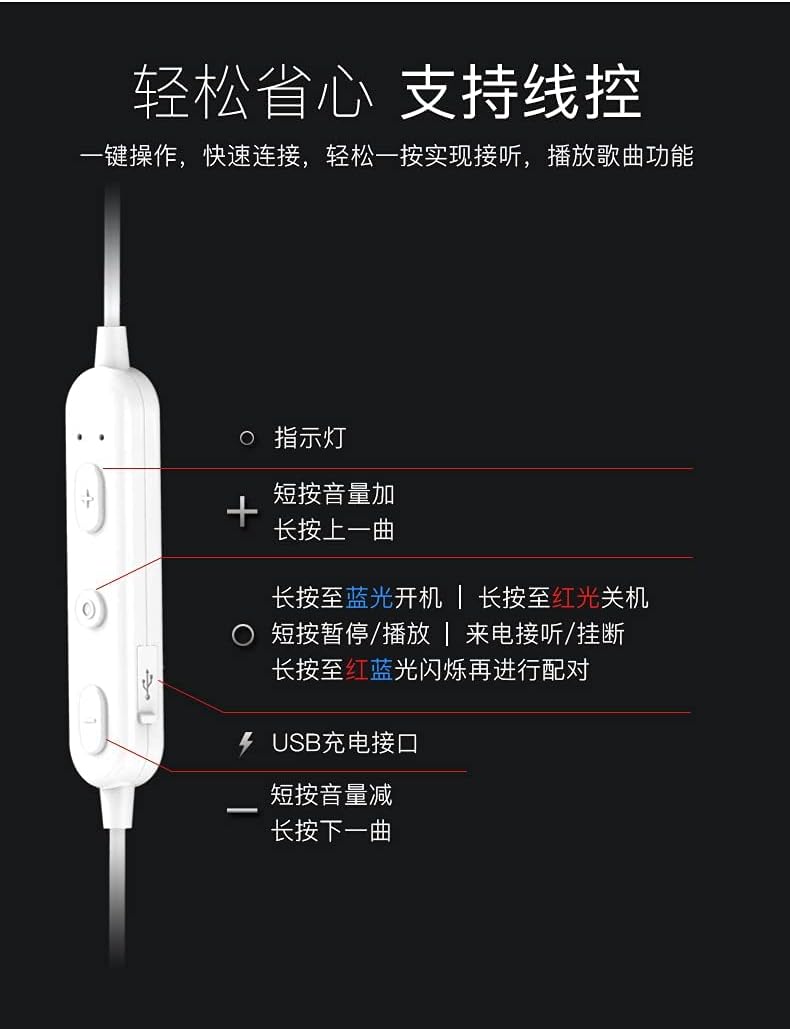
Bild: Detaillierte view of the earphone control unit, showing the indicator light, volume/track buttons, multi-function button, and USB charging port.
- Kontrollleuchte: Zeigt den Status an (Stromversorgung, Kopplung, Ladevorgang).
- '+'-Schaltfläche: Short press for Volume Up; Long press for Previous Track.
- Multifunktionstaste (Mitte): Long press for Power On (blue light) / Power Off (red light); Short press for Play/Pause or Answer/Hang up calls; Long press until red and blue lights flash for Pairing Mode.
- '-' Taste: Short press for Volume Down; Long press for Next Track.
- USB Ladeanschluss: Zum Anschließen des Ladekabels.
SD-Kartensteckplatz
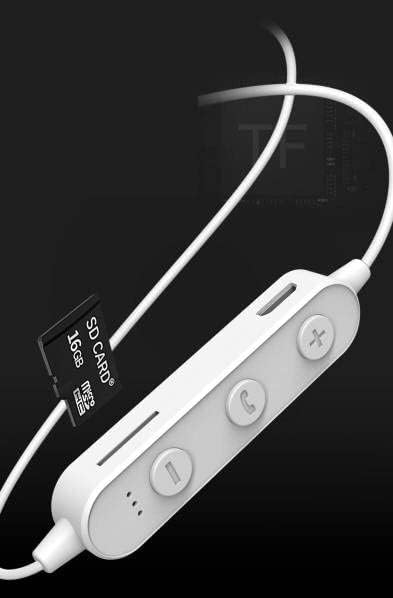
Bild: Close-up of the control unit showing the SD card slot, indicating direct music playback without a phone. A 64GB card can store approximately 15,000 songs.
The earphones feature an integrated SD card slot, allowing you to play music directly from a memory card without needing a connected device. This is ideal for sports or activities where carrying a phone is inconvenient.
5. Einrichtung
5.1 Aufladen der Kopfhörer
- Connect the USB charging cable to the USB charging port on the earphone control unit.
- Verbinden Sie das andere Ende des USB-Kabels mit einem USB-Netzteil (nicht im Lieferumfang enthalten) oder einem USB-Anschluss Ihres Computers.
- The indicator light will typically show a red light during charging and turn off or change color when fully charged.
- Für eine vollständige Aufladung rechnen Sie mit etwa 1-2 Stunden.
5.2 Bluetooth-Kopplung
- Stellen Sie sicher, dass die Kopfhörer ausgeschaltet sind.
- Press and hold the Multi-function Button (center button) for approximately 5-7 seconds until the indicator light flashes red and blue alternately. This indicates pairing mode.
- On your mobile phone or Bluetooth-enabled device, go to the Bluetooth settings and turn on Bluetooth.
- Suchen nach available devices. You should see "YESIDO YSP03" or a similar name in the list.
- Select "YESIDO YSP03" to connect. Once successfully paired, the indicator light will typically flash blue slowly or turn off.
- Wenn Sie zur Eingabe eines Passworts aufgefordert werden, geben Sie „0000“ ein.
5.3 Einlegen einer SD-Karte
- Suchen Sie den SD-Kartensteckplatz an der Steuereinheit.
- Gently insert a formatted Micro SD card (TF card) with the metal contacts facing down until it clicks into place.
- The earphones will automatically detect the card and switch to SD card playback mode if no Bluetooth device is connected or if Bluetooth is disconnected.
6. Bedienungsanleitung
6.1 Ein-/Ausschalten
- Einschalten: Press and hold the Multi-function Button until the blue indicator light appears.
- Ausschalten: Press and hold the Multi-function Button until the red indicator light appears.
6.2 Musikwiedergabe (Bluetooth-Modus)
- Abspielen/Pause: Drücken Sie kurz die Multifunktionstaste.
- Lautstärke erhöhen: Short press the '+' Button.
- Lautstärke runter: Short press the '-' Button.
- Nächster Titel: Long press the '-' Button.
- Vorheriges Lied: Long press the '+' Button.
6.3 Anrufmanagement
- Anruf annehmen/beenden: Short press the Multi-function Button when an incoming call is received.
- Anruf ablehnen: Long press the Multi-function Button when an incoming call is received.
- Wahlwiederholung letzte Nummer: Drücken Sie die Multifunktionstaste zweimal.
6.4 SD-Karten-Wiedergabe
- Once an SD card is inserted and detected, the earphones will automatically begin playing music from the card.
- The same controls for Play/Pause, Volume, Next/Previous Track apply as in Bluetooth mode.
7. Wartung
- Reinigung: Reinigen Sie die Ohrhörer mit einem weichen, trockenen Tuch. Verwenden Sie keine scharfen Chemikalien oder Scheuermittel.
- Lagerung: Bewahren Sie die Kopfhörer an einem kühlen, trockenen Ort fern von direkter Sonneneinstrahlung und extremen Temperaturen auf.
- Batteriepflege: To prolong battery life, charge the earphones regularly, even if not in frequent use. Avoid fully discharging the battery for extended periods.
8. Fehlerbehebung
| Problem | Lösung |
|---|---|
| Earphones won't power on. | Ensure the earphones are fully charged. Press and hold the Multi-function Button for a longer duration. |
| Kopplung mit dem Gerät nicht möglich. | Ensure earphones are in pairing mode (red and blue flashing light). Turn off and on Bluetooth on your device. Move closer to the earphones. Forget the device in your phone's Bluetooth settings and try pairing again. |
| Kein Ton. | Check volume levels on both earphones and your connected device. Ensure earphones are properly connected via Bluetooth or that the SD card is inserted correctly and contains playable files. |
| SD card not playing. | Ensure the SD card is inserted correctly and contains compatible audio files (e.g., MP3). Try re-inserting the card. Ensure no Bluetooth device is actively connected, as SD card playback might be prioritized when Bluetooth is disconnected. |
| Schlechte Tonqualität. | Ensure there are no obstructions between the earphones and your device. Move closer to your device. Try a different audio source or file. |
9. Spezifikationen
| Besonderheit | Detail |
|---|---|
| Marke | YESIDO |
| Modellnummer | YSP03 |
| Farbe | Weiß |
| Platzierung des Ohrs | In-Ear |
| Konnektivitätstechnologie | Kabellos (Bluetooth) |
| Lärmschutz | Keiner |
| Kompatible Geräte | Mobiltelefone |
| Spezifische Verwendungen für das Produkt | Sport |
| Kabelfunktion | Cable-free |
| Wasserbeständigkeit | Nicht wasserfest |
| Steuerungstyp | Sprachsteuerung |
| Kontrollmethode | App (Voice Control implies app integration for some functions) |
Batterieleistung

Bild: Visual representation of battery performance metrics for the YESIDO YSP03 earphones.
- Musikwiedergabezeit: Ungefähr 9 Stunden
- Headphone Standby Time: Ungefähr 120 Stunden
- Gesprächsdauer: Ungefähr 7.5 Stunden
*Note: These data are obtained from YESIDO laboratory tests, and slight deviations may occur due to changes in objective environment and usage patterns.
10. Garantie und Support
10.1 Garantieinformationen
This product is provided without an explicit warranty. Please refer to your retailer's return policy for any issues within the applicable return period.
10.2 Kundendienst
For further assistance or inquiries, please contact the retailer where you purchased the product. You may also visit the official YESIDO website for general product information and potential support resources.