
Einführung
The Studebaker SB2002TE is a portable AM/FM analog radio designed for clear audio reception and versatile connectivity. It features a 3-inch speaker, a swivel telescopic antenna for enhanced signal, an Aux-in jack for connecting external audio devices, and a 3.5mm headphone jack for private listening. This radio offers flexible power options, operating on both AC and DC power, and includes a built-in carry handle for easy portability.
Wichtige Sicherheitshinweise
Please read and understand all safety and operating instructions before using this product. Keep these instructions for future reference.
- Wasser und Feuchtigkeit: Do not use this product near water (e.g., bathtubs, sinks, swimming pools) or expose it to dripping or splashing liquids.
- Hitze: Stellen Sie das Produkt nicht in die Nähe von Wärmequellen wie Heizkörpern, Heizkörpern, Öfen oder anderen Wärme erzeugenden Geräten.
- Belüftung: Sorgen Sie für ausreichende Belüftung. Blockieren Sie keine Belüftungsöffnungen.
- Energiequellen: Operate this product only from the type of power source indicated on the marking label.
- Reinigung: Unplug this product from the wall outlet before cleaning. Use a soft, dry cloth only. Do not use liquid cleaners or aerosol cleaners.
- Wartung: Versuchen Sie nicht, dieses Produkt selbst zu warten, da Sie durch das Öffnen oder Entfernen von Abdeckungen gefährlichen Luftströmen ausgesetzt sein können.tage oder andere Gefahren. Überlassen Sie sämtliche Wartungsarbeiten qualifiziertem Servicepersonal.
- Batterien: Follow all instructions for battery installation and disposal. Do not mix old and new batteries, or different types of batteries. Remove batteries if the unit is not used for extended periods.
Packungsinhalt
Carefully unpack your radio and ensure all items are present:
- Studebaker SB2002TE Portable AM/FM Radio
- Built-in AC Power Cord
Note: 4 'C' size batteries are required for DC operation and are not included.
Bedienelemente und Funktionen
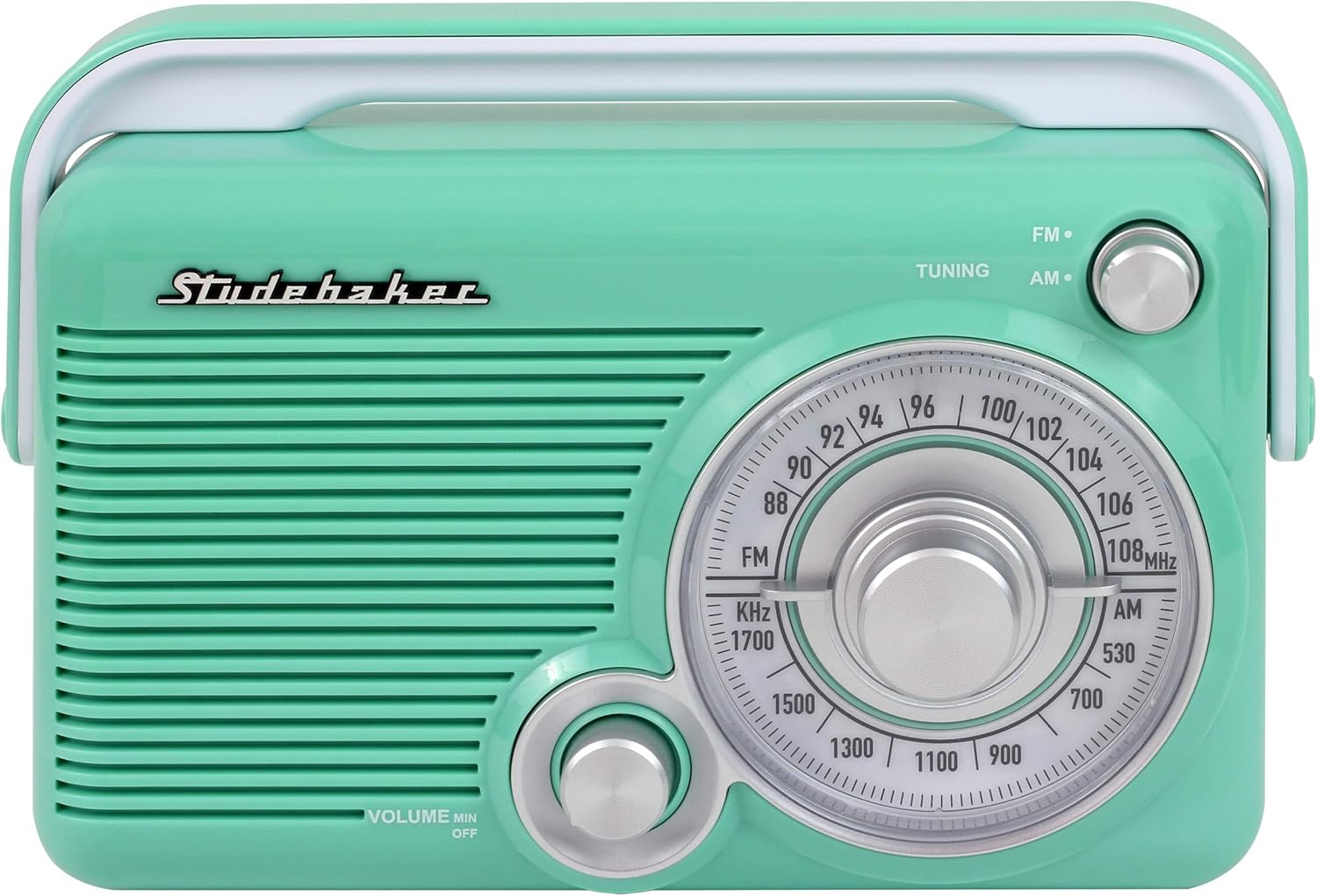
Front view of the radio, highlighting the main controls.

Seite view of the radio, showing the Aux-in and Headphone jacks.
- VOLUME MIN/OFF Knob: Rotate clockwise to turn the radio ON and increase volume. Rotate counter-clockwise to decrease volume and turn OFF.
- Abstimmungsknopf: Rotate to select your desired AM or FM radio station.
- AM/FM Selector Switch: Slide to choose between AM (Amplitude Modulation) or FM (Frequency Modulation) radio bands.
- Frequenzwahl: Zeigt die aktuelle Radiofrequenz für AM- und FM-Bänder an.
- Teleskopantenne: Extend and adjust for optimal FM reception.
- AUX IN-Buchse: Schließen Sie ein externes Audiogerät mit einem 3.5-mm-Audiokabel an.
- Kopfhöreranschluss: Schließen Sie 3.5-mm-Kopfhörer für ungestörtes Musikhören an.
- Tragegriff: For easy transportation of the radio.
- Built-in AC Power Cord: Located in the battery compartment for AC power connection.
- Batteriefach: Holds 4 'C' size batteries for DC power.
Aufstellen
Stromversorgung des Geräts
Your Studebaker SB2002TE radio can be powered by either AC (household current) or DC (batteries).
Wechselstrombetrieb
- Locate the built-in AC power cord, typically stored within the battery compartment.
- Extend the AC power cord and plug it into a standard 120V AC ~ 60Hz wall outlet.
- Das Radio ist nun bereit für den Betrieb mit Wechselstrom.
DC (Battery) Power Operation
- Ensure the unit is turned OFF and unplugged from any AC power source.
- Locate the battery compartment on the back or bottom of the radio.
- Öffnen Sie die Abdeckung des Batteriefachs.
- Insert 4 'C' size (UM-2) batteries (not included) into the compartment. Ensure the positive (+) and negative (-) terminals of the batteries match the diagrams inside the compartment.
- Schließen Sie den Batteriefachdeckel fest.
- The radio is now ready for use with battery power.
Antenneneinstellung
- For FM Reception: Fully extend the telescopic antenna and rotate it for the best possible signal reception.
- For AM Reception: The radio has a built-in AM antenna. For optimal AM reception, rotate the entire radio unit until the clearest signal is achieved.
Bedienungsanleitung
Ein-/Ausschalten und Lautstärkeregelung
- Drehen Sie den VOLUME MIN/OFF knob clockwise. You will hear a click as the unit turns ON.
- Continue rotating the knob clockwise to increase the listening volume.
- To turn the radio OFF, rotate the VOLUME MIN/OFF knob counter-clockwise until it clicks into the OFF position.
Radio hören
- Turn the radio ON using the VOLUME MIN/OFF Knopf.
- Schieben Sie den AM/FM Selector Switch to your desired band (AM or FM).
- Drehen Sie den TUNING knob to scan through the frequencies. Stop when you find your desired station.
- Passen Sie die VOLUMEN Stellen Sie mit dem Drehknopf Ihre bevorzugte Lautstärke ein.
- For FM, adjust the telescopic antenna for optimal reception. For AM, rotate the entire radio unit.
Verwenden der AUX IN-Buchse
The AUX IN jack allows you to connect an external audio device (e.g., smartphone, MP3 player) to play audio through the radio's speaker.
- Connect one end of a 3.5mm audio cable (not included) to the headphone jack or line-out jack of your external audio device.
- Verbinden Sie das andere Ende des 3.5-mm-Audiokabels mit dem/der AUX IN jack on the side of the radio.
- Turn the radio ON. The unit will automatically switch to AUX IN mode.
- Starten Sie die Wiedergabe auf Ihrem externen Audiogerät.
- Adjust the volume using both the radio's VOLUMEN knob and the volume control on your external device.
Using the HEADPHONE Jack
For private listening, you can connect headphones to the radio.
- Connect a pair of 3.5mm headphones (not included) to the KOPFHÖRER jack on the side of the radio.
- The radio's built-in speaker will automatically be muted.
- Stellen Sie die Lautstärke mit den VOLUMEN Knopf am Radio.
Wartung
Reinigen des Geräts
- Always unplug the radio from the AC outlet before cleaning.
- Use a soft, dry cloth to wipe the exterior surfaces of the radio.
- Verwenden Sie keine Scheuermittel, Wachse oder Lösungsmittel, da diese die Oberfläche beschädigen können.
Batteriepflege
- Remove batteries if the unit will not be used for an extended period (e.g., one month or more) to prevent battery leakage and corrosion.
- Entsorgen Sie gebrauchte Batterien verantwortungsvoll gemäß den örtlichen Vorschriften.
Fehlerbehebung
If you experience issues with your radio, please consult the following table before contacting customer support.
| Problem | Mögliche Ursache | Lösung |
|---|---|---|
| Kein Strom | AC cord not plugged in; Batteries dead or incorrectly inserted; Volume knob in OFF position. | Ensure AC cord is securely plugged into a live outlet. If using batteries, replace with fresh ones and check polarity. Rotate VOLUME knob clockwise past the click. |
| Schlechter Radioempfang | Antenna not extended/adjusted; Radio positioned in a poor reception area; Interference from other electronics. | For FM, fully extend and adjust the telescopic antenna. For AM, rotate the entire radio unit. Move the radio to a different location away from other electronic devices. |
| No sound from speaker (but power is on) | Volume too low; Headphones connected; Aux-in cable connected. | Increase the VOLUME. Disconnect headphones if not desired. Disconnect Aux-in cable if not desired. |
| Ton verzerrt oder unklar | Poor reception; Volume too high; Weak batteries. | Adjust antenna/radio position for better reception. Lower the volume. Replace batteries if using DC power. |
| Aux-In funktioniert nicht | Aux-in cable not fully inserted; External device volume too low; Incorrect cable. | Ensure 3.5mm audio cable is fully inserted into both the radio and the external device. Increase volume on the external device. Use a standard 3.5mm audio cable. |
Technische Daten

The Studebaker SB2002TE radio, showcasing ist sein tragbares Design.
- Marke:
- Studebaker
- Modellnummer:
- SB2002TE
- Farbe:
- Blaugrün/Weiß
- Tuner-Technologie:
- AM, FM
- Unterstützte Radiobänder:
- AM/FM
- Konnektivitätstechnologie:
- Hilfs
- Hardware-Schnittstelle:
- 3.5-mm-Audio
- Kompatible Geräte:
- Headphone, Smartphone
- Produktabmessungen (L x B x H):
- 2.99" x 8.27" x 5.89"
- Artikelgewicht:
- 1.5 Pfund
- Material:
- Plastik
- Energiequelle:
- AC (built-in cord) or 4 'C' batteries (not included)
- UPC:
- 077283010064
- Hersteller:
- Spectra Merchandising International, Inc.
Garantieinformationen
This Studebaker product is covered by a limited manufacturer's warranty. The warranty period and terms may vary. Please refer to the warranty card included in your original product packaging for specific details regarding coverage, duration, and how to make a claim. Keep your purchase receipt as proof of purchase.
Kundenservice
For technical assistance, troubleshooting not covered in this manual, or warranty inquiries, please contact Studebaker customer support. Contact information, including phone numbers and email addresses, can typically be found on the official Studebaker webauf der Website oder in der mit Ihrem Produkt gelieferten Dokumentation.