
1. Einleitung
1.1 Produktüberschussview
The Renkforce RF-HC-100 is a compact 16-megapixel trail camera designed for outdoor monitoring. It features a time-lapse function, night vision capabilities, and a durable, camouflage brown housing. This camera is suitable for wildlife observation, property surveillance, and other outdoor recording needs.
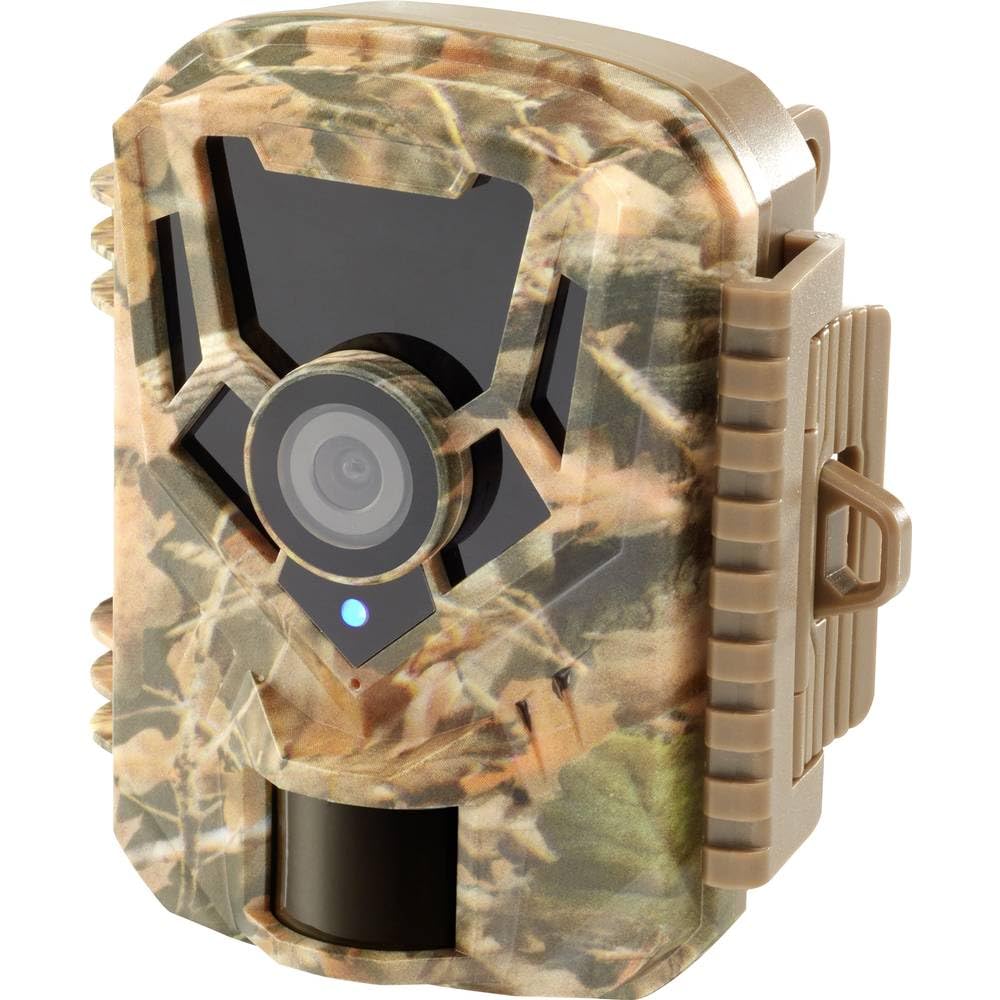
Abbildung: Vorderseite view of the Renkforce RF-HC-100 Trail Camera, showcasing its compact design and camouflage pattern.

Bild: Vorderseite view of the Renkforce RF-HC-100 Trail Camera, highlighting the main lens and motion sensor.
1.2 Packungsinhalt
- 1 x Renkforce RF-HC-100 Trail Camera Unit
- Note: Additional accessories such as mounting straps, USB cables, or user manuals may be included depending on the specific package.
2. Sicherheitshinweise
- Lesen Sie alle Anweisungen sorgfältig durch, bevor Sie das Gerät in Betrieb nehmen.
- Do not expose the camera to extreme temperatures, direct sunlight for prolonged periods, or corrosive liquids.
- Ensure the battery compartment is properly sealed to maintain the IP65 weather resistance.
- Batterien sind gemäß den örtlichen Vorschriften zu entsorgen. Alte und neue Batterien sowie verschiedene Batterietypen dürfen nicht zusammen entsorgt werden.
- Bewahren Sie das Gerät außerhalb der Reichweite von Kindern auf.
- Versuchen Sie nicht, die Kamera zu zerlegen oder zu verändern, da dies zum Erlöschen der Garantie führt und Schäden verursachen kann.
3. Produktmerkmale
The Renkforce RF-HC-100 Trail Camera offers the following key features:
- Hochauflösende Bildgebung: 16 Megapixel effective capture resolution for clear photos and 1080p video recording.
- Nachtsicht: Equipped with color night vision for monitoring in low-light conditions.
- Zeitrafferfunktion: Capture images at set intervals to observe long-term events.
- SD-Kartensteckplatz: Supports external SD cards for ample storage of photos and videos.
- Wetterbeständigkeit: IP65 international protection rating ensures durability in various outdoor environments.
- Kompaktes Design: Miniature form factor with a camouflage brown finish for discreet placement.
- Weitwinkel View: 90-degree angle of view ein breites Gebiet abdecken.
- Konnektivität: Features wired connectivity (USB, AV ports) and Wi-Fi protocol for data transfer and control via application.
- Montagemöglichkeiten: Includes support for wall mounting.
4. Einrichtung
4.1 Einlegen der Batterie
- Öffnen Sie das Kameragehäuse, indem Sie die seitlichen Clips entriegeln.
- Suchen Sie das Batteriefach.
- Insert the required number of AA batteries (not included) according to the polarity markings (+/-).
- Verschließen Sie das Batteriefach fest.
4.2 Installation der SD-Karte
- Suchen Sie bei geöffnetem Kameragehäuse den SD-Kartensteckplatz.
- Insert a compatible SD card (up to 32GB, Class 10 recommended) into the slot with the metal contacts facing down until it clicks into place.
- Zum Entfernen die SD-Karte erneut hineindrücken, bis sie herausspringt.

Image: The Renkforce RF-HC-100 Trail Camera with its housing open, revealing the control panel, USB, AV, and DC ports, and the ON/SETUP/OFF switch.
4.3 Montage der Kamera
The camera can be mounted using a strap or a wall mount bracket (if included or purchased separately).
- Gurtbefestigung: Thread a mounting strap through the slots on the back of the camera and secure it to a tree or pole.
- Wandmontage: Use the integrated mounting points or a compatible wall mount bracket to attach the camera to a flat surface. Ensure the camera is stable and pointed in the desired direction.
5. Bedienungsanleitung
5.1 Ein-/Ausschalten und Modusauswahl
Locate the ON/SETUP/OFF switch inside the camera housing.
- AUS: Schaltet die Kamera aus.
- KONFIGURATION: Enters setup mode, allowing you to configure settings via the internal display.
- AUF: Activates the camera for recording based on the configured settings.
5.2 Einstellungen konfigurieren
In SETUP mode, use the navigation buttons (if available) to access the menu and adjust parameters such as:
- Foto-/Videoauflösung
- Empfindlichkeit des PIR-Sensors
- Erkennungsverzögerung
- Zeitrafferintervall
- Datum und Uhrzeit
- Recording Mode (Photo, Video, Photo+Video, Time-Lapse)
5.3 Datenabruf
Um auf aufgezeichnete files:
- Über USB: Connect the camera to a computer using a USB cable. The camera will appear as a removable disk.
- Über SD-Karte: Remove the SD card from the camera and insert it into a computer's card reader.
6. Wartung
- Reinigung: Use a soft, dry cloth to clean the camera lens and housing. For stubborn dirt, a slightly damp Ein Tuch kann verwendet werden, achten Sie aber darauf, dass keine Feuchtigkeit in das Gerät eindringt.
- Batteriewechsel: Tauschen Sie die Batterien aus, wenn die Anzeige für niedrigen Batteriestand erscheint oder die Leistung nachlässt.
- SD-Kartenverwaltung: Regularly format the SD card (after backing up important data) to maintain optimal performance and prevent errors.
- Lagerung: Bei längerer Nichtbenutzung die Batterien entfernen und die Kamera an einem kühlen, trockenen Ort ohne direkte Sonneneinstrahlung aufbewahren.
7. Fehlerbehebung
| Problem | Mögliche Ursache | Lösung |
|---|---|---|
| Die Kamera lässt sich nicht einschalten. | Low or dead batteries; incorrect battery installation; power switch in OFF position. | Replace batteries; ensure correct polarity; set switch to ON or SETUP. |
| Schlechte Bild-/Videoqualität. | Verschmutzte Linse; schlechte Lichtverhältnisse; falsche Auflösungseinstellungen. | Clean the lens; ensure adequate lighting or use night vision; adjust resolution settings. |
| Die Kamera zeichnet nicht auf. | SD card full or faulty; incorrect mode selected; PIR sensor blocked. | Format or replace SD card; select appropriate recording mode; clear sensor path. |
| Kann keine Verbindung zum Computer herstellen. | Faulty USB cable; camera not in correct mode; driver issues. | Try a different USB cable; ensure camera is in connection mode (if applicable); try another computer or card reader. |
8. Spezifikationen
| Modellname | RF-HC-100 (RF-4466574) |
| Effective Capture Resolution | 16 Megapixel |
| Videoauflösung | 1080p |
| Abmessungen (L x B x H) | 21 x 12 x 9 cm (8.27 x 4.72 x 3.54 Zoll) |
| Gewicht | 186 Gramm (0.41 Pfund) |
| Konnektivitätstechnologie | Wired (USB, AV), Wi-Fi Protocol (for control/transfer) |
| Besondere Merkmale | Local Recording, Night Vision (Color Night Vision) |
| Nutzungsumgebung | Im Freien |
| Internationale Schutzbewertung | IP65 |
| Stromquelle | Manual Operation (Battery-powered, batteries not included) |
| Wastage | 1.5 Watt |
| View Winkel | 90 Grad |
| Farbe | Camouflage Brown |
| Material | Metal (internal) |
| Montagetyp | Unterstützung für Wandmontage |
9. Garantie und Support
Renkforce provides support for its products. Spare parts availability is indicated for 1 year from the date of purchase. For technical assistance, troubleshooting beyond this manual, or warranty claims, please refer to the contact information provided with your product packaging or visit the official Renkforce webWebsite.