
Lixada OVS6258358204085VR
Lixada Wireless Bicycle Computer OVS6258358204085VR User Manual
Model: OVS6258358204085VR
Einführung
This manual provides essential information for the proper installation, operation, and maintenance of your Lixada Wireless Bicycle Computer. Please read these instructions carefully before use to ensure optimal performance and longevity of the device. This bicycle computer is designed to track various cycling metrics, offering a clear display and robust construction for diverse riding conditions.
Hauptmerkmale
- Lightweight and Easy Installation: Compact design for convenient setup and use.
- 2.8-inch HD LCD Backlit Screen: Provides clear data readability in various lighting conditions, including night.
- Umfassende Datenerfassung: Records current speed, maximum speed, average speed, distance, total distance, temperature, calories burned, stopwatch, and cycling time.
- Wasserdichtigkeitsklasse IPX6: Designed to withstand rain, ensuring functionality in wet weather. Avoid prolonged exposure to heavy rain.
- Universelle Kompatibilität: Suitable for all types of bicycles, including road bikes, mountain bikes, and folding bikes.


Bestandteile umfaßten
Das Paket enthält die folgenden Artikel:
- 1 x Fahrradcomputer
- 1 x Extension Bracket
- 1 x Nut
- 1 x Base for mounting
- 1 x Funksender
- 1 x Magnetic Screw (for wheel spoke)
- 4 x Zip Ties for secure attachment
- 1 x Rubber Pad for mounting

Setup und Installation
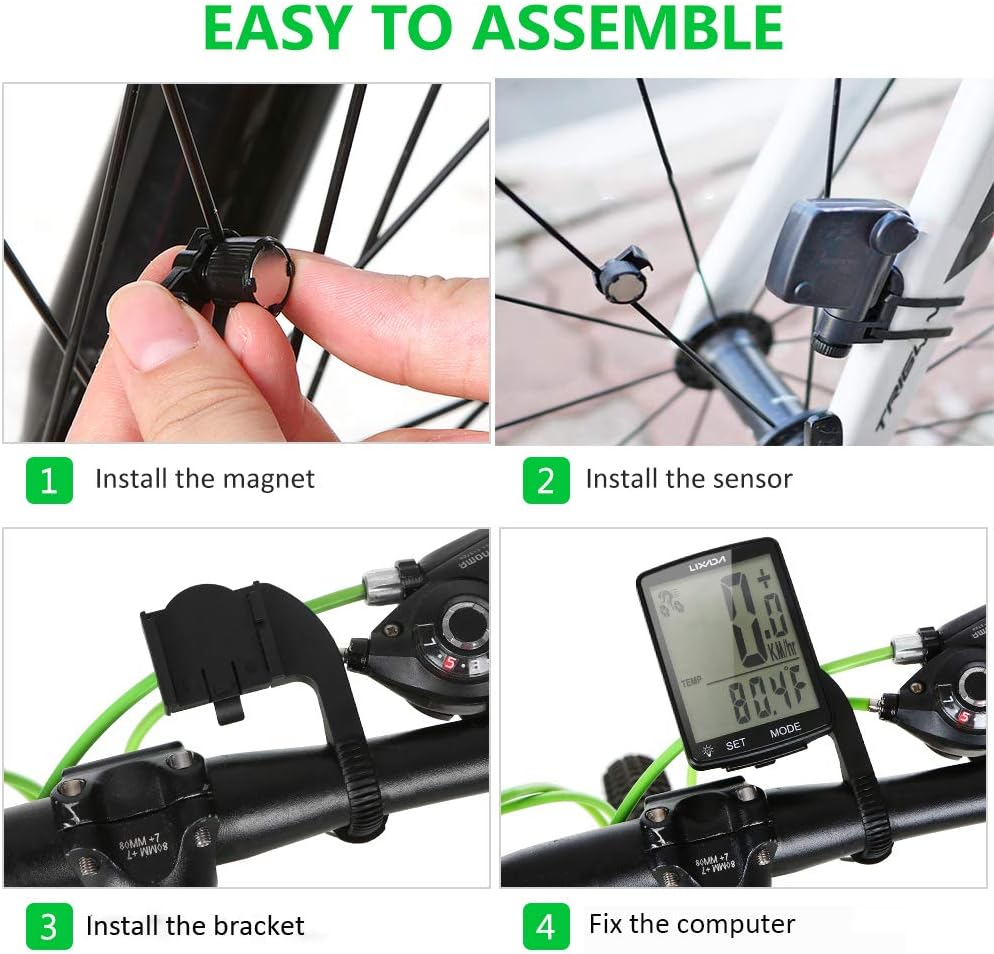
Follow these steps to correctly install your bicycle computer:
- Installieren Sie den Magneten: Securely attach the magnetic screw to a spoke on your bicycle's front wheel. Ensure it is positioned to pass closely by the sensor.
- Installieren Sie den Sensor: Mount the wireless transmitter (sensor) on the front fork of your bicycle. Adjust its position so that the magnet passes within 3mm of the sensor when the wheel rotates.
- Installieren Sie die Halterung: Attach the extension bracket to your bicycle's handlebar. Use the provided zip ties and rubber pad to ensure a firm and stable mount.
- Fix the Computer: Slide the bicycle computer unit onto the installed bracket until it clicks into place. Ensure it is securely fastened and facing the rider for easy viewing.

Bedienungsanleitung
Your Lixada Wireless Bicycle Computer features a user-friendly interface with two main buttons: SATZ Und MODUS.
Grundfunktionen
- Ein-/Ausschalten: The device typically powers on automatically when motion is detected or a button is pressed. It will enter sleep mode after a period of inactivity to conserve battery.
- MODE-Taste: Press the MODE button to cycle through different display modes and view various cycling data (e.g., current speed, distance, time, temperature).
- Set-Taste: Use the SET button to enter settings menus or confirm selections. Refer to the detailed manual for specific setting adjustments like wheel circumference.
ViewDaten
The computer allows for quick switching between 24 cycling data points. Simply press the MODUS button to navigate through the available metrics.

Wartung
Reinigung
Wipe the computer's screen and body with a soft, damp Reinigen Sie das Gerät mit einem Tuch. Vermeiden Sie die Verwendung von Scheuermitteln oder Lösungsmitteln, da diese das Display oder die Elektronik beschädigen können.asing.
Wasserbeständigkeit
The device has an IPX6 waterproof rating, meaning it is protected against powerful water jets. It can be used in rainy conditions. However, it is not designed for submersion. Avoid exposing it to heavy rain for extended periods or submerging it in water.

Batteriewechsel
The bicycle computer uses a lithium button battery. When the display becomes dim or unresponsive, it may be time to replace the battery. Refer to the specific instructions in the included detailed manual for battery compartment access and replacement procedures.
Fehlerbehebung
- Keine Anzeige/leerer Bildschirm:
- Überprüfen Sie, ob die Batterie ausgetauscht werden muss.
- Ensure the computer is securely seated in its bracket.
- Ungenaue Geschwindigkeits-/Entfernungsmessungen:
- Verify that the magnet and sensor are correctly aligned and the gap is within 3mm.
- Ensure the wheel circumference setting is accurate for your bicycle.
- Prüfen Sie, ob es Hindernisse oder Störungen zwischen dem Sensor und dem Computer gibt.
- Schaltflächen reagieren nicht:
- Ensure the device is not in a locked mode (if applicable).
- Versuchen Sie, die Batterie zu entfernen und wieder einzusetzen, um das Gerät zurückzusetzen.
If you encounter issues not covered here, please refer to the comprehensive manual included with your product or contact customer support.
Technische Daten
| Besonderheit | Detail |
|---|---|
| Modellnummer | OVS6258358204085VR |
| Marke | Lixada |
| Anzeigegröße | 2.8 Zoll |
| Anzeigetyp | LCD |
| Wasserdichtigkeit | IPX6 |
| Abmessungen (L x B x H) | 13 x 8 x 4.4 cm |
| Gewicht | 65 Gramm |
| Batteriezusammensetzung | Lithium (Button Battery) |
| Konnektivitätstechnologie | Wireless (ANT, Bluetooth for sensor communication) |
Garantie und Support
For warranty information or technical support, please refer to the specific warranty card included with your product or contact the manufacturer directly. Keep your purchase receipt as proof of purchase for any warranty claims.
Ask a question about this manual
Ask about setup, troubleshooting, compatibility, parts, safety, or missing instructions. Manuals+ will review the question and use this page’s manual context to help answer it.