
Einführung
Thank you for choosing the SelfieShow L02S Selfie Stick with Fill Light. This versatile device combines a selfie stick, tripod, and fill light to enhance your photography and videography experience. Designed for portability and ease of use, it features an extendable rod, a detachable wireless remote, and adjustable lighting to suit various environments and creative needs.
Zu den Hauptmerkmalen gehören:
- Integrated Fill Light: Offers 3 color temperature options and 6 brightness levels for optimal lighting.
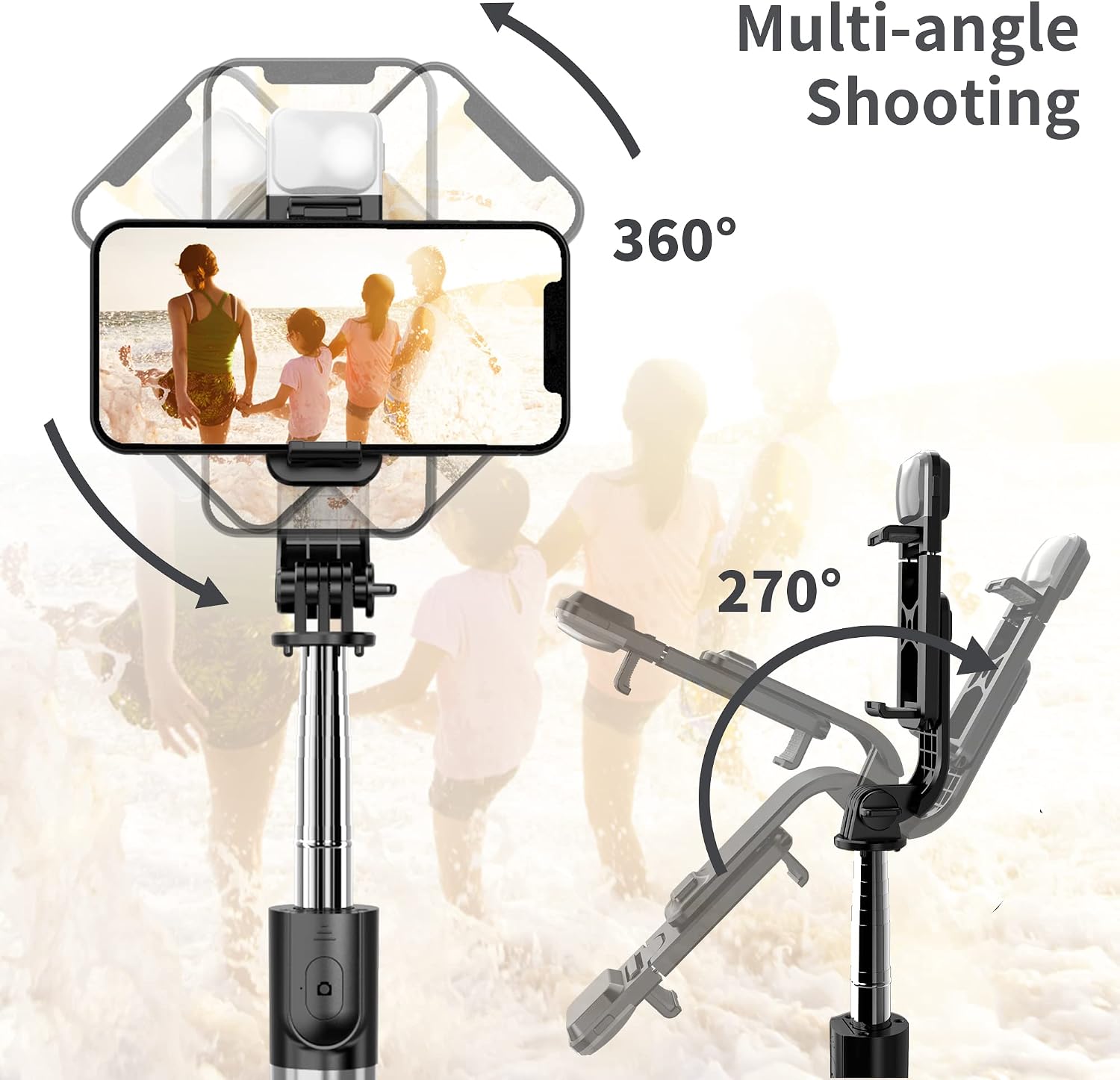
- Adjustable Angle: 360° clamp rotation for horizontal or vertical phone orientation and 225° neck rotation for diverse shooting angles.
- Portable Design: Lightweight (6.7oz) and compact (7.6'' folded size) for easy transport. Extends up to 40.3 inches (104cm).
- Detachable Wireless Remote: Control your phone's camera from up to 10m/33ft away.
- Wide Compatibility: Supports most iOS and Android devices (4-6.5 inches) without requiring additional apps.

Installationsanweisungen
- Unfold the Selfie Stick: Gently unfold the phone clamp from the main body of the stick.
- Verlängern Sie die Stange: Pull the telescopic rod upwards to extend it to your desired length. The rod can extend up to 104cm (40.3 inches).
- Open Tripod Legs: If using as a tripod, push the bottom part of the handle upwards to release and spread the three tripod legs for stability. Ensure the legs are fully extended on a flat surface.
- Montieren Sie Ihr Telefon: Öffne das Telefon clamp and carefully place your smartphone inside. The clamp is designed to securely hold devices between 4 and 6.5 inches.
- Telefonwinkel anpassen: Drehen Sie das Telefon clamp 360° to switch between horizontal (landscape) and vertical (portrait) modes. The neck also rotates 225° for fine-tuning your shooting angle.
- Detachable Remote: The wireless remote control is located on the handle. Slide it out to detach for remote operation.

Bedienungsanleitung
Koppeln der drahtlosen Fernbedienung
- Ensure the remote is charged (if applicable, use the provided USB cable).
- Press and hold the button on the remote control until a blue indicator light starts flashing, indicating it's in pairing mode.
- Öffnen Sie auf Ihrem Smartphone die Bluetooth-Einstellungen und suchen Sie nach verfügbaren Geräten.
- Select "SelfieShow" or a similar device name from the list to connect. The blue light will become solid once paired.
- For Android smartphones, you may need to set the volume button as the camera button in your phone's camera settings for the remote to function correctly.
Verwenden der Fernbedienung
Once paired, open your smartphone's camera app. Press the button on the remote to take photos or start/stop video recording. The remote has a control range of up to 10m/33ft.

Activating and Adjusting the Fill Light
- Locate the fill light on the phone clamp.
- Press the dedicated button on the fill light to turn it on.
- Press the button repeatedly to cycle through 3 light modes (White, Natural, Warm) and 6 brightness levels.
- Hold the button to turn the fill light off.

Using as a Selfie Stick or Tripod
The device can be used handheld as an extendable selfie stick or placed on a flat surface as a stable tripod. The 360° rotating clamp and 225° neck rotation allow for versatile shooting angles, whether for full-body photos, live streaming, or group shots.
Mediendemonstrationen
Produkt überview und Nutzung
Detaillierte Beschreibungview und Setup
Key Features and Portability
Wartung
- Reinigung: Wipe the selfie stick and light with a soft, dry cloth. Avoid using harsh chemicals or abrasive materials.
- Lagerung: Store the device in a cool, dry place away from direct sunlight and extreme temperatures. Ensure it is fully collapsed and the remote is securely placed in its slot.
- Batteriepflege: For the remote control, ensure the battery is properly installed. If not in use for extended periods, consider removing the battery to prevent leakage.
Fehlerbehebung
- Fernbedienung lässt sich nicht koppeln:
- Ensure the remote is charged and powered on (blue light flashing).
- Check your phone's Bluetooth settings to ensure it's discoverable and try re-pairing.
- Verify the remote's battery is not depleted.
- Light Not Turning On/Adjusting:
- Ensure the fill light is charged.
- Press the light button firmly to activate and cycle through modes.
- Phone Not Stable in Clamp:
- Ensure your phone size is within the supported 4-6.5 inch range.
- Remove bulky phone cases if they prevent a secure fit.
- Instabilität des Stativs:
- Ensure the tripod legs are fully extended and placed on a flat, stable surface.
- Avoid extending the telescopic rod to its maximum length in windy conditions or on uneven ground.
Technische Daten
| Technische Daten | 1.77"T x 1.38"B x 40.31"H |
| Gefaltete Größe | 7.6 Zoll |
| Maximale Höhe | 100 Zentimeter (40.3 Zoll) |
| Artikelgewicht | 6.7 Unzen |
| Material | Aluminium, Kunststoff |
| Kompatible Geräte | Camera, Cellphone (4-6.5 inches) |
| Besondere Merkmale | Adjustable, Lightweight, Portable, Fill Light, Wireless Remote |
| Batterien | 1 C-Batterie erforderlich (im Lieferumfang enthalten) |
Garantie und Support
The SelfieShow L02S Selfie Stick with Fill Light comes with a worry-free 1-year warranty. Our dedicated customer service team is available to assist you 7 days a week, 24 hours a day. For any inquiries or support needs, please refer to the contact information provided with your product packaging or visit the official SelfieShow webWebsite.