
1. Einleitung
The JHS Pedals 3 Series Chorus is a versatile guitar effect pedal designed to deliver classic chorus and vibrato modulation sounds. Its straightforward controls allow for a wide range of tonal possibilities, suitable for various musical styles. This manual provides essential information for setting up, operating, maintaining, and troubleshooting your 3 Series Chorus pedal.
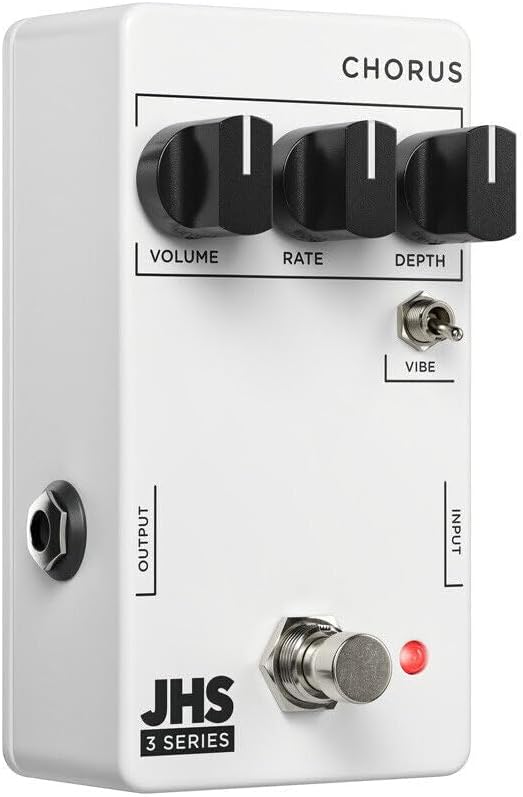
Bild 1: Vorderseite view of the JHS 3 Series Chorus pedal.
2. Einrichtung
Follow these steps to properly set up your JHS 3 Series Chorus pedal:
- Stromanschluss: Connect a standard 9V DC negative center power supply to the power input jack. The pedal requires 70mA of current. Ensure your power supply meets these specifications to prevent damage.
- Eingangsanschluss: Connect your guitar or other instrument to the INPUT jack on the right side of the pedal using a standard 1/4-inch instrument cable.
- Ausgangsanschluss: Verbinden Sie die OUTPUT-Buchse auf der linken Seite des Pedals mit Ihrem ampSchließen Sie den Verstärker oder das nächste Pedal in Ihrer Signalkette mit einem Standard-Instrumentenkabel (6,35 mm Klinkenstecker) an.
- Aktivierung: Press the footswitch to engage or bypass the effect. The red LED indicator will illuminate when the effect is active.

Abbildung 2: Oben view of the JHS 3 Series Chorus pedal, showing input and output jacks.
Einrichtung überview Video
Video 1: Ein überview of the JHS 3 Series Pedals, including setup and general features. This video provides a visual guide to connecting and understanding the basic operation of the 3 Series line.
3. Bedienelemente
The JHS 3 Series Chorus features three primary knobs and one toggle switch for shaping your sound:
- Volumen: This knob controls the overall output level of the pedal. Adjust it to match the volume of your bypassed signal or to boost your sound when the effect is engaged.

Image 3: Detail of the Volume control knob.
- Rate: The Rate knob adjusts the speed of the chorus or vibrato modulation. Turning it clockwise increases the speed, creating faster, more intense wobbles. Counter-clockwise movement slows the modulation for a more subtle, swirling effect.

Image 4: Detail of the Rate control knob.
- Tiefe: This knob controls the intensity or depth of the modulation. A lower setting (counter-clockwise) provides a gentle, less pronounced chorus. Increasing the depth (clockwise) results in a more pronounced, seasick-like modulation.

Image 5: Detail of the Depth control knob.
- Vibe Toggle: This two-position toggle switch alters the character of the effect. When engaged (up position), the Vibe toggle removes the dry signal, transforming the chorus into a true pitch vibrato sound. In the down position, the pedal operates as a standard chorus effect, blending the modulated signal with your dry signal.

Image 6: Detail of the Vibe toggle switch.
4. Spezifikationen
| Marke | JHS Pedale |
| Modellname | 3 Series Chorus |
| Modellnummer | 3SCHORUS |
| Stil | Chor |
| Farbe | Weiß |
| Artikelgewicht | 0.3 Kilogramm |
| Bandtage | 9 Volt Gleichstrom |
| AmpAlter | 70 Milliamps |
| Stromquelle | Corded Electric (9V DC Negative Center) |
| Audioausgabeeffekte | Chorus, Vibrato |
| Steuerelementtyp | Knob (Volume, Rate, Depth), Toggle (Vibe) |
| Signalformat | Analog |
| Sound Profile | Warm, Musical, Chorus/Vibrato |
| Artikelabmessungen | 4 x 3 x 2 Zoll |
| UPC | 650415212354 |
5. Wartung
To ensure the longevity and optimal performance of your JHS 3 Series Chorus pedal, follow these maintenance guidelines:
- Reinigung: Reinigen Sie die Außenseite des Pedals mit einem weichen, trockenen Tuch. Vermeiden Sie die Verwendung von Scheuermitteln oder Lösungsmitteln, da diese die Oberfläche und die internen Bauteile beschädigen können.
- Lagerung: Bewahren Sie das Pedal an einem kühlen, trockenen Ort, geschützt vor direkter Sonneneinstrahlung und extremen Temperaturen, auf. Trennen Sie es bei längerer Nichtbenutzung vom Stromnetz.
- Verbindungen: Überprüfen Sie regelmäßig alle Kabelverbindungen auf Verschleiß. Stellen Sie sicher, dass die Buchsen frei von Staub und Schmutz sind.
- Stromversorgung: Always use a regulated 9V DC negative center power supply that meets the 70mA current requirement. Incorrect power can damage the pedal and void the warranty.
6. Fehlerbehebung
If you encounter issues with your JHS 3 Series Chorus pedal, refer to the following troubleshooting tips:
- Kein Ton:
- Überprüfen Sie alle Kabelverbindungen (Gitarre an Eingang, Ausgang an amp).
- Ensure the power supply is correctly connected and providing the specified 9V DC negative center power.
- Vergewissern Sie sich, dass Ihr Instrument und amplifier are working correctly by bypassing the pedal.
- Confirm the pedal is engaged (red LED illuminated).
- Schwacher oder verzerrter Ton:
- Check the Volume knob setting on the pedal.
- Ensure your power supply is providing stable power. Low battery or an inadequate power supply can cause performance issues.
- Testen Sie verschiedene Kabel, um fehlerhafte Verbindungen auszuschließen.
- Der Effekt funktioniert nicht wie erwartet:
- Adjust the Rate and Depth knobs to explore the full range of the effect.
- Experiment with the Vibe toggle switch to understand its impact on the sound (chorus vs. vibrato).
- If the sound is too subtle, increase the Depth. If it's too fast or slow, adjust the Rate.
7. Garantie und Support
The JHS Pedals 3 Series Chorus comes with a 4-year non-transferable warranty within the USA. Product registration is required to activate the warranty.
For warranty claims, technical support, or further assistance, please visit the official JHS Pedals website or contact their customer service department. Always refer to the official JHS Pedals resources for the most accurate and up-to-date support information.
Offiziell WebWebsite: www.jhspedals.com