
Einführung
The Fostex 6301DT is a compact and versatile 4-inch powered studio monitor, designed for broadcast, production facilities, mobile setups, project studios, and home recording environments. Building upon the legacy of the 6301-series, this model incorporates a D-class power amplifier and a new driver unit, featuring an energy-saving auto stand-by function. The 6301DT integrates Dante network audio capabilities, allowing playback of any two channels of Dante network audio signals, alongside traditional 1/4-inch TS analog inputs. Its ultra-rugged die-cast aluminum enclosure ensures durability for professional use.
Sicherheitshinweise
- Energiequelle: Schließen Sie das Gerät nur an die angegebene Stromversorgungsspannung an.tage. Ensure the power cord is securely connected.
- Belüftung: Blockieren Sie nicht die Lüftungsöffnungen. Sorgen Sie für ausreichende Luftzirkulation um das Gerät herum, um eine Überhitzung zu vermeiden.
- Feuchtigkeit: Setzen Sie das Gerät weder Regen noch Feuchtigkeit oder übermäßiger Luftfeuchtigkeit aus. Stellen Sie keine mit Flüssigkeit gefüllten Gegenstände auf das Gerät.
- Fremdkörper: Führen Sie keine Gegenstände in die Öffnungen des Geräts ein.
- Wartung: Überlassen Sie alle Wartungsarbeiten qualifiziertem Fachpersonal. Versuchen Sie nicht, das Gerät selbst zu öffnen oder zu reparieren.
- Platzierung: Place the monitor on a stable surface. Avoid locations with excessive vibration, dust, or direct sunlight.
Packungsinhalt
Überprüfen Sie, ob alle Artikel im Paket vorhanden sind:
- Fostex 6301DT Active Monitor Speaker
- IEC-Netzkabel
Produkt überview
Vorderseite

Abbildung 1: Bedienelemente auf der Vorderseite
- Netzschalter: Press to turn the unit ON or OFF. An LED indicator shows the power status.
- Lautstärkeregler: Adjusts the output level of the monitor.
Rückseite
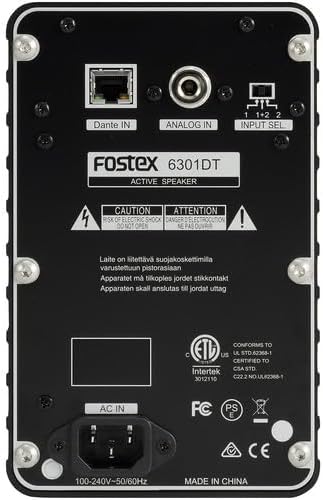
Abbildung 2: Anschlüsse auf der Rückseite
- Dante IN (RJ45): Connects to a Dante network for digital audio input.
- Analog IN (1/4" TS): Connects to an analog audio source using a 1/4-inch TS cable.
- Eingangswahlschalter: Selects the audio input channel for monitoring (1, 2, or 1+2 mixed).
- AC-EINGANG: Connects the supplied IEC power cord.
Aufstellen
Platzierung
Place the Fostex 6301DT on a stable, flat surface. For optimal sound reproduction, position the monitor at ear level and equidistant from your listening position. An optional EB-6301 mounting bracket (not included) allows for easy surface-mounting at various angles.

Abbildung 3: Bspample Anwendungs-Setup
Stromanschluss
- Ensure the monitor's power button is in the OFF position.
- Connect the supplied IEC power cord to the AC IN port on the rear panel of the monitor.
- Stecken Sie das andere Ende des Netzkabels in eine geeignete Wechselstromsteckdose.
Audioanschlüsse
The 6301DT supports both analog and Dante network audio inputs.
- Analoger Eingang: Connect your analog audio source (e.g., mixer, audio interface) to the 1/4" TS Analog IN port on the rear panel using a 1/4-inch TS cable.
- Dante Network Input: Connect an RJ45 Ethernet cable from your Dante network switch or device to the Dante IN port on the rear panel.
Betrieb
Ein-/Ausschalten
Press the Power button on the front panel to turn the monitor ON. The power indicator LED will illuminate. Press the button again to turn the monitor OFF.
Lautstärkeregelung
Rotate the Volume knob on the front panel clockwise to increase the output level and counter-clockwise to decrease it. Start with a low volume setting and gradually increase it to a comfortable listening level.
Eingangsauswahl
Use the Input Select switch on the rear panel to choose the desired audio source:
- Analog: Selects the 1/4" TS analog input.
- Dante Channel 1: Monitors the first Dante audio channel.
- Dante Channel 2: Monitors the second Dante audio channel.
- Dante Channel 1+2 (Mixed): Monitors a mix of both Dante channels.
Dante-Netzwerkkonfiguration
For Dante network operation, you will need to use Audinate's Dante Controller software on a computer connected to the same Dante network. This software allows you to route audio signals to the Fostex 6301DT and configure its network settings. The 6301DT supports sampling frequencies of 44.1 kHz, 48 kHz, 88.2 kHz, and 96 kHz.
Wartung
- Reinigung: Use a soft, dry cloth to clean the exterior of the monitor. Do not use abrasive cleaners, waxes, or solvents.
- Lagerung: Wenn Sie das Gerät über einen längeren Zeitraum lagern, trennen Sie es vom Stromnetz und lagern Sie es an einem kühlen, trockenen Ort, geschützt vor direkter Sonneneinstrahlung und extremen Temperaturen.
- Belüftung: Ensure that the ventilation openings are kept clear of dust and debris.
Fehlerbehebung
| Problem | Mögliche Ursache | Lösung |
|---|---|---|
| Keine Tonausgabe |
|
|
| Verzerrter Ton |
|
|
| Dante connection issues |
|
|
Technische Daten

Abbildung 4: Produktabmessungen
| Besonderheit | Spezifikation |
|---|---|
| Modellnummer | AMS-6301DT |
| Lautsprechertyp | Aktiver Studiomonitor |
| Lautsprechergröße | 4 Zoll |
| Woofer-Durchmesser | 4 Zoll |
| Amplifier-Typ | Klasse D |
| Maximale Ausgangsleistung | 20 Watt |
| Audioausgabemodus | Stereo |
| Anzahl der Audiokanäle | 2.0 |
| Konnektivitätstechnologie | RJ45 (Dante), 1/4" TS (Analog) |
| Konnektivitätsprotokoll | Dante |
| Unterstützte Sampling Frequenzen | 44.1/48/88.2/96 kHz |
| Signal-Rausch-Verhältnis | 85 dB |
| Stromquelle | Kabelgebundene Elektrik |
| Gehäusematerial | Aluminiumdruckguss |
| Farbe | Schwarz |
| Artikelabmessungen (T x B x H) | 4.7" x 7.5" x 4.7" |
| Artikelgewicht | 5.1 Pfund |
| Zusätzliche Merkmale | Auto stand-by function, Recessed front-panel controls |
Garantie und Support
Garantieinformationen
The Fostex 6301DT is covered by a 1 Jahre eingeschränkte HerstellergarantieBitte bewahren Sie Ihren Kaufbeleg für Garantieansprüche auf.
Kundenservice
For technical assistance, troubleshooting, or warranty service, please contact American Music and Sound, the manufacturer, or your authorized Fostex dealer. Refer to the Fostex official webAuf dieser Website finden Sie die aktuellsten Kontaktinformationen für den Support.