
1. Einleitung
Vielen Dank für Ihren Einkauf.asing the JVC XS-N2239TC Wireless Stereo Speaker System. This manual provides essential information for the safe and efficient use of your new speaker system. Please read these instructions thoroughly before operating the device and retain them for future reference.
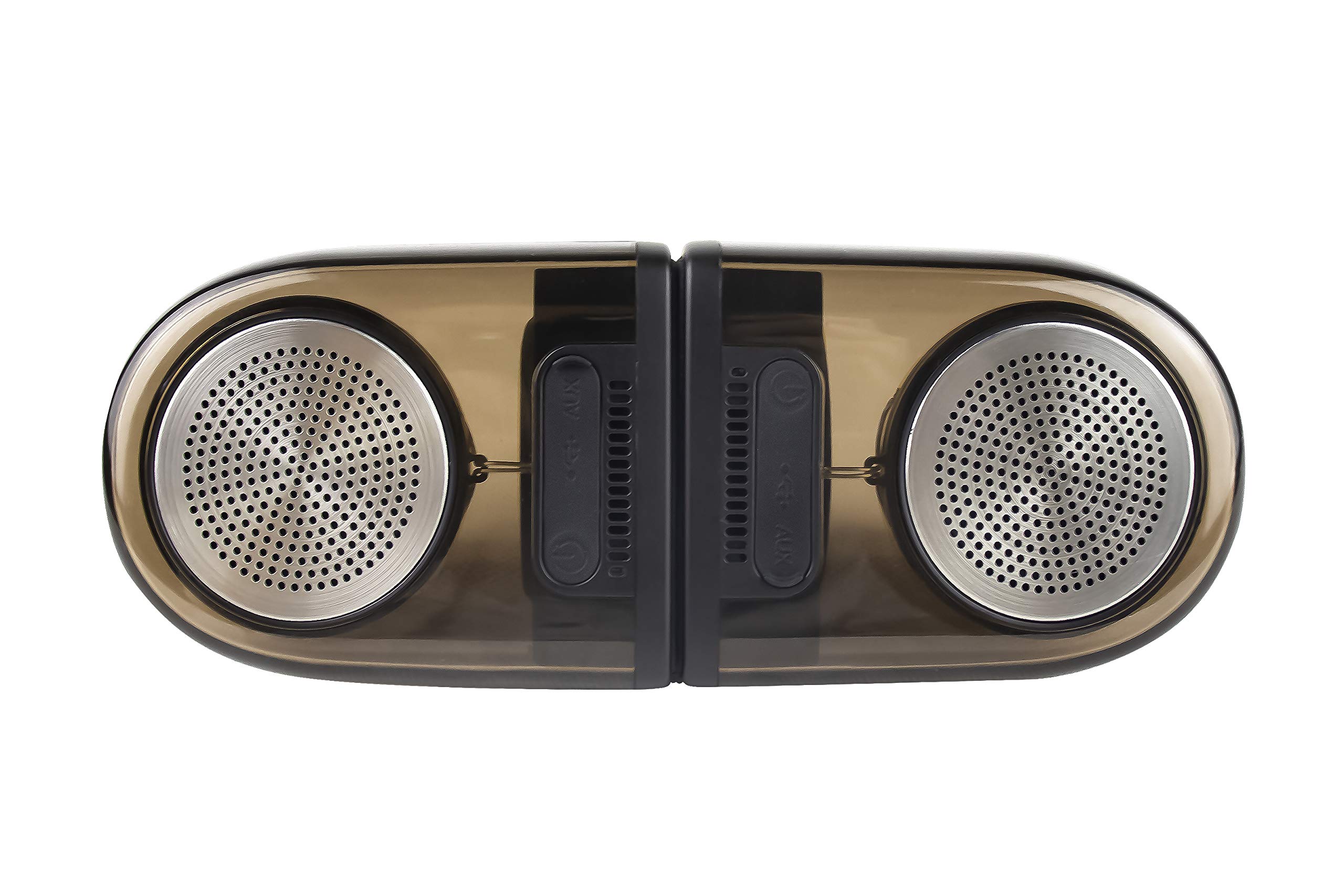
Image of the JVC XS-N2239TC speaker system, showcasing seine Konstruktion und Komponenten.
2. Inhalt der Box
Bitte überprüfen Sie, ob alle folgenden Artikel in Ihrem Paket enthalten sind:
- 1 x JVC XS-N2239TC Speaker Unit
- 1 x AUX-Kabel
- 1 x Benutzerhandbuch (dieses Dokument)
- 1 x Ladekabel
- 1 x Garantiekarte
3. Einrichtung
3.1 Platzierung
The JVC XS-N2239TC speakers are designed for versatile placement, suitable as Bookshelf or Floor Standing units. Ensure the speakers are placed on a stable, flat surface or floor, away from direct sunlight, heat sources, and moisture. For optimal stereo sound, position the two speakers appropriately within your listening area.
3.2 Stromanschluss
- Connect the charging cable to the speaker's power input port.
- Stecken Sie das andere Ende des Ladekabels in eine geeignete Steckdose.
- Ensure the speaker is fully charged before initial use for optimal battery life.
4. Bedienungsanleitung
4.1 Ein-/Ausschalten
Locate the power button on the speaker unit. Press and hold the button for a few seconds to power the speaker on or off. An indicator light will typically confirm the power status.
4.2 Konnektivität
4.2.1 Drahtlose Verbindung
The speaker supports wireless streaming. To connect wirelessly:
- Ensure the speaker is powered on and in pairing mode (refer to the speaker's indicator lights for status).
- On your device (e.g., smartphone, tablet, television), enable wireless functionality.
- Suchen nach available devices and select "JVC XS-N2239TC" from the list.
- Once connected, you can stream audio wirelessly to the speaker system.
4.2.2 USB-Anschluss
The speaker features a plug-and-play USB card reader. Insert a USB storage device containing audio files into the designated USB port on the speaker. The speaker will automatically detect and begin playing compatible audio files.
4.2.3 AUX-Verbindung
Use the provided AUX cable to connect the speaker to devices with a 3.5mm audio output jack, such as televisions or other audio sources. Plug one end of the AUX cable into the speaker's AUX input and the other end into your audio source's output.
4.3 Bedienelemente
4.3.1 Multifunctional Panel Keys
The speaker unit is equipped with multifunctional panel keys. These keys allow you to:
- Adjust volume (increase/decrease).
- Audiowiedergabe starten/pausieren.
- Navigate tracks (forward/backward) when playing from USB or wireless sources.
4.3.2-Fernbedienung
The included remote control provides convenient access to various functions from a distance. Use the remote to:
- Lautsprecher ein-/ausschalten.
- Lautstärke anpassen.
- Wiedergabe steuern (Wiedergabe, Pause, Titel überspringen).
- Switch input modes (e.g., Wireless, USB, AUX).
5. Wartung
5.1 Reinigung
To clean the speaker, use a soft, dry cloth. Do not use abrasive cleaners, waxes, or solvents as they may damage the finish. Ensure the speaker is powered off and unplugged before cleaning.
5.2 Wasserbeständigkeit
The JVC XS-N2239TC speaker is designed with water resistance. While it can withstand splashes, it is not intended for submersion. Avoid exposing the speaker to excessive moisture or direct water jets to prevent damage.
6. Fehlerbehebung
If you encounter issues with your speaker system, please refer to the following common solutions:
- Kein Strom: Ensure the charging cable is securely connected to both the speaker and a working power outlet. Check if the power button has been pressed correctly.
- Kein Ton: Verify the volume level on both the speaker and your connected device. Ensure the correct input mode (Wireless, USB, AUX) is selected. Check all cable connections.
- Probleme mit der drahtlosen Verbindung: Make sure the speaker is within range of your device. Try unpairing and re-pairing the speaker with your device. Ensure no other devices are interfering with the wireless signal.
- USB-Wiedergabeprobleme: Confirm the USB device is formatted correctly and contains compatible audio files. Versuchen Sie es mit einem anderen USB-Gerät.
- Fernbedienung funktioniert nicht: Check the remote control's batteries and replace them if necessary. Ensure there are no obstructions between the remote and the speaker's sensor.
Sollte das Problem weiterhin bestehen, wenden Sie sich bitte an den Kundendienst.
7. Spezifikationen
| Besonderheit | Detail |
|---|---|
| Marke | JVC |
| Modellname | JVC XS-N2239TC |
| Konnektivitätstechnologie | USB, Kabellos |
| Art der drahtlosen Technologie | Kabellos |
| Konnektivitätsprotokoll | USB |
| Audioausgabemodus | Stereo |
| Lautsprechertyp | Bücherregal |
| Montagetyp | Bodenständig |
| Produkteigenschaften | Fernbedienung |
| Kontrollmethode | Fernbedienung |
| Kompatible Geräte | Fernsehen |
| Anzahl der Audiokanäle | 2.1 |
| Lautsprechergröße | 7.5 Zentimeter |
| Subwoofer Speaker Diameter | 5 Zoll |
| Tweeter Driver Diameter | 1 Zoll |
| Audiotreibertyp | Dynamischer Treiber |
| Farbe | Schwarz |
| Ist wasserdicht | WAHR |
| Wasserbeständigkeit | Wasserdicht |
| Spezifische Verwendungen für das Produkt | Heimunterhaltungssysteme |
| Durchschnittliche Batterielebensdauer | 6 Stunden |
| Artikelgewicht | 0.56 Kilogramm |
8. Garantie und Support
8.1 Garantieinformationen
Dieses Produkt wird mit einem 1 Jahre Garantie Die Garantie wird vom Hersteller ab Kaufdatum gewährt. Bitte bewahren Sie Ihren Kaufbeleg und die Garantiekarte für eventuelle Garantieansprüche auf.
8.2 Kundendienst
For any complaints, technical assistance, or support regarding your JVC XS-N2239TC speaker system, please contact JVC customer care:
- Kundenbetreuungsnummer: +91-9910332380
Bitte halten Sie Ihre Produktmodellnummer und die Kaufdetails bereit, wenn Sie den Support kontaktieren.