
Logilink BP0117
Logilink BP0117 TV Wall Mount User Manual
For 43-80 Inch Flat and Curved Monitors
Einführung
This manual provides essential information for the safe and proper installation and use of your Logilink BP0117 TV Wall Mount. Please read these instructions thoroughly before beginning installation and retain them for future reference. This fixed wall mount is designed to securely hold 43-80 inch flat and curved monitors with a maximum load capacity of 40 kg (88 lbs).
Sicherheitshinweise
- Stellen Sie sicher, dass die Wandkonstruktion das Gesamtgewicht der Halterung und des Fernsehers sicher tragen kann.
- Überschreiten Sie nicht die maximale Tragfähigkeit von 40 kg (88 lbs).
- Use appropriate tools and follow all drilling and mounting instructions carefully.
- Always use a stud finder to locate wall studs for secure mounting, especially for drywall installations.
- Wenn Sie sich bei irgendeinem Teil der Installation unsicher sind, konsultieren Sie einen qualifizierten Fachmann.
- Halten Sie Kinder und Haustiere während der Installation fern.
Packungsinhalt
Verify that all components are present before beginning installation. Refer to the included parts list in your product packaging for a complete inventory.
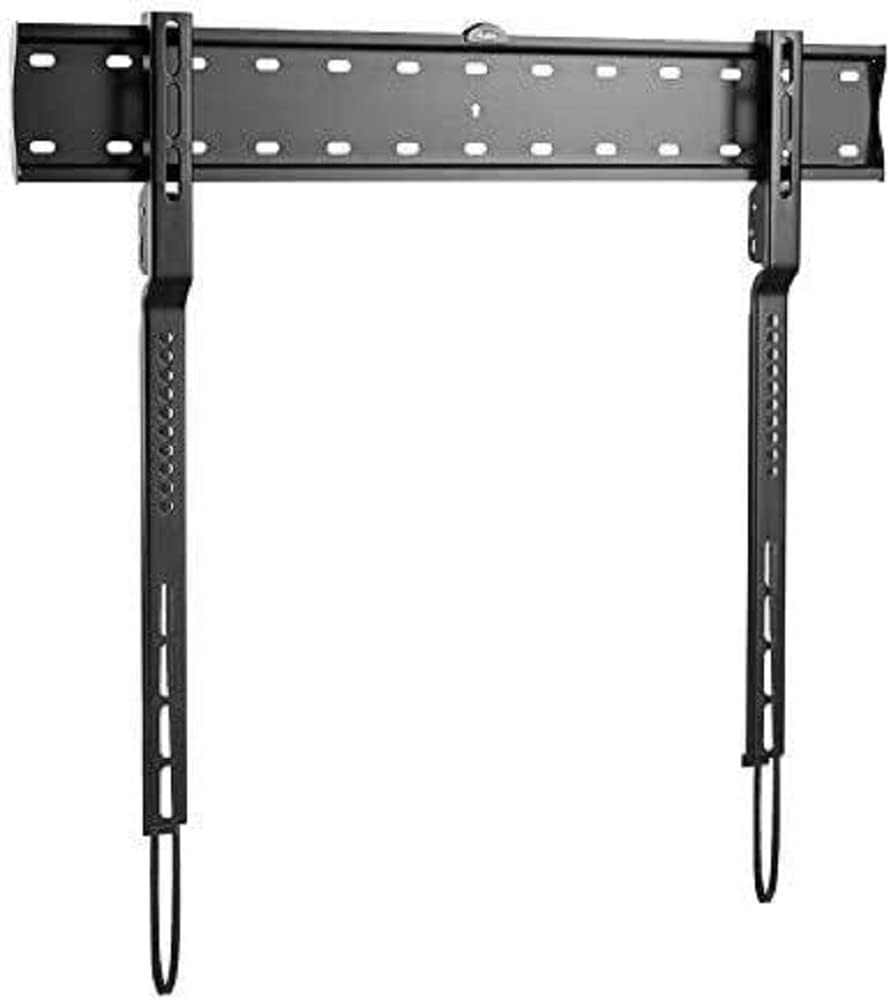
Bild: The Logilink BP0117 TV Wall Mount, showing the main wall plate and the two vertical TV brackets. The wall plate has multiple mounting holes, and the TV brackets feature VESA mounting points and pull-down straps for easy release.
Setup und Installation
Befolgen Sie diese Schritte für eine sichere Installation:
- Bereiten Sie die Wand vor:
- Ermitteln Sie die gewünschte Höhe für Ihren Fernseher.
- Locate wall studs using a stud finder. Mark the center of the studs.
- Position the wall plate against the wall at the marked height and use the built-in spirit level to ensure it is perfectly horizontal. Mark the drilling points.
- Drill pilot holes at the marked points. Ensure the drill bit size is appropriate for your wall anchors/screws.
- Wandplatte anbringen:
- Secure the wall plate to the wall using the provided screws and anchors. Tighten all screws firmly but do not overtighten.
- The silicone pads on the mount help prevent scratches or damage to the wall.
- Befestigen Sie die TV-Halterungen am Fernseher:
- Legen Sie Ihren Fernseher vorsichtig mit dem Bildschirm nach unten auf eine weiche, saubere Oberfläche.
- Identifizieren Sie die VESA-Montagelöcher auf der Rückseite Ihres Fernsehers.
- Attach the two vertical TV brackets to the back of your TV using the appropriate screws and spacers (if needed) that match your TV's VESA pattern. The BP0117 supports VESA patterns: 200x200, 300x200, 300x300, 400x200, 400x300, 600x300.
- Ensure the brackets are securely fastened and evenly spaced.
- Fernseher an der Wandplatte befestigen:
- With assistance, carefully lift the TV and align the hooks on the TV brackets with the top edge of the wall plate.
- Senken Sie den Fernseher vorsichtig ab, bis die Halterungen in die Wandplatte einrasten.
- The spring with the strap mechanism will lock your TV into place. Pull the straps down to ensure the TV is securely latched.
- Double-check that the TV is level and securely attached to the wall mount.
Bedienung der Montierung
The Logilink BP0117 is a fixed wall mount, meaning it does not offer tilt, swivel, or extension capabilities. Once installed, your TV will remain in a fixed position, 18 mm from the wall.
To remove the TV from the mount, simply pull down on the release straps located at the bottom of the TV brackets. This will disengage the locking mechanism, allowing you to lift the TV off the wall plate.
Wartung
- Überprüfen Sie regelmäßig alle Schrauben und Bolzen, um sicherzustellen, dass sie fest angezogen und sicher befestigt sind.
- Reinigen Sie die Halterung mit einem weichen, trockenen Tuch. Vermeiden Sie scheuernde Reiniger oder Lösungsmittel.
- Inspect the mount for any signs of wear or damage. If any damage is found, do not use the mount and contact customer support.
Fehlerbehebung
| Problem | Mögliche Ursache | Lösung |
|---|---|---|
| Der Fernseher steht nach der Installation nicht waagerecht. | Die Wandplatte war bei der Montage nicht waagerecht. | Remove TV, loosen wall plate screws, adjust with spirit level, re-tighten. |
| Der Fernseher sitzt wackelig auf der Halterung. | Screws not tightened sufficiently; incorrect VESA screws used; wall not strong enough. | Ensure all screws are tight. Verify correct VESA screws are used. Confirm wall structure can support weight. Ensure release straps are engaged. |
| Die TV-Halterungen können nicht am Fernseher befestigt werden. | Falsches VESA-Muster oder falsche Schraubengröße. | Check your TV's VESA pattern against the mount's compatibility. Use the correct screws and spacers for your TV model. |
Technische Daten
| Besonderheit | Detail |
|---|---|
| Modellnummer | BP0117 |
| Marke | Logilink |
| Montagetyp | Wandhalterung |
| Bewegungstyp | Behoben |
| Kompatible TV-Größen | 43-80 inches (Flat and Curved) |
| Max. Ladekapazität | 40 kg |
| VESA-Kompatibilität | 200x200, 300x200, 300x300, 400x200, 400x300, 600x300 |
| Wandabstand | 18 mm |
| Material | Silicone pads (for wall protection) |
| Technische Daten | 4.53 x 2.69 x 1.59 inches (mount only) |
| Artikelgewicht | 4.62 Pfund |
Garantie und Support
Specific warranty information for the Logilink BP0117 TV Wall Mount is not provided within this manual. Please refer to the product packaging or the official Logilink webAuf der Webseite finden Sie die detaillierten Garantiebedingungen.
For technical support, missing parts, or any inquiries regarding your product, please contact Logilink customer service through their official channels. Contact information can typically be found on the manufacturer's webStandort oder Produktverpackung.
Ask a question about this manual
Ask about setup, troubleshooting, compatibility, parts, safety, or missing instructions. Manuals+ will review the question and use this page’s manual context to help answer it.