
1. Einleitung
The Walfront SVP-912 is an advanced adjustable voltage protector designed to safeguard your electrical appliances and systems from voltage fluctuations. It provides comprehensive protection against both over-voltage und Unterlautstärketage conditions, featuring an automatic recovery function to restore power once voltage returns to safe levels. This device also includes voltage display, adjustable protection and recovery values, and customizable action and delay times for enhanced performance and reliability.
This manual provides detailed instructions for the proper installation, operation, and maintenance of your Walfront SVP-912 voltage Beschützer.

Figure 1: Walfront SVP-912 Adjustable Voltage Protektor
2. Sicherheitshinweise
- Professionelle Installation empfohlen: Die Installation sollte von einem qualifizierten Elektriker durchgeführt werden, um die Einhaltung der örtlichen Elektrovorschriften und Sicherheitsstandards zu gewährleisten.
- Stromversorgung trennen: Always disconnect the main power supply before installing, wiring, or performing any maintenance on the device to prevent electric shock.
- Richtige Verdrahtung: Ensure all wiring connections are secure and correctly matched (Line to Line, Neutral to Neutral) as indicated in the wiring diagram. Loose connections can cause overheating or malfunction.
- Betriebsumgebung: Do not expose the device to water, excessive humidity, or extreme temperatures. Operate within specified environmental conditions.
- Tragfähigkeit: Do not exceed the maximum current rating of 80A. Overloading can damage the device and connected equipment.
- Belüftung: Sorgen Sie für ausreichende Belüftung rund um das Gerät, um eine Überhitzung zu vermeiden.
3. Produktkomponenten und Display
The Walfront SVP-912 features a clear digital display and intuitive control buttons for easy configuration and monitoring.
Vorderseite
- Digitaler Bildschirm: Zeigt Echtzeit-Voltage and parameter settings.
- Set-Taste: Used to enter the parameter setting mode and confirm selections.
- Aufwärtstaste (▲): Wird verwendet, um Parameterwerte zu erhöhen.
- Abwärtstaste (▼): Wird verwendet, um Parameterwerte zu verringern.
- Over(V) Indicator: Leuchtet auf, wenn ein Überdruck auftritttagDer Zustand wird erkannt.
- Under(V) Indicator: Erleuchtet, wenn ein UntervolumentagDer Zustand wird erkannt.
Klemmen
- IN (L, N): Input terminals for connecting the incoming power supply (Line and Neutral).
- OUT (L, N): Output terminals for connecting to the protected load (Line and Neutral).
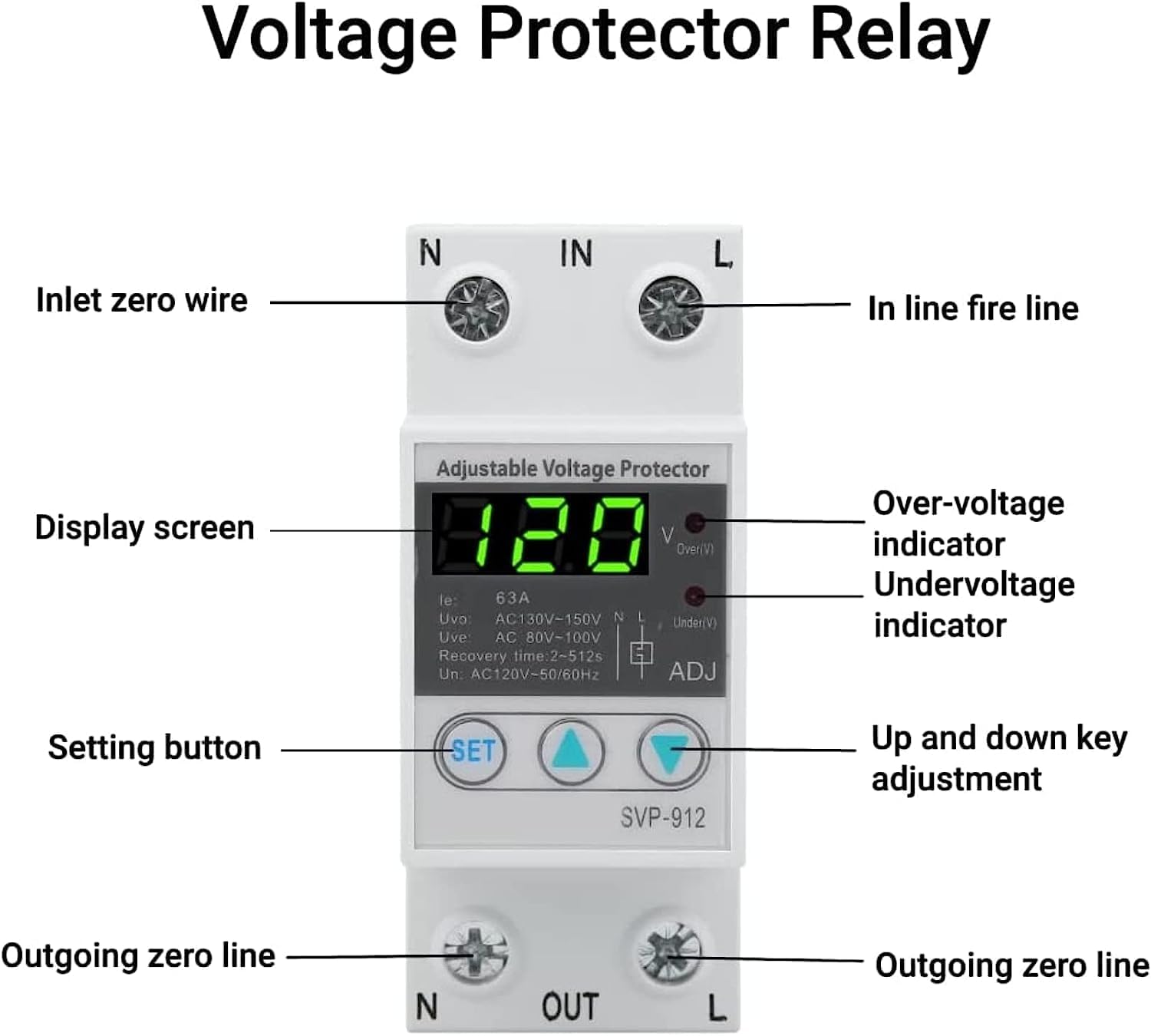
Figure 2: Front Panel Components and Labels

Figure 3: Close-up of Display and Control Buttons
4. Einrichtung und Installation
4.1 Montage
The Walfront SVP-912 is designed for DIN rail mounting. Securely attach the device to a standard DIN rail within an electrical panel or enclosure.
4.2 Schaltplan
Follow the wiring diagram below carefully. Ensure all connections are tight and correct to prevent electrical hazards and ensure proper device function.
- Connect the incoming Line (L) and Neutral (N) wires from your power source to the IN terminals of the protector.
- Connect the Line (L) and Neutral (N) wires leading to your protected load (appliances, circuit) to the AUS terminals of the protector.
- It is recommended to install a circuit breaker or power switch upstream of the voltage protector for additional safety and ease of maintenance.

Abbildung 4: Typischer Schaltplan
5. Bedienungsanleitung
5.1 Erstes Einschalten
After successful installation and wiring, turn on the main power supply. The device's digital display will illuminate and show the current real-time voltage Ihrer elektrischen Anlage.
5.2 Parameter anpassen
The Walfront SVP-912 allows you to customize various protection parameters. To enter the setting mode:
- Halten Sie die SATZ button for approximately 3-5 seconds until the display starts flashing, indicating you are in setting mode.
- Verwenden Sie die Nach oben (▲) Und Runter (▼) buttons to adjust the displayed parameter value.
- Drücken Sie die SATZ button briefly to confirm the current setting and advance to the next parameter.
- Repeat steps 2 and 3 for all parameters you wish to adjust.
- After setting the last parameter, press SATZ again to exit the setting mode. The device will save your settings and return to displaying the real-time voltage.
Zu den einstellbaren Parametern gehören:
- Uvo (Over-voltage protection value): Die voltage threshold at which the device will trip due to over-voltage.
- Uve (Over-voltage recovery value): Die voltage level at which the device will automatically restore power after an over-voltagDas Ereignis.
- t-ov (Over-voltage action time): The delay before the device trips after detecting an over-voltagDer Zustand.
- Uu (Under-voltage protection value): Die voltage threshold at which the device will trip due to under-voltage.
- Uue (Under-voltage recovery value): Die voltage level at which the device will automatically restore power after an under-voltagDas Ereignis.
- t-uv (Under-voltage action time): The delay before the device trips after detecting an under-voltagDer Zustand.
- t-rd (Fault recovery delay time): The delay before the device attempts to restore power after any fault condition has cleared.
- t-pd (Power-on delay time): The delay before the device supplies power to the load after initial power-on or manual reset.
5.3 Fault Query and Factory Reset
- Fault Query: The device supports fault query functionality. Consult the full product manual (if provided separately) or contact customer support for specific instructions on how to access fault history.
- Werkseinstellungen zurückgesetzt: The device has a factory reset function. To perform a factory reset, typically you would press and hold a combination of buttons or a specific button for an extended period. Refer to the full product manual or contact customer support for the exact procedure.
5.4 Produktdemonstrationsvideo
Video 1: Demonstration of an adjustable voltage current protector, showing its physical features and basic handling. Note: This video may feature a model with different voltage/current ratings (AC230V 63A) than the SVP-912 (AC120V 80A), but illustrates general device interaction.
6. Wartung
- Reinigung: Reinigen Sie die Außenseite des Geräts regelmäßig mit einem weichen, trockenen Tuch. Verwenden Sie keine Scheuermittel oder Lösungsmittel.
- Inspektion: Überprüfen Sie regelmäßig die Kabelverbindungen auf festen Sitz und Anzeichen von Verschleiß oder Beschädigung.
- Umgebungsbedingungen: Stellen Sie sicher, dass die Betriebsumgebung innerhalb der vorgegebenen Temperatur- und Feuchtigkeitsbereiche bleibt.
- Firmware-Updates: Überprüfen Sie die Angaben des Herstellers website for any available firmware updates, if applicable.
7. Fehlerbehebung
If you encounter issues with your Walfront SVP-912, refer to the following troubleshooting guide:
| Problem | Mögliche Ursache | Lösung |
|---|---|---|
| Device does not power on or display is blank. | Keine Stromversorgung; falsche Verkabelung; interner Fehler. | Check main power supply. Verify wiring connections (IN L/N). If problem persists, contact support. |
| Falsche Lautstärketage readings or device does not function correctly with 60Hz systems. | Frequency incompatibility; calibration issue. | Ensure the device is rated for your local frequency (50Hz/60Hz). If readings are consistently off, contact customer support for potential calibration or replacement. |
| Buttons are unresponsive or one button does not work. | Button malfunction; internal defect. | Attempt a factory reset (refer to section 5.3 or contact support). If buttons remain unresponsive, the device may be faulty and require replacement. |
| Device trips frequently without apparent voltage-Probleme. | Protection parameters set too narrowly; unstable power supply; faulty device. | Review and adjust over-voltage und Unterlautstärketage protection/recovery values (Uvo, Uve, Uu, Uue) to appropriate ranges for your region. Monitor your power supply for hidden fluctuations. If problem persists, contact support. |
8. Spezifikationen
- Modell: SVP-912
- Nennvolumentage: 120 V Wechselstrom
- Nennstrom: 80 A
- Betriebsfrequenz: 50/60 Hz
- Überlautstärketage Protection Range: Adjustable (e.g., AC130V-150V N/L as seen on display)
- Untervolumentage Protection Range: Adjustable (e.g., AC80V-100V as seen on display)
- Wiederherstellungsverzögerungszeit: Adjustable (e.g., 2-512s as seen on display)
- Artikelgewicht: 170 Gramm
- Abmessungen (ungefähr): 85 mm (Höhe) x 48 mm (Breite) x 65 mm (Tiefe)
- ASIN: B08L9FMV92
- Produktverfügbarkeit: November 19, 2020 (on Amazon.com.mx)

Abbildung 5: Produktabmessungen
9. Garantieinformationen
Walfront products are manufactured to high-quality standards. This product comes with a standard manufacturer's warranty against defects in materials and workmanship. The specific terms and duration of the warranty may vary by region and retailer. Please retain your proof of purchase for warranty claims. For detailed warranty information, refer to the documentation included with your purchase or contact Walfront customer support.
10. Kundendienst
If you have any questions, require technical assistance, or need to report an issue with your Walfront SVP-912 voltage protector, please contact Walfront customer support. Contact information can typically be found on the product packaging, the retailer's website, or the official Walfront brand store.
When contacting support, please have your product model (SVP-912) and ASIN (B08L9FMV92) readily available.