
1. Einleitung
This manual provides detailed instructions for the safe and proper installation and operation of your Barkan Full Motion Articulating TV Wall Mount. This mount is designed for televisions ranging from 13 to 56 inches and supports a maximum weight of 79 lbs (36 kg). It offers four movement capabilities: rotation, folding, swivel, and tilt, allowing for optimal viewwinkeln.
2. Sicherheitshinweise
Wichtiger Sicherheitshinweis: Child safety is paramount. To prevent tip-over accidents, always secure your TV to the wall using a strong and safe mount. All Barkan TV mounts include a Fall Proof system designed to prevent accidental disengagement of the screen.
- Stellen Sie sicher, dass die Wandkonstruktion das Gesamtgewicht der Halterung und Ihres Fernsehers tragen kann.
- Verwenden Sie geeignetes Werkzeug und befolgen Sie alle Installationsschritte sorgfältig.
- If your screen requires different screen-connection screws than those provided, obtain suitable ones from a local hardware store or contact Barkan support.
- Die maximale Tragfähigkeit von 79 lbs (36 kg) darf nicht überschritten werden.
3. Packungsinhalt
Vergewissern Sie sich vor Beginn der Installation, dass alle Komponenten vorhanden sind. Das Paket sollte Folgendes enthalten:
- TV Mount Assembly
- Hardware Kit (including various screws, anchors, and spacers)
- Montageanleitung (dieses Dokument)
If any parts are missing, please contact Barkan support.

Image: Contents of the Barkan Hardware Kit, showing various screws, anchors, and washers for wall and TV mounting.
4. Spezifikationen
| Montagetyp | Wandhalterung |
| Bewegungstyp | Artikulation (volle Bewegung) |
| Kompatible Bildschirmgrößen | 13 bis 56 Zoll |
| Maximale Tragfähigkeit | 79 kg |
| VESA-Kompatibilität | 75x75, 100x100, 100x200, 200x100, 200x200, 300x300, 300x400, 400x200, 400x300, 400x400 mm (and non-VESA up to 400x400 mm) |
| Mindestabstand zur Wand | 2.6 Zoll (6.5 cm) |
| Maximum Distance from Wall | 15.9 Zoll (40.5 cm) |
| Neigungswinkel | -5° bis +15° |
| Schwenkwinkel | Up to 360° (at screen connection plate) |
| Rotation (near wall) | 180° |
| Nivellierung | ±5° |
| Material | Eisen |
| Farbe | Schwarz |

Image: Detailed diagram showing the dimensions, VESA patterns, tilt, swivel, and extension capabilities of the Barkan TV wall mount.
5. Einrichtung und Installation
5.1 Benötigtes Werkzeug
Bevor Sie beginnen, stellen Sie sicher, dass Sie über folgende Werkzeuge verfügen:
- Drill (with 1/4" - 6mm and 3/8" - 10mm bits for wood/concrete, and 5/32" - 4mm for wood studs)
- Ebene
- Schutzbrille
- Balkensucher (empfohlen für Trockenbauarbeiten)
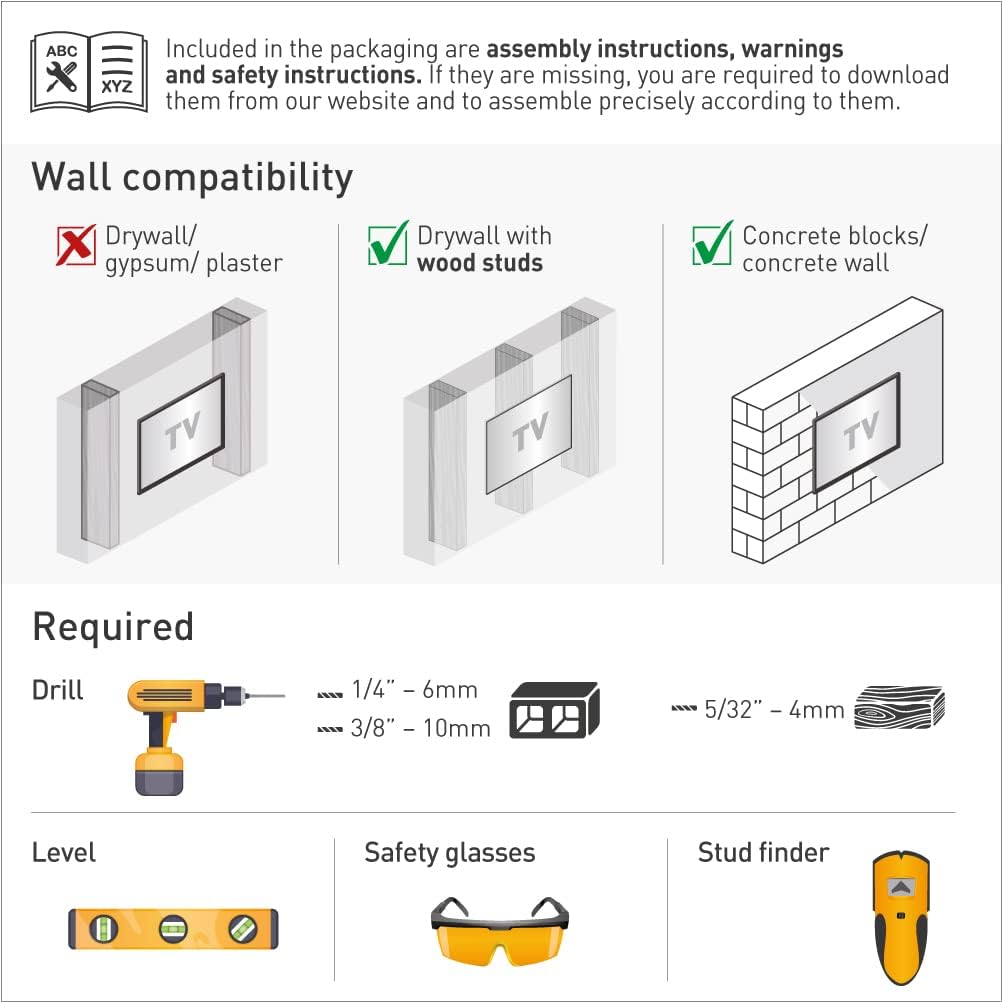
Image: Illustration of required tools (drill, level, safety glasses, stud finder) and wall compatibility types (drywall with wood studs, concrete blocks/concrete wall).
5.2 Wandkompatibilität
Diese Halterung ist kompatibel mit:
- Trockenbau mit Holzständern
- Betonblöcke / Betonwand
Note: Not compatible with drywall/gypsum/plaster walls without wood studs.
5.3 Montageschritte
Follow these three main steps for assembly:
- Connect the TV plate to the back of the TV: Attach the adapter plates to the rear side of your television using the appropriate screws from the hardware kit. Ensure a secure fit.
- Montieren Sie die Halterung an der Wand: Mark the desired mounting location on the wall. Use a stud finder for wood stud installations. Drill pilot holes and securely fasten the wall bracket using the provided wall screws and anchors suitable for your wall type. Use a level to ensure the bracket is straight.
- Befestigen Sie den Fernseher an der Halterung: Carefully lift the television and align the TV plate with the wall bracket. Snap the TV onto the bracket, ensuring it is securely engaged. The Fall Proof system will help prevent accidental disengagement.

Image: Visual guide illustrating the three easy steps for installing the TV mount: connecting the TV plate, installing the wall bracket, and snapping the TV onto the bracket.
5.4 Backscreen Connection Positioning
The mount supports various VESA and non-VESA backscreen connection patterns. Refer to the diagram below to identify the correct adapter configuration for your TV. If your TV's connection points are not shown, please contact Barkan support.

Image: Diagram showing various backscreen connection positioning options in millimeters (Width x Height) for different VESA patterns, including the use of adapters.
6. Bedienungsanleitung
The Barkan Full Motion Articulating TV Wall Mount allows for flexible positioning of your television to achieve the best viewErfahrung.
- Neigung: Adjust the screen vertically from -5° to +15° by gently pushing or pulling the top or bottom edge of the TV.
- Schwenken: Rotate the screen horizontally up to 360° at the screen connection plate to change the viewing-Winkel.
- Rotation (near wall): The arm can rotate 180° near the wall, allowing for broad lateral movement.
- Verlängerung: The mount can extend from a minimum of 2.6 inches (6.5 cm) to a maximum of 15.9 inches (40.5 cm) from the wall.
- Nivellierung: Fine-tune the horizontal level of the screen by ±5°.
To adjust, gently push or pull the TV to the desired angle. Avoid excessive force.

Image: Diagram illustrating the full motion capabilities of the mount, including tilt (0°-15°), swivel (180°), leveling (±5°), and extension (2.6" to 15.9").
7. Wartung
The Barkan TV Wall Mount requires minimal maintenance. Periodically check all screws and connections to ensure they remain tight and secure. Do not use abrasive cleaners on the mount; a soft, damp Zur Reinigung genügt ein Tuch.
8. Fehlerbehebung
If you encounter issues during installation or operation:
- Fernseher nicht waagerecht: Use the leveling adjustment feature to correct the horizontal alignment.
- Das Gefährt fühlt sich instabil an: Re-check all wall and TV connections to ensure they are securely fastened. Verify that the wall type is compatible and that appropriate anchors were used. Ensure the TV weight does not exceed the maximum capacity.
- Difficulty with screen-connection screws: If the provided screws do not fit your TV, please purchase suitable ones from a local hardware store.
For further assistance, please contact Barkan support.
9. Garantie und Support
9.1 Gewährleistung
The Barkan TV Wall Mount comes with a 5 Jahr GarantieBitte bewahren Sie Ihren Kaufbeleg für Garantieansprüche auf.
9.2 Unterstützung
For any questions, assistance, or if you are not satisfied with the product, please contact Barkan support:
- E-Mail: sales.usa@barkanmounts.com
- WebWebsite: https://www.barkanmounts.com/support
Our customer service experts are available to assist you.