
1. Sicherheitshinweise
Read all safety instructions carefully before installing and operating the PNI SP2000W Voltage Inverter. Failure to follow these instructions may result in electric shock, fire, or serious injury.
- Elektrische Sicherheit: Dieses Gerät arbeitet mit hoher Spannungtage. Öffnen Sie den Wechselrichter nicht.asing. All servicing must be performed by qualified personnel.
- Belüftung: Ensure adequate ventilation around the inverter. Do not block the cooling fans or place the inverter in an enclosed space. Overheating can cause damage or fire.
- Umfeld: Do not expose the inverter to water, rain, snow, spray, or dust. Operate in a dry, cool, and well-ventilated area.
- Batterieanschluss: Connect the inverter directly to a 12V car battery. Do not connect to other voltage sources or attempt to use with solar panels, as special inverters are required for solar systems.
- Lastkompatibilität: This inverter is designed for resistive loads such as TVs, lighting lamps, radios, fans, and mini-refrigerators. Avoid connecting inductive loads with high starting currents unless within the inverter's surge capacity.
- Überlastschutz: The inverter includes overload protection. Do not exceed the continuous output power of 2000W.
2. Produktüberschreitungview
The PNI SP2000W is a pure sinusoid voltage inverter designed to convert 12V DC power from a car battery into 230V AC power, suitable for powering various electrical appliances. It features a continuous output of 2000W and active cooling for efficient operation.
2.1. Hauptmerkmale
- Ausgangsleistung: 2000 W Dauerleistung, 4000 W Spitzenleistung.
- Eingangslautstärketage: 12V Gleichstrom.
- Ausgangsvolumentage: 220V / 230V AC.
- Ausgabe Wellenform: Pure Sinusoid.
- Frequenz: 50 Hz.
- Kühlung: Active cooling with two built-in fans and aluminum housing.
- Schutz: Overload, thermal, short circuit.
2.2. Packungsinhalt
- PNI SP2000W Voltagund Wechselrichter
- Power connection cables (red for positive, black for negative)
- Wrench for terminal connections
- Benutzerhandbuch
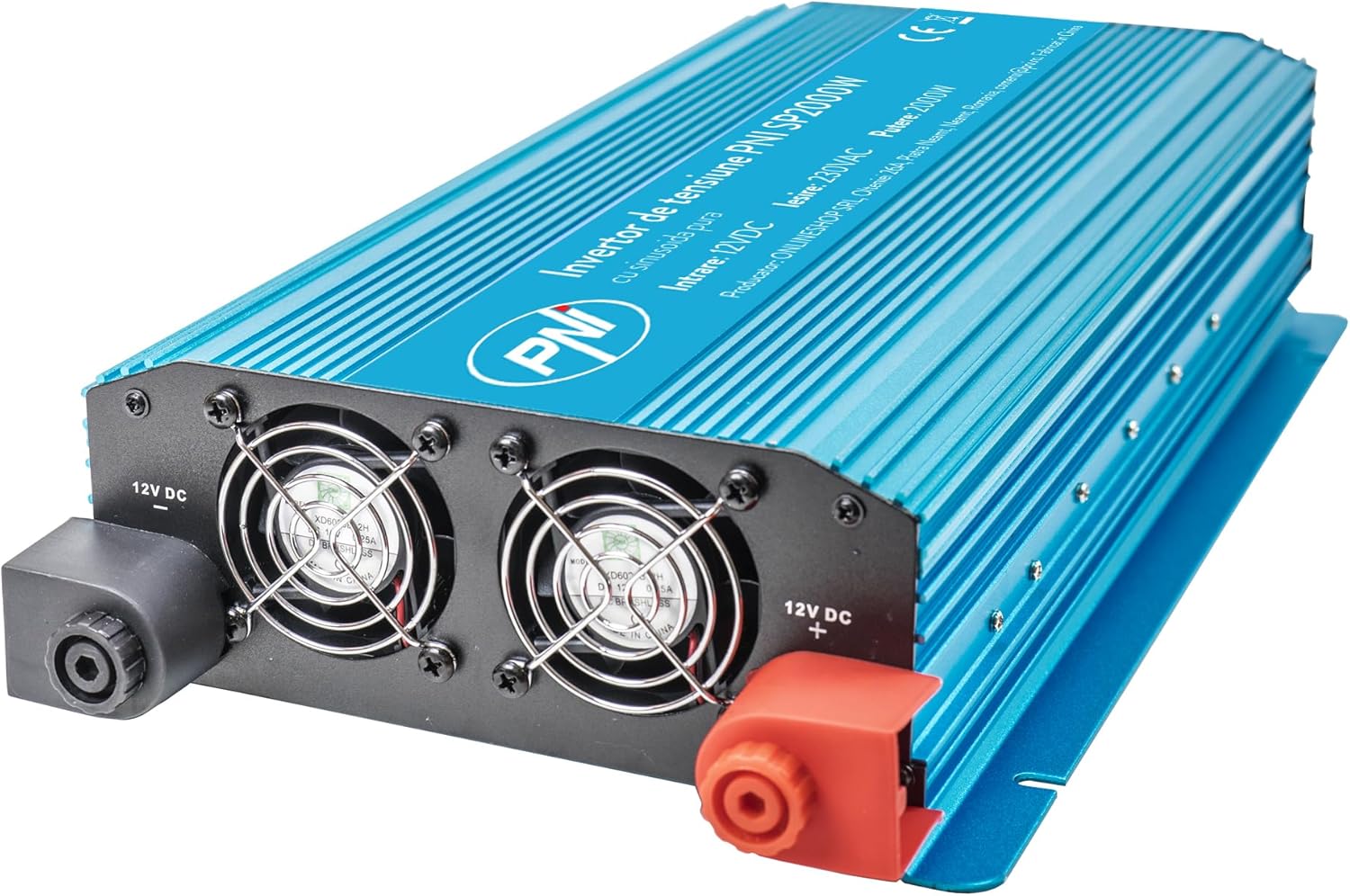
Abbildung 1: Vorderseite view of the PNI SP2000W Voltage Inverter, showing the blue casing and the PNI logo.

Abbildung 2: Oben view of the PNI SP2000W Voltage Inverter, displaying the product label with model information and specifications.

Figure 3: The PNI SP2000W Voltage Inverter shown with its included accessories: power connection cables (red and black) and a wrench for securing terminals.
3. Einrichtung
Eine korrekte Einrichtung ist entscheidend für den sicheren und effizienten Betrieb Ihres Wechselrichters.
3.1. Platzierung
- Place the inverter on a flat, stable surface.
- Ensure there is at least 15 cm (6 inches) of clear space around the inverter for proper ventilation.
- Vermeiden Sie direkte Sonneneinstrahlung, Wärmequellen und Bereiche mit hoher Luftfeuchtigkeit oder Staub.
3.2. Connecting to a 12V Battery
The inverter must be connected directly to a 12V DC battery. Use the provided cables for connection.
- Stellen Sie sicher, dass sich der Netzschalter des Wechselrichters in der Position „AUS“ befindet.
- Connect the red cable to the positive (+) terminal of the inverter and then to the positive (+) terminal of the 12V battery.
- Connect the black cable to the negative (-) terminal of the inverter and then to the negative (-) terminal of the 12V battery.
- Tighten all connections securely using the provided wrench to prevent loose connections, which can cause overheating and damage.
- Verify that all connections are correct and secure before proceeding.

Figure 4: Input side of the inverter, showing the 12V DC positive (+) and negative (-) terminals for battery connection, along with the cooling fans.

Figure 5: Output side of the inverter, featuring two 230V AC sockets, the main power switch, and indicator lights for power and fault status.
4. Bedienungsanleitung
Follow these steps to operate your PNI SP2000W Voltage Inverter safely.
- Einschalten: After ensuring all connections are secure and correct, switch the inverter's power button to the "ON" position. The green "POWER" indicator light should illuminate.
- Geräte anschließen: Plug your 230V AC appliances into the inverter's output sockets. Ensure the total wattagDie Gesamtleistung aller angeschlossenen Geräte darf 2000 W nicht überschreiten.
- Monitor: Observe the inverter's indicator lights. If the red "FAULT" light illuminates, refer to the Troubleshooting section.
- Ausschalten: When you are finished using the inverter, first turn off and unplug all connected appliances. Then, switch the inverter's power button to the "OFF" position.
5. Wartung
Regelmäßige Wartung trägt dazu bei, die Langlebigkeit und zuverlässige Leistung Ihres Wechselrichters zu gewährleisten.
- Reinigung: Periodically clean the exterior of the inverter with a soft, dry cloth. Do not use liquid cleaners or solvents. Ensure the cooling vents are free from dust and debris.
- Belüftung: Regularly check that the cooling fans are not obstructed and are operating correctly. Good airflow is essential to prevent overheating.
- Kabelverbindungen: Periodically inspect the battery connection cables for any signs of wear, damage, or corrosion. Ensure connections remain tight.
- Lagerung: If storing the inverter for an extended period, disconnect it from the battery and store it in a cool, dry place away from direct sunlight.
6. Fehlerbehebung
If you encounter issues with your PNI SP2000W Inverter, refer to the following common problems and solutions.
| Problem | Mögliche Ursache | Lösung |
|---|---|---|
| No power output / Inverter does not turn on | Lose Batterieanschlüsse Niedrige Batterieladungtage Wechselrichterschalter ist AUS | Batteriekabel prüfen und gegebenenfalls festziehen Akku aufladen oder ersetzen Stellen Sie sicher, dass der Wechselrichter eingeschaltet ist. |
| Red "FAULT" light is on | Überlast Überhitzung Kurzschluss Niedrige/hohe Eingangslautstärketage | Reduziere die Anschlusslast Wechselrichter abkühlen lassen, für ausreichende Belüftung sorgen Check for short circuits in connected appliances/cables Überprüfen Sie die Batterieladungtage |
| Geräte funktionieren nicht richtig | Gerätewassertage zu hoch Appliance type incompatible (e.g., high inductive load) | Ensure total load is within 2000W continuous Consult appliance manual for compatibility with pure sine wave inverters |
| Die Ventilatoren laufen ständig laut. | Hohe Innentemperatur aufgrund hoher Beladung oder mangelhafter Belüftung | Reduce load or improve ventilation around the inverter |
Sollte das Problem nach Anwendung dieser Lösungsansätze weiterhin bestehen, wenden Sie sich bitte an den Kundendienst.
7. Spezifikationen
| Besonderheit | Spezifikation |
|---|---|
| Modell | PNI-SP2000W |
| Kontinuierliche Ausgangsleistung | 2000 Watt |
| Maximum Output Power (Peak) | 4000 Watt |
| Eingangslautstärketage | 12 V Gleichspannung |
| Ausgangsvolumentage | 220 V / 230 V Wechselstrom |
| Arbeitsfrequenz | 50 Hz |
| Ausgangswellenform | Pure Sinusoid |
| Effizienz | > 88 % |
| Consumption in Stand-by | 10 bis 15 W |
| Aktive Kühlung | Mit Lüfter |
| Abmessungen (L x B x H) | 440 x 220 x 100 mm |
| Gewicht | 4.27 Kg |
| Kabellänge | 44 cm |
| Betriebstemperatur | -10 °C ~ +40 °C |
| Lagertemperatur | -20 °C ~ +55 °C |
| Luftfeuchtigkeit | 90 % (nicht kondensierend) |
| Überlastfähigkeit | > 120 % |
| Schutz | Overload, Thermal, Short Circuit, Over-voltage, Untervoltage |
| Ausgangsbuchsen | 2 x 230 V AC sockets |
8. Garantie und Support
PNI products are manufactured to high-quality standards. This product is covered by a manufacturer's warranty against defects in materials and workmanship. Please retain your proof of purchase for warranty claims.
For technical support or warranty inquiries, please refer to the contact information provided with your purchase documentation or visit the official PNI webWebsite.