
FLEXISPOT EC1
FLEXISPOT EC1 Essential Adjustable Desk User Manual
Model: EC1 (9817e369-8671-4ffb-8546-ba858c65c4f3)
Marke: FLEXISPOT
Produkt überview
The FLEXISPOT EC1 Essential Adjustable Desk is designed to provide a versatile workspace, allowing users to easily switch between sitting and standing positions. This helps to mitigate the health impacts associated with prolonged sitting, promoting enhanced focus and increased activity throughout the workday.

Image: The FLEXISPOT EC1 desk, showcasing its spacious wooden desktop and sturdy gray frame, set up with a laptop and monitor.
Hauptmerkmale
- Großzügiger Arbeitsbereich: The desk features a large 48” x 24” environmentally sourced work surface, providing ample space for various monitor or laptop setups, along with room for ongoing projects and office supplies. Note: Hand measurement may have a discrepancy of about 1 inch.
- Electric Height Adjustable Lift System: Equipped with a motor lift mechanism, the desk offers smooth height adjustments from 28" to 47.6" (excluding the 1” tabletop thickness). It operates at a speed of 1”/second with low noise (under 50 dB).
- Solide Konstruktion: An industrial-grade steel frame combined with a solid desktop ensures a 154 lbs weight capacity, supporting your ideal workspace setup.
- Built for Work from Home: This standing desk is designed to help independent and remote workers maintain activity, health, and productivity. Adjust the desk precisely to your height to incorporate healthy movement into your day.
- One-Piece Desktop: The desktop is a single, seamless piece, offering a smooth and consistent work surface.
- Water & Scratch Resistance: The desktop material is designed to resist water and scratches, ensuring durability.

Image: Detail of the desk's environmentally friendly desktop, highlighting its protective edge for durability.
Einrichtung und Montage
The FLEXISPOT EC1 desk is shipped in two separate packages, which may arrive at different times. Please ensure you have all components before beginning assembly.
Wichtige Hinweise:
- Befolgen Sie stets sorgfältig die mitgelieferte Montageanleitung.
- Some steps may require a drill, which is not included with the product.
- Allow for slight 0-1 inch size difference due to manual measurement.
- Ensure the desk is properly assembled and stable before placing any items on it or using it.

Bild: Eine Draufsicht view illustrating the 48-inch width and 24-inch depth of the desk's work surface.
Bedienungsanleitung
The FLEXISPOT EC1 desk features an intuitive electric height adjustment system. The control panel is typically located on the underside of the desktop for easy access.
Höhenverstellung:
- Verwenden Sie die up (^) Und down (v) buttons on the control panel to adjust the desk height.
- The desk can be adjusted smoothly from a minimum height of 28 inches to a maximum height of 47.6 inches (excluding tabletop thickness).
- The motor operates quietly, under 50 dB.
Speichervoreinstellungen:
Some models may include memory preset buttons (e.g., 1, 2, 3, 4) to save your preferred sitting and standing heights. Refer to your specific control panel for details on setting and recalling these presets.

Image: A close-up of the simple 2-button controller, used for easy up and down height adjustments.
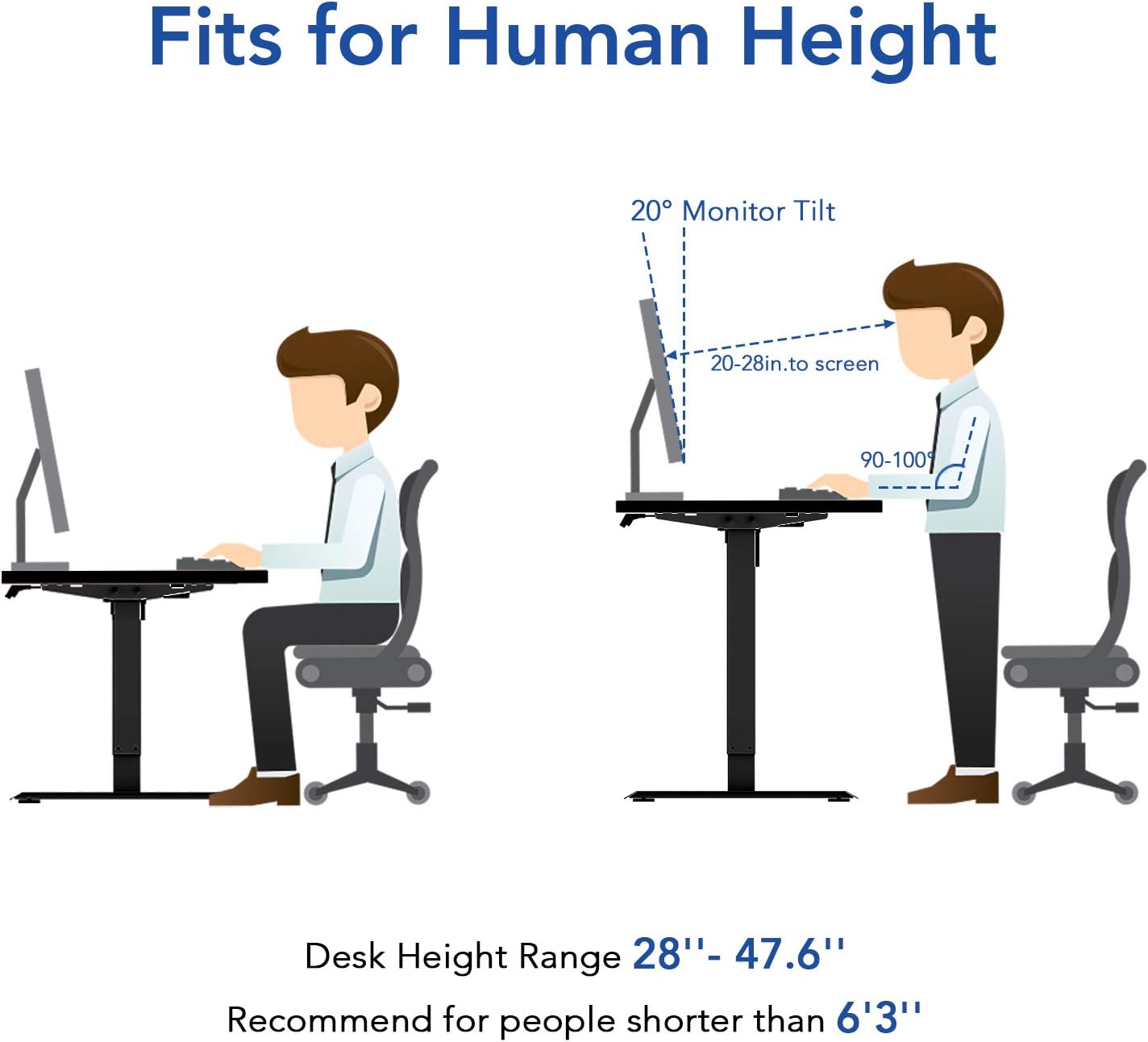
Image: An illustration demonstrating how the desk's adjustable height range (28"-47.6") accommodates different user heights for ergonomic sitting and standing positions.
Offizielle Produktvideos:
Video: "Upgrade Your Space with FLEXISPOT One-Piece Desk" - This video demonstrates the seamless one-piece desktop and the smooth height adjustment features of the FLEXISPOT desk, highlighting its benefits for a modern workspace.
Video: "FlexiSpot Brand Store" - This video provides a general overview of the FlexiSpot brand and its products, showcasing various users interacting with their adjustable desks in different professional and creative settings.
Wartung
- Regularly wipe the desktop surface with a soft, damp cloth to keep it clean. Avoid abrasive cleaners.
- Check all screws and bolts periodically to ensure they remain tight. Tighten if necessary.
- Motor und elektrische Bauteile vor Staub und Feuchtigkeit schützen.
- Überlasten Sie den Schreibtisch nicht über die maximale Gewichtskapazität von 154 kg hinaus.
Fehlerbehebung
Desk Not Adjusting Height:
- Prüfen Sie, ob das Netzkabel sowohl am Schreibtisch als auch an der Wandsteckdose fest eingesteckt ist.
- Stellen Sie sicher, dass keine Hindernisse das Heben oder Senken des Schreibtisches verhindern.
- If the desk has a reset function (refer to specific assembly manual), try performing a reset.
Ungewöhnliche Geräusche während des Betriebs:
- A low noise (under 50 dB) is normal during operation.
- If you hear grinding or loud noises, stop operation immediately and check for any loose parts or obstructions.
Schreibtisch wackelt:
- Stellen Sie sicher, dass alle Montageschrauben fest angezogen sind.
- Verify the desk is on a flat, even surface. Adjust floor glides if necessary.
Technische Daten
| Besonderheit | Detail |
|---|---|
| Marke | FLEXISPOT |
| Modellnummer | 9817e369-8671-4ffb-8546-ba858c65c4f3 |
| Produktabmessungen (T x B x H) | 24"D x 48"W x 28"H (Min Height) |
| Maximale Höhe | 47.6 Zoll |
| Tischplattendicke | Ca. 1 Zoll |
| Farbe | Grey (Frame), Grey Wood Grain (Top) |
| Grundmaterial | Legierter Stahl |
| Maximalgewichtsempfehlung | 154 Pfund |
| Erforderliche Montage | Ja |
| Empfohlene Personenzahl für die Montage | 2 |
| Für die Montage empfohlene Werkzeuge | Bohrer (nicht enthalten) |
| Ist elektrisch | Ja |
Garantie und Support
The FLEXISPOT EC1 Essential Adjustable Desk comes with a Eingeschränkte Garantie und ein Umfassende Garantie from the manufacturer, FLEXISPOT.
For detailed warranty terms, claims, or technical support, please refer to the official FLEXISPOT webBesuchen Sie die Website oder kontaktieren Sie direkt den Kundenservice. Bewahren Sie Ihren Kaufbeleg als Kaufnachweis auf.
You can visit the official FLEXISPOT store on Amazon for more information: FLEXISPOT-Filiale
Ask a question about this manual
Ask about setup, troubleshooting, compatibility, parts, safety, or missing instructions. Manuals+ will review the question and use this page’s manual context to help answer it.